
Agent loop and tool calling
medium 40 minAn agent is a loop.
Theory
Read or listen first. About 3 min.
What it is
A language model on its own turns text into more text. It cannot look up a booking, read a file or send an email. Tool calling (also called function calling) gives it a way to ask: you describe some tools, and instead of plain text the model can reply with a structured request such as get_booking with booking_id: "BK-7". The model never runs anything. Your code does.
An agent puts that request in a loop. Call the model. If it asked for tools, run them, add the results to the conversation, and call the model again. If it did not, its reply is the answer. The code that runs this loop, checks each request, enforces limits and records what happened is called the harness.
This page follows one running example of ours. Max booked train IC 512 on Friday 4 December, seat 14A, booking BK-7. They write to support: please move it to Saturday. Our agent has four tools: get_booking, fare_rules, seat_map and change_booking. Noor, a support lead, must approve any change.
Why it exists
Many tasks need facts the model does not have and actions it cannot take. A fixed program can do the steps when they are always the same. But when the next step depends on what the last one found, someone has to decide. The loop lets the model decide the next step while your code keeps control of what is allowed.
That freedom has a price. Every turn of the loop is another model call that rereads the whole conversation, so cost and time grow with each step. Errors can compound, and text that comes back from tools can try to steer the model. Most of the engineering on this page is about keeping that freedom inside limits: schemas, budgets, approvals, traces and tests.
A short history
2022
ReAct, submitted to arXiv on 6 October, has a model alternate between reasoning steps and actions that query outside sources, then read what came back. Most agent loops today follow this shape.
2023
Toolformer, submitted on 9 February, trains a model to decide by itself which APIs to call and with what arguments.
2023
On 13 June OpenAI adds function calling to its chat API: developers describe functions with JSON Schema and the model returns a JSON object of arguments.
2024
On 30 May tool use becomes generally available for Anthropic's Claude 3 models. On 25 November Anthropic publishes the Model Context Protocol, an open standard for connecting tools to models.
2024
On 19 December Anthropic's essay Building effective agents separates workflows, where code fixes the path, from agents, where the model directs its own steps.
2025
On 11 March OpenAI releases the Responses API and the open-source Agents SDK, with handoffs, guardrails and tracing built around the same loop.
2025
On 10 June a paper on design patterns for securing agents against prompt injection proposes six ways to limit what untrusted text can make an agent do.
Inside this chapter
Chapter sources- Tool or function
- Something your code can do for the model, described by a name, a description and a JSON Schema for its arguments.
Example.
seat_map(day, train) - Tool call
- The model's structured request to use a tool: a call ID, a tool name and arguments. A request, not an action.
- Tool result
- What your code sends back after running a call, tagged with the same call ID. It may be an error message.
- Harness
- Your code around the model: it runs the loop, validates calls, asks for approval, enforces budgets and writes the trace.
- Workflow
- A program where code decides the order of steps and calls the model at fixed points.
- Agent
- A program where the model decides the next step, inside limits your code sets.
- Step budget
- The most model calls one run may make. A cost budget does the same in tokens or money.
- Context
- Everything sent to the model on one call: rules, tool descriptions and all messages so far.
- Prompt injection
- Text from outside, such as a web page or a customer note, written to make the model do something its owner did not intend.
- Trace and span
- A trace records one run. Each model call and each tool call inside it is a span with timing, tokens and IDs.
How it works
Step through the idea, or press Play.
Send goal, rules and tools. The model sees what it may ask for
Understand it
Start here
A balloon that cannot touch the ground
Asha flies a hot air balloon on a long line over a fair. From the basket they can see far, but they cannot read the weather station, open a map or buy fuel. Lee, Sam and Noor work on the ground. The only way between them is a canvas bag that slides up and down the line.
Asha decides what to ask. The crew decides what really happens on the ground.
First question
Agent or workflow?
Anthropic's essay from December 2024 draws the line clearly. In a workflow, models and tools are arranged along code paths written in advance. In an agent, the model directs its own process and decides which tools to use and when. Both can call tools. The difference is who chooses the next step.
Think of a recipe and a cook. A recipe lists the steps in order, and it works every time the kitchen is the same. A cook looks at what is in the fridge and decides. You pay a cook more, and you check their work more, so you only hire one when the recipe cannot work. The deeper comparison lives in choosing between agents and workflows.
Who chooses the next step
| Workflow | Agent | |
|---|---|---|
| Next step decided by | Your code | The model, inside limits |
| Number of model calls | Known in advance | Varies by task |
| Cost and time | Predictable | Varies; needs budgets |
| Testing | Test each step | Test outcomes and paths |
| Good for | Fixed steps: look up, format, send | Open tasks where the next step depends on the last result |
Do you need an agent?
The core
The loop in five lines
Every agent, from a weekend script to a coding assistant, runs some version of this. Here it is with a scripted fake model, so it runs without a network or a key.
import jsondef get_booking(booking_id): return {"day": "Fri 4 Dec", "train": "IC 512", "seat": "14A"}TOOLS = {"get_booking": get_booking}replies = iter([ # a fake model with a script {"tool_calls": [{"id": "call_1", "name": "get_booking", "args": {"booking_id": "BK-7"}}]}, {"text": "BK-7 is IC 512 on Friday 4 December, seat 14A.", "tool_calls": []},])model = lambda messages: next(replies)def run(goal, max_steps=5): messages = [{"role": "user", "content": goal}] for step in range(1, max_steps + 1): reply = model(messages) # 1. ask the model messages.append({"role": "assistant", **reply}) if not reply["tool_calls"]: # 2. no tool calls: done return reply["text"] for c in reply["tool_calls"]: # 3. run each call, keep its ID try: out = TOOLS[c["name"]](**c["args"]) except Exception as e: # 4. errors go back as text out = f"error: {e}" messages.append({"role": "tool", "id": c["id"], "content": json.dumps(out)}) print(f"step {step}: {len(messages)} messages") return "stopped: step budget" # 5. a limit always ends itprint(run("Where is booking BK-7?"))The loop as states
TOAST: one turn of the loop
- 1
Think
The model reads the rules, the tool descriptions and all messages so far.
- 2
Order
It replies with tool calls, each with an ID, a name and arguments. Or with an answer.
- 3
Act
The harness validates each call, checks permissions and runs it.
- 4
See
Each result, or error, is appended with its call ID. The model will see it next turn.
- 5
Stop
If the reply was an answer, or a limit fired, the loop ends. Otherwise, around again.
One run
Max moves to Saturday
Here is the whole run for Max, step by step. Notice who does what. The model never touches the booking system, and Noor's yes is a real pause in the code, not a sentence in the prompt.
Five model calls
Who decides, who runs, who records
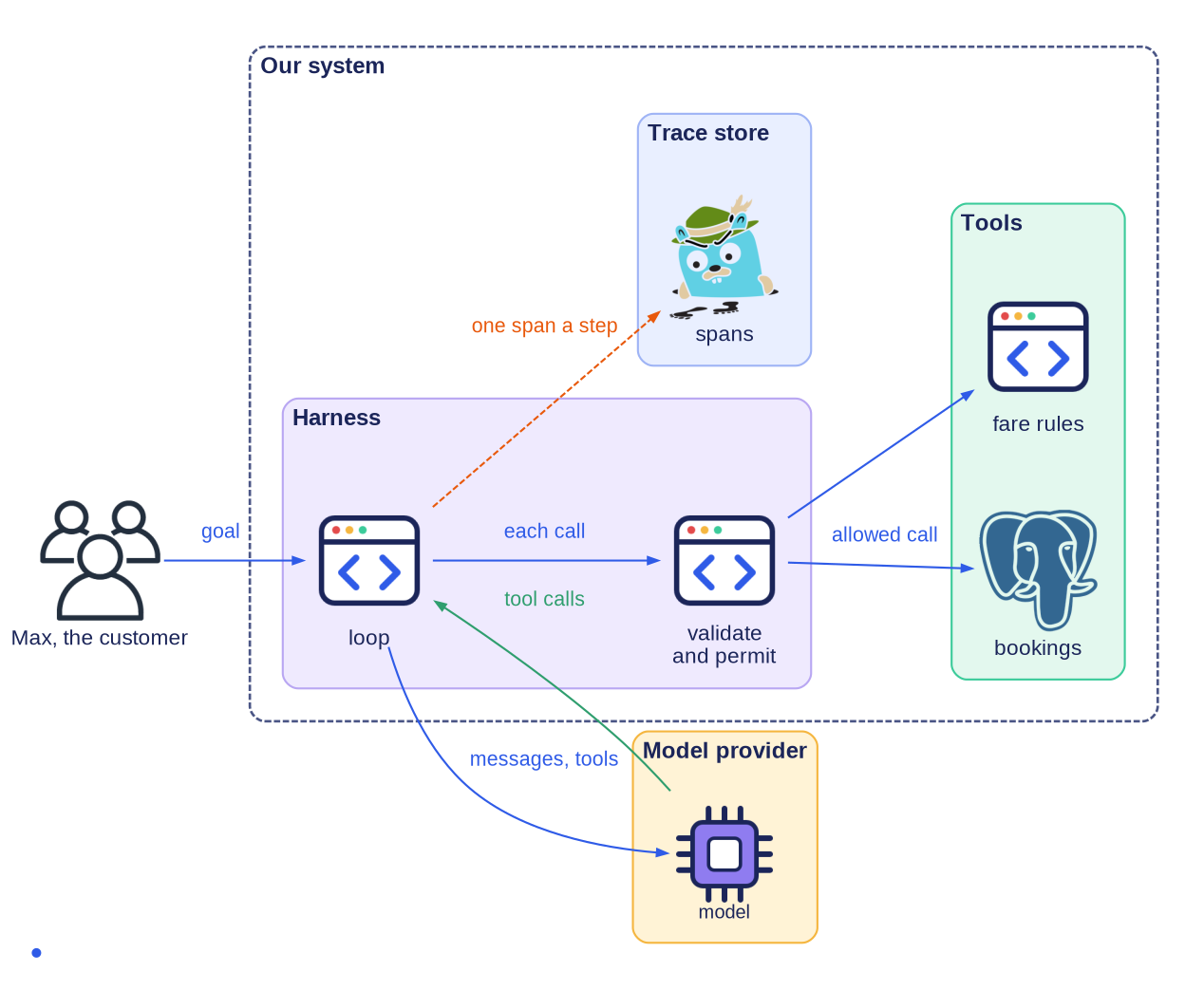
The model decides
Which tool, with which arguments, in which order, and when it is finished.
The harness executes
Validates arguments, runs tools with timeouts, appends results, enforces budgets.
The policy permits
Which tools a task may use, which need a person, which accounts and amounts are allowed.
The trace remembers
Every model call and tool call, with IDs, tokens, time and errors.
What the model sees
Tool schemas
A tool description is a small contract. The name is what the model writes. The description is the only explanation the model gets, so write it like documentation for a new colleague: what it does, when to use it, what the arguments mean, with an example. The schema is JSON Schema: types, required fields, allowed values.
{ "name": "change_booking", "description": "Move an existing booking to another day and seat. Changes a real booking: only call it after the customer agreed. day is an ISO date such as 2026-12-05. key must be the same on every retry of the same change.", "input_schema": { "type": "object", "properties": { "booking_id": { "type": "string", "description": "Such as BK-7" }, "day": { "type": "string", "pattern": "^\\d{4}-\\d{2}-\\d{2}$" }, "seat": { "type": "string", "description": "A free seat from seat_map, such as 22C" }, "key": { "type": "string", "description": "Idempotency key, such as BK-7-sat" } }, "required": ["booking_id", "day", "seat", "key"], "additionalProperties": false }}The three big providers say the same thing with different field names. The ideas match one for one: a list of tools, a call with an ID, and a result that points back at that ID. The details below change often, so they carry a date.
The same contract, three dialects (last checked 27 November 2026)
| Anthropic Messages API | OpenAI Responses API | Google Gemini (generateContent) | |
|---|---|---|---|
| Tool definition | name, description, input_schema | type: "function", name, description, parameters | functionDeclarations: name, description, parameters |
| The model asks | stop_reason: "tool_use" and tool_use blocks: id, name, input | function_call items: call_id, name, arguments (a JSON string) | functionCall part: name, args, optional id |
| You answer | tool_result block: tool_use_id, content, is_error | function_call_output item: call_id, output | functionResponse part: name, response, optional id |
| Turn off parallel calls | disable_parallel_tool_use: true inside tool_choice | parallel_tool_calls: false | Not a single switch; return all results together |
| Force or forbid tools | tool_choice: auto, any, a named tool, none | tool_choice: auto, required, a named function, none, allowed_tools | Modes AUTO, ANY, NONE; allowedFunctionNames with ANY |
| Exact schema matching | strict: true on the tool | strict: true; every field required, additionalProperties: false | Schema is an OpenAPI subset; up to 128 declarations |
More on writing names and descriptions the model picks correctly: tool calling.
Speed
Parallel tool calls
When two questions do not depend on each other, a model can ask both in one reply. That saves a whole model call, and each model call rereads the entire context. The rule that makes it work: every call has an ID, and every ID gets exactly one result in the next message, even for a call you chose not to run.
Matched by ID, not by order
Anthropic's documentation asks for all results in one user message, with the results before any text, and says not to send them in separate messages. OpenAI and Gemini both document the same pairing by ID. Turn parallel calls off when two tools must not run together, for example two changes to the same booking.
When things fail
Errors and retries
A tool can fail in three different ways, and they need different answers. The model asked for something impossible. The tool broke. Or the action worked but the reply was lost. The first two go back to the model as text. The third is the dangerous one.
What the harness does with one call
Who fixes which failure
| Failure | Example | Who retries | What to return |
|---|---|---|---|
| Bad arguments | day: "5 Dec" | The model, next turn | What was wrong and what right looks like |
| Missing fact | Booking BK-9 does not exist | The model | Not found, and what IDs look like |
| Temporary failure | Timeout, rate limit, 503 | The harness, with backoff | Only if retries run out: the error |
| Permanent failure | Payment card declined | Nobody automatically | The reason, so the model can tell the user |
| Lost reply after a side effect | Seat moved, reply lost | Harness, with the same idempotency key | The first result, replayed by the tool |
That last row is why side-effecting tools take an idempotency key: the same key twice means the same change once. More on the pattern itself: idempotency and retries. Anthropic's documentation also warns that the model may simply call a failing tool again, so limit how many retries your loop allows.
Limits
Stop conditions and budgets
A model that never gives a final answer would keep the loop running forever. So every harness needs stops that do not depend on the model agreeing to stop. Anthropic's essay names a maximum number of iterations as a basic guardrail, and every framework below ships one.
Ways a run ends
| Stop | Fires when | Our example value |
|---|---|---|
| Final answer | A reply has no tool calls | Call 5 for Max |
| Step budget | Model calls reach the cap | 8 calls |
| Cost or token budget | Spend passes a limit | 5 cents |
| Repeated identical call | Same tool, same arguments, too often | More than 2 times |
| Explicit done tool | The model calls a tool that means finished | Optional |
| A person stops it | Someone cancels or declines | Noor declines |
| Wall-clock time | The run takes too long | 60 seconds, our choice |
Why long runs fail more often
Cost
The context grows, and caching helps
A model call has no memory of the last one. The harness sends everything again: the rules, the tool descriptions, and every message and result so far. So the input grows every step. Say the rules and tools are S tokens and each step adds d tokens of calls and results.
Input tokens for one run
Tokens sent at each call
| Call | Sent | New since last call | Running total |
|---|---|---|---|
| 1 | 3,000 | 3,000 | 3,000 |
| 2 | 3,600 | 600 | 6,600 |
| 4 | 4,800 | 600 | 15,600 |
| 8 | 7,200 | 600 | 40,800 |
Model servers keep the internal work for a prompt's opening tokens in a KV cache. When the next request starts with exactly the same tokens, that work can be reused, and providers sell this as cheaper cached input. How it works inside the server: KV cache and prefix caching.
The same run with a prefix cache
Keeps the cache warm
- Tools and rules first, in a fixed order
- History appended, never edited
- Time, user names and request IDs at the end
- Same tool list on every call of a run
Breaks the cache every call
- A timestamp in the first line of the prompt
- Tools shuffled or added mid-run
- Summarising or rewriting earlier messages each step
- Changing settings that the provider says invalidate the cache
Anthropic's documentation says changing the tool definitions invalidates the whole cache, and that matching is exact. OpenAI caches automatically from 1,024 tokens on its newer models and asks for stable content first. Big tool outputs grow the context fastest, so return the five rows the model needs, not five thousand. Keeping long runs small is the subject of agent memory.
People
Human approval
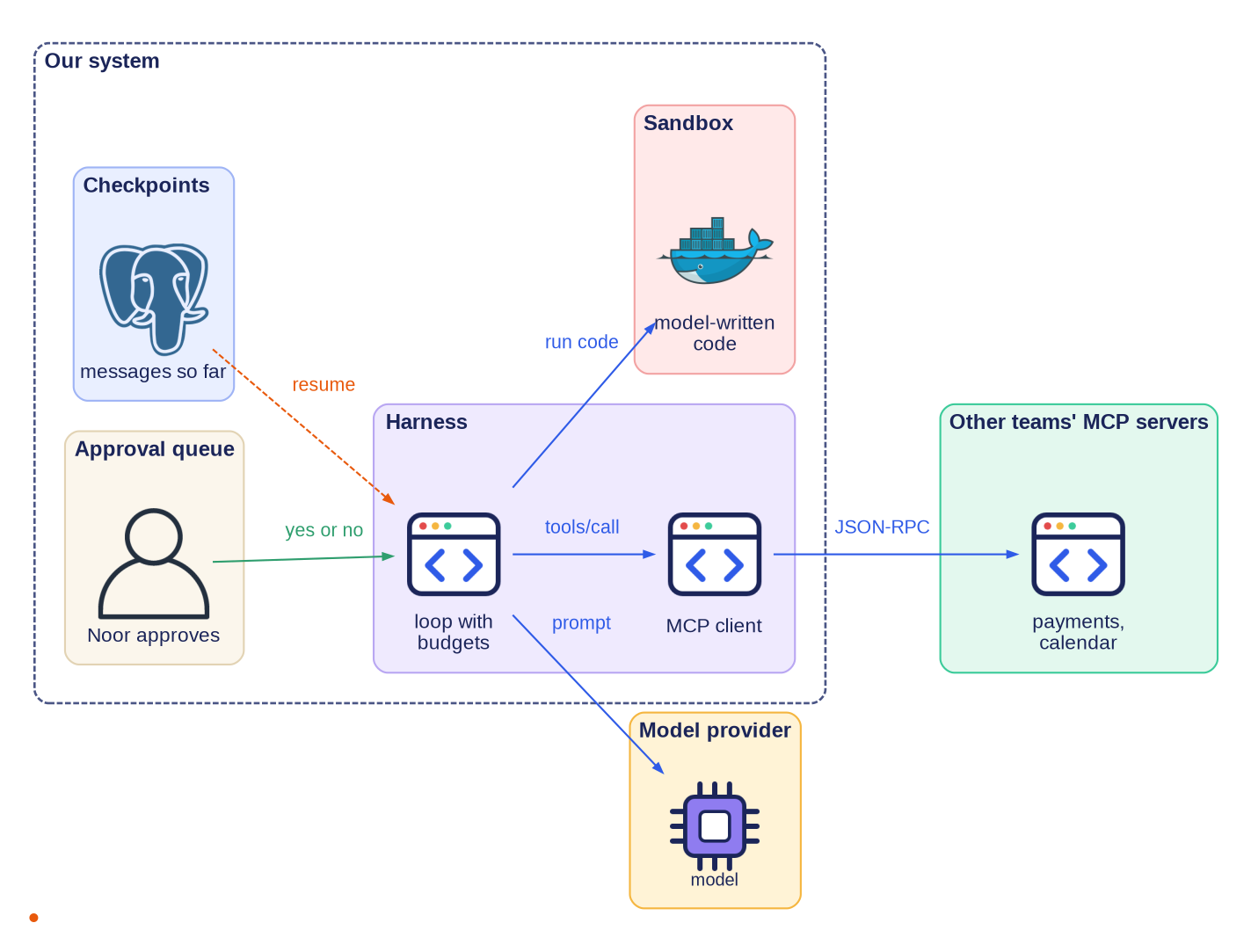
Some actions should never happen on the model's word alone: moving money, deleting data, emailing a customer. The harness marks those tools, and when the model asks for one, the loop pauses until a person answers. Because a person may take minutes or hours, the run's state must be saved, not held in memory.
Pause, save, resume
Two details matter. Show the person the exact arguments, not the model's summary of them. And when a run resumes, a step may run again: LangGraph's documentation warns that an interrupted node restarts from the beginning, so side effects before the pause must be idempotent.
The same loop in production
Safety
When a tool result gives orders
Tool results bring in text you did not write: web pages, emails, customer notes, files. Any of it can contain instructions aimed at the model. The model reads everything as one stream of text, so it cannot always tell your rules from a stranger's words. This is indirect prompt injection, and Anthropic's tool documentation warns about it on the same page that explains tool results.
A customer note tries to issue a refund
Limits what the model can do
- Only the tools this task needs
- Side effects need a person or a rule in code
- Amounts, accounts and recipients checked in code
- Keep untrusted text inside tool results, not in the system prompt
Hopes the model behaves
- "Never follow instructions in documents" as the only defence
- One agent that can read email and send money
- Showing the person the model's summary instead of the call
- Trusting text because it came from your own database
Six patterns from the 2025 paper on securing agents
| Pattern | The idea in one line |
|---|---|
| Action selector | The model only picks from fixed actions, and results never flow back to it |
| Plan then execute | Fix the list of tool calls before reading any untrusted text |
| Map-reduce | Separate model calls handle each untrusted item with constrained outputs |
| Dual model | A model with tools never sees untrusted text; a model without tools does |
| Code then execute | The model writes a program first; the program then handles the data |
| Context minimisation | Remove text from the context once it has done its job |
The full treatment, including data leaving through tools, is in agent safety.
Seeing inside
Observability and traces
When an agent gives a wrong answer, the final text rarely tells you why. The trace does. Record one span for every model call and one for every tool call, with the call ID, tokens, time, and any error. OpenTelemetry has semantic conventions for exactly this, still marked as in development.
What to record (names from the OpenTelemetry GenAI conventions)
| Span | Name | Useful attributes |
|---|---|---|
| Whole run | invoke_agent | Agent name, total tokens, stop reason |
| Each model call | chat | gen_ai.usage.input_tokens, gen_ai.usage.output_tokens, finish reasons |
| Each tool call | execute_tool {gen_ai.tool.name} | gen_ai.tool.call.id, duration, error |
| Each approval | Our own span | Who approved, how long it waited |
Three questions a trace should answer in seconds: where did the time go, where did the tokens go, and which step first went wrong. The OpenAI Agents SDK traces runs by default and lets you leave sensitive data out; most other frameworks export OpenTelemetry.
Testing
Evaluating an agent
A unit test checks one answer. An agent can reach a right answer by a wasteful or unsafe path, or a wrong answer by a sensible one. So test three things: the outcome, the path, and the cost. Build a set of tasks with known end states, run each several times because models vary, and compare.
What to measure
| Check | Question | Example for Max's task |
|---|---|---|
| Outcome | Is the world in the right state? | BK-7 is Saturday, 22C, and nothing else changed |
| Path | Were the right tools used, in a sensible order? | No change_booking before seat_map |
| Safety | Did anything forbidden happen? | No refund, no change without approval |
| Cost | Steps, tokens, time | At most 6 calls |
| Stability | Same result across repeated runs? | 5 of 5 runs succeed |
Check the end state in the tool's data, not the model's words: a model can say it moved the booking when it did not. More methods, including model graders and simulated users: agent evaluation.
Frameworks
Every framework wraps the same loop
Frameworks add state, tracing, retries, approvals and deployment around the loop. Underneath, each one calls the model, runs the tools it asked for, appends results and stops on an answer or a limit. Knowing the loop lets you read any of them in an afternoon.
The loop inside four frameworks (last checked 27 November 2026)
| Framework | How it describes the loop | Default limit | Approval and state |
|---|---|---|---|
| OpenAI Agents SDK | Call the model; final output ends it; a handoff switches agent; tool calls run and loop | max_turns 10, then MaxTurnsExceeded | Pause for approval, resume from RunState |
| LangGraph | A graph of nodes; the agent node and a tools node cycle | Recursion limit 10,007 super-steps, then GraphRecursionError | interrupt(), Command(resume=...), checkpointers |
| Google ADK | LlmAgent with name, model, instruction, tools; Python functions become FunctionTool | max_llm_calls 500 per run | Callbacks and session state |
| Pydantic AI | A state machine: UserPromptNode, ModelRequestNode, CallToolsNode, End | request_limit 50, then UsageLimitExceeded | ModelRetry lets a tool ask the model to try again |
import anthropic, os # pip install anthropic; needs ANTHROPIC_API_KEYclient = anthropic.Anthropic(api_key=os.environ["ANTHROPIC_API_KEY"])messages = [{"role": "user", "content": "Move booking BK-7 to Saturday"}]for step in range(8): # step budget reply = client.messages.create(model=MODEL, max_tokens=1024, tools=TOOL_SCHEMAS, messages=messages) messages.append({"role": "assistant", "content": reply.content}) if reply.stop_reason != "tool_use": break results = [] for block in reply.content: if block.type == "tool_use": out, failed = execute(block.name, block.input) # validate, permit, run results.append({"type": "tool_result", "tool_use_id": block.id, "content": out, "is_error": failed}) messages.append({"role": "user", "content": results}) # all results, one messagePlugging in tools
Where MCP fits
So far our tools live inside our own code. The Model Context Protocol lets a tool live in a separate server, often owned by another team, that any harness can connect to. The harness asks the server which tools it offers and passes their descriptions to the model. When the model calls one, the harness forwards the call with tools/call and appends the result, exactly as before.
Nothing about the loop changes. What changes is trust: a server you did not write supplies both the tool descriptions and the results, so both are untrusted text. The protocol in detail: MCP. Patterns for several agents working together: agent loops.
Interview
Build one from scratch
A common live-coding round: write an agent loop in 20 to 30 minutes. Interviewers watch for the same things in almost every version.
In this order
- 1
Messages and tools
A list of messages, a dictionary of tools with schemas. Say that the model only proposes.
- 2
The loop with a cap
for step in range(MAX_STEPS). Never while True.
- 3
Answer or calls
No tool calls: return the text. Otherwise handle each call by ID.
- 4
Validate, then run
Unknown tool, bad arguments and exceptions all become error results, never crashes.
- 5
Append and repeat
One result per call ID, in one message. Then call the model again.
- 6
Then improve
Parallel calls, cost budget, repeat detection, approval for side effects, idempotency keys, one span per step.
Debugging
Symptoms and their usual causes
When an agent misbehaves, start from the symptom you can see, open the trace, and find the first step that went wrong. These six cover most cases we would expect to meet.
Read the symptom, then the trace
| Symptom | Usual cause | First fix |
|---|---|---|
| Picks the wrong tool | Two tools with overlapping names or descriptions | Rename, say when to use each, merge or remove one |
| Calls the same tool again and again | Results too vague to act on, or no stop signal | Better tool output, a repeat check, a step cap |
| Invented arguments | The description lacks examples; the value was never seen | Examples in the description, value checks in the tool, clear errors |
| Cost per task jumps | A tool returns whole documents; the context balloons | Paginate, filter, summarise inside the tool |
| Does something unsafe after reading content | Instructions in a tool result | Fewer tools per task, approval in code |
| Double refunds or double bookings | A retry after a lost reply | Idempotency keys and saved state |
Size tool outputs for the model, not for a person
Return what decides the next step
Five matching seats, not the whole train. Each extra token is reread on every later call.
Use IDs the next tool accepts
If change_booking needs a seat like 22C, return seats in that form.
Say when there is more
"Showing 5 of 40; ask with page=2" lets the model choose, instead of guessing.
Errors that teach
"day must look like 2026-12-05" fixes the next call. "failed" does not.
A debugging conversation
Interviewer
Your agent's cost per ticket tripled overnight. Nothing in the prompt changed. Where do you look?
You
The traces: input tokens per model call and the number of calls. If calls stayed the same and input grew, a tool started returning more text, or something broke the prompt cache.
Interviewer
Input per call doubled and the cache hit rate fell to zero.
You
Then the start of the prompt changed on every call. I would diff the first few hundred tokens of two calls. A tool list built in a different order each time, or a date added to the system prompt, would do exactly that.
All together
Max's run from start to end
| Call | The model asks | The harness does | Sent |
|---|---|---|---|
| 1 | get_booking(BK-7) | Runs it: Friday, IC 512, 14A, flex | 3,000 |
| 2 | fare_rules and seat_map together | Runs both, matches by ID: fee 0; 22C, 31A free | 3,600 |
| 3 | change_booking, day 5 Dec | Schema check fails: error as text | 4,200 |
| 4 | change_booking, 2026-12-05, 22C | Saves state, Noor approves, runs with key BK-7-sat | 4,800 |
| 5 | Nothing: final answer | Returns the answer, closes the trace | 5,400 |
Summary
The whole topic in one minute.
An agent is a loop around a model. Each turn, the model reads the rules, the tool descriptions and every message so far, and replies with either an answer or tool calls. Each tool call has an ID, a name and arguments that should match a JSON Schema. Your harness validates each call, runs the allowed ones, and appends one result per call ID, including errors as readable text.
The loop ends on a final answer, or when a limit fires: steps, tokens, money, repeated identical calls, or a person stopping it. Calls that change the world wait for approval and carry an idempotency key, so a retry does not repeat the effect. Text that tools return is data, never instructions, and the harness limits which tools a task may use.
Every call resends the whole context, so input grows with each step and the total grows roughly with the square of the steps. A stable prompt start lets prefix caching make the repeated part cheap. Record a span for every model call and tool call, test outcomes and paths, and remember that every framework wraps this same loop.
- An agent is a loop: call the model, run the tools it asks for, append the results, repeat until an answer or a limit.
- The model proposes; the harness validates, permits, runs and records. Side effects never happen on the model's word alone.
- Tools are a name, a description and a JSON Schema. Every call has an ID, and every ID gets exactly one result.
- Parallel calls save model calls. Errors go back as text so the model can fix them.
- Stop on an answer, a step cap, a cost cap, repeated calls or a person. Return something useful when you stop.
- Input grows every step, so the total grows with the square of the steps. A stable prompt start makes caching work.
- Tool results are data, never instructions. Limit tools per task and keep approvals in code.
- One span per model call and tool call. Test outcome, path, safety and cost, several runs each.
Sources
- Anthropic: tool use with Claude
- Anthropic: handle tool calls (tool_result, is_error, injection warning)
- Anthropic: parallel tool use
- Anthropic: handling stop reasons
- Anthropic: prompt caching
- Anthropic: Building effective agents (2024)
- Anthropic: tool use generally available (2024)
- Anthropic: introducing the Model Context Protocol (2024)
- OpenAI: function calling guide
- OpenAI: prompt caching guide
- OpenAI: function calling and other API updates (2023)
- OpenAI: new tools for building agents (2025)
- OpenAI Agents SDK: running agents
- OpenAI Agents SDK source: DEFAULT_MAX_TURNS
- Google: Gemini function calling
- Google Cloud: function calling reference
- Google Gen AI Python SDK: automatic function calling
- Google ADK: LLM agents
- Google ADK: runtime config (max_llm_calls)
- LangGraph: graph API (recursion limit, interrupts)
- Pydantic AI: agents (usage limits, run graph)
- OpenTelemetry: GenAI semantic conventions
- ReAct: Synergizing Reasoning and Acting in Language Models (2022)
- Toolformer: Language Models Can Teach Themselves to Use Tools (2023)
- Design Patterns for Securing LLM Agents against Prompt Injections (2025)