
From power-on to a ready service
easy 7 minBoot crosses ownership boundaries.
Video lesson · Chapter 1 of 8
A healthy kernel with a late application
Theory
Read or listen first. About 2 min.
What it is
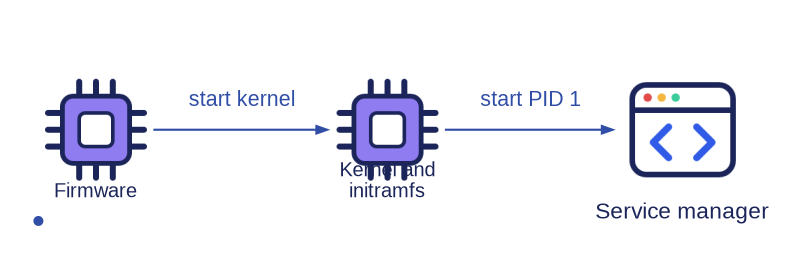
Boot crosses ownership boundaries. Firmware locates a bootable image, a loader or firmware starts the kernel, and early userspace discovers the real root filesystem. PID 1 then activates units according to their ordering and requirement dependencies. Several units start in parallel, so summing unit durations can overstate the delay on the critical path.
Why it exists
After an image change new hosts pass their kernel heartbeat but miss the load balancer deadline. Align boot-relative timestamps on an old and a new host. A long wait for an optional remote mount can postpone the application even though the kernel is healthy. Check who actually requires the mount before changing the dependency.
If PID 1 never started, unit dependency timing cannot explain the failure. Move back to early console or root-mount evidence.
A healthy kernel with a late application
Inside this chapter
- BIOS/UEFI and the POST sequence
- Firmware initializes essential hardware, performs checks and selects a boot target. An application log cannot diagnose a host that never reached the operating system.
- Bootloaders (GRUB)
- A boot loader selects a kernel and passes its configuration and initial filesystem. A known-good boot entry gives operators a comparison after an image change.
- Kernel Initialization (init)
- The kernel initializes subsystems and devices before starting the first userspace process. PID 1 manages subsequent userspace initialization and has special process-reaping responsibilities.
- initramfs and initrd
- An initramfs supplies early userspace tools and drivers needed to find the real root. A device may be usable in the full image yet missing from early boot.
- Kernel command line parameters
- Boot parameters affect early behavior such as root device selection and console output. Compare the effective parameters from a working and failing boot before rebuilding an image.
- Systemd architecture and targets
- Systemd targets group units. Requirement and ordering edges serve separate purposes. A dependency can be required without specifying when its start job runs relative to another.
- dmesg and the Kernel Ring Buffer
- Kernel messages live in a bounded ring. Older entries can roll out. Boot identity and monotonic timestamps help connect a device message to the correct startup attempt.
- Troubleshooting Kernel Panics and Boot failures
- Localize the last successful transition using the console and previous boot journal. A failed root mount, an early panic and an application readiness failure require different recovery paths.
How it works
Step through the idea, or press Play.
Load the kernel. Firmware or a boot loader loads the kernel and early filesystem.
Understand it
Worked incident
A healthy kernel with a late application
| Observation | Time to readiness (s) | Interpretation |
|---|---|---|
| Baseline | 18 | The root filesystem mounts and the app becomes ready after 18 seconds. |
| Incident | 94 | An optional mount now blocks the app behind a timeout. |
| After intervention | 21 | Decouple that optional dependency and verify a cold boot with the mount unavailable. |
Choose the next investigation
Summary
The whole topic in one minute.
The kernel already handed control to userspace. Unit ordering, mount timeouts and readiness timestamps distinguish the remaining delays.
If PID 1 never started, unit dependency timing cannot explain the failure. Move back to early console or root-mount evidence.