
API search and filtering
easy 25 minA list API lets the caller narrow, order and search.
Video lesson · Chapter 1 of 6
Apply filters consistently
Filter, sort and search in 75 seconds
1:15Reel coming soon
Theory
Read or listen first. About 2 min.
What it is
A list endpoint usually serves many screens, and each needs a different part of the list. Filtering keeps the rows whose fields match, sorting puts them in order, and searching finds rows by words that people type. Together with pagination they decide what one request returns.
Filters work on fields with exact meanings: price below 100, in stock. Search works on text and ranks by how well it matches. They look alike in a URL, but they use different indexes and often different systems.
Why it exists
Someone wants wireless headphones under 100 with four stars. Without server-side filters the client must download everything and look for itself: slow, wasteful and impossible on a phone.
Once callers can ask questions, they can also ask very expensive or harmful ones. An API therefore offers a list of fields and operators, checks every value, and puts a limit on the work. Freedom inside a fence.
A short history
January 2005
RFC 3986 defines the URI syntax, including the query part and which characters must be percent-encoded.
February 2008
PostgreSQL 8.3 moves full-text search into the core database.
May 2015
JSON:API 1.0 gives conventions for sort, sparse fieldsets and a reserved filter family of parameters.
June 2026
RFC 10008 defines the HTTP QUERY method: a safe, repeatable request with the question in its body.
Words to know
- Filter
- A condition on a field, such as price below 100.
- Operator
- How to compare: eq, gt, in and so on.
- Allowlist
- The fields and operators callers may use. Everything else is refused.
- Sparse fieldset
- Returning only the fields that were asked for.
- Full-text search
- Finding documents by words and ranking them.
- Inverted index
- A map from each word to the documents that contain it.
- Stemming
- Reducing word forms to one, such as headphones to headphone.
- Relevance
- A score for how well a document fits the query.
How it works
Step through the idea, or press Play.
Parse and check. Only known fields and operators, right types, sensible limits
Understand it
Start here
The lost umbrella
Imagine the lost property office of a station. Twelve umbrellas hang there. You could look through all of them, or tell the clerk what you know: the colour, the size, the day. Or you just say what you would call it.
The clerk does the looking, and only answers the questions on the card.
Why
On the server, not on the phone
Server-side: GET /products?search=wireless&price_lt=100&rating_gte=4&limit=20
- Sends only what is needed: 20 items, about 40 KB
- The database does the heavy work
- Works with pagination
- Keeps working with millions of rows
Client-side: GET /products, then filter in the browser
- Sends 10,000 items, about 20 MB
- Slow on mobile connections
- Uses a lot of memory
- Pagination brings nothing
The download
Three tools
Filtering
Narrow by field values: equal, greater, less, contains. ?category=electronics&price_lt=100
Sorting
Order by one or more fields, up or down. ?sort=price:asc,rating:desc
Full-text search
Words as people type them, ranked, with typos forgiven. ?q=wireless+noise+cancelling
Filtering
Operators
Comparison operators
| Operator | Meaning | Example | In SQL |
|---|---|---|---|
| eq | Equal | status_eq=active | status = 'active' |
| ne | Not equal | status_ne=deleted | status <> 'deleted' |
| gt | Greater than | price_gt=100 | price > 100 |
| gte | Greater or equal | rating_gte=4 | rating >= 4 |
| lt | Less than | price_lt=50 | price < 50 |
| lte | Less or equal | quantity_lte=10 | quantity <= 10 |
| in | Any of a list | status_in=active,pending | status IN (...) |
| nin | None of a list | category_nin=deleted,archived | category NOT IN (...) |
| like | Pattern | name_like=wireless | name ILIKE '%wireless%' |
Special values
| Kind | Example | Rule |
|---|---|---|
| Several filters | category=electronics&price_gte=50&price_lte=200&in_stock=true | Joined by AND |
| Several values | category=electronics,accessories | Any of them, OR |
| Array holds a value | tags_contains=wireless | The list includes it |
| True or false | in_stock=true, featured=false | Accept true and false, perhaps 1 and 0. Refuse the rest |
| Null | deleted_at_is_null=true, parent_id_exists=false | Null needs its own operator: equals never matches it |
| Dates | created_after=2024-01-01 | ISO 8601 with a time zone, and say whether the border day is included |
Syntax
How to write a filter in a URL
| Pattern | Example | For | Against |
|---|---|---|---|
| Flat suffix | price_gte=100&price_lte=500&category_in=a,b | Easy to read and write, works everywhere | The operator is part of the name: what about a field called price_in? |
| Bracket operator | price[gte]=100&price[lte]=500 | Field and operator are separate; several per field. Stripe uses it for dates | Brackets should be percent-encoded |
| Filter namespace | filter[status]=active&filter[price][gte]=100 | Keeps filters apart from page and sort; can nest. JSON:API reserves filter | Long |
| Value prefix | price=gte:100 | Short | A value may contain a colon |
| Expression | filter=price >= 100 AND in_stock = true | Any logic. Google AIP-160 and OData work this way | Needs a parser and strict limits |
# (status = active OR status = pending) AND category = electronicsGET /products?status[in]=active,pending&category=electronics# price < 50 OR rating > 4.5: different fields, so AND is not enoughGET /products?filter={"or":[{"price":{"lt":50}},{"rating":{"gt":4.5}}]} (percent-encoded in reality)GET /products?or[0][price_lt]=50&or[1][rating_gt]=4.5# A long question: in the body, with a safe and repeatable methodQUERY /productsContent-Type: application/json{"or": [{"price": {"lt": 50}}, {"rating": {"gt": 4.5}}], "sort": "-rating", "limit": 20}Callers often want only some fields: ?fields=id,name,price,rating returns four. JSON:API writes fields[products]=name,price. Allow only documented names: never expose internal column names.
Sorting
Order
Three ways to write it
| Style | Example | Note |
|---|---|---|
| Colon | sort=price:asc | Clear, long |
| Minus sign | sort=-price and sort=price | Short, used by JSON:API. Do not use a plus: in a query string it means a space |
| Two parameters | sort_by=price&sort_order=desc | Simple, but only one field |
sort=category:asc,price:desc
| Product | Category, up | Price, down | Place |
|---|---|---|---|
| Laptop Stand | accessories | $59.99 | 1st |
| Cable Kit | accessories | $19.99 | 2nd |
| Keyboard | electronics | $149.99 | 3rd |
| Mouse | electronics | $49.99 | 4th |
Safety
From the URL to the database
One request
Do
- Choose one syntax
- Document every operator
- Check and convert all inputs
- Set defaults, such as limit 20
- Limit the number of conditions
- Build indexes for the common questions
Do not
- Mix syntaxes
- Put input into SQL or NoSQL text
- Expose internal field names
- Allow unlimited results
- Ignore what a question costs
- Skip validation
May this parameter pass?
Speed
Indexes for filters
A composite index works from left to right. Put the equality columns first, then the column you sort or range by, then the id. An index on (category, price, id) serves category=electronics&price_lt=100&sort=price in one walk.
How much is left
When filters multiply
- 1
Cover the common ones
Read the query log. A few combinations are most of the traffic.
- 2
Let the database combine
Several single-column indexes can be joined for rarer combinations.
- 3
Move wide search away
Twenty optional filters, counts per value and free text belong in a search engine.
- 4
Refuse the rest
Require a selective filter, or limit the date range.
Words
Full-text search
Full-text: ?q=wireless+noise+cancelling
- Words as people type them
- Ranked by relevance
- Ignores case and word forms
- Searches several fields
Pattern filter: ?name_like=wireless
- Exact characters
- No ranking
- Case handling depends on operator and collation
- Usually one field; % at the start needs a trigram index
How it works
- 1
Tokenize
Wireless Noise-Cancelling Headphones becomes wireless, noise, cancelling, headphones.
- 2
Normalise
Lower case, then stems: running becomes run, headphones becomes headphone. Lemmatization does it with a dictionary.
- 3
Look up
The inverted index gives the documents of each token.
- 4
Score
TF-IDF, BM25 or a learned model orders the matches.
An inverted index
| Word | Documents |
|---|---|
| wireless | 1, 10 |
| mouse | 1 |
| desk | 6, 11 |
| pro | 1, 8 |
Rare words weigh more
Extras people expect
| Feature | Example | Effect |
|---|---|---|
| Typo tolerance | q=wireles~ | Still finds wireless |
| Phrase | q="noise cancelling" | The words together, in order |
| One field | q=title:headphones | Only the title |
| Highlighting | q=wireless&highlight=true | Marks the matched words |
| Facets | facets=category | How many hits per category |
Where
Database or search engine?
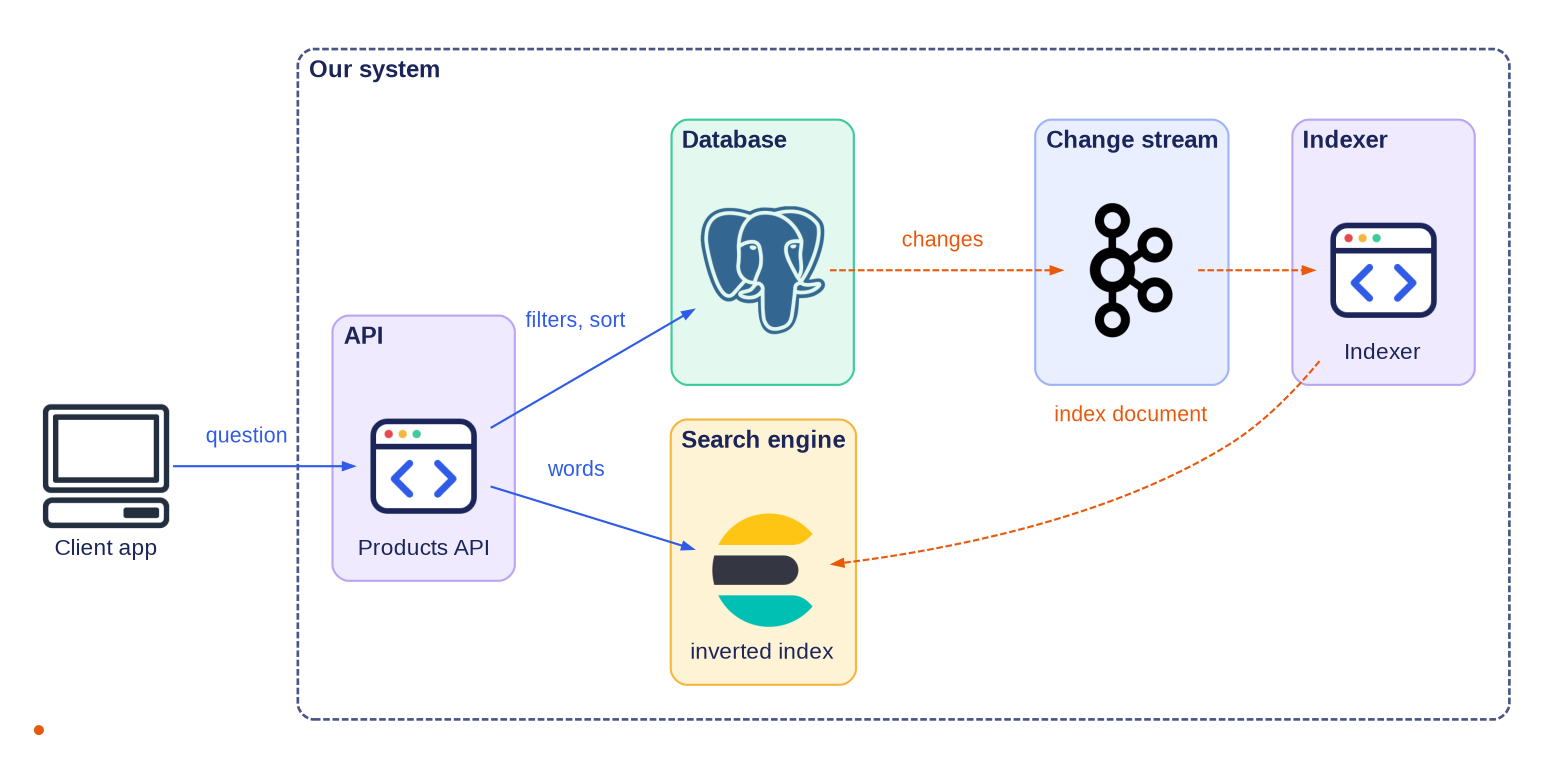
Filters from the database, words from the search engine
| Option | Good at | Mind |
|---|---|---|
| PostgreSQL full text | Built in: tsvector and tsquery, no extra system, same transaction | Ranking and typo handling are basic; good for a medium size |
| Elasticsearch or OpenSearch | Large amounts, rich query language, facets | A cluster to run; near real time, not instant; must be fed |
| Algolia, Typesense | Typo tolerance and fast suggestions with little setup | Algolia is a hosted service; Typesense is open source with a hosted option. Cost grows with use |
Which one?
A change reaches the index
Limits
What may a question cost?
A public search endpoint is the easiest way to load your database. Set limits before somebody finds them for you.
| Limit | Example | Why |
|---|---|---|
| Page size | 20, at most 100 | Bounds the answer |
| Conditions | At most 10, lists of at most 50 values | Bounds the plan |
| Query length | 200 characters | Bounds the parsing |
| Time | 2 seconds, then 503 | Protects everyone else |
| Rate | Lower than for single reads | Searches cost more. See rate limiting |
| Depth | 10,000 results, then use a cursor or narrow | Deep pages are expensive |
Summary
The whole topic in one minute.
Offer filters, sorting and search as one documented syntax over an allowlist of fields. Turn values into bound parameters, never into SQL text, and end every sort with a unique column.
Filters live in the database with indexes that fit. Words need an inverted index, in the database or in a search engine that is fed by changes and lags a little. Limit how much one question may cost.
- Filter, sort and search on the server; send one page.
- One syntax, an allowlist, typed values, bound parameters.
- End the sort with a unique column; decide where nulls go.
- Index equality columns first, then range or sort.
- Words need an inverted index; a search engine lags behind the database.
- Publish limits for size, conditions, time and depth.