
Cache TTL
easy 24 minA time to live (TTL) says how long a cached copy may be used.
Video lesson · Chapter 1 of 5
Sixty seconds from which event?
Cache TTL in 75 seconds
1:15Reel coming soon
Theory
Read or listen first. About 1 min.
What it is
A cached copy starts to age the moment it is made, because the original can change. A time to live is the number of seconds the copy may be used. After that it has expired and the next reader needs a fresh value.
The promise is simple: if copies are only made from fresh data and the TTL is 60 seconds, a reader of that cache never sees data more than 60 seconds old. Nothing has to notice the change.
Why it exists
Without a TTL, one forgotten update leaves a wrong value in the cache for ever. With it, every mistake heals by itself after a known time.
A TTL is also a control for load. A longer one means fewer visits to the source, a shorter one means fresher data. Every TTL is a point on the line between those two wishes.
A short history
September 1981
RFC 791 gives every internet packet a time to live, so that lost packets cannot circle for ever.
November 1987
RFC 1035 gives every DNS record a TTL that tells resolvers how long they may keep the answer.
January 1997
RFC 2068, the first HTTP/1.1 specification, defines Cache-Control with max-age.
March 1998
RFC 2308 describes negative caching in DNS: remembering that a name does not exist.
May 2010
RFC 5861 defines stale-while-revalidate and stale-if-error for HTTP caches.
Words to know
- TTL
- Time to live: how long a copy may be used.
- Fresh
- The copy is younger than its TTL.
- Stale
- The copy is older than its TTL, or differs from the source.
- Jitter
- A random change to a TTL so that copies expire at different times.
- Revalidation
- Asking the source if a copy is still correct.
- Negative caching
- Caching the fact that something does not exist.
- Origin
- The server that owns the real response.
How it works
Step through the idea, or press Play.
Store with a lifetime. The copy gets an expiry time
Understand it
Start here
Flowers with a replace-by day
Imagine flowers in vases, each with a card that says when to replace them. Nobody inspects the flowers every hour. The card is enough. That is a TTL.
The card limits the age without anybody watching. That is why TTLs are everywhere.
The idea
Too short, too long, just right
Too short
Fresh data, but the source does nearly all the work again. The cache earns little.
Just right
As stale as users accept, and no fresher than you need to pay for. It differs per kind of data.
Too long
Fast and cheap, but people see outdated information.
What a read does
Why a TTL matters
| Reason | What it gives you |
|---|---|
| Data consistency | Nobody sees a wrong value for ever |
| Memory | Unused entries go away |
| Planning | A predictable load on the origin |
| Security | A shorter window for a leaked or revoked value |
| Cost | A dial between storage and computing |
| Compliance | Copies do not outlive retention rules by much |
Kind 1
Absolute TTL
The clock starts when the value is stored. Reading does not change it. Created at 0 with a TTL of 60, it expires at 60, even if somebody reads it at 59.
Good for
- Stock prices, exchange rates, breaking news
- Anything with a staleness limit
- Predictable expiry
Costs
- May expire in the middle of heavy use
- Values stored together expire together
Kind 2
Sliding TTL
Every access restarts the clock. A 60-second value stored at 0 and read at 30 and 80 now expires at 140. It disappears only after 60 quiet seconds.
Good for
- User sessions
- Shopping carts
- Keeping active data in memory
Costs
- Busy data may never be refreshed
- Every read becomes a small write
- Needs a maximum age
Kind 3
Adaptive TTL
The TTL changes with what you observe. One version gives popular entries a bonus.
A popularity bonus
Good for
- Trending content and viral posts
- Popular products
- Less hand tuning
Costs
- More complex, harder to explain
- Popularity can mean more staleness
- Needs limits at both ends
The three side by side
| Absolute | Sliding | Adaptive | |
|---|---|---|---|
| Clock starts | When stored | At each access | Depends on the rule |
| A read changes it | No | Yes | Often |
| Limits the age of data | Yes | No | Only with a cap |
| Typical use | Prices, catalogues | Sessions | Trends, search |
Choosing
How to choose the number
- 1
Ask about harm
How old may this be before somebody is misled? That is the upper limit.
- 2
Look at change
Data that changes once a day does not need a 10-second TTL.
- 3
Check the load
Compute the refreshes per second that remain.
- 4
Add events
If you can delete the key on a change, the TTL is only a safety net and may be longer.
- 5
Measure
Start short, watch hit rate and complaints, then lengthen.
Hit rate of one key with an absolute TTL
Starting points by use case
| Use case | Kind | TTL | Why |
|---|---|---|---|
| User sessions | Sliding, with a cap | 15 to 30 minutes | Ends after inactivity |
| Product catalogue | Absolute, plus delete on change | 1 to 24 hours | Changes rarely |
| Stock prices on a page | Absolute, short | 1 to 5 seconds | Must be fresh |
| User profiles | Absolute, plus events | 5 to 15 minutes | The owner notices a change |
| Search results | Adaptive | 1 to 60 minutes | Popular searches repeat |
| Feature flags | Short, or polling | 30 to 60 seconds | Quick switch-off, little load |
Short against long
| Factor | Short TTL | Long TTL |
|---|---|---|
| Freshness | High | Low |
| Hit rate | Lower | Higher |
| Database load | Higher | Lower |
| Memory | Lower | Higher |
| Average latency | Higher | Lower |
| Expiry stampedes | More often | Rarer, not smaller |
Layers
Every layer has its own clock
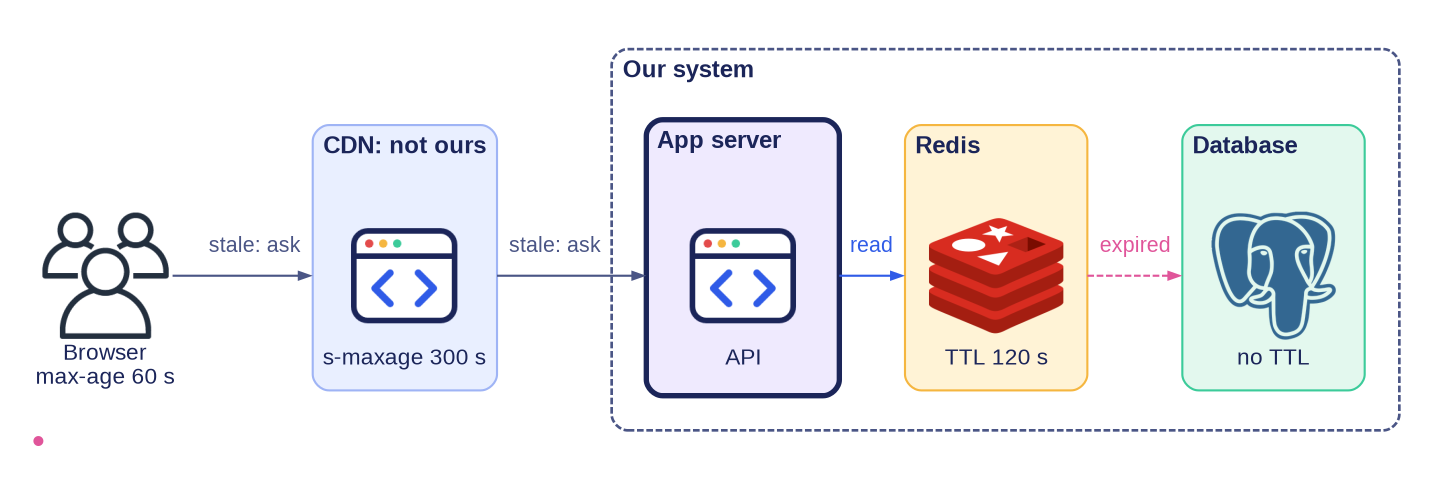
Four copies, four lifetimes
Typical ranges
| Layer | TTL | Holds |
|---|---|---|
| Browser | 1 hour to 1 year | Static files that rarely change |
| CDN | 5 minutes to 24 hours | Public pages and responses |
| Application cache | 1 minute to 1 hour | Computed results, sessions |
| Query results | 1 second to 5 minutes | Frequent queries |
Ages can add up. If the app fills the CDN from a Redis value that is already 119 seconds old, the CDN keeps it 300 more. HTTP caches report their own waiting time in the Age header, so a browser counts the time spent in the CDN, but HTTP knows nothing about Redis.
Worst age at the user
Age. If they do not, add every layer: 120 + 300 + 60 = 480 s.HTTP
TTL in HTTP headers
Browsers and CDNs read their TTL from the response, for example Cache-Control: public, max-age=3600.
| Directive | Meaning |
|---|---|
max-age=N | Fresh for N seconds |
s-maxage=N | The same for shared caches such as CDNs |
public | Shared caches may store it |
private | Only the user's browser may store it |
no-cache | May be stored, but must be checked before each use |
no-store | Must not be stored |
stale-while-revalidate | May be served stale for N seconds while it is refreshed |
ETag: renewing a copy without sending it again
Common header patterns
| Content | Header |
|---|---|
| CSS and JS with a hash in the name | max-age=31536000, immutable (1 year) |
| Public API response | max-age=300 (5 minutes) |
| HTML page | max-age=0, must-revalidate |
| User-specific data | private, max-age=60 |
More on this layer in API caching.
Trouble
When everything expires together
Load 10,000 keys at deployment with the same 10-minute TTL and they all expire in the same second. A single very popular key is just as bad: more than 100 readers can miss at once. The full story is in thundering herd.
Four preventions: JELS
Jitter
Add a random part to each TTL. 60 s plus or minus 10% is 54 to 66 s.
Early refresh
Renew some time before expiry, with a probability that grows.
Locking
One request computes the new value; the others wait for it.
Stale while revalidate
Return the old value now and refresh in the background.
Jitter turns a spike into a trickle
Same keys, spread expiry
Details
How expiry really works
Redis removes expired keys in two ways. Passive: when a client touches the key. Active: it regularly tests a few random keys that have an expiry and deletes the expired ones. So expired data can hold memory for a while, but no client is given it.
Three traps
- 1
Writing can remove the TTL
In Redis a plain
SETclears the expiry. Set it again in the same command, or useKEEPTTL. - 2
Two commands are not one
SETand thenEXPIREleaves a key without expiry if the client dies between them. UseSET key value EX 60. - 3
Clocks
Measure durations inside a process with a monotonic clock, since the wall clock can jump.
Which kind of TTL?
Golden rules
- 1
Start shorter
Lengthen it once you know the access pattern.
- 2
Add jitter
For every group of keys that is stored together.
- 3
Watch the hit rate
A low rate may mean a short TTL, or keys nobody repeats.
- 4
Invalidate user changes
People notice when their own edit is missing.
- 5
Give each layer its own TTL
Long where you can purge (the CDN), short where you cannot (the browser).
- 6
Cache missing data
With a shorter TTL.
Summary
The whole topic in one minute.
A TTL limits how old a cached copy may be. Absolute TTLs count from creation, sliding TTLs restart on use, adaptive TTLs grow with popularity. Only the absolute kind limits the age of the data.
Choose it from the staleness users accept, then check the load that remains. Add jitter so copies do not expire together, invalidate on important changes, and keep the TTL as the safety net under everything else.
- A TTL limits how long a wrong copy can live.
- Absolute limits age, sliding limits idleness, adaptive follows behaviour.
- Choose from the harm of staleness, then check the load.
- Jitter spreads many keys; a lock or stale answer protects one hot key.
- Ages of layers can add up.