
CDN operations
medium 30 minRunning a CDN day by day: what to measure, when to wake somebody, how to keep attackers away, how to make it faster and cheaper, and how to find out why a user got a slow, stale or broken answer.
Video lesson · Chapter 1 of 5
One chart says the edge is nearly healthy
Four numbers for a CDN
1:15Reel coming soon
Theory
Read or listen first. About 2 min.
What it is
After a CDN is switched on, somebody must look after it. CDN operations has four parts: monitoring what it does, securing what passes through, optimizing speed and cost, and troubleshooting when an answer is wrong.
The special difficulty is that the machines belong to another company and stand in hundreds of places. You see them through headers, logs, metrics and your own tests from outside.
Why it exists
A CDN fails quietly. A wrong header in one release can cut the hit ratio from 95% to 70%. Users notice little, but the origin gets six times the load, and at the next peak it falls over.
It is also your front door. Nearly every request passes it, so it is the right place to stop attacks, and the place where one wrong rule can stop everybody.
A short history
November 2012
RFC 6797 defines HTTP Strict Transport Security: a site can tell browsers to use only HTTPS.
July 2019
A web application firewall rule with a costly regular expression exhausts CPU at Cloudflare, and its service is down for 27 minutes.
May 2021
RFC 9000 standardizes QUIC, the transport under HTTP/3.
June 2021
A customer's valid configuration triggers a bug at Fastly and 85% of its network returns errors. Within 49 minutes 95% of the network works normally.
June 2022
RFC 9211 defines Cache-Status, a standard header for what caches did with a request. RFC 9114 defines HTTP/3.
Words to know
- Cache hit ratio
- Hits divided by cacheable requests, or by all requests. Say which.
- Byte hit ratio
- The share of bytes served from cache.
- Origin offload
- The share of traffic that the origin does not serve.
- p95
- 95% of requests are at or below this time.
- WAF
- Web application firewall: rules that inspect requests and block harmful ones.
- Cache warming
- Requesting content before users do, so that the first user gets a hit.
- Synthetic check
- A test request sent on purpose, from outside, at regular times.
How it works
Step through the idea, or press Play.
Measure. Hits, bytes, delay, errors per place
Understand it
Start here
A string of mountain huts
Imagine three huts along a mountain path. Hikers want hot soup. Cooking happens in the valley, and the huts keep pots ready.
A restaurant chain has the same work: check every kitchen, keep trouble outside, speed up service, repair quickly.
The whole field
Performance
Delay, hit ratio, throughput.
Security
Firewall, floods, limits.
Cache management
Lifetimes, purge, warming.
Alerts and incidents
Notice early, respond calmly.
Cost
Speed against the bill.
Logs and compliance
Who changed what, and what was served.
Monitor
The numbers to watch
| Metric | Example target | Tells you |
|---|---|---|
| Request hit ratio | Above 90% for static files | How often the edge answers |
| Byte hit ratio | Set your own | What the origin link carries |
| Origin share | Below 20% of all requests | What still reaches your servers |
| p95 latency per region | Below 100 ms for cached files | What most users feel |
| 5xx error rate | Below 0.1% | Broken answers |
| Bandwidth and requests a second | A trend | Capacity and cost |
Small changes in the ratio are large at the origin
Requests and bytes tell different stories
The example dashboard saves 2.4 TB a day. That is 2.4 x 10^12 x 8 bits / 86,400 s, or about 222 Mbit/s on average and about 667 Mbit/s at a 3x peak that the origin does not have to send.
Alert
When to wake somebody
| Level | Example trigger | Action |
|---|---|---|
| Critical | Errors above 5%, or the origin is down | Page the person on call |
| Warning | Hit ratio below 85%, latency jump | Message the team, look today |
| Info | Unusual traffic, a new location | Log for review |
Page or not?
Where the signals come from
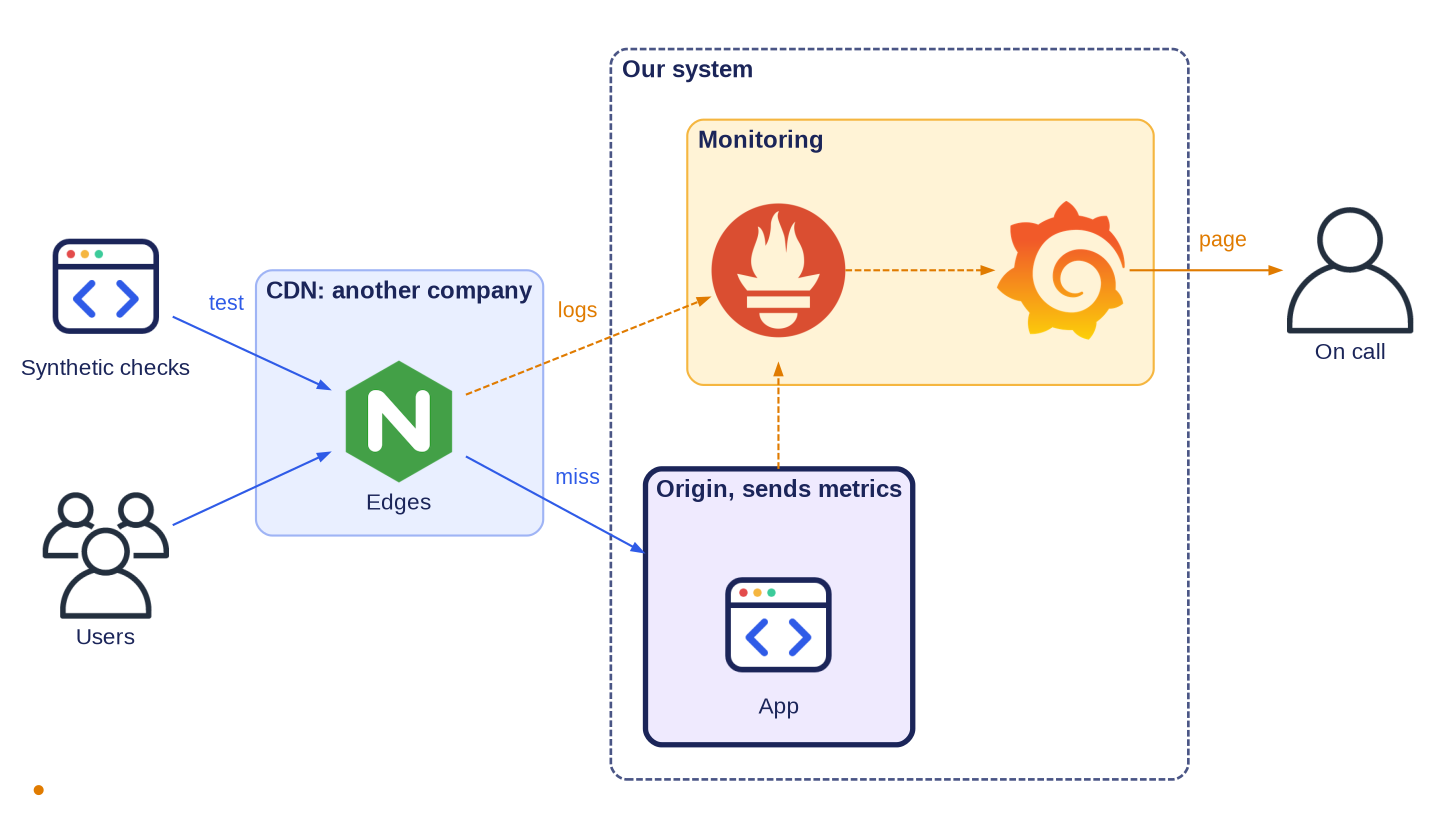
Tools people use: the CDN's own analytics (Cloudflare, Fastly, CloudFront metrics in CloudWatch), and Datadog, Grafana, New Relic, Prometheus or Splunk for collecting. CloudFront's cache hit rate counts cacheable requests only and must be switched on per distribution.
Secure
Layers of protection
Flood protection
Large networks absorb traffic floods. Small, clever floods on costly pages need limits too.
WAF
Rules against injection, scripts and known attacks. It reduces risk and does not repair the app.
Rate limiting
Too many requests from one key get a 429.
Bot management
Keep bad bots out and let good ones in, with proof of identity.
TLS
Certificates at the edge. Encrypt the way to the origin as well.
Geo rules
By country, for law or licences. Easy to get around, so not a security wall.
A request through the layers
Secure
Security headers
| Header | Value | Does |
|---|---|---|
| Strict-Transport-Security | max-age=31536000; includeSubDomains | Only HTTPS for a year |
| X-Content-Type-Options | nosniff | No guessing of types |
| Content-Security-Policy | default-src 'self'; frame-ancestors 'none' | Limits sources and framing |
| X-Frame-Options | DENY | Framing, for older browsers |
| Referrer-Policy | strict-origin-when-cross-origin | Less address data to others |
Optimize
Faster and smaller
| Technique | What it does | Remember |
|---|---|---|
| Compression | gzip or Brotli for text | Not for JPEG or video. CloudFront compresses 1,000 to 10,000,000 bytes |
| HTTP/2 and HTTP/3 | Many requests on one connection, HTTP/3 on QUIC | Gains depend on the network |
| Image formats | WebP, AVIF, right sizes, lazy loading | Google: lossy WebP is 25 to 34% smaller than comparable JPEG |
| Cache rules | Lifetimes per type of content | Usually the largest gain |
| Minification | Smaller HTML, CSS and JS | Do it in the build |
| Connection hints | dns-prefetch and preconnect | Only for a few important hosts |
Raise the hit ratio
- 1
Split by path
One path often causes most misses.
- 2
Look at the key
Tracking words, cookies, many values of a header.
- 3
Look at the headers
Set-Cookie or private on public files stops caching.
- 4
Lengthen lifetimes
With hashed names or a purge by tag.
- 5
Add a shield
One place for all misses: see CDN design.
Prepare
Warming a cache
Request the important pages before users do: after a deployment, before a campaign. A request warms only the location it reaches, so test requests from one city warm that one city, plus the shield. Warm the shield and let edges fill quickly from it.
Do
- A list of the top pages
- Slowly, below the spare load of the origin
- The same key as users: encoding, language
- Before the peak, after the purge
Avoid
- Crawling everything
- All at once
- Warming a version users do not ask for
- Warming so early that it expires
Warming 10,000 pages at 100 a second takes 100 seconds through one shield. At 50 locations without a shield it is 500,000 requests to the origin, or 83 minutes at the same speed. More in cache warming.
Troubleshoot
Four common troubles
| Trouble | Look for | Do |
|---|---|---|
| Low hit ratio | Short TTL, Vary with many values, query words, Set-Cookie | Longer TTL, normalize, clean the key |
| High latency | Misses, slow origin, wrong location | Warm, speed up the origin, check routing |
| Stale content | Long TTL, purge not sent or late, browser copy | Check Age and ETag, repeat the purge, new name |
| 5xx errors | Origin down, TLS between CDN and origin, limits, timeouts | Test the origin directly, certificates, limits |
Why did the user get this answer?
Headers that help
| Header | Says | Who |
|---|---|---|
| Age | Seconds since the copy was made or checked | Standard |
| Cache-Status | Hit, or why it was forwarded | Standard, RFC 9211 |
| X-Cache | HIT or MISS | Fastly, CloudFront and others |
| X-Cache-Hits | Hits at each node | Fastly |
| X-Served-By | Which cache servers answered | Fastly |
| CF-Cache-Status | HIT, MISS, STALE, BYPASS, DYNAMIC and more | Cloudflare |
| CF-Ray | Identifier of the request | Cloudflare |
curl -sS -o /dev/null -D - https://www.example.com/logo.png# look for: cache-control, age, etag, x-cache, cache-status, vary, set-cookiePay and prove
Cost and logs
| You pay for | Lower it by |
|---|---|
| Bytes sent to users | Compression, right image sizes |
| Number of requests | Browser caching, fewer files |
| Origin traffic | Byte hit ratio, a shield |
| Extras: logs, functions, purges | Sampling, hashed names instead of purges |
Keep edge logs for debugging, security and billing, and keep them only as long as you need. Addresses of users are personal data in many places. Also record who changed which rule, and when.
An incident, step by step
Change
Rules are deployments
A CDN configuration reaches the whole world in seconds. Both outages in the history above began with a change. So treat rules as code: review, test, and roll out in steps.
A safe rule change
- 1
Log only
Count what the rule would block.
- 2
A small part
One path, one region or 1% of traffic.
- 3
Watch
Errors, blocked share, complaints.
- 4
Everywhere
With a tested way back.
- 5
Write it down
Who, why, until when.
Do
- Monitor each location and path
- Runbooks for the common troubles
- Security headers for the whole site
- Review hit ratios regularly
- A plan for a CDN outage
Avoid
- Ignoring alerts until they mean nothing
- Switching the WAF off to make an error go away
- Limits so tight that shared offices are blocked
- Skipping load tests
- Changes without a way back
Summary
The whole topic in one minute.
Watch hit ratio in requests and in bytes, origin load, p95 per region and the error rate, each split by path and place. Page a person for harm to users, not for every wobble.
Protect in layers: floods, firewall rules, limits, bots, TLS, headers, and an origin that accepts only the CDN. Roll rules out in steps. For every strange answer, read the headers first: hit or miss, how old, which place.
- Monitor, optimize, secure, troubleshoot.
- Misses, not hits, are what the origin feels.
- Count requests and bytes.
- Close the origin to everybody but the CDN.
- Read the headers before you guess.