
When a deleted record still has older copies
medium 6 minA customer export disappears from the current catalog.
Video lesson · Chapter 1 of 5
An old backup brings a photo back
Deleted from today’s catalog. Still reachable yesterday.
1:19Reel
Theory
Read or listen first. About 1 min.
What it is
A current catalog is a view of what should be served now. Versioned storage and historical tables deliberately keep older data addressable. Removing an entry from today’s catalog can make it disappear instantly for users even though several physical copies remain. The completion condition therefore has to name the layer being checked.
Which reference still reaches the export?
Why it exists
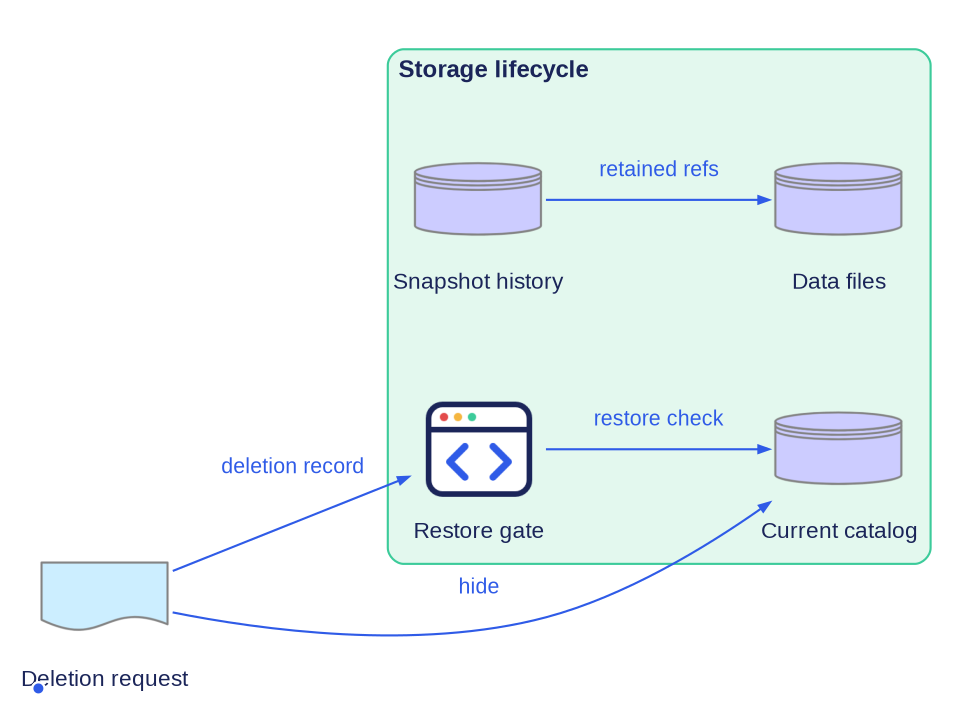
Think of a published export as a graph of references. A catalog points to a manifest, and a manifest points to data files. An old snapshot can still point to a file after the newest snapshot stops using it. Deleting a shared file early would break a reader using that old snapshot.
View diagram · Retained references
Words to know
- Delete marker
- A versioned S3 marker that hides an object from ordinary current-version reads.
- Snapshot
- A retained table state that can keep data files reachable.
How it works
Step through the idea, or press Play.
Inventory references. List live rows, snapshots, versioned blobs and derived exports. Give each owner a retention policy and a completion signal. Distinguish lookup removal from removal of retained content.
Understand it
Start here
Follow the copies of an export
An export has vanished from the search screen. Follow its catalog entry, historical reference and backup copy to see what an operator can still recover.
Probe current reads, references and restored reads.
Structure
Retained references
Retained references
Test a restore
Delete an export at noon, then restore yesterday’s catalog into a test environment. Reapply the durable deletion record before serving reads. Record separately whether the current catalog hides the export, historical versions remain, or cleanup has finished.
What survives a delete
Trace one export
| Layer | After current removal | Evidence to collect |
|---|---|---|
| Live catalog | Ordinary lookup misses | Current read result |
| Versioned object store | Prior versions may be reachable | List and inspect eligible version IDs |
| Historical table | Snapshots may reference old files | Snapshot references and retention status |
| Backup restore | Old catalog could become visible | Replay deletion record before serving |
Clean up in dependency order
Expire historical references that are eligible under the retention policy, then identify files no retained reader needs. A writer may have uploaded files for a commit that has not yet appeared in the catalog. Give ongoing writers a safe window before removing apparent orphans. Keep an audit of what was hidden, what was physically removed, and what is still retained.
Prove that a restore respects deletion
A restore test should run in isolation. Restore a backup from before the deletion, replay the durable deletion record, rebuild derived indexes, then attempt both normal reads and reads through old export links. Separately verify storage cleanup when retention allows it. These probes answer different questions and can finish at different times.
Verify every milestone
- Probe current reads, references and restored reads.
Treat one 404 as proof of erasure
- Older versions can remain reachable.
Summary
The whole topic in one minute.
Define deletion as a set of observable milestones. Verify live visibility, historical references, physical cleanup and restore behavior independently.