
Layer 4 and layer 7 load balancers
medium 26 minA layer 4 load balancer chooses a server from addresses and ports and keeps a whole connection on it.
Video lesson · Chapter 1 of 5
Follow one encrypted connection
Label or contents: layer 4 and layer 7 in 75 seconds
1:15Reel coming soon
Theory
Read or listen first. About 2 min.
What it is
A load balancer receives traffic for a service and hands it to one of several servers. The important question is how much of the traffic it reads before it decides. The numbers 4 and 7 name how far up the network layers it looks.
At layer 4 it reads IP addresses, ports and the protocol, TCP or UDP. It picks a server once per connection, or per UDP flow, and then passes everything along. At layer 7 it understands the application protocol, usually HTTP. It receives the whole request, reads the host, path, headers and cookies, and can pick a different server for every request.
Why it exists
Reading less is cheap. A layer 4 balancer keeps little memory per connection and can work for any protocol that runs on TCP or UDP, including databases, games and mail.
Reading more is useful. If /api and /images live on different servers behind one name, somebody must read the path. The same place can hold certificates, add headers, limit requests and send one percent of users to a new version. That needs decryption and parsing, so it costs processor time.
A short history
May 1994
RFC 1631 describes Network Address Translation: rewriting addresses in packets on the way through. Many layer 4 balancers use the same idea.
August 2016
AWS launches the Application Load Balancer, a layer 7 service that routes by the content of a request.
September 2017
AWS launches the Network Load Balancer, a layer 4 service built for very many connections.
January 2019
The Network Load Balancer gains TLS listeners. Decrypting and reading HTTP turn out to be two separate decisions.
Words to know
- Five-tuple
- Protocol, source address, source port, destination address and destination port. Together they name one flow.
- VIP
- Virtual IP: the one address clients connect to, held by the load balancer.
- NAT
- Network Address Translation: changing addresses or ports in a packet as it passes.
- Flow table
- The memory of which flow belongs to which server.
- TLS termination
- Ending the encrypted connection here, so the bytes inside can be read.
- Full proxy
- A balancer that holds two connections, one to the client and one to the server.
- SNI
- Server Name Indication: the host name a client sends at the start of a TLS handshake, normally readable without decryption.
How it works
Step through the idea, or press Play.
Ask what must be read. Address and port, or host, path and cookie
Understand it
Start here
The parcel sorting story
Imagine a sorting room full of parcels. Some sorters only read the label outside. Others open the box and look at what is inside. The first is quicker. The second can make choices the first cannot.
Reading the label is fast. Opening the box is informed. Big sorting rooms do one and then the other.
The layers
Where 4 and 7 come from
The seven layers of the OSI model
| Layer | Name | Examples | Which balancer |
|---|---|---|---|
| 7 | Application | HTTP, WebSocket, gRPC | Layer 7 |
| 6 | Presentation | Encoding. TLS is often drawn here | |
| 5 | Session | RPC sessions, NetBIOS | |
| 4 | Transport | TCP, UDP | Layer 4 |
| 3 | Network | IP, ICMP | Read by layer 4 balancers too |
| 2 | Data link | Ethernet, MAC addresses | |
| 1 | Physical | Cables, radio |
HTTPS is HTTP inside TLS inside TCP. HTTP/3 is HTTP inside QUIC, which runs on UDP and has TLS built in. So "layer 7" for a website means the balancer ends TLS as well.
Layer 4
How a layer 4 balancer works
Layer 4: one choice per connection
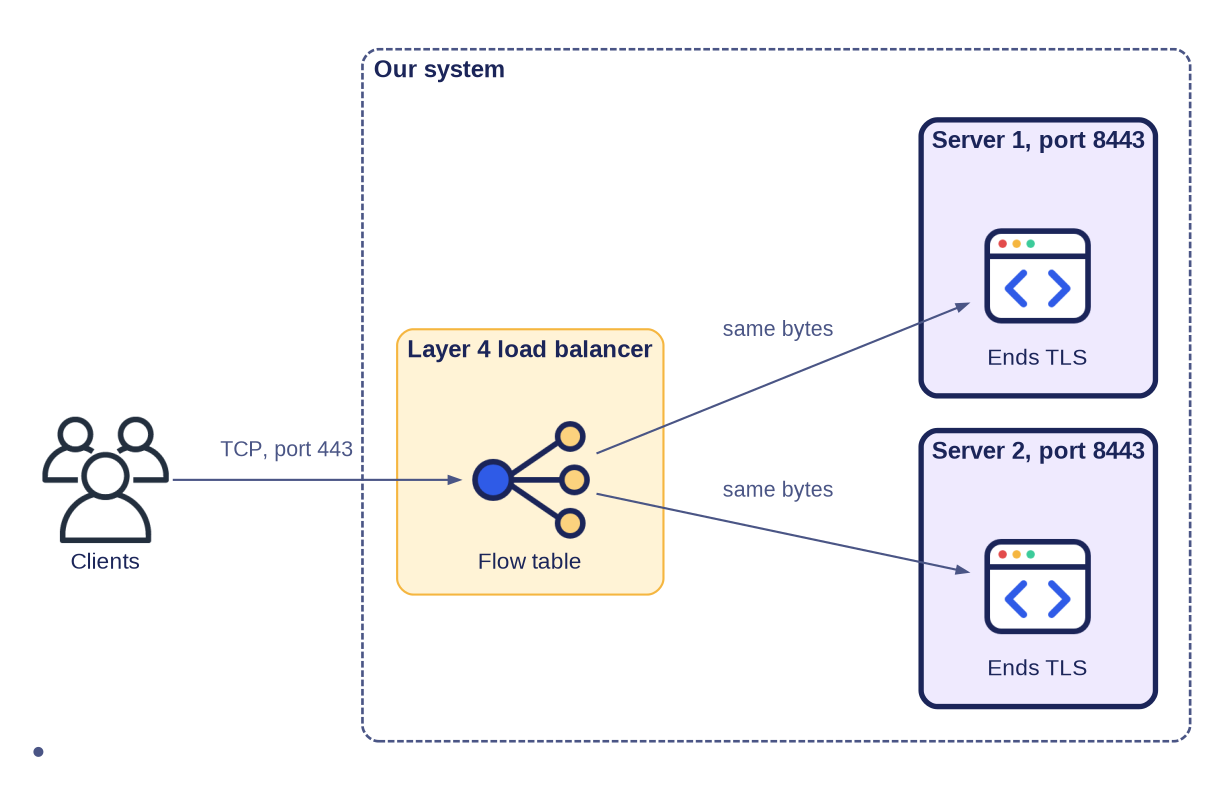
- 1
A SYN arrives
The client opens a TCP connection to the virtual IP. The first packet is a SYN.
- 2
Read the headers
Source and destination address, source and destination port, protocol, and TCP flags such as SYN, ACK and FIN.
- 3
Choose a server
Round robin, least connections, weights, or a hash of the five-tuple or source address.
- 4
Remember it
Write the flow in the flow table, so later packets of the connection go to the same server.
- 5
Forward
With NAT, change the destination to the server's address and port, for example from
198.51.100.7:443to10.0.0.1:8443. - 6
The reply
It returns through the balancer, which changes the source back. With direct server return the server answers the client itself.
Layer 4 can see
- Source and destination IP address
- Source and destination port
- Protocol: TCP or UDP
- TCP flags: SYN, ACK, FIN
- The SNI host name, if it peeks at the TLS greeting
Layer 4 does not use
- The URL path
- HTTP headers and the Host header
- Cookies
- The request body
- The content type
A layer 4 connection
Choosing by hash
Layer 7
How a layer 7 balancer works
Layer 7: one choice per request
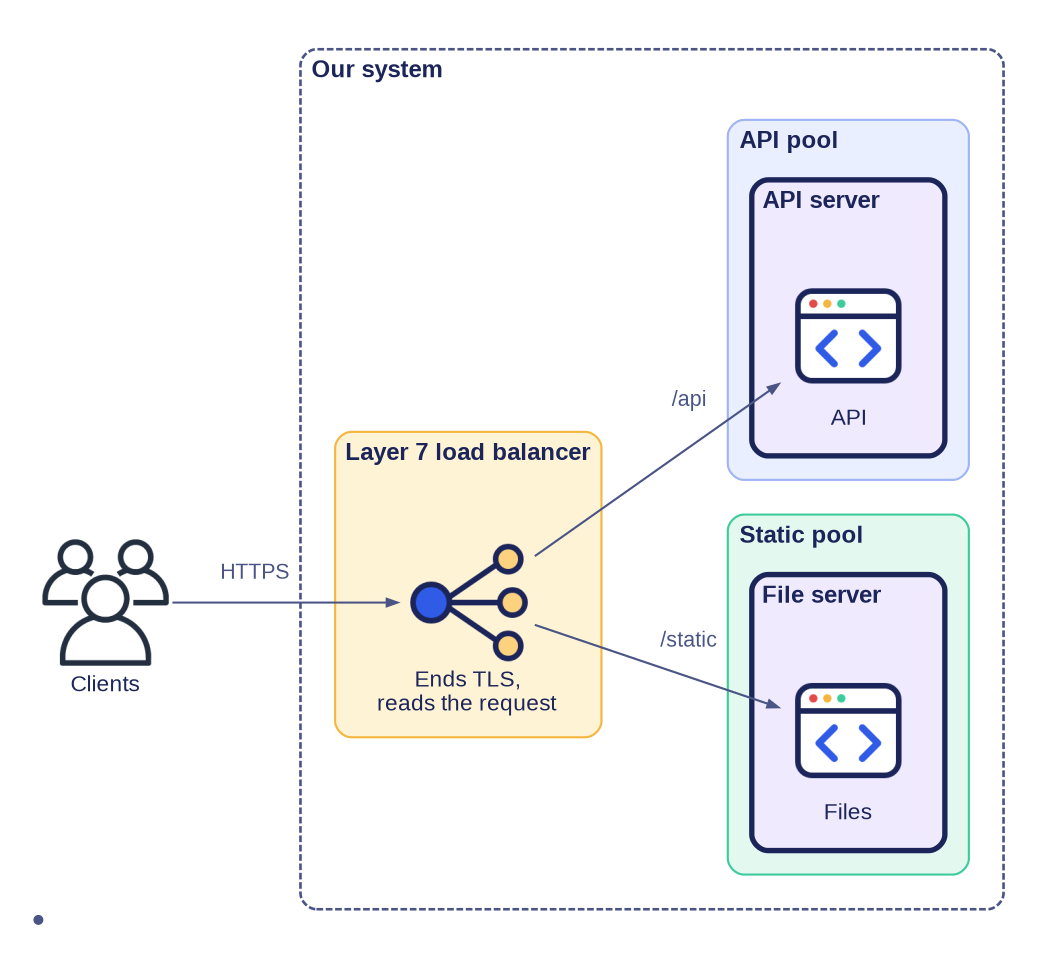
- 1
Accept the connection
The balancer itself completes the TCP handshake with the client.
- 2
End TLS
It holds the certificate and key for the host, and decrypts.
- 3
Parse the request
Method, host, path, query string, headers, cookies. The body only if a rule needs it.
- 4
Match the rules
In a fixed order. The first match, or the most specific, gives a pool of servers.
- 5
Change it if needed
Add
X-Forwarded-Forand a request ID, rewrite the path, remove headers that must not come from outside. - 6
Forward and answer
Use a connection that is already open to a server. The response can be compressed, cached or given new headers on the way back.
What layer 7 can route by
| By | Example rule | Use |
|---|---|---|
| URL path | /api/* to API servers | Several services under one name |
| Host | api.example.com to the API pool | Many sites on one balancer |
| Header | Accept: image/* to media servers | Split by what the client wants |
| Cookie | group=beta to version 2 | Keep a tester on one version |
| Query string | region=us to US servers | Explicit choice in the link |
| Method | POST to the write pool | Separate reads and writes |
What else it can do
TLS termination
One place for certificates. See load balancer security for the choices.
Change requests
Add, change or remove headers, and rewrite URLs.
Cache and compress
Answer repeated reads itself, and shrink responses.
Protect
Rate limits per client or endpoint, and a web application firewall.
Split traffic
Send 10% of requests to a new version, for A/B tests and canaries.
Retry
Send a safe request to another server when the first one fails.
Balance
Connections are not requests
Layer 4 spreads connections. HTTP/2 and gRPC put many requests on one long connection, so equal connections can mean very unequal work. Layer 7 spreads requests.
Three clients, three servers
One busy connection
Side by side
Layer 4 and layer 7 compared
| Question | Layer 4 | Layer 7 |
|---|---|---|
| Protocols | Any TCP or UDP | HTTP, gRPC, WebSocket, or others it understands |
| Chooses per | Connection or flow | Request |
| Added delay | Lower | Higher: decrypt, parse, second connection |
| Work per byte | Less | More |
| TLS | Usually passes through. Some products can end it | Usually ends it |
| URL and host rules | No. SNI only, if it peeks | Yes |
| Change headers | No | Yes |
| Cache | No | Some products |
| Application firewall | No: it has no request to inspect | Yes |
| Stay on one server | Flow table or source address | Cookie or header as well |
| Health checks | TCP connect, often HTTP too | HTTP status and body |
| Retry a request | No | Yes, when it is safe |
| Client address at the server | Kept, or PROXY protocol | X-Forwarded-For or Forwarded |
/health over HTTP and still forward TCP.Forwarding
Pass through or full proxy
| Way | What happens | Server sees the client as |
|---|---|---|
| NAT | Rewrite the destination. Replies must come back this way | The client, if only the destination changes |
| Full NAT | Rewrite source and destination | The balancer |
| Direct server return | Deliver unchanged to a server that also holds the VIP | The client. The reply skips the balancer |
| TCP proxy | Two TCP connections, bytes copied between them | The balancer, unless PROXY protocol is used |
| HTTP proxy | Two connections and full requests | The balancer. The client is in a header |
Connections from one proxy address to one server port
Products
Where you meet them
| Product | Layer 4 | Layer 7 |
|---|---|---|
| AWS | Network Load Balancer | Application Load Balancer |
| Azure | Azure Load Balancer | Application Gateway |
| Google Cloud | Network Load Balancers | Application Load Balancers |
| NGINX | stream module | http module |
| HAProxy | mode tcp | mode http |
| Envoy | Network filters | HTTP filters |
| Traefik | TCP and UDP routers | HTTP routers |
| F5 BIG-IP | Yes | Yes |
Uses
What each is good at
Reach for layer 4
- Databases and other protocols that are not HTTP
- Games and voice over UDP
- DNS queries over UDP
- Very many connections with little processing
- Media ingest over TCP, such as RTMP
- You must not decrypt here
Reach for layer 7
- Version 1 and version 2 of an API under one host
/usersand/orderson different services- One host name per tenant
- A/B tests and canary releases
- Static files and dynamic pages split
- Headers, limits or a firewall at the edge
Together
Layer 4 in front of layer 7
Two tiers
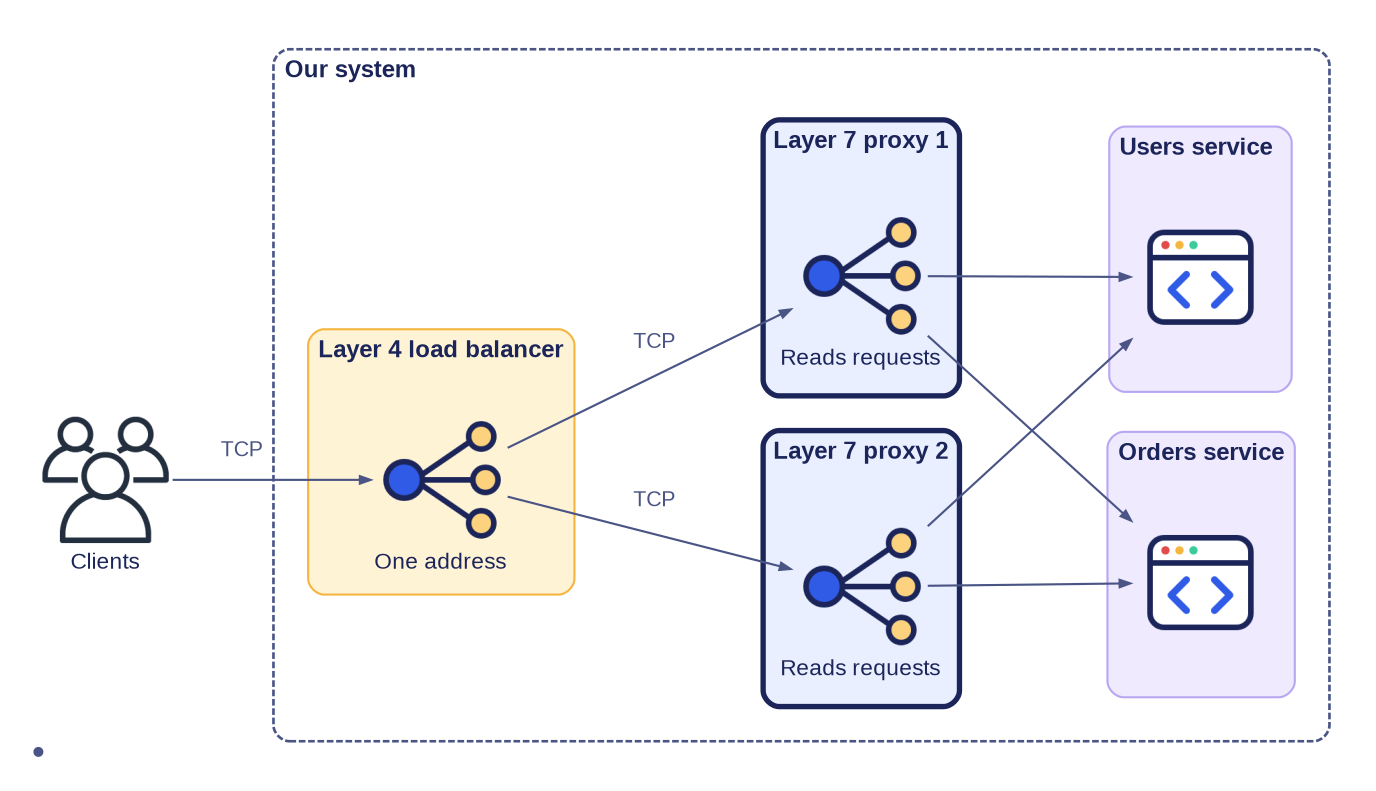
Decrypting is the expensive part, so it is spread over several proxies. The layer 4 tier hides them behind one address and stops sending new connections to one that fails. Global and local load balancing adds a tier above this one, between regions.
Decide
A quick guide
Which layer?
Where does TLS end?
Good habits
Do and do not
Do
- Use layer 4 for high-volume TCP and UDP
- Use layer 7 when content decides
- Give each layer a fitting health check
- Reuse connections from layer 7 to servers
- Combine the two in a large system
- Plan certificates before you end TLS
Do not
- Put an HTTP balancer before a protocol it does not know
- Rely on source address alone for state
- Forget the cost of decrypting and parsing
- Forget WebSocket upgrades and long timeouts
- Trust a client's forwarding headers
- Retry a payment without an idempotency key
Summary
The whole topic in one minute.
Layer 4 chooses by address and port, once per connection. It works for any TCP or UDP protocol and does little work, but it cannot see a path, a header or a cookie. Long connections can leave it unbalanced.
Layer 7 chooses by the content of each request. It can route, rewrite, retry, cache and protect, and it pays for that with decryption, parsing and a second connection. Large systems often place layer 4 in front of a group of layer 7 proxies.
- Layer 4 reads addresses and ports and chooses once per connection.
- Layer 7 reads the request and can choose for every request.
- Long HTTP/2 or gRPC connections unbalance layer 4.
- Ending TLS and reading HTTP are separate choices.
- Layer 4 in front of several layer 7 proxies is a common pair.