
Log-based message queues
medium 30 minA log-based queue appends messages to a file and keeps them after they were read.
Video lesson · Chapter 1 of 5
A notebook whose pages stay numbered
The log that remembers, in 80 seconds
1:20Reel coming soon
Theory
Read or listen first. About 2 min.
What it is
A log is a list that grows only at the end. Every entry gets the next number, its offset, and is never changed. A log-based message queue stores messages in such a log.
Reading does not remove anything. A consumer keeps one number, the offset of the next message. Two consumers are two numbers, and replaying the past means setting the number back.
Why it exists
A traditional work queue removes a message after it was acknowledged. That is right for tasks. It is wrong for facts, such as an order that was placed: next month somebody builds a new service that needs the same facts, and they are gone.
A log keeps them for a time, or keeps the latest value of each key for ever. It also suits the hardware: adding at the end and reading in sequence is what disks and the operating system do best.
A short history
1991
Rosenblum and Ousterhout describe a log-structured file system: the whole disk is written as one log. Their Sprite system ran one in 1992.
1992
ARIES, a recovery method from IBM, is published. Databases write their changes to a log first. Replaying it rebuilds the state after a crash.
2011
LinkedIn open-sources Kafka, which makes such a log a service that many programs can read.
2021
RabbitMQ 3.9 introduces streams, a log that consumers read without removing messages, beside its classic queues.
Words to know
- Offset
- The number of a message in its partition. It never changes.
- Log end offset
- The number that the next message will get.
- Segment
- One file of the log. Only the newest, active one is written.
- Sparse index
- A small table with some of the offsets and their positions in the file.
- Retention
- Deleting old segments by age or size.
- Compaction
- Keeping the latest message of each key.
- Tombstone
- A message with a key and no value. It says that the key is deleted.
- Replay
- Reading again from an earlier offset.
How it works
Step through the idea, or press Play.
Append. A message goes to the end of the active segment and gets the next offset
Understand it
Start here
A comic strip along the corridor
Think of a long comic strip, pinned picture by picture along the corridor of a school. Asha adds one picture after another. Everyone reads at their own speed and leaves a coloured bookmark under the next picture. Nobody takes a picture away after reading it.
The strip is a partition, the number under a picture is its offset, and a bookmark belongs to the reader.
The idea
What changes against a work queue
| Work queue | Log-based queue | |
|---|---|---|
| After the message is handled | It is removed | It stays until retention or compaction |
| Who remembers progress | The broker, for each message | One offset for each group and partition |
| Replay | Not possible | Set the offset back |
| Several purposes | A copy in a queue for each | One copy, several groups |
| Order | Can change when messages are redelivered | Fixed inside a partition |
| Retry or delay of one message | Built in | You build it, for example with a retry topic |
| Good for | Delivering tasks | Streams of events, audit, reprocessing |
Key benefits
Replay
Read again from any offset that is still kept.
Ordering
Strict inside a partition.
Throughput
Sequential writes, batches and few copies in memory.
Durability
On disk and, with replicas, on several machines.
Decoupling
Producers do not know their readers.
Scalability
More partitions on more brokers.
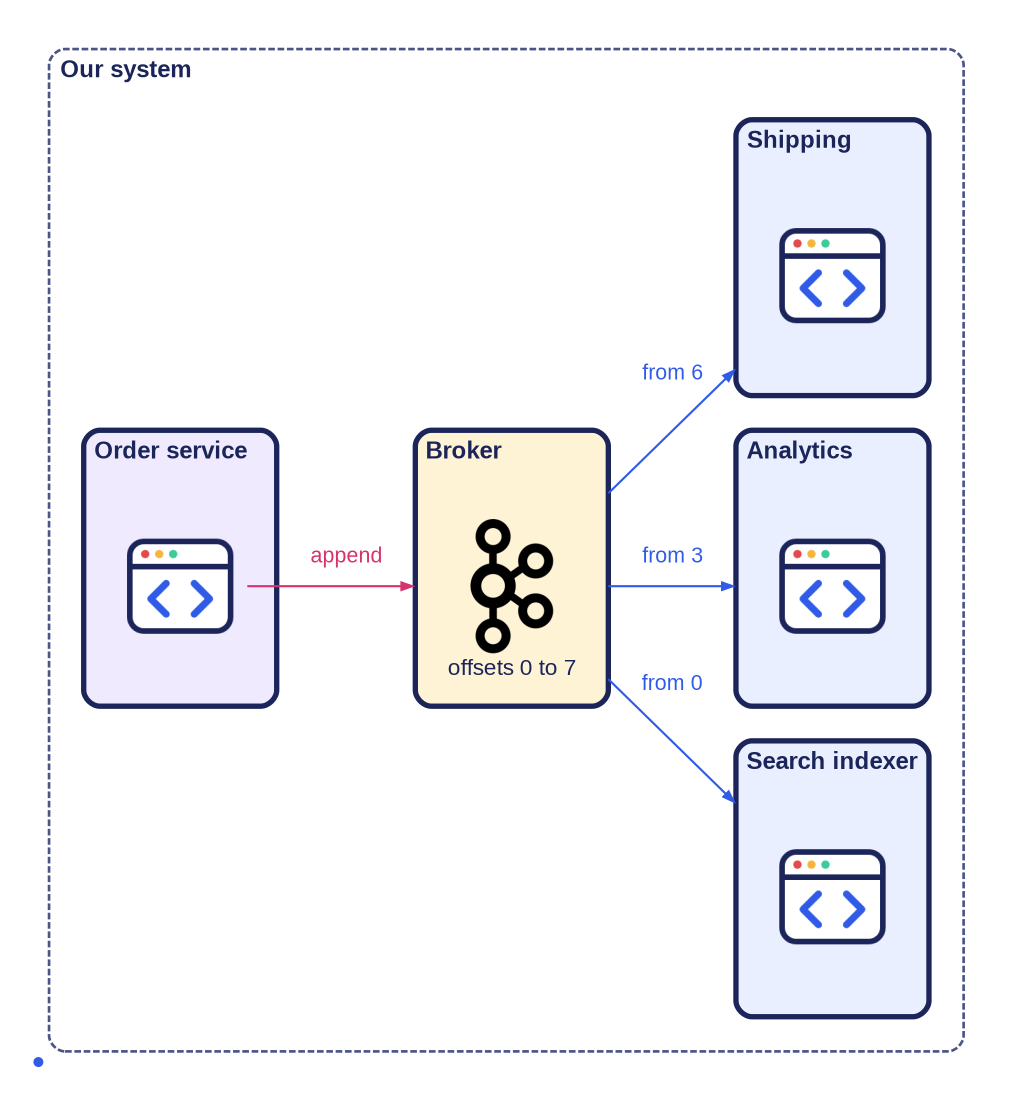
One log, three independent readers
Structure 1
Offsets
Suppose msg-0 to msg-7 are stored. The log start offset is 0 and the log end offset is 8. A message is never changed and never moves. The log grows only at the end, and shrinks only at the beginning, when old segments go.
Append and read
Positions
Structure 2
Segment files
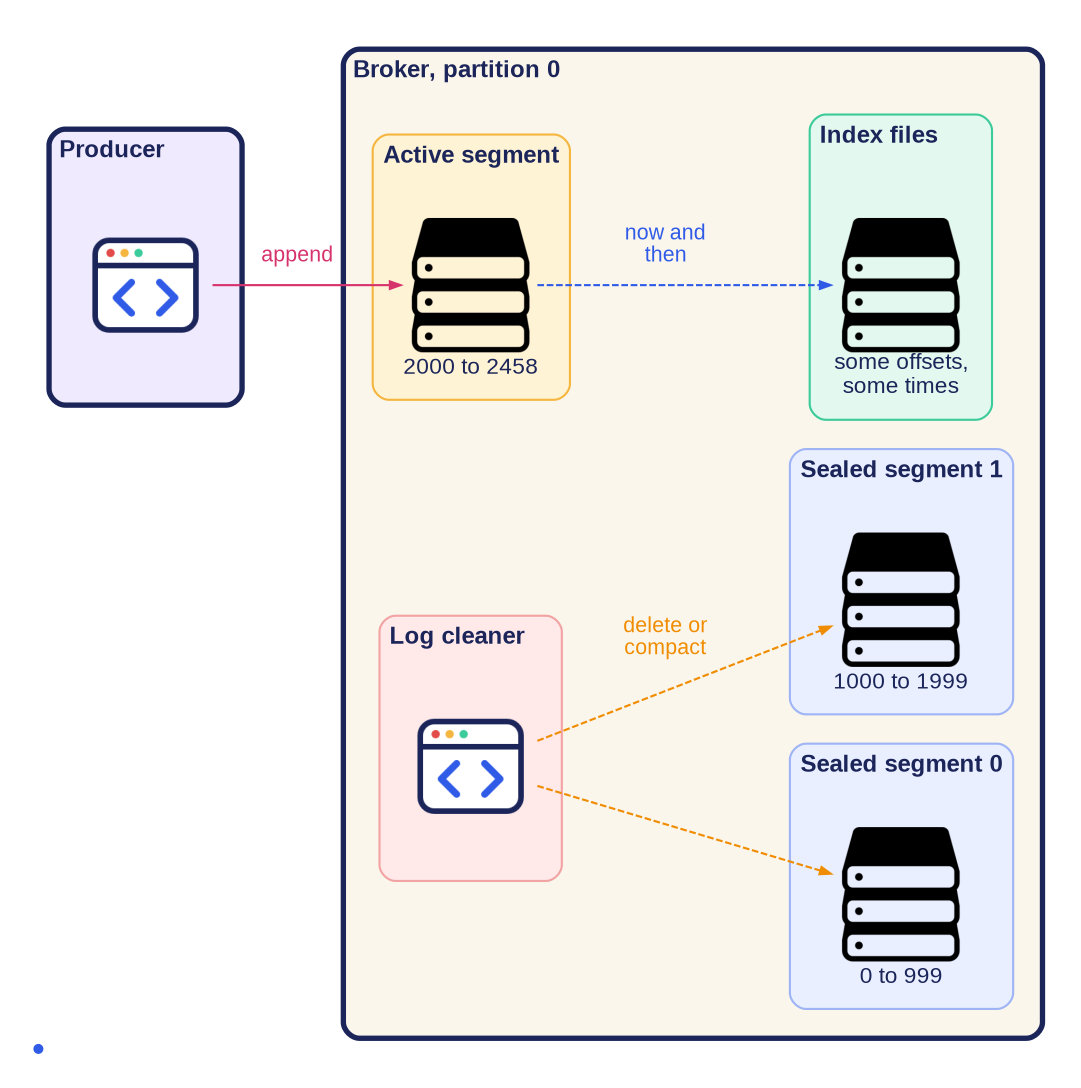
One endless file would be hard to clean. So a partition is a directory with a series of files, each named after its first offset. Only the last one, the active segment, takes writes. A full one is sealed and a new one begins.
An example with 512 MB segments
| First offset in the name | Offsets | Size | State |
|---|---|---|---|
| 0 | 0 to 999 | 512 MB | Sealed |
| 1000 | 1000 to 1999 | 512 MB | Sealed |
| 2000 | 2000 to 2458 | 234 MB | Active |
Partition 0 on one broker
Structure 3
Finding an offset
The .index file maps some offsets to byte positions. The .timeindex file maps some times to offsets, for a question like: where was the log at midnight? Both are sparse: Kafka adds an entry about every 4,096 bytes of messages, so the files stay small.
Read offset 2150
- 1
Pick the segment
The largest first offset that is not above 2150 is 2000. Binary search over the names.
- 2
Ask the index
Entries: 2000 at byte 0, 2100 at byte 8192, 2200 at byte 16384. The last one that is not above 2150 is 2100.
- 3
Scan
Start at byte 8192 and read forward past 50 messages to 2150.
Cost of a lookup
The time index
| Time stamp | Time (UTC) | Offset |
|---|---|---|
| 1704067200 | 1 January 2024, 00:00 | 0 |
| 1704070800 | 01:00 | 100 |
| 1704074400 | 02:00 | 200 |
Cluster
Where the log lives
A topic has several partitions, each with a leader and followers on different brokers. Brokers store the logs, answer produce and fetch requests and copy from leaders. The cluster's controller assigns leaders; since Kafka 4.0 that works without ZooKeeper (KRaft). How copies, in-sync replicas and failover work is on the page distributed messaging queue.
A topic with typical settings
| Setting | Example | Meaning |
|---|---|---|
partitions | 12 | Parallel lines of work |
replication.factor | 3 | Copies of each partition |
min.insync.replicas | 2 | Copies needed for a confirmed write with acks=all |
retention.ms | 604800000 | 7 days, which is also the default |
retention.bytes | 1073741824 | 1 GiB for each partition; by default there is no size limit |
segment.bytes | 536870912 | 512 MiB for each segment file |
cleanup.policy | delete | Or compact, or both |
Cleanup 1
Retention: delete by age or size
Four messages, seven days
- 1
msg-1 and msg-2 are 8 days old
They are past the limit.
- 2
msg-3 is 2 days old, msg-4 is 1 day old
They are within it.
- 3
If each pair is in its own segment
The first segment is deleted as a whole file.
- 4
If all four are in one segment
Nothing is deleted yet. A segment goes when its newest message is too old.
So retention promises at least this long, not exactly. A consumer that stops for longer than the retention loses messages. Its saved offset no longer exists, and a rule decides where it continues: at the earliest message, at the latest one, or with an error.
Cleanup 2
Compaction: the latest value of each key
Sometimes the question is not what happened this week but what is true now. Compaction removes a message when a later one has the same key. What remains is a snapshot of the current state, still in log form.
Before and after
| Offset | Key | Value | After compaction |
|---|---|---|---|
| 0 | A | 1 | removed |
| 1 | B | 1 | removed |
| 2 | A | 2 | removed |
| 3 | C | 1 | removed |
| 4 | B | 2 | removed |
| 5 | A | 3 | kept |
| 6 | C | none (tombstone) | kept for a day, then removed |
| 7 | B | 3 | kept |
Which cleanup?
Compaction settings in Kafka
| Setting | Default | Meaning |
|---|---|---|
min.cleanable.dirty.ratio | 0.5 | Clean when at least half of the log is uncompacted |
delete.retention.ms | 86400000 | Keep tombstones for a day, so that slow readers see them |
min.compaction.lag.ms | 0 | The least time before a message may be removed |
Good uses of compaction
- Change data capture from a database
- Rebuilding a cache or the state of an application
- User profiles and preferences
- The last known location of a device
Wrong uses
- Page views or payments, where every event counts
- Messages without a key
- Deleting personal data at once: it takes time until segments are cleaned
- A guarantee of only one value for each key
Reading again
Replay and rebuilding state
Fix a bug by replay
A replay repeats effects. Counting into a new table is safe. Sending emails again is not. Keep effects on the outside world in a consumer of their own, and make them idempotent.
How long does catching up take?
Processing
Streams and tables
Kafka Streams is a client library that reads topics, transforms the messages and writes the result to other topics. It has two views of a topic.
KStream: events
- An endless stream of records
- Each record stands for itself
- Insert: alice 1, then alice 3, sums to 4
KTable: current values
- A stream of changes
- One value for each key
- Upsert: alice 1, then alice 3, means 3
From a stream to a table
Common operations
| Operation | What it does | State |
|---|---|---|
filter() | Keeps records that match | none |
map() | Changes the key or the value | none |
flatMap() | One record becomes several | none |
groupByKey() | Groups by the message key | none by itself |
join() | Combines streams or tables | yes |
aggregate() | Builds a value for each key | yes |
Numbers
Size a log
Assume 172.8 million events a day of 1 KB: 2,000 a second, 2 MB/s on average and 6 MB/s at a 3x peak, with three replicas and seven days.
Disk
Summary
The whole topic in one minute.
A log-based queue appends, numbers and keeps. Readers own their position, so a new reader, a slow reader and a replay cost the log almost nothing.
Segments make cleanup and lookup cheap. Retention deletes whole old segments, compaction keeps the latest value for each key, and a tombstone removes a key. A stream of events and a table of current values are two views of the same log.
- Append only, one offset for each message, and reading removes nothing.
- Readers own their position: new, slow and repeated readers are cheap.
- Segments allow cheap deletes, and sparse indexes allow quick lookups.
- Retention deletes whole old segments. Compaction keeps the latest value of each key, and a tombstone deletes a key.
- A consumer that stays away longer than the retention loses messages.