
API authentication
medium 24 minAuthentication answers one question about every API call: who is asking?
Video lesson · Chapter 1 of 6
From password to an authenticated call
API authentication
1:16Reel
Theory
Read or listen first. About 2 min.
What it is
Authentication is checking who is making a request. The caller presents a proof, such as a password, a key or a signed token, and the server decides whether to believe it.
It is not the same as authorization, which decides what that caller may do. Authentication comes first and gives authorization a name to work with. The second half has its own topic.
HTTP itself remembers nothing between calls. So every request has to carry its own proof, and most of the design is about what that proof is, how long it lasts and how it can be taken away.
Why it exists
Without it, anyone who knows an address can read or change anyone's data. With it, you can protect accounts, bill customers, limit each caller and write an audit trail with names in it.
There are several methods because callers differ. A program on a server can keep a long secret. A phone in a stranger's pocket cannot. A partner's app should never see your user's password at all.
A short history
May 1996
HTTP/1.0 (RFC 1945) describes Basic authentication: a user name and password sent with each request.
April 2010
OAuth 1.0 is published as RFC 5849, so an app can use someone's data without their password.
October 2012
RFC 6749 publishes OAuth 2.0 and replaces OAuth 1.0.
May 2015
RFC 7519 standardises JSON Web Token (JWT), a compact signed set of claims.
September 2015
RFC 7636 adds PKCE, which protects the authorization code in apps that cannot keep a secret.
January 2025
RFC 9700 collects current OAuth 2.0 security practice: no password grant, and no implicit grant for tokens.
Words to know
- Credential
- The proof a caller presents: a password, key, token or certificate.
- Bearer token
- A token that works for whoever holds it, like cash. Keep it secret and send it only over HTTPS.
- Claim
- One statement inside a token, such as
sub(who),aud(for which service) orexp(until when). - Access token
- A short-lived token sent with API calls.
- Refresh token
- A longer-lived token used only to get a new access token.
- OAuth 2.0
- A standard way to let an app act with limited access, without sharing a password.
- OpenID Connect
- A login layer on top of OAuth 2.0. Its ID token says who the user is.
- Revocation
- Making a credential stop working before it expires.
How it works
Step through the idea, or press Play.
Present. The caller sends a proof with the request
Understand it
Start here
The hotel story
Think of a hotel. You prove who you are once, at the front desk. After that you carry a key card, and each door reads the card without phoning the desk.
The ID card is authentication. Which doors the key card opens is authorization.
Authentication
- Verifies identity: who you are
- Fails with 401, and the response must carry a
WWW-Authenticateheader - Examples: login, API key, JWT, certificate
- Sends
Authorization: Bearer <token>
Authorization (next topic)
- Checks permission: what you may do
- Fails with 403
- Examples: roles, scopes, access lists
- Example: role
adminmay delete a product
Choices
Four common methods
API keys
A long random string that names a calling program. Best between servers. Simple, but anyone holding the key is you.
Session cookies
A random ID in a cookie. The server looks up the session. Best for your own web app, and easy to end.
Signed tokens (JWT)
A token that carries its own claims and a signature. Best across many services. Hard to take back early.
OAuth 2.0
A way to give an app limited access without a password. Best for third parties and for single sign-on with OpenID Connect.
Side by side
| API key | Session | JWT | OAuth 2.0 | |
|---|---|---|---|---|
| Effort | Low | Low | Medium | High |
| Server lookup per call | Yes, the key record | Yes, the session | No | Depends: none for a JWT, one for an opaque token |
| Grows to many servers | With a shared or cached key store | With a shared session store | Naturally | Naturally with JWT |
| Revoke now | Easy | Easy | Hard without a denylist | Easy for refresh tokens, hard for JWT access tokens |
| Names a person | No, names an app | Yes | Yes, if it has sub | With OpenID Connect |
| Third-party access | No | No | Not by itself | Yes |
| Best for | Server to server | Your own website | Mobile apps, many services | Partners, social login |
Which one do I need?
Method 1
API keys
An API key is a random string that identifies the calling application. It is the simplest method and gives limited protection: no person is named, and a leaked key works until someone turns it off.
How a key is used
- 1
Generate
A developer creates a key in the dashboard. Show it once, then store only its SHA-256 hash and a short visible prefix.
- 2
Send
The client adds it to each request, for example
X-API-Key: demo_key_EXAMPLE_not_real. - 3
Validate
The server hashes what it received, finds the record, and checks that it is active.
- 4
Proceed
The request continues with the app's identity, its limits and its permissions.
Where to put the key
| Place | Verdict | Why |
|---|---|---|
Header: X-API-Key or Authorization | Use this | Stays out of URLs, browser history and most access logs. Make sure your own logs drop it too |
Query parameter: ?api_key= | Avoid | URLs are written to logs, history and shared links |
| Request body | Avoid | Not standard, and GET requests normally have no body |
Do
- Different keys for development and production
- Rotate keys, with two active during the change
- Keep keys in a secret manager or environment variables
- Limit rate and permissions per key
- Set an expiry date
Do not
- Commit keys to version control
- Share one key between services
- Put a secret key in frontend or mobile code
- Use one key for all customers
Good points
- Simple to add and to use
- Works well between servers
- Easy to revoke and rotate
- No redirects or complex flows
Weak points
- Names an app, not a person
- A leak means full access until revoked
- Can end up in logs and URLs
- No expiry unless you build one
Why a random key needs only a fast hash
Method 2
Sessions
After login the server stores a session and sends a random ID in a cookie. Every later request is one lookup. A shared store such as Redis lets any server answer, so sessions do scale. Logging out deletes the row, and it takes effect at once.
Method 3
JSON Web Tokens
A JWT is a signed note with three parts: header, payload, signature. The server needs no stored session, because the facts are in the token and the signature shows that nobody changed them.
HEADER {"alg": "HS256", "typ": "JWT"} which algorithm signed itPAYLOAD {"iss": "https://auth.shop.example", who issued it "aud": "orders-api", who it is for "sub": "user_123", "role": "customer", who it is about "exp": 1735689600} until when (seconds)SIGNATURE HMAC-SHA256( base64url(header) + "." + base64url(payload), secret )Size of a JWT
The flow
- 1
Login
The user sends credentials over HTTPS:
POST /auth/login. - 2
Create
The server checks them and signs a token with user, audience and expiry.
- 3
Return
It sends an access token and a refresh token.
- 4
Store
A browser keeps the access token in memory and the refresh token in an
HttpOnlycookie. A phone uses its keychain. NotlocalStorage, which any injected script can read. - 5
Send
Each call carries
Authorization: Bearer <token>. - 6
Verify
The API checks algorithm, signature, issuer, audience and expiry, then uses
sub.
Login, then a call
Access token and refresh token
| Access token | Refresh token | |
|---|---|---|
| Life | Short: 5 to 60 minutes, often 15 | Long: days or weeks |
| Sent to | Every API call | Only the token endpoint |
| Holds | Identity and limited permissions | A random value, or a pointer to a session |
| Stored | In memory | HttpOnly cookie, or the phone's keychain |
| Revoke | Wait for expiry, or a denylist | Delete it on the server |
JWT strengths
- No session storage for access checks
- Any instance or service can verify it
- Carries the user, so no lookup is needed
- Not tied to one domain's cookies
JWT costs
- Cannot be revoked early without a denylist
- Larger than a session ID
- Readable by whoever holds it
- Refresh and key rotation to build
Ending access
Revocation and rotation
How long a stolen access token lives
Refresh token rotation with reuse detection
Ways to end access early
| Way | Takes effect | Cost |
|---|---|---|
| Short expiry only | Within the token's life | Nothing extra |
Denylist of token IDs (jti) | At once | One fast lookup per call; entries can be dropped after expiry |
| User's token version in a cache | At once, for all devices | One lookup per call |
| Rotate the signing key | At once, for everyone | All users log in again: for emergencies |
Method 4
OAuth 2.0 and OpenID Connect
OAuth 2.0 lets a user give an app limited access to their data without sharing a password. It is about access, not login. Buttons such as "Sign in with Google" use OpenID Connect, which adds an ID token that says who the user is.
Four roles
| Role | Does | Example |
|---|---|---|
| Resource owner | Owns the data | You |
| Client | Asks for access | The ShopEasy app |
| Authorization server | Asks for consent, issues tokens | Google's OAuth server |
| Resource server | Holds the data | A Google API |
Authorization code flow with PKCE
state ties the answer to this browser; the verifier proves that the same app started the flow.Grant types today
| Grant | Use it for | Note |
|---|---|---|
| Authorization code + PKCE | All apps with users | PKCE is required for public clients and recommended for all (RFC 9700) |
| Authorization code without PKCE | Older web apps with a backend | Secret stays on the server; add PKCE |
| Client credentials | Machine to machine | No user is involved |
| Device authorization | Televisions and command lines | User confirms on another device |
| Implicit | Avoid | Token appears in the URL; use code with PKCE |
| Password | Never | The app sees the password; RFC 9700 says it must not be used |
OAuth strengths
- Users never give a third party their password
- Narrow access through scopes
- A widely used standard
- Users can withdraw consent
OAuth costs
- Easy to get wrong: use a tested library
- Redirects need exact, registered addresses
- Several grant types to choose from
- Tokens to store, refresh and revoke
Architecture
Where the check happens
One issuer, many verifiers
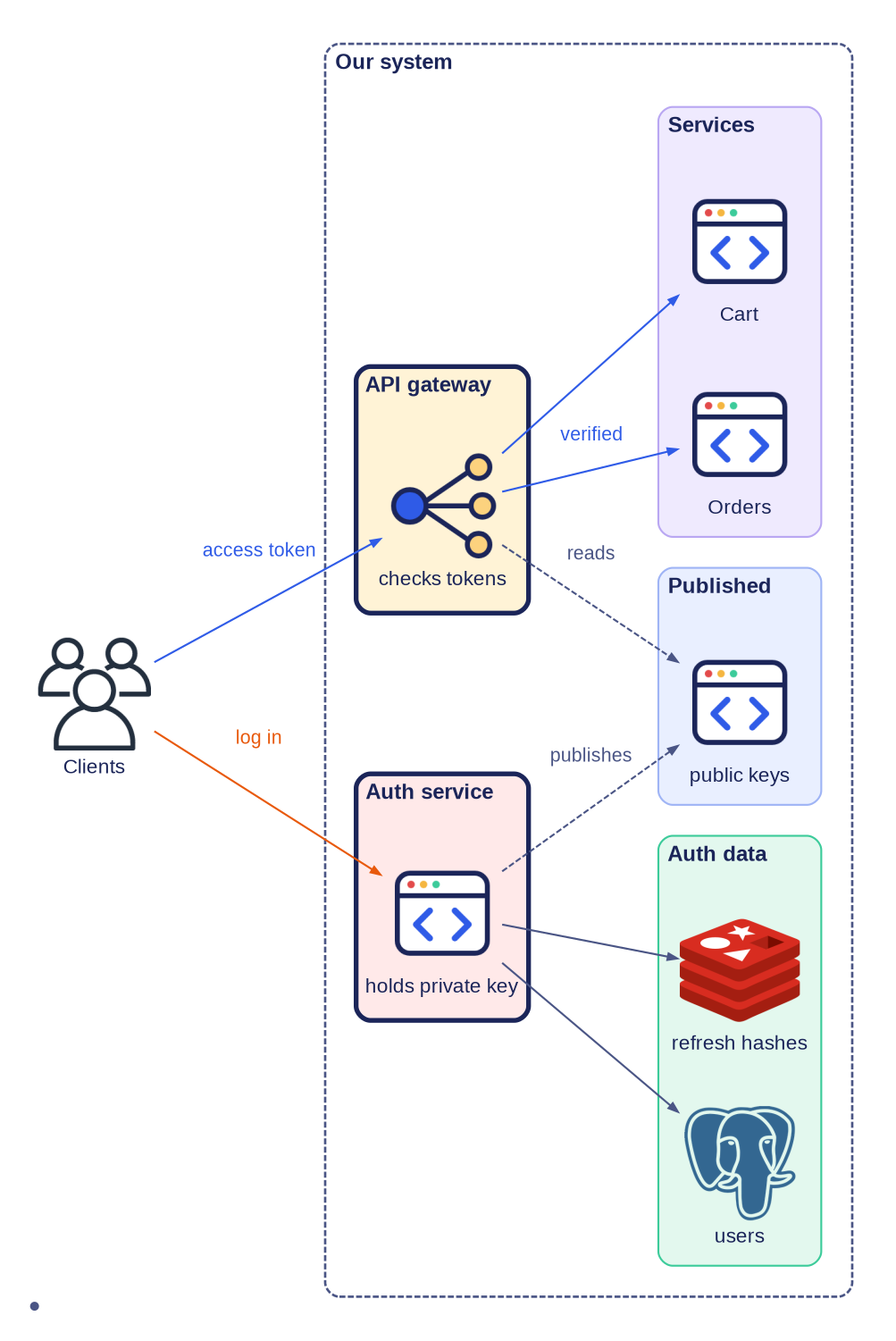
Keys
Who can verify, and who can issue
Sharing the trust between services
| Signing | Who can verify | Who can issue | Use |
|---|---|---|---|
| HS256 (one shared secret) | Everyone with the secret | Everyone with the secret | One service talking to itself |
| RS256 or ES256 (key pair) | Everyone, with the public key | Only the holder of the private key | Many services |
| Mutual TLS | Both ends of the connection | Your certificate authority | Service to service |
import base64, hashlib, hmac, json, secretsKEY = secrets.token_bytes(32) # made fresh for this run, never in codedef b64(raw): return base64.urlsafe_b64encode(raw).rstrip(b"=").decode()def unb64(s): return base64.urlsafe_b64decode(s + "=" * (-len(s) % 4))def mac(text): return hmac.new(KEY, text.encode(), hashlib.sha256).digest()def sign(claims): head = b64(json.dumps({"alg": "HS256", "typ": "JWT"}).encode()) body = b64(json.dumps(claims).encode()) return f"{head}.{body}.{b64(mac(head + '.' + body))}"def verify(token, now, iss="auth", aud="orders-api"): head, body, sig = token.split(".") if json.loads(unb64(head)).get("alg") != "HS256": return "wrong algorithm" if not hmac.compare_digest(mac(head + "." + body), unb64(sig)): return "bad signature" c = json.loads(unb64(body)) if c.get("iss") != iss or c.get("aud") != aud: return "not for us" if c.get("exp", 0) <= now: return "expired" return c["sub"]t = sign({"iss": "auth", "aud": "orders-api", "sub": "user_123", "exp": 1000})print(verify(t, now=900), "|", verify(t, now=1000), "|", verify(t, 900, aud="cart-api"))h, _, s = t.split(".")forged = b64(json.dumps({"sub": "admin"}).encode())print(verify(f"{h}.{forged}.{s}", now=900))Failures
What goes wrong
| Mistake | Result | Fix |
|---|---|---|
Trusting the alg in the token | A forged token may pass | Allow a fixed list of algorithms |
Skipping aud or iss | A token for another service works here | Check both, every time |
| Accepting a refresh token as an access token | A week-long pass to every endpoint | Use separate audiences or types, and check them |
| Different answers for unknown user and wrong password | Attackers learn which accounts exist | Same message, similar time |
| No limit on login attempts | Passwords can be guessed | Limit per account and per address; offer passkeys or a second factor |
| Clocks that disagree | Valid tokens rejected | Sync clocks, allow about 30 seconds |
What the server answers
Summary
The whole topic in one minute.
Pick the proof from the caller. A server gets a key or client credentials, your own web app gets a session cookie, your own mobile app gets short access tokens with rotating refresh tokens, and a third party gets OAuth 2.0.
A signed token can be checked without a lookup, and that is exactly why it is hard to take back. Keep it short, check every claim, and keep something on the server that you can revoke.
- Authentication asks who; failing it is 401. Authorization asks what; failing it is 403.
- API keys name programs. Store only hashes, send them in headers, rotate them.
- A JWT is header, payload, signature: signed, readable, and hard to revoke, so keep it short.
- OAuth 2.0 gives limited access without a password. OpenID Connect adds login. Use the code flow with PKCE.
- Always HTTPS, never a secret in frontend code, and always something on the server you can revoke.