
API design examples (CRUD)
easy 24 minCreate, read, update and delete cover most of what an API does with data.
Video lesson · Chapter 1 of 6
Create one product
CRUD in 75 seconds
1:15Reel coming soon
Theory
Read or listen first. About 2 min.
What it is
CRUD stands for create, read, update and delete: the four things you can do with stored data. A shop adds a product, shows it, changes its price and removes it. A chat app does the same with messages, a bank with standing orders.
In a resource API, each of the four becomes an HTTP method on an address. The collection /products is the whole set, the item /products/{id} is one member. Two addresses and five methods cover the life of a product.
Why it exists
The pattern is predictable. A developer who has seen one resource can guess the next one, and tools can be generated from it.
The details decide whether it is safe. What happens when a create is sent twice? When a field is left out of an update? When two people edit the same thing? CRUD looks trivial until these questions arrive, and they arrive in every interview.
A short history
1983
James Martin's book Managing the Data-base Environment is usually credited with making the term CRUD popular.
January 1997
RFC 2068, HTTP/1.1, defines PUT and DELETE next to GET and POST.
March 2010
RFC 5789 adds PATCH, because PUT could only replace a whole resource.
April 2013
RFC 6902, JSON Patch, describes a change as a list of operations.
October 2014
RFC 7396, JSON Merge Patch, describes a change as a partial document where null removes a field.
Words to know
- Collection
- The set of all items of one kind: /products.
- Item
- One member of it: /products/PROD-001.
- Partial update
- Changing some fields and leaving the rest.
- Idempotent
- Repeating it has the same intended effect as doing it once.
- ETag
- A label for one state of a resource, used to notice that it changed.
- Soft delete
- Marking a row as deleted instead of removing it.
- Lost update
- Two people edit the same thing and one change disappears.
How it works
Step through the idea, or press Play.
Two addresses. The collection /products and the item /products/{id}
Understand it
Start here
A box of recipe cards
Imagine a box of recipe cards in a kitchen. Everything you can do with a card has a name, and the same names work for products, users and orders.
Five actions on one card. The box is the collection, the number is the id.
The idea
Four operations, one table
| CRUD | HTTP | SQL | In a shop |
|---|---|---|---|
| Create | POST /products | INSERT | Add a product to the catalogue |
| Read | GET /products, GET /products/{id} | SELECT | See the list or one product |
| Update | PATCH or PUT /products/{id} | UPDATE | Change the price |
| Delete | DELETE /products/{id} | DELETE | Remove a discontinued product |
The shop behind the examples
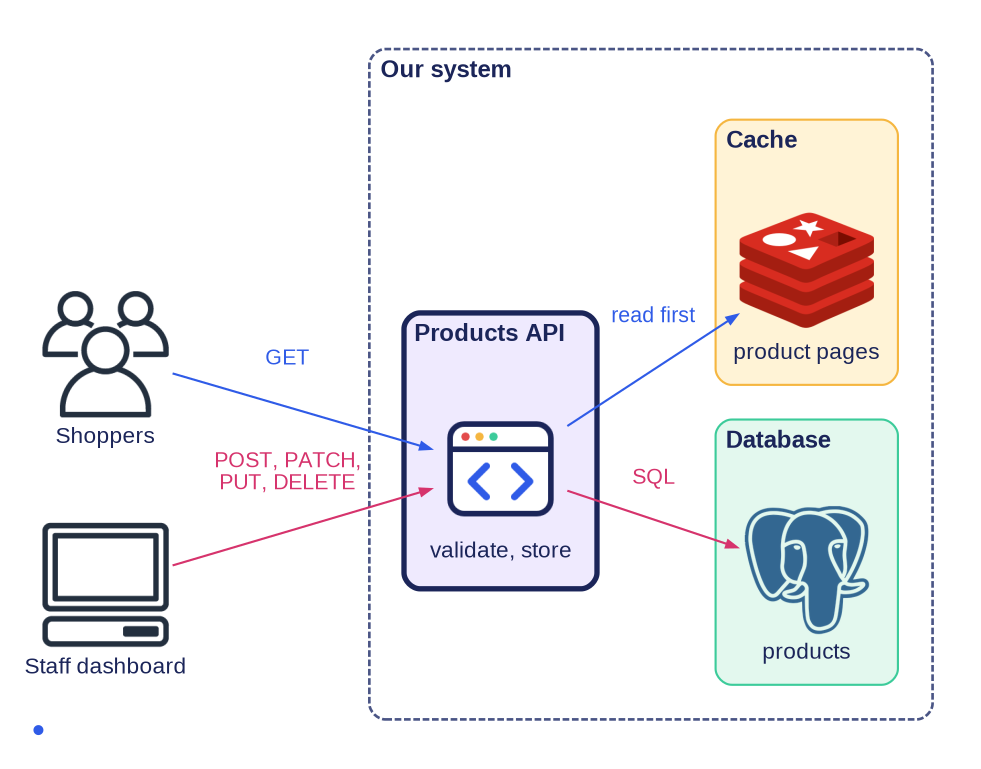
Create
POST: add a product
POST /api/v1/products HTTP/1.1Host: api.shopeasy.exampleContent-Type: application/jsonAuthorization: Bearer fake-staff-token{ "name": "Bluetooth Speaker", "price": 79.99, "category": "electronics", "description": "Portable wireless speaker", "stock": 100 }HTTP/1.1 201 CreatedLocation: /api/v1/products/PROD-003Content-Type: application/json{ "id": "PROD-003", "name": "Bluetooth Speaker", "price": 79.99, "category": "electronics", "description": "Portable wireless speaker", "stock": 100, "created_at": "2024-01-15T10:30:00Z" }- POST to the collection creates a new item.
- 201 Created means it exists now.
- Location is the address of the new item.
- The server chooses the id and the timestamp. Ignore or refuse an id sent by the client.
Create, message by message
Read
GET: a list and one item
GET /api/v1/products?category=electronics&limit=10200 OK{ "data": [ { "id": "PROD-001", "name": "Wireless Headphones", "price": 149.99 }, { "id": "PROD-002", "name": "USB Cable", "price": 9.99 }, { "id": "PROD-003", "name": "Bluetooth Speaker", "price": 79.99 } ], "pagination": { "next_cursor": null } }GET /api/v1/products/PROD-001200 OK{ "id": "PROD-001", "name": "Wireless Headphones", "price": 149.99, "description": "Noise-cancelling, 30 hours", "review_count": 128, "related_ids": ["PROD-002"] }- GET reads and 200 OK carries the data.
- GET is safe: the client asks for no change.
- GET is idempotent: repeating it is fine, although the data may have changed meanwhile.
- Every list has a limit: API pagination. Filters: search and filtering.
Read through a cache
Update
PATCH and PUT
Staff lowers the price of the headphones from 149.99 to 129.99 for a sale.
PATCH /api/v1/products/PROD-001Content-Type: application/merge-patch+json{ "price": 129.99 } <- only what changes; the rest staysPUT /api/v1/products/PROD-001Content-Type: application/json{ "name": "Wireless Headphones", "price": 129.99, "category": "electronics", "description": "Noise-cancelling, 30 hours", "stock": 50 } <- everythingThe same product, two updates
| Field | Before | After PATCH with price 80 | After PUT with name and price 80 |
|---|---|---|---|
| name | Headphones | Headphones | Headphones |
| price | 100 | 80 | 80 |
| stock | 50 | 50 | gone, or its default |
| category | electronics | electronics | gone, or its default |
PATCH
- Changes one field or a few
- Small payloads
- Less risk of losing data
- But: not idempotent by itself, more merging logic, several formats to choose from
PUT
- Replaces the whole resource
- Idempotent by definition
- Fits a form with every field
- But: all fields needed, larger payload, a forgotten field is lost
PUT or PATCH?
Two ways to write a patch
| JSON Merge Patch | JSON Patch | |
|---|---|---|
| Standard | RFC 7396 | RFC 6902 |
| Body | {"price": 80, "badge": null} | [{"op": "replace", "path": "/price", "value": 80}] |
| Remove a field | Send null | remove operation |
| Arrays | Replaced as a whole | Single elements |
| Good for | Most APIs | Precise or conditional changes |
Delete
DELETE: remove a product
DELETE /api/v1/products/PROD-OLDAuthorization: Bearer fake-staff-token204 No Content <- first time, empty body404 Not Found <- second time{ "error": "product_not_found" }- DELETE is idempotent: after one call or five, the product is gone. The status code may differ.
- 204 means success with nothing to return.
- 404 means it does not exist: already deleted, or never there. Some APIs answer 204 again, which is simpler for retries. Pick one and write it down.
- A soft delete marks the row as deleted, so orders that mention it still work and mistakes can be undone. Personal data may have to be erased for real.
Delete, message by message
Names
Seven rules for URLs
| Rule | Avoid | Prefer | Why |
|---|---|---|---|
| 1. Nouns, not verbs | /getProducts, /createOrder, /deleteUser | GET /products, POST /orders, DELETE /users/{id} | The method is the action |
| 2. Plurals | /product/123, /user/456 | /products/123, /users/456 | Collection and item share a path |
| 3. Hyphens | /orderItems, /user_profiles, /ProductCategories | /order-items, /user-profiles, /product-categories | Readable |
| 4. Lowercase | /Products, /API/V1/PRODUCTS | /products, /api/v1/products | Paths are case-sensitive |
| 5. Nest 2 to 3 levels | /users/123/orders/456/items/789/variants | /users/{id}/orders, /orders/{id}/items, /products/{id}/reviews | Deep paths are fragile |
| 6. No trailing slash | /products/ | /products | One address per thing |
| 7. No file extension | /products.json | /products with Accept | Format is a header |
Good and bad design
| Avoid | Prefer | Why |
|---|---|---|
/getAllProducts | GET /products | No verb needed |
/getProductById?id=123 | GET /products/123 | An id belongs in the path |
/createProduct | POST /products | POST to a collection creates |
/updateProductStock | PATCH /products/123 | Partial update |
/searchProducts?q=phone | GET /products?q=phone | Search filters a collection |
/sendEmailToUser | POST /users/123/emails | The email is the resource |
Outcomes
Status codes for CRUD
2xx: it worked
200 for GET, PUT and PATCH. 201 for a create. 204 for a delete, or any success without a body.
4xx: the request
400 malformed, 401 not logged in, 403 not allowed, 404 not found, 409 conflict, 412 version check failed, 422 invalid values, 429 too many.
5xx: the server
500 internal error, 502 bad gateway, 503 unavailable, 504 gateway timeout.
Which code?
| Scenario | Code |
|---|---|
| List of products | 200 |
| New order created | 201 |
| Item removed from the cart | 204 |
| Field "name" is missing | 400 (some APIs use 422) |
| Checkout without login | 401 |
| A customer tries to delete a product | 403 |
| An order that does not exist | 404 |
| Register with an email that exists | 409 |
| Quantity is minus 2 | 422 |
| Quantity is larger than the stock | 409 (some use 422) |
| Too many searches | 429 |
| Unexpected exception | 500 |
| Database down, or overloaded on a sale day | 503 |
Deep dive
Two people, one product
Two staff members open the same product. Both see a stock of 50. One sells 10 and saves 40. The other sells 5 and saves 45. The last save wins, and ten sales disappear. This is a lost update.
ETag and If-Match
Numbers
What the choices cost
Payload of an update
Reads and writes of a shop
Limits
When CRUD is not enough
- Actions with rules. Cancelling an order is not deleting it. Model it:
POST /orders/{id}/cancellation. - Bulk work. Changing 5,000 prices one by one is slow. Offer
POST /price-importsand answer 202 with a job to look at. - History. A bank adds entries, it does not update balances.
- Reports. A monthly summary is its own read resource.
Summary
The whole topic in one minute.
CRUD maps to HTTP in one line each: POST a collection to create, GET to read, PATCH an item to change a part, PUT an item to replace it, DELETE an item to remove it. The URL stays a plural noun.
The hard parts are outside that line. Answer 201 with a Location, 204 without a body and the right 4xx. Remember that PUT loses what you leave out, that a repeated POST creates twice, and that two editors overwrite each other unless you use a version check.
- Create POST, read GET, update PUT or PATCH, delete DELETE.
- PUT replaces everything, PATCH changes what you send.
- Plural nouns: /products, not /product. No verbs: the method is the verb.
- 201 created, 200 fine, 204 done without a body.
- 4xx is the request, 5xx is the server.
- Plan for the second POST and the second editor.