
The AWS outage of December 2021
medium 26 minOn 7 December 2021 an automated scaling activity in US-EAST-1 triggered a surge of connections that overwhelmed the devices between two AWS networks.
Video lesson · Chapter 1 of 5
The running instance and the launch button
The December 2021 AWS outage in 75 seconds
1:15Reel coming soon
Theory
Read or listen first. About 2 min.
What it is
AWS runs most services and all customer applications on its main network. A separate internal network hosts foundations: monitoring, internal DNS, authorization and parts of the EC2 control plane. Networking devices connect the two.
On 7 December 2021 an automated activity to scale one service in the main network triggered unexpected behaviour from a large number of clients in the internal network. Their surge of connections overwhelmed the devices between the networks. Delays caused errors, errors caused more attempts, and the congestion stayed.
Every fact and time here comes from the report AWS published. Times are Pacific Standard Time (PST), in the Northern Virginia Region, US-EAST-1.
Why it exists
It shows a persistent overload: the trigger was short, but the retries kept the system in its bad state until people removed load. That pattern is the reason interviewers ask about backoff, jitter and load shedding.
It also shows the difference between a control plane, which creates and changes things, and a data plane, which does the everyday work. Running servers kept running. Starting new ones failed. Designs that need no change to survive were much better off.
A short history
January 1984
RFC 896 describes congestion collapse: hosts resend so much that the network does little useful work, and the condition is stable.
4 March 2015
The AWS Architecture Blog publishes an article on exponential backoff and jitter.
25 November 2020
An earlier event in the same Region also affects monitoring and status posts.
7 December 2021
The network congestion described on this page.
Words to know
- Control plane
- The part that creates, changes and lists resources.
- Data plane
- The part that does the daily work of those resources.
- Congestion
- More traffic than a path can carry, so queues and delays grow.
- Retry storm
- Failed requests tried again by many clients, adding load to what is already full.
- Backoff
- Waiting longer after each failure.
- Jitter
- A random part in the wait, so clients do not return together.
- Static stability
- Staying correct without having to make any change when something fails.
- NAT
- Network address translation: rewriting addresses where two networks meet.
How it works
Step through the idea, or press Play.
A surge between two networks. An automated activity triggers many connections at once
Understand it
Start here
The footpath to the map office
One narrow footpath joins a village to its map office. Two people pass easily. When many set off at once and everyone who is stuck turns back and tries again, the path never clears, and the map that shows where the jam is lies at the far end.
The first rush was short. The turning back made it last.
Background
Two networks and a narrow place
Where the networks meet
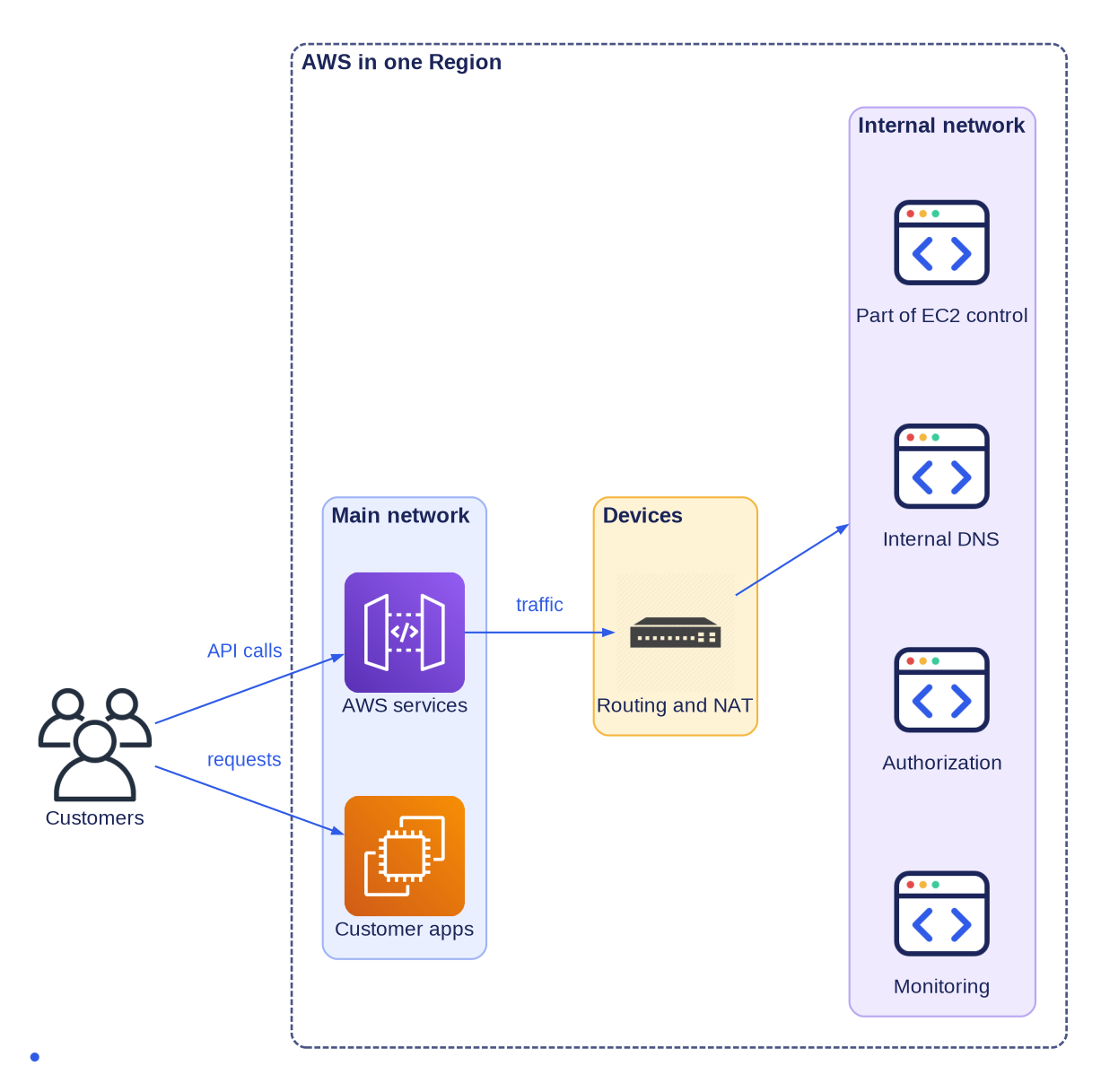
Main network
Most AWS services and all customer applications. It was not affected itself.
Internal network
Foundations: monitoring, internal DNS, authorization services, parts of the EC2 control plane.
Devices between
Multiple, geographically isolated, scaled well ahead of need. They route and translate addresses.
Clients
Programs with tested backoff behaviour. A latent issue kept them from backing off enough this time.
Redundancy was there: several devices in separate places. But they served the same clients. A surge that comes from everywhere fills all of them, and spare devices do not help against a load that grows with every failure.
What happened
The timeline
7 December 2021, PST
| Time | Event |
|---|---|
| 7:30 AM | Automated scaling of a main-network service triggers a connection surge. Route 53 APIs impaired |
| 7:33 AM | EC2 APIs show errors and delays. Support cases are hard to create |
| 8:22 AM | The Service Health Dashboard can be updated |
| 9:28 AM | Internal DNS traffic has been moved off the congested paths; DNS errors recover |
| 12:35 PM | Operators disable EventBridge delivery to reduce load |
| 1:15 PM | EC2 API errors begin to improve |
| 1:34 PM | Congestion significantly improved |
| 1:35 PM | API Gateway starts to recover; most container API errors are back to normal |
| 2:22 PM | All network devices recovered. Console access restored |
| 2:35 PM | EventBridge delivery re-enabled |
| 2:40 PM | Launches of new EC2 instances recover |
| 4:28 PM | STS fully recovered |
| 4:37 PM | API Gateway largely recovered |
| 4:41 PM | Amazon Connect normal |
| 5:00 PM | Fargate API errors begin to return to normal |
| 6:40 PM | EventBridge delivery delays end, after the backlog |
The network and the tail
Cause
Congestion that feeds itself
The loop
- 1
Trigger
An automated activity scaled capacity of one service hosted in the main network.
- 2
Unexpected behaviour
A large number of clients in the internal network opened connections. This behaviour had not been observed before.
- 3
Overload
Devices between the networks were overwhelmed, so communication was delayed.
- 4
Amplification
Delays raised latency and errors, which led to even more attempts and retries.
- 5
Persistence
Clients have tested backoff, but a latent issue in a code path that had been in use for many years kept them from backing off enough.
How retries multiply load
Three kinds of client in our model
| After a failure | Surge of 1,500 at once | Why |
|---|---|---|
| Try again at once | All 1,500 still waiting after 300 ticks | The whole surge returns every tick, and refusing it uses all the work |
| Wait 2, 4, 8 ... ticks, no jitter | All 1,500 still waiting | Long pauses, but everyone returns in the same tick |
| Wait a random time up to 2, 4, 8 ... | 0 waiting, refusals in 40 ticks | The surge is spread out, and each tick finishes some of it |
What a good client decides after a failure
Diagnosis
Repairing with the lights off
Monitoring data travels across the same devices. Operators relied on logs and first saw raised internal DNS errors. DNS is a foundation for all services and part of the load, so they moved it away first. That helped several services but did not end the congestion.
What the operators could and could not do
| Reason it was slow | In the report | What to take from it |
|---|---|---|
| Little visibility | Monitoring data was not available | Keep a small independent view of shared devices |
| Slow deployments | Deployment systems run in the internal network | Have a deployment path for emergencies |
| Deliberate care | Much was still working, and changes could have harmed it | Prefer actions that remove load and can be undone |
What removed the load
- 1
Move internal DNS
Its traffic left the congested paths. Finished at 9:28 AM.
- 2
Isolate the largest sources
Top sources of traffic were identified and moved to dedicated devices.
- 3
Switch heavy traffic off
Some services with heavy network traffic were disabled. EventBridge delivery was off from 12:35 to 2:35 PM.
- 4
Add capacity
More networking capacity was brought online.
Effects
What failed and what kept working
Control plane and data plane
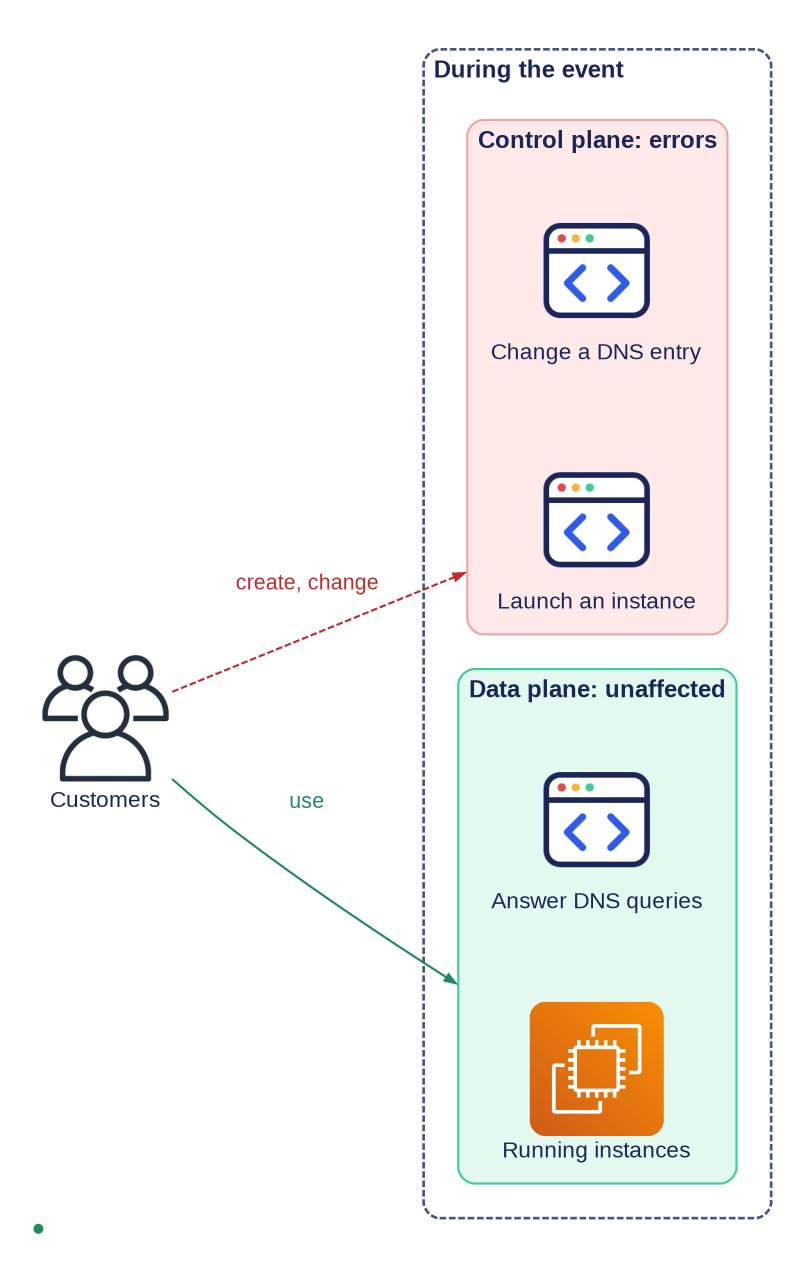
| Service | Affected | Still worked |
|---|---|---|
| EC2 | APIs to launch and describe instances | Running instances |
| Elastic Load Balancing | Provisioning, registering instances | Existing load balancers |
| Route 53 | Changing entries, 7:30 AM to 2:30 PM | Existing entries and answers |
| Containers | Restarting a task or pod that failed | Running tasks and pods |
| Lambda | Not affected | APIs and invocations, all day |
| API Gateway | Errors; many servers had to be replaced | Nothing is stated |
| S3 and DynamoDB | Access through VPC endpoints | Normal access |
| RDS, EMR, WorkSpaces | Creating new resources, since it needs EC2 launches | Nothing is stated |
| STS | Slow for third-party identity through OIDC, until 4:28 PM | Nothing is stated |
| CloudWatch | Delays; a small amount of data missing | The rest of the data |
| Amazon Connect | Calls, chats and tasks failed more often | Nothing is stated |
| Console, support | Login failures; creating cases impaired | Nothing is stated |
Did well that day
- Enough servers already running
- DNS failover set up in advance
- Cached credentials with time left
- More than one Region in use
Did badly that day
- Scaling out to survive
- Creating a load balancer to fail over
- Changing DNS during the event
- Needing the console to act
The right-hand list is our reading of the table: each item needs a control plane. AWS's guidance calls the left-hand idea static stability: be prepared so that nothing must be created while something is broken.
Static stability in numbers
Tail
Why some services took longer
- 1
Damaged servers
Many API Gateway servers got into a state where they had to be replaced. The automatic recycling needs the EC2 APIs, so it had to wait for them.
- 2
Backlogs
EventBridge worked through stored events until 6:40 PM.
- 3
Everyone restarts
Fargate met a backlog of tasks to start, and capacity pools had to be refilled.
- 4
A chain
Amazon Connect needs API Gateway to run Lambda functions, so it recovered after it.
The order of recovery
Telling customers was late as well. The dashboard tooling did not fail over properly to its standby Region because of the congestion, and was working by 8:22 AM. AWS used one banner for all services, and later learned that it made information harder to find.
Change
What AWS said it would do
| Change | State in the report |
|---|---|
| Disable the scaling activities until all remediations are deployed | Done at once; capacity is sufficient without them |
| Fix the client issue that prevented backing off | Planned over the following two weeks |
| Network configuration that protects devices in a similar event | Deployed |
| API Gateway stays healthy without the internal network; faster recycling | In progress |
| New version of the Service Health Dashboard | Expected early the next year |
| Support system that runs actively in several Regions | Expected early the next year |
The shape to aim for
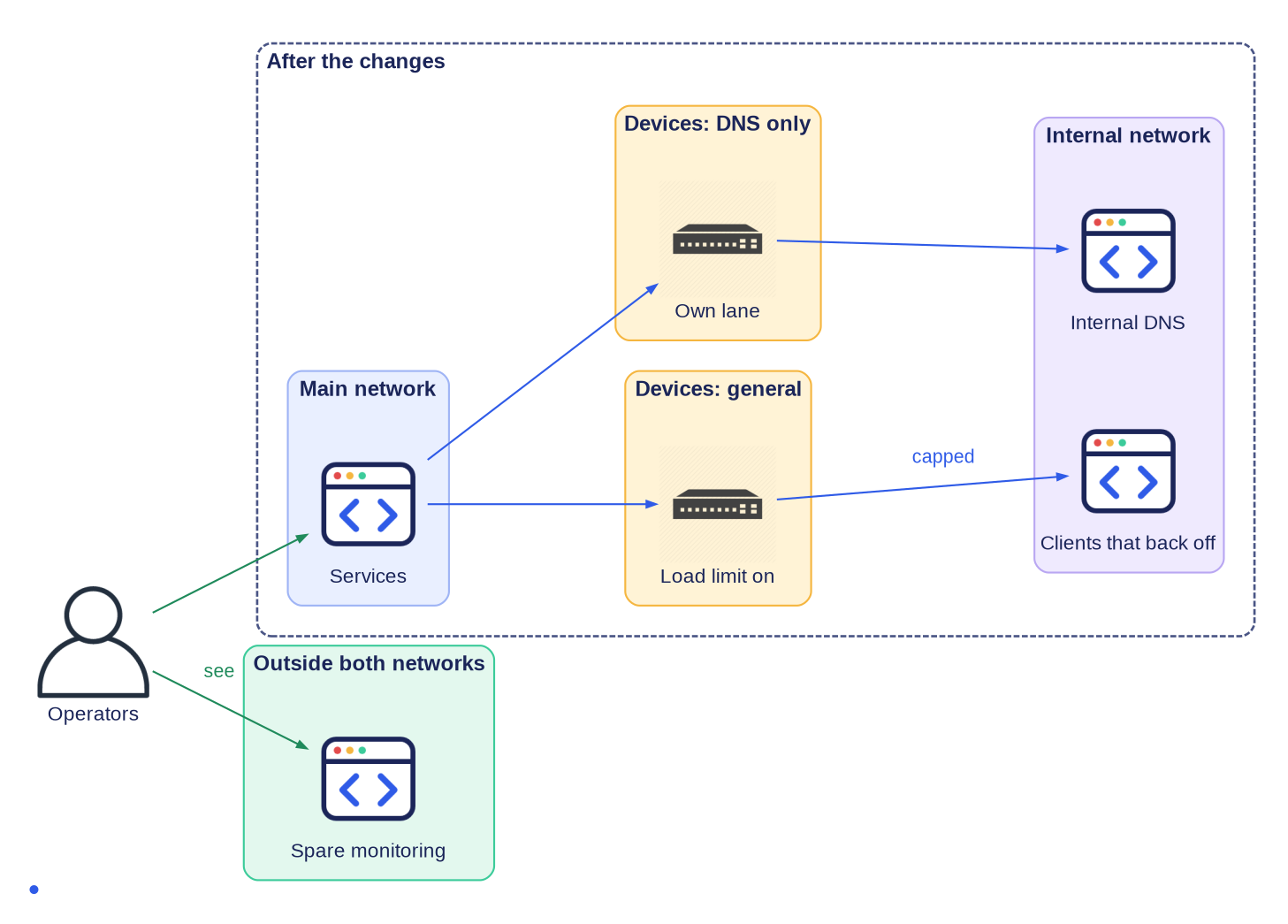
Lessons
Six lessons for your design
| Lesson | Do this | Read more |
|---|---|---|
| Find the narrow places | List devices, gateways and pools that many share; watch their use | Latency |
| Stop retry storms | Backoff, jitter, a budget, and retries in one layer only | Retries |
| Include the network when scaling | Check what is downstream before an automatic change | Throughput |
| Limit the blast radius | Cells, bulkheads and separate lanes | Resilience |
| Limit inside too | Rate limits and load shedding between your own systems | Rate limiting |
| Test automation at real scale | Run it in stages under load, with a stop button | Operability |
Three patterns that fit
Cells
Independent copies with their own network paths, so a surge in one cannot fill the others.
Bulkheads
Separate pools and lanes for different traffic, as in the compartments of a ship. DNS got its own lane on the day.
Circuit breakers
Stop calling after repeated failures, then test gently. They turn many retries into a few probes. See circuit breaker.
For customers of a cloud
- 1
Run in more than one Region
If the cost of an outage justifies it. Keep data copied and traffic ready to move.
- 2
Fail over without creating anything
Capacity, records and permissions exist before the event.
- 3
Do not let one Region be the only one
List every global dependency that lives in a single Region.
- 4
Practise
Move real traffic regularly. See global and local load balancing.
Summary
The whole topic in one minute.
An automated scaling activity triggered a surge of connections from many clients in the internal network. The devices between the two networks were overwhelmed, clients did not back off adequately because of a latent issue, and the congestion sustained itself. It improved when internal DNS was moved away at 9:28 AM, and ended at 2:22 PM after operators isolated heavy traffic, disabled some of it and added network capacity.
Monitoring data and deployment systems were affected too, which slowed the repair. Running instances, load balancers and DNS answers kept working, while creating and changing them failed. The lessons: cap and spread retries, protect shared devices, keep monitoring independent, and design so that surviving a failure needs no new resources.
- A scaling activity triggered a surge of connections that overwhelmed devices between two networks.
- A latent issue kept clients from backing off, so the congestion lasted.
- Monitoring and deployment were behind the jam, which slowed the repair.
- Control planes failed while data planes kept working.
- Cap and spread retries, protect narrow places, and prepare capacity in advance.