
CDN cache invalidation
medium 30 minHow to make a CDN stop serving an outdated copy: let it expire, purge it, mark it stale, give the new version a new name, or purge a whole group by tag.
Video lesson · Chapter 1 of 5
An updated poster still looks old
Five ways to replace a cached file
1:20Reel coming soon
Theory
Read or listen first. About 2 min.
What it is
A CDN holds many copies of one original. When the original changes, the copies are wrong until something happens. Cache invalidation is declaring copies outdated, so that caches remove them, or check and refresh them before the next use.
There are two families. Passive: the copy carries an expiry and ages out. Active: you send a message, or you change the name so that nobody asks for the earlier copy any more.
Why it exists
Long lifetimes make a CDN effective, short lifetimes make it fresh. Invalidation lets you have long lifetimes and still change things quickly.
It is hard because copies are far apart and messages can be late or lost, because one change can touch many pages, and because removing popular copies sends their readers to the origin together. A saying credited to Phil Karlton puts it like this: "There are only two hard things in Computer Science: cache invalidation and naming things."
A short history
May 2010
RFC 5861 defines stale-while-revalidate and stale-if-error.
September 2017
RFC 8246 defines immutable, a promise that the content under this address will not change while it is fresh.
June 2022
RFC 9111 replaces earlier HTTP caching standards. RFC 9211 adds a standard header that says how caches handled a request.
September 2024
Cloudflare describes a purge that reaches its network in under 150 ms at the median.
April 2025
Cloudflare opens all purge methods, including purge by tag, to all plans.
October 2025
RFC 9875 standardizes HTTP cache groups: responses that can be invalidated together.
Words to know
- Invalidate
- Declare a copy outdated.
- Hard purge
- Remove the copy now. The next request is a miss.
- Soft purge
- Mark the copy stale. It may still be served while a new one is fetched.
- Cache tag (surrogate key)
- A label on a response, so that many responses can be purged by one name.
- Cache busting
- Changing the address so that caches see a new resource.
- Revalidation
- Asking the origin whether the copy is still right, often with an ETag.
- Propagation
- The time until every location has followed a purge.
How it works
Step through the idea, or press Play.
The original changes. Every copy is now outdated
Understand it
Start here
Posters at bus shelters
Imagine a concert poster that hangs in three bus shelters. The concert moves from Monday to Tuesday. How do the posters change?
Libraries with an outdated edition have the same choice: wait, recall, mark, or publish under a new number.
The problem
Why it is hard
Many places
A message must reach every location, and some may be unreachable for a while.
Timing
During propagation some readers get the earlier version.
Dependencies
One price appears on a product page, a list and a search result.
Thundering herd
Removing a popular copy sends its readers to the origin.
The way of a purge
Way 1
Let it expire
The simplest way needs no message. The copy is stale after its TTL, and the edge then asks the origin, often with If-None-Match. How to choose the number is in Cache TTL.
Expiry and revalidation
Directives that control it
| Directive | Meaning | Used for |
|---|---|---|
max-age=3600 | Fresh 1 hour in browsers and shared caches | Images, CSS, JS |
s-maxage=86400 | Fresh 24 hours in shared caches instead | Public pages with purge |
stale-while-revalidate=60 | May be served stale 60 s during a refresh | Content that may lag |
stale-if-error=86400 | May be served stale up to 24 h when the origin fails | Resilience |
immutable | Will not change while fresh: do not revalidate on reload | Files with a hash |
no-cache | Check with the origin before each use | Pages that must be current |
no-store | Do not keep it | Sensitive data |
s-maxage forbids serving stale in a shared cache, so do not combine it with the two stale directives. CDN settings or CDN-Cache-Control do that job.Starting points
| Content | Lifetime | Note |
|---|---|---|
| JS and CSS with a hash | 1 year | Add immutable |
| Images | 1 week to 1 year | The year needs a versioned name |
| HTML pages | 1 minute to 1 hour at the edge | Short in the browser |
| Public API responses | 0 to 5 minutes | Or no-cache with an ETag |
Way 2
Hard purge
A purge call removes the copy from all locations. The next request is a miss and fetches the current version.
Good
- Quick
- Precise for one address
- The right tool for leaks and legal removals
Costs
- A call that can fail or be limited
- Load at the origin for popular content
- Propagation is not zero
Scope of a purge
| Scope | Example | Risk | Use |
|---|---|---|---|
| One address | /images/logo.png | Low | One file changed |
| Prefix | /images/* | Medium | A folder changed |
| Tag | product-123 | Medium | Related pages |
| Everything | all of it | High | Emergency |
Why everything is dangerous
Collapsing and a shield soften it. With 2,000 hot pages and 50 locations there are 2,000 x 50 = 100,000 refills without a shield, and 2,000 with one. See CDN design.
Way 3
Soft purge
A soft purge marks copies as stale and keeps them. The next reader can be given the stale copy while the edge fetches the new one. If the origin fails, the stale copy is still there.
Soft purge
Good
- Nobody waits
- One request per object and layer
- Survives a failing origin
Costs
- Some readers get the earlier version once more
- Needs a CDN and headers that allow stale
- Wrong for content that must disappear
Fastly offers it as a header on the purge call, but not for purge-all. Cloudflare calls it invalidating and keeps it next to purging.
Way 4
A new name
Put a hash of the content into the file name: app.3f9c.js. A new build has a new name, so no cache has it, and every cache and browser must fetch it. No purge is needed.
A release with versioned names
- 1
Upload new files first
Both versions exist side by side.
- 2
Then change the page
HTML now points to the new names.
- 3
Purge or shorten the HTML
It is the one part with a fixed name, so it needs a short lifetime or a purge.
- 4
Keep the earlier files
Readers with the previous page still ask for them. Delete after days, not minutes.
Good
- Reaches browsers too
- No purge calls, no race
- Rollback: point to the earlier name
Costs
- A build step that writes a manifest
- HTML must stay fresh
- More files to keep
Way 5
Purge by tag
The origin labels each response, and one call purges a label. The page needs to know its tags. Nobody needs to know the addresses.
One product, three pages
| Page | Tags |
|---|---|
| /product/123 | product-123, catalog |
| /category/shoes | product-123, shoes |
| /search, words: nike | product-123, search |
Header names differ: Fastly reads Surrogate-Key, with spaces between keys of at most 1,024 bytes and 16,384 bytes in total. Cloudflare reads Cache-Tag, with commas and at most 16 KB. CloudFront lets you configure the header, and Google Cloud CDN supports cache tags too. RFC 9875 defines Cache-Groups as a standard.
Decide
Which way?
Decision
Side by side
| Expiry | Hard purge | Soft purge | New name | |
|---|---|---|---|---|
| Speed | Up to the TTL | Seconds or less | Next request plus one | At the next page load |
| Origin load | Spread | Peak | Low | Only new files |
| Reaches browsers | By their own TTL | No | No | Yes |
| Needs | A header | An API call | An API call | A build step |
Timing
How fast, and what it never reaches
What providers document
| Provider | Statement |
|---|---|
| Cloudflare | Under 150 ms at the median (September 2024). A 200 answer means received, not that the file was cached |
| Google Cloud CDN | About 10 seconds, at most 500 requests a minute per project |
| CloudFront | First 1,000 paths a month free. A path with * counts as one |
| Fastly | Instant Purge. Its engineering blog describes servers that pass purges on and repair lost messages |
How long can a reader still see the earlier version?
Races
Order matters
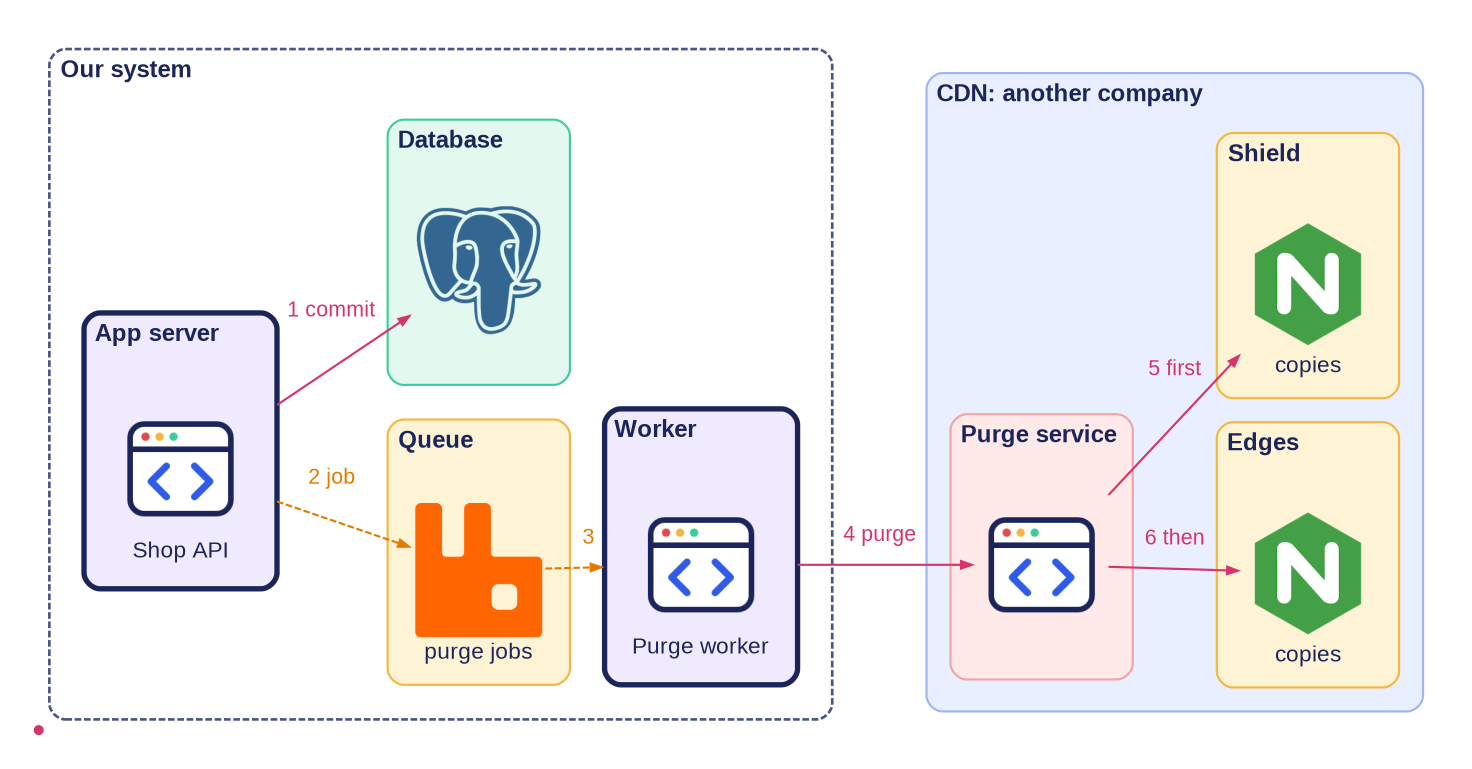
A purge can come too early. The edge then refills with the earlier content, and keeps it for a full TTL.
Purge before commit goes wrong
A safe purge path
- 1
Commit the change
And write a purge job in the same transaction.
- 2
Clear inside out
Redis key, then shield, then edges.
- 3
Mind replicas
If pages are built from a lagging replica, wait, or read the primary, or purge again after the lag.
- 4
Retry
Purging twice does no harm, so repeat until it succeeds.
- 5
Keep a TTL
It heals what all this missed.
The general theory is in cache consistency.
Practice
Do and avoid
Do
- Hash names for static files, with immutable
- Tags for related pages
- Soft purge by default
- Purge from the deployment pipeline or from events
- Watch hit ratio and origin load after a purge
- Test the purge
Avoid
- Purge everything in normal work
- TTLs of a second or two to avoid thinking
- Relying on a query string that rules may drop
- Purging by hand
- Forgetting Vary versions
- Caching errors for long
Summary
The whole topic in one minute.
Give files that never change under one name a year and a hash in the name. Give pages a lifetime you can live with and a purge by tag for changes. Keep the lifetime as the safety net under every purge.
Prefer soft purge, because readers keep an answer and the origin gets one request. Use hard purge for content that must not be seen again. Purge the inner caches before the outer ones, and remember that no purge reaches a browser.
- Expire, purge, mark stale, rename, or purge by tag.
- Hard purge for what must vanish, soft purge for the rest.
- Commit first, then purge, inside out.
- No purge reaches a browser. A new name does.
- A TTL stays as the safety net.