
Document database
easy 25 minA document database stores each thing as one self-describing document, such as a JSON object with nested objects and lists.
Video lesson · Chapter 1 of 5
Pack the order the way someone opens it
Document databases in 90 seconds
1:30Reel coming soon
Theory
Read or listen first. About 2 min.
What it is
A document database keeps data as documents. A document is a set of named fields, and a field may hold a number, a text, a date, a list, or another small document. Formats such as JSON, BSON and XML all have this shape.
Documents live in collections, and every document has a unique identifier. Unlike a key-value store, the database can look inside the document: it can filter on a field, index it, and change a part of it.
Why it exists
Programs work with objects that contain lists and other objects. A table stores flat rows, so one order may be spread over four tables and put back together on every read. A document keeps the order in one piece.
Products also change. A book has an ISBN and a film has a duration. With documents, each can have its own fields without a migration. The price is that the application must now decide which shapes it accepts.
A short history
2005
Damien Katz, a former Lotus Notes developer, starts CouchDB: JSON documents, reached over HTTP, made to synchronise between machines. It becomes an Apache project in 2008.
February 2009
The company 10gen releases MongoDB, which stores documents in a binary form called BSON.
December 2014
PostgreSQL 9.4 adds the
jsonbtype with indexing, so a relational table can hold documents too.December 2017
RFC 8259 is published as the current Internet Standard for JSON, the text format most document databases speak.
Words to know
- Document
- One record made of named fields, which may be nested.
- Collection
- A group of documents, similar to a table, without one fixed set of columns.
- Field
- One name and its value inside a document.
- BSON
- Binary JSON: a binary format with extra types such as dates and binary data.
- Embed
- Store related data inside the same document.
- Reference
- Store only the identifier of another document.
- Aggregation pipeline
- A list of stages, each taking documents in and passing documents on.
- Multikey index
- An index with one entry for every element of a list.
Understand it
Start here
A folder for every pet
Imagine a vet that keeps one scrapbook folder for each pet. Everything about that pet is inside. A parrot's folder has a page for its wings and a dog's folder does not, and nobody minds.
A cupboard where each folder may look different is easy to fill. Knowing what to put in the folder is the skill.
The idea
A row and a document
Document: only what exists
- Jo has a name and an email, so those are the only two fields.
- Jane also has a phone and a list of tags.
- The list sits inside the document.
- A new field needs no change to other documents.
Row: the same columns for all
- Columns: id, name, email, phone, address.
- Jo has no phone and no address, so both cells are NULL.
- A list of tags needs a second table.
- A new column is a schema change for the whole table.
Neither is wrong. Equal columns are exactly what you want when every record really has the same shape. Read SQL databases for that side.
Self-describing
Each document carries the names of its fields along with the values.
Schema flexible
Fields can vary between documents of one collection.
Nested
A field can be a list or another document, to a limited depth.
Close to your code
The stored shape is the shape of the object in the program.
Application, database, collections
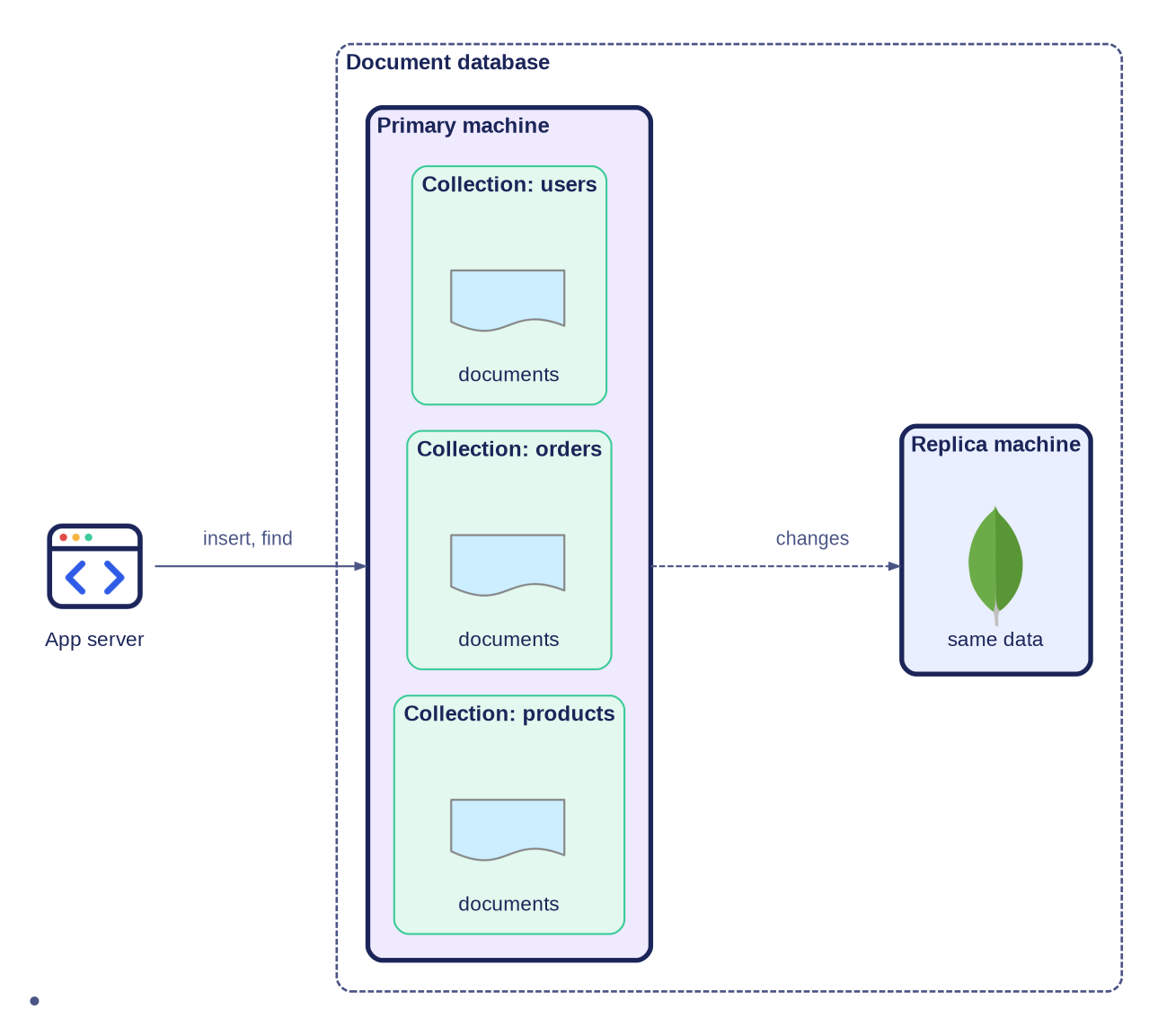
The four levels
Structure
What a document looks like
This order is one document. It embeds the customer, nests an address inside that, and holds a list of items and a list of tags. The total is .
{ "_id": ObjectId("507f1f77bcf86cd799439011"), "orderNumber": "ORD-2024-001", "customer": { // embedded document "name": "Jo Doe", "email": "jo@example.com", "address": { // nested again "street": "123 Main St", "city": "NYC", "zip": "10001" } }, "items": [ // list of documents { "sku": "ITEM-001", "qty": 2, "price": 29.99 }, { "sku": "ITEM-002", "qty": 1, "price": 49.99 } ], "status": "shipped", "total": 109.97, "tags": ["priority", "express"], // list of strings "createdAt": ISODate("2024-01-15T10:30:00Z"), "metadata": { "source": "mobile-app", "campaign": "winter-sale" }}JSON and BSON
| JSON | BSON | |
|---|---|---|
| Form | Text people can read | Binary |
| Types | String, number, boolean, null, array, object | Adds dates, ObjectId, binary data, 32 and 64 bit integers, decimals |
| Example fields | _id: "user123", age: 28, active: true | _id: ObjectId, created: ISODate, data: BinData |
| Found in | CouchDB, and the jsonb type of PostgreSQL accepts it | MongoDB |
BSON types you meet every day
| Type | Example | Note |
|---|---|---|
| String | "hello" | UTF-8 text |
| Int32, Int64 | 42 | Whole numbers |
| Double | 3.14159 | Floating point |
| Boolean | true | Or false |
| ObjectId | 12 bytes | Starts with a 4-byte time in seconds |
| Date | ISODate() | A moment in time |
| Array | [1, 2, 3] | A list |
| Object | { nested } | A document in a document |
Writing
What happens on an insert
One insert
- 1
Receive the document
The application sends it. The driver encodes it as BSON.
- 2
Give it an identifier
If
_idis missing, an ObjectId is made, normally by the driver. - 3
Validate
If the collection has validation rules, the document must pass them. By default a document that fails is rejected.
- 4
Write it
The document goes to the collection, and the change goes to the log that replicas read.
- 5
Update indexes
Every index on the collection gets its entries. More indexes make inserts slower.
- 6
Acknowledge
The application learns that the write is safe at the level it asked for.
Reading
Queries and operators
The four basic operations
| Job | MongoDB shell | What it does |
|---|---|---|
| Create | insertOne, insertMany | Adds one document or a list |
| Read | find, findOne | Filters, for example age above 18 |
| Update | updateOne, updateMany | Changes fields, for example pending becomes active |
| Delete | deleteOne, deleteMany | Removes matches, for example last login before a date |
Query operators
| Group | Operators | Meaning |
|---|---|---|
| Comparison | $eq, $ne | Equal, not equal |
| Comparison | $gt, $gte, $lt, $lte | Greater, at least, less, at most |
| Comparison | $in | One of these values |
| Logical | $and, $or | All conditions, any condition |
| Logical | $not, $nor | Negate one, none match |
| Array | $all, $size | Contains all of these, has this length |
| Array | $elemMatch | One element meets all the conditions |
How a find runs
Indexes
Finding documents fast
Without an index, the database reads every document. Most document indexes are B-trees, and they can point at nested fields and list elements.
| Index | Definition | For |
|---|---|---|
| Single field | { email: 1 } | Login by email. Add unique to forbid duplicates |
| Compound | { customer: 1, date: -1 } | One customer's orders, newest first |
| Multikey | { tags: 1 } on a list | Find by any element. Made automatically |
| Text | { content: "text" } | Simple word search |
| Geospatial | { loc: "2dsphere" } | Places near a point |
| TTL | { createdAt: 1 }, expire after 30 days | Delete old sessions on their own |
Analysis
The aggregation pipeline
An aggregation sends documents through stages. Each stage takes documents in and passes documents on, like a line of workers.
Five common stages
// Orders of 2024, by status, most common firstdb.orders.aggregate([ { $match: { year: 2024 } }, { $group: { _id: "$status", count: { $sum: 1 } } }, { $sort: { count: -1 } }])A related stage, $lookup, is a left outer join to another collection. So joins exist. They are a tool for the exception. If most of your reads need one, the data may belong in tables. Reports over years of data belong in an OLAP system.
Modeling
Embed or reference
Embed
- A single read gets all the data
- An update inside the document is atomic
- Costs: copies of shared data
- Costs: MongoDB allows 16 MiB a document
- Best for one to one and one to few
Reference
- Benefit: each fact is stored once
- Benefit: documents stay small
- Costs: more queries, or a
$lookup - Costs: changes over several documents need a transaction
- Best for one to many and many to many
Four questions
How many comments fit in one post?
The price of a copy
Patterns
Four modeling patterns
Bucket
Group many small events. One document for sensor temp-1 on 15 January holds the readings 10:00 is 22 and 10:05 is 23.
Polymorphic
Different shapes in one collection: a book with an ISBN, a film with a duration of 120, a game for PC. A type field says which.
Computed
Store the answer and update it on write: 1,523 reviews and an average of 4.7 beside the product.
Subset
Embed only the part that is shown: the last 10 reviews, with a reference to the full list.
The bucket pattern saves identifiers and index entries. A reading every 5 minutes is readings a day. One bucket a day turns 288 documents into one, and one index entry instead of 288.
Schema
Flexible does not mean absent
If the database accepts any shape, then every reader has to handle every shape ever written. Two habits keep this under control: validation rules in the database, and a schema version field in the document.
Adding a field to millions of documents
| Way | How | Good when |
|---|---|---|
| Default on read | Code treats a missing field as a default | The default is simple and permanent |
| Upgrade on read | Read version 1, write back version 2 | Old documents are touched often |
| Batch | A background job rewrites old documents slowly | You want to delete the old code |
Scale
Replicas and shards
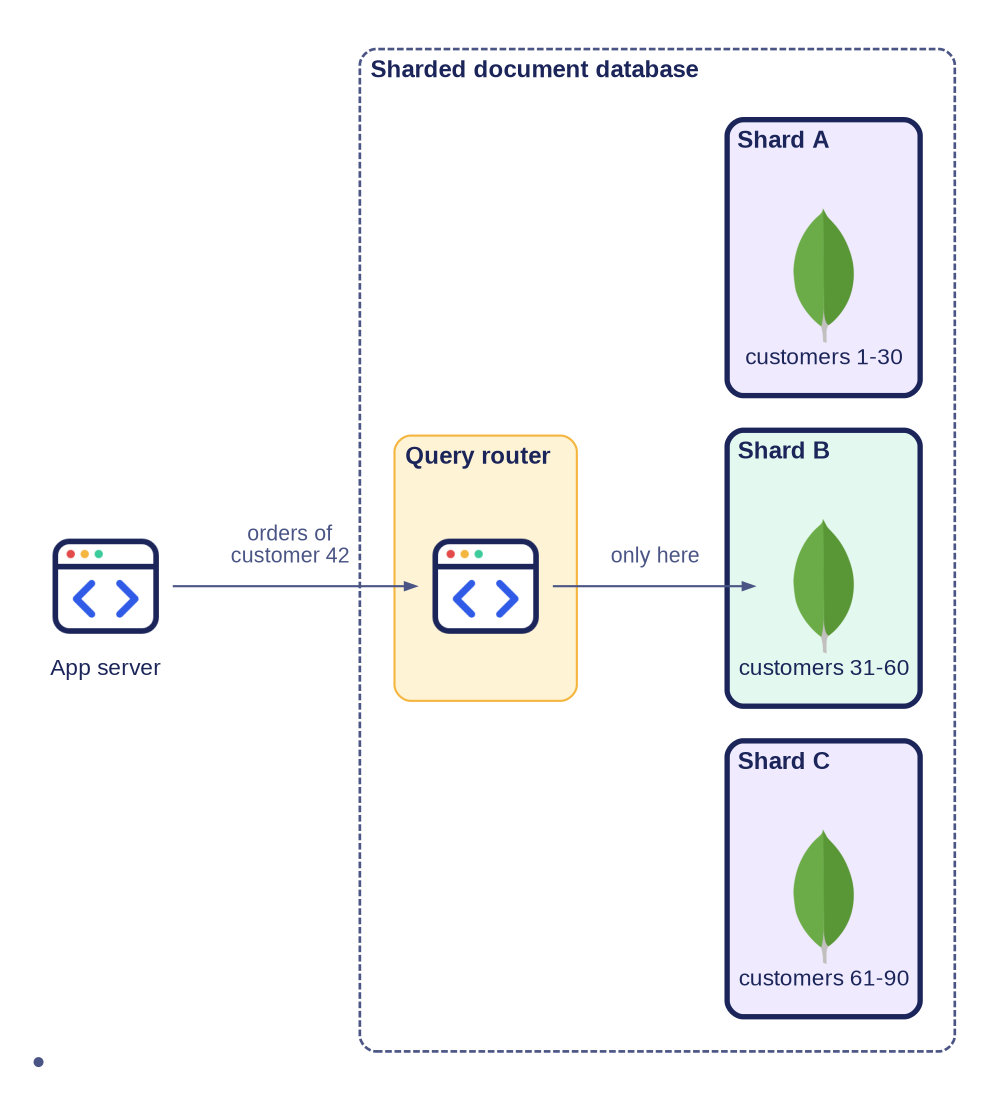
A replica set keeps copies of the data so that another member can take over. Sharding splits a collection over machines by a shard key. A query that contains the shard key goes to one shard; a query without it has to ask all of them.
A query with the shard key
Products
Popular document databases
| MongoDB | CouchDB | Amazon DocumentDB | |
|---|---|---|---|
| Format | BSON | JSON | BSON, through the MongoDB API |
| Query | Rich query language, aggregation pipeline | Mango queries, MapReduce views | Compatible with MongoDB APIs 3.6, 4.0, 5.0 and 8.0 |
| Replication | Replica sets, plus sharding | Multi-master, any copy accepts writes | Managed by AWS, storage grows on its own |
| Special | Change streams, Atlas managed cloud | HTTP API, offline-first with PouchDB | Multi-AZ service agreement of 99.99% |
| Best for | General use: content, catalogues, mobile backends, IoT | Offline apps, edge sites, decentralised sync | Teams that live in AWS |
Summary
The whole topic in one minute.
A document database stores whole objects: fields, lists and nested objects together, under one identifier. Reading one document is one lookup, and a change inside one document is atomic.
The main decision is embed or reference. Embed what is read together, changes rarely and stays small. Reference what is shared, changes often or grows without end. A flexible schema does not remove the schema; it moves it into your code and your validation rules.
- A document is one self-describing object with nested fields.
- One document is read in one lookup and changed atomically.
- Embed what is read together and bounded; reference what is shared, busy or unbounded.
- The schema still exists: in your code and in validation rules.
- Index the fields you filter on, and choose a shard key that your queries contain.