
SQL databases
easy 25 minA SQL (relational) database keeps data in tables with declared columns, joins those tables by key when you ask a question, and enforces rules such as unique emails and valid references.
Video lesson · Chapter 1 of 5
Give an order a stable identity
Theory
Read or listen first. About 2 min.
What it is
A relational database stores facts in tables. A table has named columns, each with a type, and each row is one fact: one customer, one order. You ask questions in SQL, the Structured Query Language, by describing the answer you want instead of the steps to find it.
The database also guards the data. You declare rules once, such as "every email is unique" or "every order belongs to a real customer", and no program can break them by accident. Changes that belong together are grouped into a transaction.
Why it exists
Before relational systems, programs had to know how records were linked on disk. A new question often meant a new program. With tables and SQL, a question nobody planned for is one new query, and the database chooses how to run it.
The second reason is trust. Money, stock and bookings must stay correct when two people act at once and when the power fails. Rules and transactions put that work in one well-tested place instead of in every service.
A short history
1970
Edgar F. Codd at IBM publishes "A Relational Model of Data for Large Shared Data Banks". Data is described by its values, not by how it is stored.
1973
IBM starts System R, a full-strength relational system. Its team includes Chamberlin and Boyce, who design the query language, and Patricia Selinger, who develops a cost-based optimizer.
1986
SQL becomes an ANSI standard, and an ISO standard the year after. In the same year, work begins on POSTGRES at Berkeley.
1995
The first version of MySQL appears.
1996
Berkeley's project, by then with SQL, takes its present name: PostgreSQL.
Words to know
- Table, row, column
- A named set of facts, one fact, and one named property with a type.
- Schema
- The declared shape of the data: tables, columns, types and rules.
- Primary key (PK)
- The column or columns that identify one row. Never empty, never repeated.
- Foreign key (FK)
- A column that must hold a key that exists in another table.
- Join
- Combining rows of two tables where a value matches.
- Transaction
- A group of changes that takes effect as one, or not at all.
- Index
- A sorted or hashed structure kept beside a table so that rows are found without reading all of it.
- Normalisation
- Arranging tables so that each fact is stored in one place.
How it works
Step through the idea, or press Play.
Declare. Tables, columns, types, keys and rules come first
Understand it
Start here
The school register
A school keeps its records on paper. The first version is one big sheet, and the same teacher's name is written again for every pupil in the class. Two linked lists fix that, and a simple rule keeps nonsense out.
Same facts, less repetition, and a rule that cannot be forgotten.
Another everyday picture is a very tidy filing cabinet with spreadsheets inside. You ask "show me all customers from New York" and the right rows come out. The cabinet is good, but not magic: it can still lose data if you turn durability off or never take a backup, and it is slow when nothing tells it where to look.
The idea
Tables, rows and keys
A users table
| id (PK) | name | created | |
|---|---|---|---|
| 1 | Alice | alice@ex.com | 2024-01-15 |
| 2 | Bob | bob@ex.com | 2024-01-16 |
| 3 | Carol | carol@ex.com | 2024-01-17 |
id identifies it, even if the name or the email changes.Schema first
You define the structure before you insert data. A wrong type or a missing value is refused at the door.
Relationships
Tables are linked by foreign keys and combined by joins, so one fact serves many questions.
ACID transactions
Related changes commit together or not at all, and a commit survives a crash.
Declarative queries
You say what you want. The planner chooses the order, the indexes and the join method.
Rules the database keeps for you
| Constraint | What it refuses |
|---|---|
| Primary key | A missing or repeated identity |
| Not null | A row without a required value |
| Unique | A second account with the same email |
| Foreign key | An order for a customer that does not exist |
| Check | A balance below zero, a quantity of minus three |
Modelling
Relationships between tables
A small shop
From a story to tables
- 1
Underline the nouns
"A customer places an order for products." Customer, order and product become tables.
- 2
Give each a key
A number or a UUID that never changes. Emails and phone numbers do change.
- 3
One to many
Put the foreign key on the many side: each order stores its customer's id.
- 4
Many to many
Add a table for the pair. It is also the home of facts about the pair, such as the quantity and the price paid.
- 5
Write the rules
Not null, unique, check and foreign keys, decided together with the tables.
Modelling
Normalisation: one fact, one place
Normalising is like organising a closet. Each kind of thing gets one specific place, and labels, the foreign keys, tell you where to find it. The rules come in steps called normal forms.
| Form | Rule | Breaks it | Fix |
|---|---|---|---|
| 1NF | Atomic values, no repeating groups | phones holds two numbers in one text | A phone numbers table, one row each |
| 2NF | No column depends on part of a composite key | Student name stored in the student and course table | Keep the name only in students |
| 3NF | No column depends on another non-key column | Department name in the employee table | Keep it only in departments |
| BCNF | Every determinant is a key | A teacher fixes the room, but is not a key | Split out teacher and room |
What repetition costs
Asking
Writing a query
-- big orders, newest firstSELECT u.name, o.total, o.created_atFROM users uJOIN orders o ON u.id = o.user_idWHERE o.total > 100ORDER BY o.created_at DESCLIMIT 10;-- customers with more than five ordersSELECT user_id, COUNT(*) AS order_count, SUM(total) AS spentFROM ordersGROUP BY user_idHAVING COUNT(*) > 5;WHERE filters rows before grouping. HAVING filters the groups.The logical order of a SELECT
Kinds of join
| Join | Keeps |
|---|---|
| Inner | Only pairs that match |
| Left | Every left row, with empty values when nothing matches |
| Full | Every row of both sides |
| Cross | Every combination; rarely what you meant |
Speed
Indexes
Without an index, finding a row means reading the whole table, like reading a book from the first page. An index is the index at the back of the book: sorted words with page numbers. How the tree works inside is in B-tree.
| Index | Good for | Example condition |
|---|---|---|
| B-tree | The usual default: equality, ranges, sorting | age > 25 |
| Hash | Equality only | id = 123 |
| Composite | Several columns, led by the first ones | city and state |
| Unique | Speed plus a rule | email must be unique |
CREATE INDEX builds a B-tree unless you ask for another type, and a hash index answers equality only.-- single columnCREATE INDEX idx_users_email ON users(email);-- composite: the order mattersCREATE INDEX idx_orders_user_date ON orders(user_id, created_at);-- uniqueCREATE UNIQUE INDEX idx_users_username ON users(username);Will the planner use my index?
How deep is the tree?
Safety
Transactions and ACID
ACID is a contract: whatever happens, a power cut, a crash or an error, committed data stays safe and the rules still hold. The contract covers what you declared and enabled. It cannot know a rule you never wrote.
| Letter | Means | Example |
|---|---|---|
| Atomicity | All of the transaction, or none of it | A transfer debits and credits, or does neither |
| Consistency | From one valid state to another | balance >= 0 is always enforced |
| Isolation | Transactions running together do not disturb each other, up to the chosen level | Two people book the last seat: one succeeds |
| Durability | A commit survives a crash | Power fails after the commit; the data is there |
BEGIN;-- debit account AUPDATE accounts SET balance = balance - 100 WHERE id = 'A';-- credit account BUPDATE accounts SET balance = balance + 100 WHERE id = 'B';COMMIT; -- if both succeed-- ROLLBACK; -- if anything failsA transfer that fails halfway
Isolation has levels, and the default is usually not the strictest: PostgreSQL's default is Read Committed. Details live in ACID and isolation levels.
Inside
What happens to one query
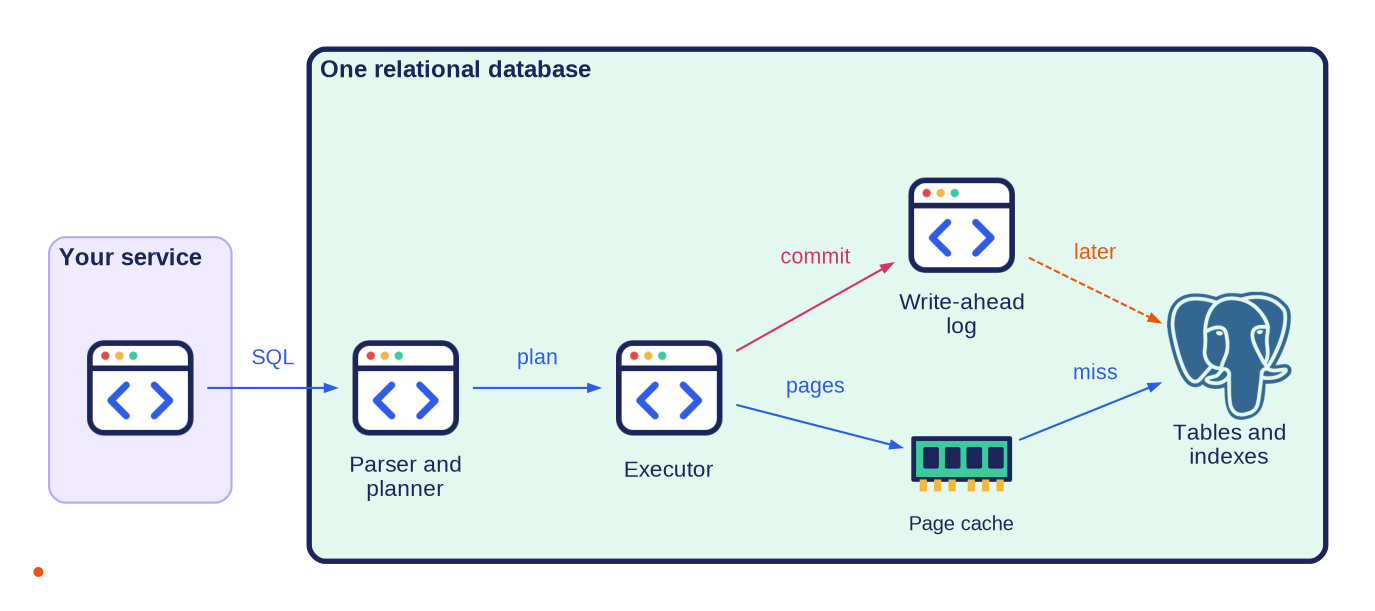
The path of a query
- 1
Parse and plan
Check the text and the names, list the possible ways, estimate their cost and choose one.
- 2
Execute
Walk indexes, read pages, join, group and sort.
- 3
Use the page cache
Hot pages stay in memory, so a working set that fits in memory rarely touches the disk.
- 4
Log before commit
The change is written to the write-ahead log first. After a crash the log is replayed.
Row storage like this suits many small reads and writes, called OLTP. Large scans over a few columns are the business of OLAP systems, which store columns together. Some engines use an LSM tree instead of a B-tree.
Numbers
Does it fit on one database?
Ten million orders a day
At an assumed 1 KB per order with its rows and indexes, that is 10 GB a day and 3.65 TB a year. The write rate is modest. The growth is what asks for a decision: keep a year in the primary tables and move older orders to cheaper storage, or split by time.
Growth
Scaling a relational database
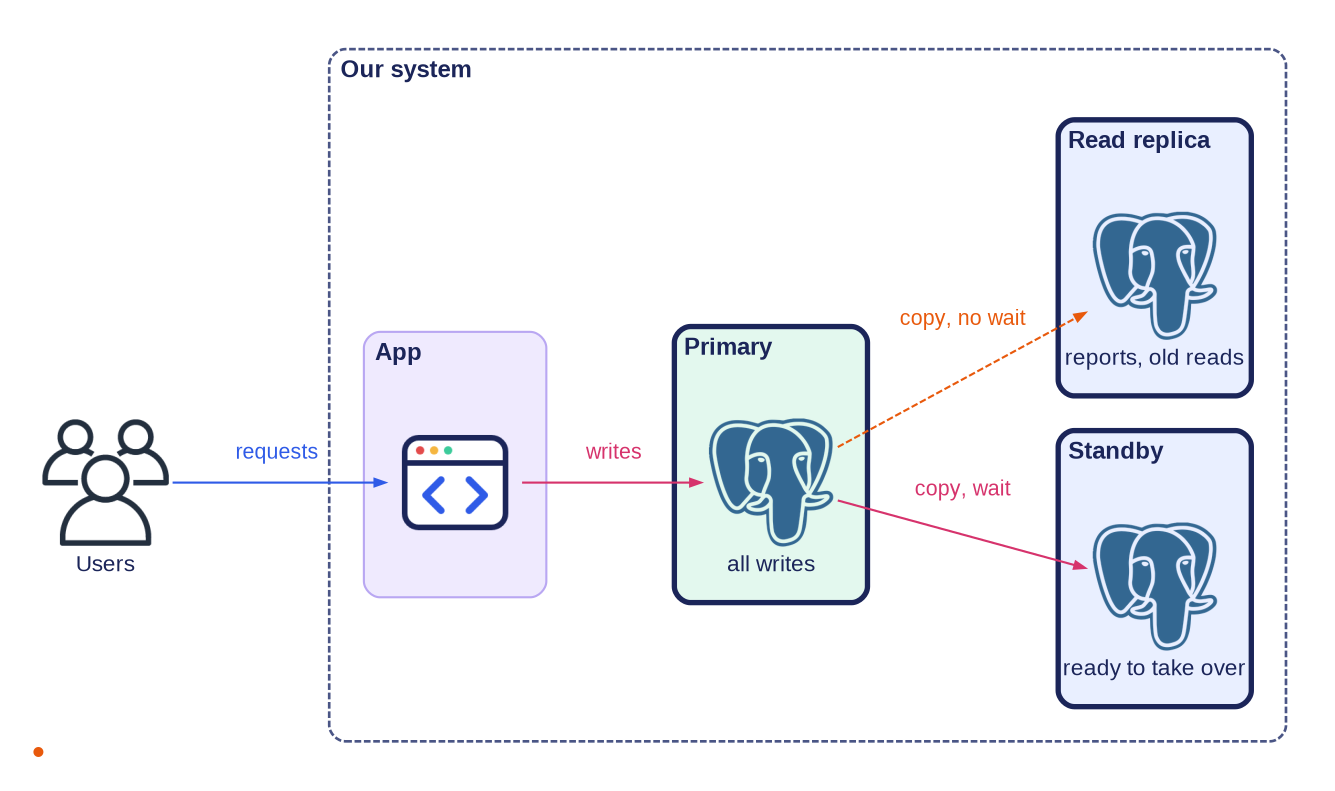
One primary, a standby and a read replica
- 1
Fix the queries
Read the slow query list, add the missing index, stop fetching rows you do not use.
- 2
Use a connection pool
Connections cost memory. A small shared pool serves many requests.
- 3
Scale up
More memory keeps more pages cached. See vertical scaling.
- 4
Add replicas
Reads that tolerate lag move away. Read your own write from the primary. See data replication.
- 5
Partition or shard
Split by time inside one database, or by customer over many. See sharding.
Products
Popular SQL databases
| Database | Character | Seen in |
|---|---|---|
| PostgreSQL | Open source, wide feature set, jsonb documents, many index types | Web back ends, analytics beside transactions |
| MySQL | Widely used open source server | Facebook describes running it for its most important workloads |
| SQL Server | Microsoft's server, on Windows and Linux | Stack Overflow described it at the centre of its 2016 design |
| SQLite | A library, not a server: one file inside your program | Android and iOS devices, Firefox and Chrome |
"Why PostgreSQL over MySQL?" is a common question. A good answer names a feature you need: jsonb with rich indexing, custom types or extensions. Do not say that MySQL lacks common table expressions or window functions: current versions have both. And "faster for reads" is a claim to test with your own queries.
Decide
When a relational database fits
Good signs
- Facts refer to each other, and questions cross them
- Money, stock or bookings: wrong is worse than slow
- You cannot list all future questions
- The data fits on one strong machine for years
- Reports and constraints matter
Look elsewhere
- Large pictures and videos: object storage
- Ranked word search: full-text search
- Short-lived sessions and counters: key-value
- Nested records read as one whole: document
- More writes than one machine can take, always by one key: NoSQL
Summary
The whole topic in one minute.
A relational database keeps each fact once, in tables linked by keys. You describe the result in SQL and the planner finds a way to compute it, using indexes when they help.
Constraints and transactions keep the data correct under failure and concurrency. Start with one such database, index for your real queries, add a standby and read replicas, and split the data only when a number forces you to.
- Tables hold typed rows; keys link them; joins combine them.
- Constraints refuse bad data even when two requests race.
- Normalise to keep each fact once; copy only on purpose.
- An index turns a scan into a few page reads, and every index slows writes.
- A transaction commits as a whole; isolation has levels.
- Grow in order: queries, pool, bigger machine, replicas, then splitting.