
Estimates in perspective
easy 24 minThe reference numbers behind every estimate: how long memory, disks and networks take, how big common data is, how to turn days into seconds, and the powers of two.
Video lesson · Chapter 1 of 6
Stretch time to see its scale
If a cache hit took one second
1:15Reel coming soon
Theory
Read or listen first. About 2 min.
What it is
Estimation needs a few reference numbers: how long a step takes, how big a thing is, how many seconds a period has, how many values fit in some bits. With those, most sums are one or two multiplications.
The useful part is the ratio. Memory is about a thousand times quicker than a random read from a solid-state disk, and a trip to another continent is about a thousand times slower than that. Ratios stay useful long after the exact values have changed.
Why it exists
A design choice is often a choice between two places to get something: memory or disk, this machine or another, this region or a far one. If you know the sizes of the gaps, you see which part of a request is slow before you measure anything.
The numbers also catch mistakes. A page that makes forty calls to another region cannot answer in 100 milliseconds, whatever the code looks like.
A short history
1998
The International Electrotechnical Commission approves the names kibi, mebi and gibi for powers of 1,024, so that kilo, mega and giga can keep meaning powers of 1,000.
2001
Peter Norvig publishes the essay Teach Yourself Programming in Ten Years. Its current version lists approximate times for operations on a typical PC.
2009
Jeff Dean's keynote at the LADIS workshop shows "numbers everyone should know", from a cache reference to a packet crossing the Atlantic and back. The list spreads widely under the name latency numbers every programmer should know.
Words to know
- Latency
- How long one operation takes.
- ns, µs, ms
- Nano-, micro- and milliseconds: a billionth, a millionth and a thousandth of a second.
- L1, L2 cache
- Small, very fast memory inside the processor.
- Round trip
- There and back over a network.
- Seek
- Moving a hard disk's head to the right place.
- GB and GiB
- 10⁹ bytes and 2³⁰ bytes (1,073,741,824). They differ by 7%.
- Order of magnitude
- A power of ten.
How it works
Step through the idea, or press Play.
Place it. Cache, memory, disk, next machine or next continent?
Understand it
Start here
Where are the shears?
A gardener needs the shears. In the hand they take a second. Further away they take longer, and the steps are not equal: each place is far worse than the one before. The story below stretches a computer's time, so that the fastest memory takes exactly one second.
Same request, five places. The distance decides far more than the speed of the gardener.
Origin
Where the numbers come from
The best known list is Jeff Dean's table from talks at Google around 2009. Very similar figures stand in an essay by Peter Norvig. The SSD rows were added by others later. They describe machines of their time, so use them as rules of thumb.
What they are good for
Design choices
Cache or database, sync or async, local or remote.
Quick estimates
Can this design answer in the time we have?
Interviews
You are expected to know orders of magnitude, not datasheets.
Debugging
Compare what you measure with what it should cost.
At a glance
| Operation | Order of magnitude | Times an L1 hit |
|---|---|---|
| L1 cache | 0.5 ns | 1 |
| L2 cache | 7 ns | 14 |
| Main memory (RAM) | 100 ns | 200 |
| SSD random read | 100 µs | 200,000 |
| Round trip in one data centre | 0.5 ms | 1,000,000 |
| Hard disk seek | 10 ms | 20,000,000 |
| Round trip across continents | 150 ms | 300,000,000 |
The same numbers on a system
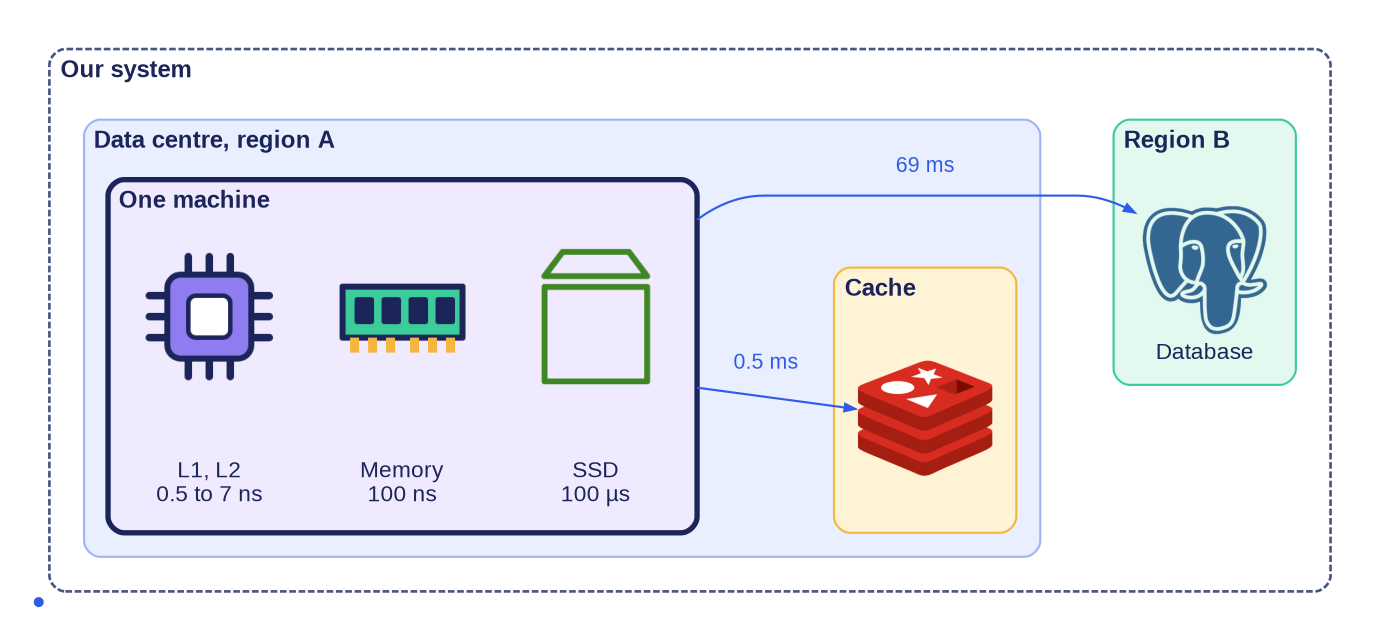
Latency
The classic table
| Operation | Classic value | Today, roughly |
|---|---|---|
| L1 cache reference | 0.5 ns | about 1 ns |
| Branch mispredict | 5 ns | a few ns |
| L2 cache reference | 7 ns | 3 to 7 ns |
| Mutex lock and unlock | 25 ns | 15 to 25 ns without contention |
| Main memory reference | 100 ns | about 100 ns |
| Compress 1 KB (Zippy, now Snappy) | 3 µs | a few µs or less |
| Send 1 KB over 1 Gb/s | 10 µs | 8 µs by arithmetic; under 1 µs at 10 Gb/s |
| Read 4 KB at random from SSD | 150 µs | about 100 µs local, single-digit ms on a cloud disk |
| Read 1 MB in order from memory | 250 µs | 100 µs at 10 GB/s |
| Round trip in one data centre | 500 µs | under 1 ms |
| Read 1 MB in order from SSD | 1 ms | 0.3 ms at 3 GB/s |
| Hard disk seek | 10 ms | 5 to 10 ms: physics hardly moved |
| Read 1 MB in order from hard disk | 20 ms | 5 ms at 200 MB/s |
| Packet California, Netherlands, California | 150 ms | about 150 ms: the speed of light did not change |
Which of them improve?
Feel it
If an L1 hit took one second
The stretch
| Operation | Real | Stretched |
|---|---|---|
| L1 cache | 0.5 ns | 1 second |
| L2 cache | 7 ns | 14 seconds |
| Memory | 100 ns | 3 minutes 20 seconds |
| SSD random read | 150 µs | 3.5 days |
| Round trip in the data centre | 0.5 ms | 11.6 days |
| Hard disk seek | 10 ms | 7.6 months |
| Round trip across continents | 150 ms | 9.5 years |
Use it
Three sums from one table
Calls one after another
Reading 1 GB in order
One request, and where the time goes
Sizes
How big things are
Typical sizes (assumptions to start with)
| Kind | Item | Size |
|---|---|---|
| Text | Short post, 280 characters | 280 bytes in plain English, up to about 4 times that in other scripts |
| Text | Email without attachments | 10 KB |
| Text | JSON response | 1 to 100 KB |
| Text | E-book, text only | 1 MB |
| Image | Thumbnail | 10 KB |
| Image | Compressed photo | 100 to 500 KB |
| Image | High-resolution photo | 2 to 5 MB |
| Image | RAW photo | 25 to 50 MB |
| Audio | 3-minute song | 3 to 5 MB (about 128 to 220 kb/s) |
| Video | 1 minute at 720p | 10 to 20 MB (1.3 to 2.7 Mb/s) |
| Video | 1 hour HD | 2 to 4 GB (4 to 9 Mb/s) |
| Video | 1 hour 4K | 10 to 20 GB (22 to 44 Mb/s) |
| Record | User profile | 1 KB |
| Record | Product | 2 to 5 KB |
| Record | Log line | 100 bytes to 1 KB |
| Record | Short link | 500 bytes |
The ladder
| Unit | Bytes | About |
|---|---|---|
| 1 byte | 1 | one English letter |
| 1 KB | 1,000 | a short note |
| 1 MB | 1,000,000 | a photo, or a book without pictures |
| 1 GB | 10⁹ | 1,000 such photos, or half an hour of HD video |
| 1 TB | 10¹² | a million photos, or a small company's database |
| 1 PB | 10¹⁵ | a thousand such databases |
Time
Days into seconds
| Period | Seconds | In your head |
|---|---|---|
| 1 minute | 60 | 60 |
| 1 hour | 3,600 | 4,000 |
| 1 day | 86,400 | 100,000 |
| 1 week | 604,800 | 600,000 |
| 30 days | 2,592,000 | 2.5 million |
| 1 year | 31,536,000 | 30 million |
| 5 years | 157,680,000 | 150 million |
| 10 years | 315,360,000 | 300 million |
Per day to per second
| A day | Exact | Dividing by 100,000 |
|---|---|---|
| 1 million | 12/s | 10/s |
| 10 million | 116/s | 100/s |
| 100 million | 1,157/s | 1,000/s |
| 1 billion | 11,574/s | 10,000/s |
Bits
Powers of two
Start with 1 and double it ten times: 2, 4, 8, 16, 32, 64, 128, 256, 512, 1,024. That is close to a thousand, and the trick repeats every ten doublings.
| Power | Value | Remember it as |
|---|---|---|
| 128 | plain ASCII characters | |
| 256 | values of one byte, 0 to 255 | |
| 1,024 | a thousand, kibi (Ki) | |
| 65,536 | port numbers | |
| 1,048,576 | a million, mebi (Mi) | |
| 1,073,741,824 | a billion, gibi (Gi) | |
| 4,294,967,296 | 32-bit ids: about 4 billion | |
| 1.0995 × 10¹² | a trillion, tebi (Ti) | |
| 1.1259 × 10¹⁵ | a quadrillion, pebi (Pi) |
How far kilo and kibi drift apart
Why powers of two keep turning up
| Where | Why | Example |
|---|---|---|
| Hash tables | The remainder becomes a cheap bit operation | 1,024, 2,048 buckets |
| Cache lines | Data is laid out in 64-byte lines on common processors | padding of structs and arrays |
| Memory allocators | Blocks of a few fixed sizes are quick to reuse | 16, 32, 64, 128 bytes |
| Shards | Doubling splits each shard in two and moves half of its rows | 4, 8, 16, 32 shards |
Choose
From a number to a choice
Where should this data live?
Is the estimate off by a unit?
Use the numbers like this
- "Memory is roughly a thousand times quicker than an SSD."
- "Forty calls across regions is seconds, so one batch."
- "About 12 a second per million a day."
- "Rule of thumb; we will measure it."
Not like this
- Reciting the table
- "0.5 ns, so it is fast."
- Adding three decimals to a guess
- Quoting a 2009 hard disk for a 2026 SSD
def stretched(ns): s = ns / 0.5 for name, size in (("years", 31_536_000), ("days", 86_400), ("minutes", 60)): if s >= size: return f"{s / size:.1f} {name}" return f"{s:.0f} seconds"for name, ns in [("L2", 7), ("memory", 100), ("SSD", 150_000), ("data centre", 500_000), ("ocean", 150_000_000)]: print(f"{name:12} {stretched(ns)}")Summary
The whole topic in one minute.
Memory is about 100 ns, a random SSD read about 100 µs, a round trip inside a data centre about 0.5 ms, a hard disk seek about 10 ms, and crossing an ocean and back about 150 ms. Remember the steps of a thousand, and treat every digit as a rule of thumb.
Sizes go up by a thousand from KB to PB. A day is 86,400 seconds, so a million a day is about 12 a second. Two to the tenth is about a thousand, and 1 GiB is 7% more than 1 GB.
- 100 ns memory, 100 µs SSD, 0.5 ms data centre, 10 ms disk seek, 150 ms ocean.
- Distance stays; devices improve.
- Count round trips before anything else.
- 1 million a day is about 12 a second.
- 2¹⁰ is about a thousand; GiB is 7% more than GB.