
Caching Strategies and Eviction
medium 25 minPlace fast memory between applications and persistent storage to slash read latency and protect databases.
Video lesson · Chapter 1 of 5
One profile, a thousand visits
Cache-aside
1:17Reel
Theory
Read or listen first. About 1 min.
What it is
A cache is a small, fast place that keeps copies of data whose original lives somewhere slower. When the copy is there, you get an answer quickly. When it is not, you fetch the original and usually keep a copy for next time.
Caches work because people ask for the same things again. A small part of the data gets most of the requests, so a small fast store can answer most of them.
Why it exists
Reading from memory is thousands of times faster than reading from a disk, and nearer is faster than farther. A cache shortens the wait and takes load away from the slower store behind it.
The price is that there are now two versions of the truth. Most of the difficulty in caching is deciding how old a copy may be, and how to remove it when the original changes.
A short history
1965
Maurice Wilkes describes a small "slave memory" in front of a larger one, the idea behind processor caches.
1968
The IBM System/360 Model 85 is the first commercial computer with a cache memory.
1990s
The web brings browser caches, proxy caches and, from 1998, Akamai's content delivery network.
2003
Brad Fitzpatrick writes memcached for LiveJournal, sharing spare memory between web servers.
2009
Salvatore Sanfilippo releases Redis, an in-memory store with richer data types.
Words to know
- Hit and miss
- The copy was there, or it was not.
- Hit rate
- The share of requests answered by the cache.
- TTL
- Time to live: how long a copy may be used.
- Eviction
- Removing something to make room.
- Invalidation
- Removing a copy because the original changed.
- Stale
- Older than the original.
- Stampede
- Many requests missing the same key at once.
How it works
Step through the idea, or press Play.
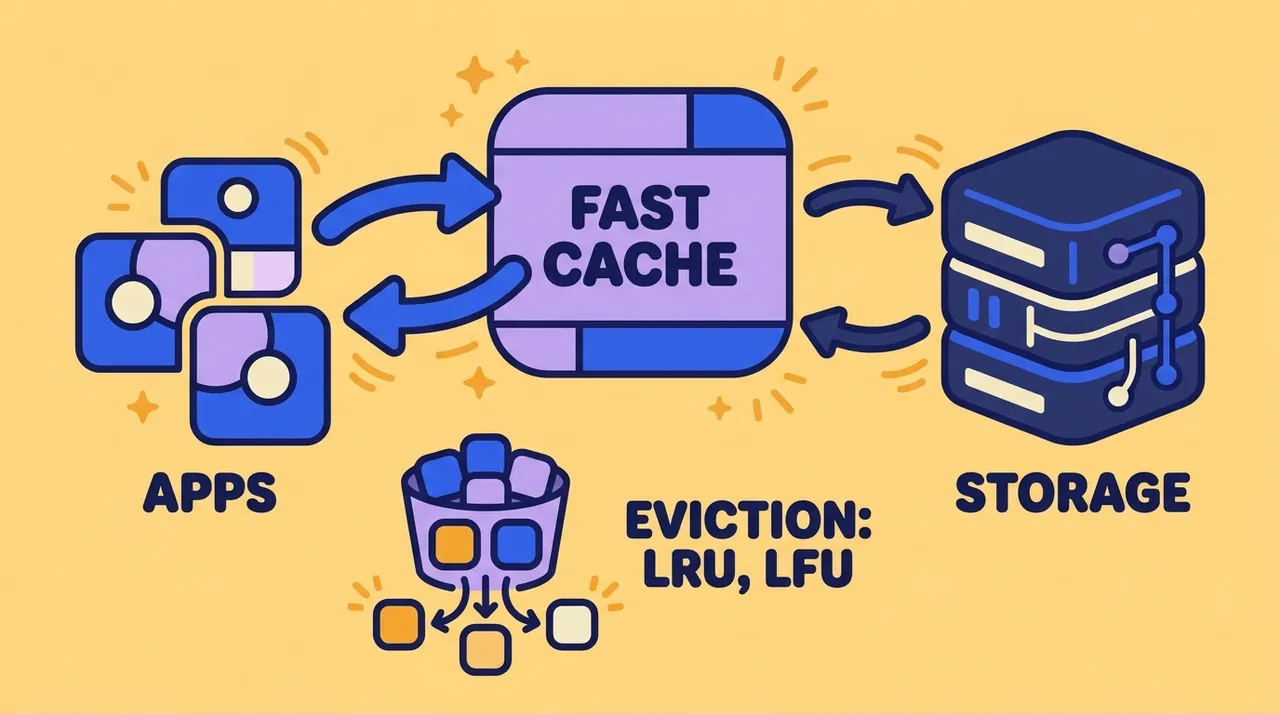
Lookup. Application checks in-memory cache before hitting the primary datastore
Understand it
Disk and network lookups are orders of magnitude slower than reading directly from RAM. Caching inserts an in-memory layer between compute and persistent storage to eliminate database bottlenecks, but introduces trade-offs around stale data, memory pressure, and operational complexity.
Start here
The pencil case
In a drawing class, all pencils live in a cupboard down the hall. Walking there for every line would take all day, so Noor keeps a few in a pencil case on the desk. The case is a cache, and the cupboard is the database.
Five ideas in one picture
Copy
The case holds copies. The cupboard stays the place of record.
Near
It is fast because it is close and small.
Few
It works because the same few pencils are needed again and again.
Full
Space is limited, so something has to leave.
Old
A copy can fall behind the original.
The same idea, bigger
The library desk
Imagine a librarian. Every book lives on far shelves, but a small shelf on the desk holds the few that people keep asking for. That desk shelf is a cache.
The whole picture
Where a cache can sit
Each layer answers what it can
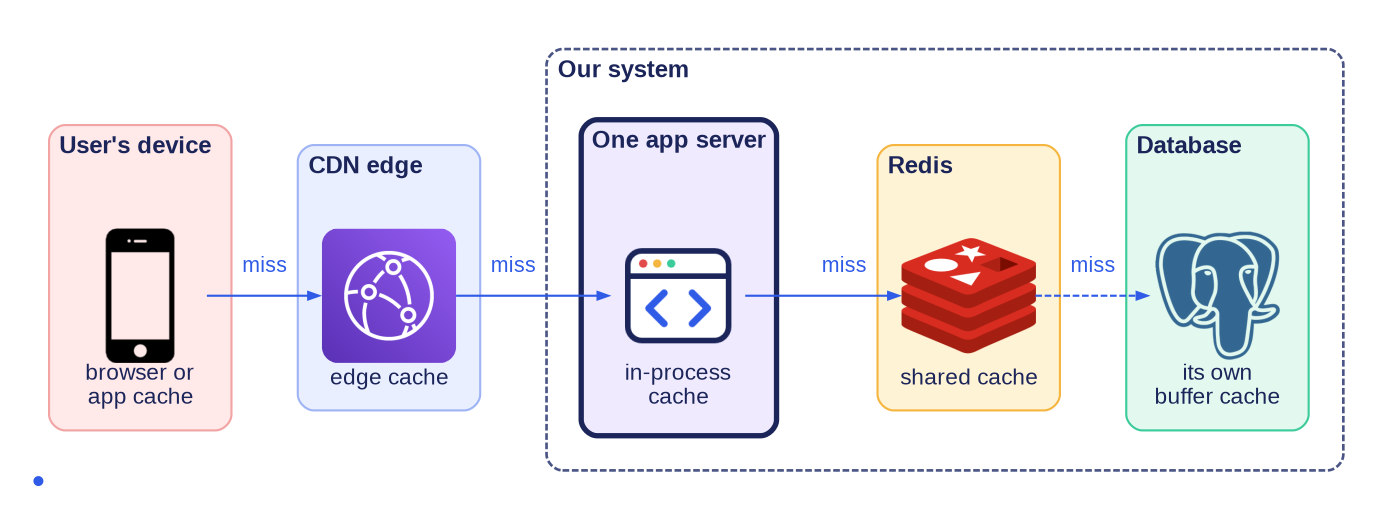
What each layer is good at
| Layer | Shared by | Good for | Watch out |
|---|---|---|---|
| Browser or app | One user | Images, scripts, the user's own data | You cannot delete it remotely; use versioned names |
| CDN edge | Users nearby | Public content | Private data, purge delay |
| In-process | One server | A few very hot items | Servers disagree for a moment |
| Redis or Memcached | All servers | Most application data | A network trip; one hot key on one node |
| Database buffer | All queries | Pages read often | Still runs the query |
What to keep
What is worth caching
Good to cache
- Read many times, changed rarely
- Slow to compute or far away
- Fine if it is a few seconds old
- Small next to its traffic
Leave it alone
- Read once and never again
- Must be exact for a decision, such as a payment
- Different for nearly every request
- Already fast with an index
The key decides who shares the copy
| Data | Key | Expires after |
|---|---|---|
| Public product page | product, id, language | 5 minutes |
| One person's orders | orders, person id, page number | 1 minute |
| Search results | search, sorted filters | 30 seconds |
| Feature settings | settings, version number | Until the version changes |
Numbers
How much does a hit rate buy?
10,000 reads a second, seen from the database
| Hit rate | Reads at the database | Compared with no cache |
|---|---|---|
| 0% | 10,000 a second | all of it |
| 50% | 5,000 a second | a half |
| 90% | 1,000 a second | a tenth |
| 95% | 500 a second | a twentieth |
| 99% | 100 a second | a hundredth |
Will the database hold?
How much memory?
The default
Cache-aside, drawn
Reading and updating
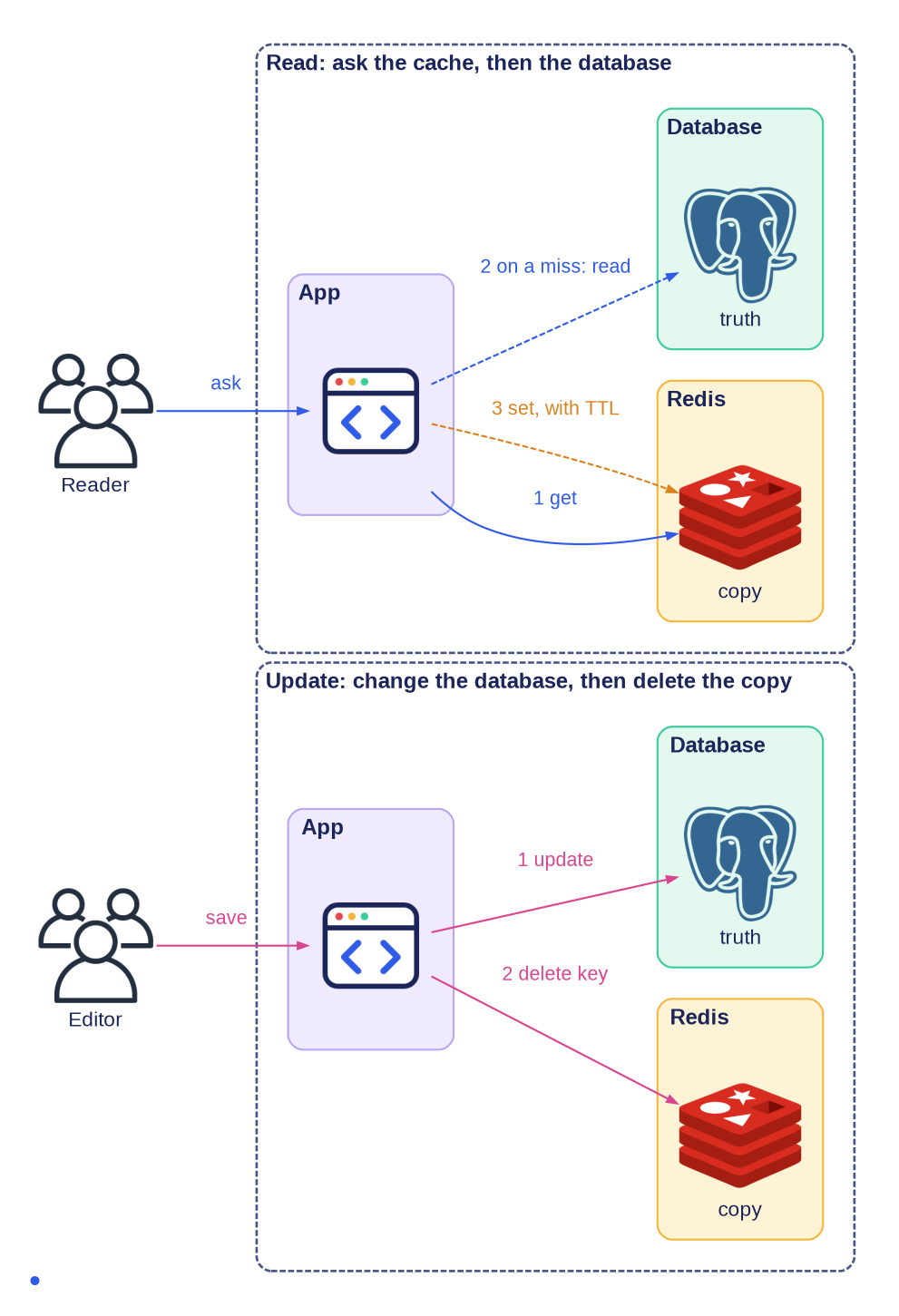
A miss, then a hit
Average read time
Architecture
Core caching patterns
Each pattern has its own page: cache-aside, write-through, write-back, and choosing a cache pattern puts them side by side.
- 1
Cache-aside (Lazy loading)
The application orchestrates both cache and database. It queries the cache first. If missed, it reads from the database, writes the result to the cache, and returns. On writes, the application updates the database and deletes (invalidates) the cache entry.
- 2
Write-through
The application writes directly to the caching layer, which synchronously persists to the database. The client only receives confirmation once both writes succeed. Reads of what was saved are fast, and the caller waits for both writes.
- 3
Write-back (Write-behind)
The application writes immediately to the cache and receives an immediate acknowledgement. A background process batches updates and flushes them asynchronously to disk. Offers maximum write throughput but risks data loss if the cache node crashes before persistence.
Writing through and writing back
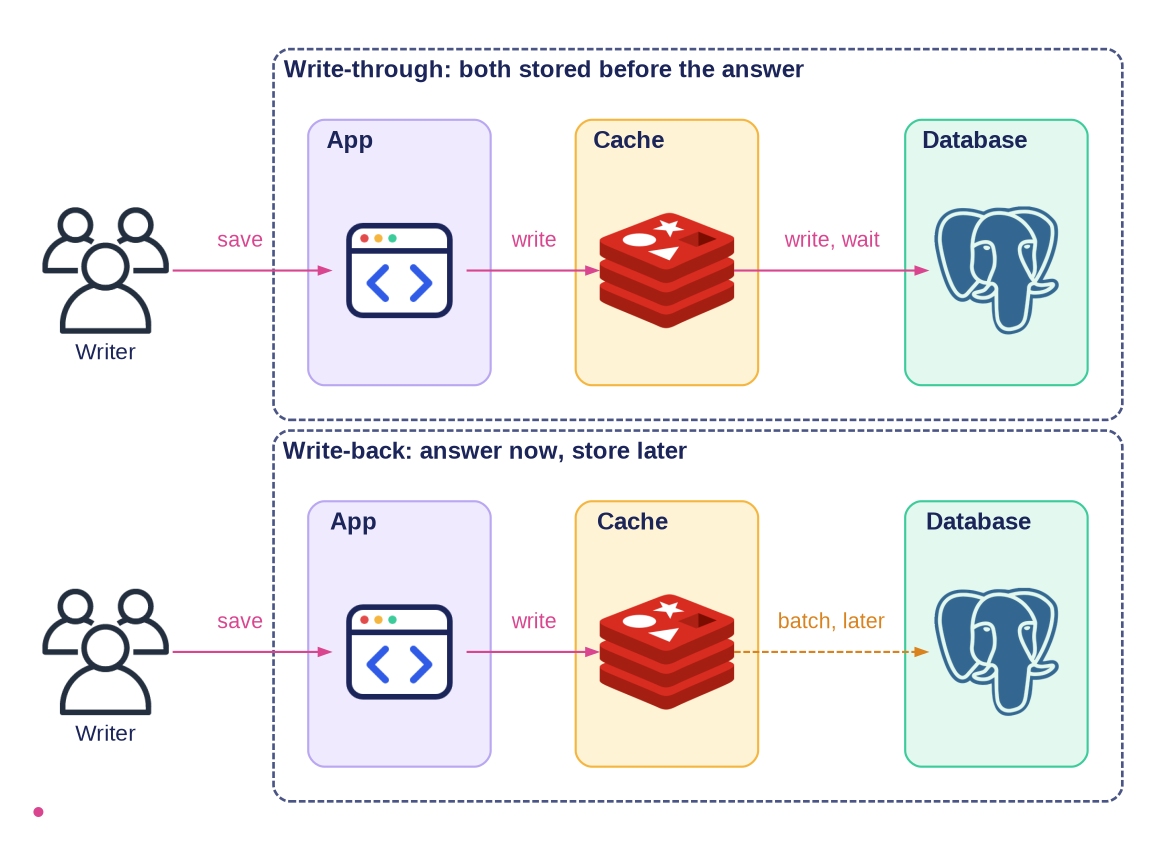
Why deleting is still not perfect
Trade-offs
Write pattern trade-offs
Cache-aside & Write-through
- Cache-aside only caches items actually queried by users.
- Cache-aside can fall back to the database when the cache fails, if the database can take the load.
- Write-through keeps cache and storage in step, as long as every write goes through it.
- Neither keeps the only copy of acknowledged data in memory.
Write-back
- Unflushed dirty records in memory are lost if a cache instance crashes.
- Increases architectural complexity with write-queues and background sync workers.
- Secondary consumers reading directly from the database observe delayed state.
Memory Management
Eviction policies
This is the short version. Cache eviction compares the policies in depth, and cache TTL is about expiry times.
Which policy?
Caches run on bounded memory. When max capacity is reached, an eviction policy decides which entries to purge to make room for new items.
- 1
Least Recently Used (LRU)
Discards the key that has not been read or written for the longest duration. Well-suited for temporal locality where recently accessed keys are likely to be accessed again.
- 2
Least Frequently Used (LFU)
Discards the key with the lowest total access counter. Well-suited for identifying consistently popular data, though historical counts can prevent newer hot items from staying cached.
- 3
Time to Live (TTL)
Associates an expiration timestamp with each key. Expired keys are cleared passively upon lookup or actively via periodic scans.
- 4
First In First Out (FIFO)
Discards keys strictly in the chronological order they were inserted, regardless of ongoing read interest.
Failure
When a hot key expires
The drawing shows the problem and one cure. Thundering herd covers the others.
Stampede, and one refresher
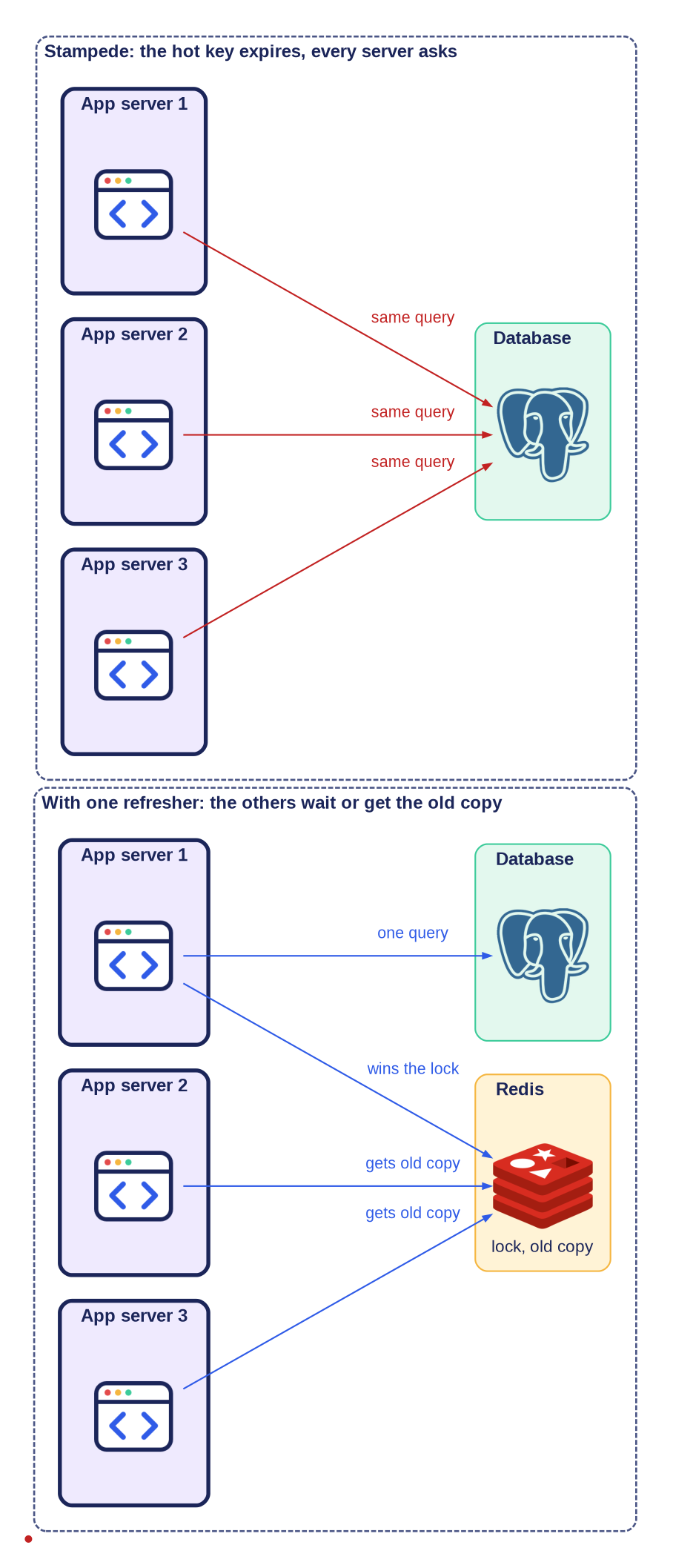
One server refreshes
Failure
What else goes wrong
| Problem | What happens | First thing to do |
|---|---|---|
| Stampede | One hot key expires and everybody asks the database | One refresher, old copy for the rest |
| Penetration | Keys that do not exist are asked for again and again | Remember the empty answer for a short time |
| Avalanche | Many keys expire in the same second, or the cache restarts empty | Spread the expiry times, limit misses in flight |
| Hot key | One key gets more reads than one cache node can serve | Keep it in app memory for a second, or copy it |
| Stale copy | A delete was lost or a race stored an old value | TTL on everything, retry deletes |
| Cache down | All reads fall through | Short timeouts, a limit in front of the database |
Operate it
What to measure
- 1
Hit rate, per kind of data
One average hides a page with 20% hits behind a page with 99%.
- 2
Reads that reach the database
This is the number the database feels.
- 3
Evictions and memory
Many evictions and a falling hit rate mean the cache is too small.
- 4
Time per cache call, slowest 1%
A cache that is slow is worse than none, because every request pays for it first.
- 5
Age of copies
Compare a sample of copies with the originals and alert when they differ for too long.
The hit rate is low: why?
Beyond the server
Caching answers over HTTP
Browsers and content delivery networks follow rules that travel with the answer, such as how long it may be kept. API caching explains those headers.
Summary
The whole topic in one minute.
A cache keeps copies of popular data somewhere faster or nearer. It cuts waiting time and protects the store behind it.
Cache-aside is the usual starting point: read the cache, fall back to the database, fill the cache, and delete the key on a change. Choose how old data may be, choose what to evict, and plan for the moment a hot key disappears.
- Cache-aside is the default choice for read-heavy workloads with tolerable stale reads.
- Write-through puts the new value in the cache at once, if all writes use it. The caller waits for both writes.
- Write-back delivers extreme write performance for ingestion pipelines but introduces risk of data loss.
- LRU is a common first choice for eviction, while a TTL limits how old a copy can get.
- Protect the database: one refresher for a hot key, short entries for missing keys, and a limit on misses in flight.