
GraphQL
medium 27 minGraphQL is a query language for APIs with a typed schema.
Video lesson · Chapter 1 of 5
Ask for one profile, follow three sources
Theory
Read or listen first. About 2 min.
What it is
GraphQL is a language for asking an API for data, and the rules a server follows to answer. The server publishes a schema: types, their fields, and how types are connected. A client sends a query that names the fields it wants. The answer has the same shape as the query.
For each field the server has a small function called a resolver, which gets the value from a database, another service or a calculation. GraphQL does not store anything and does not care where the data lives.
Why it exists
A phone screen often needs a little from many places: a name, five titles, a few counts. With fixed endpoints it receives too much from each and must call several. GraphQL sends one request that names exactly those fields, and each screen can ask for something else without a new endpoint.
The price is that clients now decide what work the server does. Servers must batch lookups, limit deep or wide queries, check permissions in every place a value can be reached, and cache by object and not only by URL.
A short history
2012
Engineers at Facebook start GraphQL while they rebuild the native mobile apps, and use it for the News Feed on iOS.
September 2015
Facebook's engineering blog presents GraphQL in public, with a draft specification.
September 2016
GitHub announces a public GraphQL API beside its REST API.
June 2018
An edition of the specification adds the schema definition language.
September 2025
The next edition adds OneOf input objects and schema coordinates.
November 2026
The September 2026 edition is released and becomes the latest.
Words to know
- Schema
- All types and fields an API offers: the contract.
- Operation
- A query (read), a mutation (write) or a subscription (events).
- Resolver
- The function that gives one field its value.
- Selection set
- The fields in braces that a client asks for.
- Fragment
- A named set of fields to use again.
- N+1
- One lookup for a list, then one more for each item in it.
- DataLoader
- A helper that collects keys for a moment and loads them in one batch.
- Trusted document
- A query that was approved in advance and is sent by its id.
Understand it
Start here
The salad bar slip
Most counters sell fixed plates. This salad bar gives you a slip with every bowl on it. You tick what you want, hand in one slip, and get one tray with exactly that.
The guest chooses, so the kitchen needs batching and a limit.
The idea
One question, same shaped answer
query GetUser($id: ID!) { user(id: $id) { name followerCount posts(limit: 2) { title likeCount } }}{ "data": { "user": { "name": "Asha", "followerCount": 120, "posts": [ { "title": "Seeds", "likeCount": 4 }, { "title": "Soil", "likeCount": 9 } ] } }}Why teams choose it
No over-fetching
A widget that needs a name asks for a name, not for fifty fields.
No under-fetching
A user, their posts and the comments come in one request.
It documents itself
Tools read the schema by introspection and give documentation and completion.
Live data
Subscriptions push events, often over WebSockets or server-sent events.
Typed
Each field has a type, so clients can generate code and catch errors at build time.
Faster screens
Frontend teams combine existing fields without a new endpoint.
Contract
The schema
scalar DateTimeenum Role { USER ADMIN MODERATOR }enum PostOrder { NEWEST LIKES }type User { id: ID! email: String! # only the user and admins, see Authorization name: String! avatar: String role: Role! createdAt: DateTime! posts(limit: Int = 10, offset: Int = 0): [Post!]! followers(first: Int = 20): [User!]! following(first: Int = 20): [User!]! followerCount: Int! # computed}type Post { id: ID! title: String! content: String! published: Boolean! createdAt: DateTime! author: User! comments(limit: Int = 20): [Comment!]! likes(first: Int = 20): [User!]! likeCount: Int! isLikedByMe: Boolean!}type Comment { id: ID! content: String! createdAt: DateTime! author: User! post: Post!}input CreatePostInput { title: String! content: String! published: Boolean = false }input UpdatePostInput { title: String content: String published: Boolean }type Query { me: User user(id: ID!): User users(search: String, limit: Int = 20): [User!]! post(id: ID!): Post posts(orderBy: PostOrder = NEWEST, limit: Int = 20): [Post!]! feed(limit: Int = 20, cursor: ID): PostConnection!}type NotifyResult { notifiedCount: Int! }type Mutation { updateProfile(name: String, avatar: String): User! createPost(input: CreatePostInput!): Post! updatePost(id: ID!, input: UpdatePostInput!): Post! deletePost(id: ID!): Boolean! notifyFollowers(postId: ID!): NotifyResult! likePost(postId: ID!): Post! unlikePost(postId: ID!): Post! followUser(userId: ID!): User! unfollowUser(userId: ID!): User! addComment(postId: ID!, content: String!): Comment! deleteComment(id: ID!): Boolean!}type Subscription { newPost: Post! commentAdded(postId: ID!): Comment! postLiked(postId: ID!): User! newFollower: User!}# Pages in the style of the Relay connection specificationtype PostConnection { edges: [PostEdge!]! pageInfo: PageInfo! }type PostEdge { node: Post! cursor: String! }type PageInfo { hasNextPage: Boolean! hasPreviousPage: Boolean! startCursor: String endCursor: String}Kinds of type
| Kind | What it is | Example |
|---|---|---|
| Scalar | A single value | String, Int, Float, Boolean, ID |
| Object | Fields | type User { id: ID! } |
| Enum | One of a set | enum Status { PENDING DONE } |
| Input | An argument with fields | input CreateUserInput { name: String! } |
| Interface | Fields shared by types | interface Node { id: ID! } |
| Union | One of several types | union Result = User | Post |
String! | Never null | required |
[User] | A list | may be null, may hold nulls |
[User!]! | A list, never null, no null items | may be empty |
Schema first means writing the schema and then the code, which helps teams agree. Code first makes the schema from code, so the two cannot drift. Either works. Review the schema like an API.
Language
Three operations, fragments and directives
| Operation | For | Example |
|---|---|---|
| Query | Reading. Top-level fields may run in parallel | query { user(id: "1") { name } } |
| Mutation | Writing. Top-level fields run one after another | mutation { deletePost(id: "9") } |
| Subscription | A stream of events | subscription { newPost { title } } |
fragment UserFields on User { id name avatar followerCount }query GetFeed($limit: Int!, $cursor: ID) { feed(limit: $limit, cursor: $cursor) { edges { node { id title createdAt likeCount author { ...UserFields } } cursor } pageInfo { hasNextPage endCursor } }}query GetDashboard { # several roots, and an alias me { id name followerCount } feed(limit: 10) { edges { node { id title } } } trending: posts(orderBy: LIKES, limit: 5) { id title likeCount }}query GetPostDetails($postId: ID!) { post(id: $postId) { id title content createdAt likeCount author { id name avatar } comments(limit: 20) { id content createdAt author { id name avatar } } }}mutation Publish($id: ID!, $tell: Boolean!) { published: updatePost(id: $id, input: { published: true }) { id published } notify: notifyFollowers(postId: $id) @include(if: $tell) { notifiedCount }}mutation CreatePost($input: CreatePostInput!) { createPost(input: $input) { id title published author { id name } }}subscription OnCommentAdded($postId: ID!) { commentAdded(postId: $postId) { id content createdAt author { id name } }}Built-in directives
| Directive | Does | Example |
|---|---|---|
| @include | Keep the field if true | name @include(if: $showName) |
| @skip | Leave it out if true | email @skip(if: $hide) |
| @deprecated | Mark a field as on its way out | old: Int @deprecated(reason: "Use new") |
| @specifiedBy | Link a scalar to its definition | scalar UUID @specifiedBy(url: "...") |
| @oneOf | Exactly one input field must be set | input UserBy @oneOf { id: ID email: String } |
Execution
From text to answer
Inside a GraphQL server
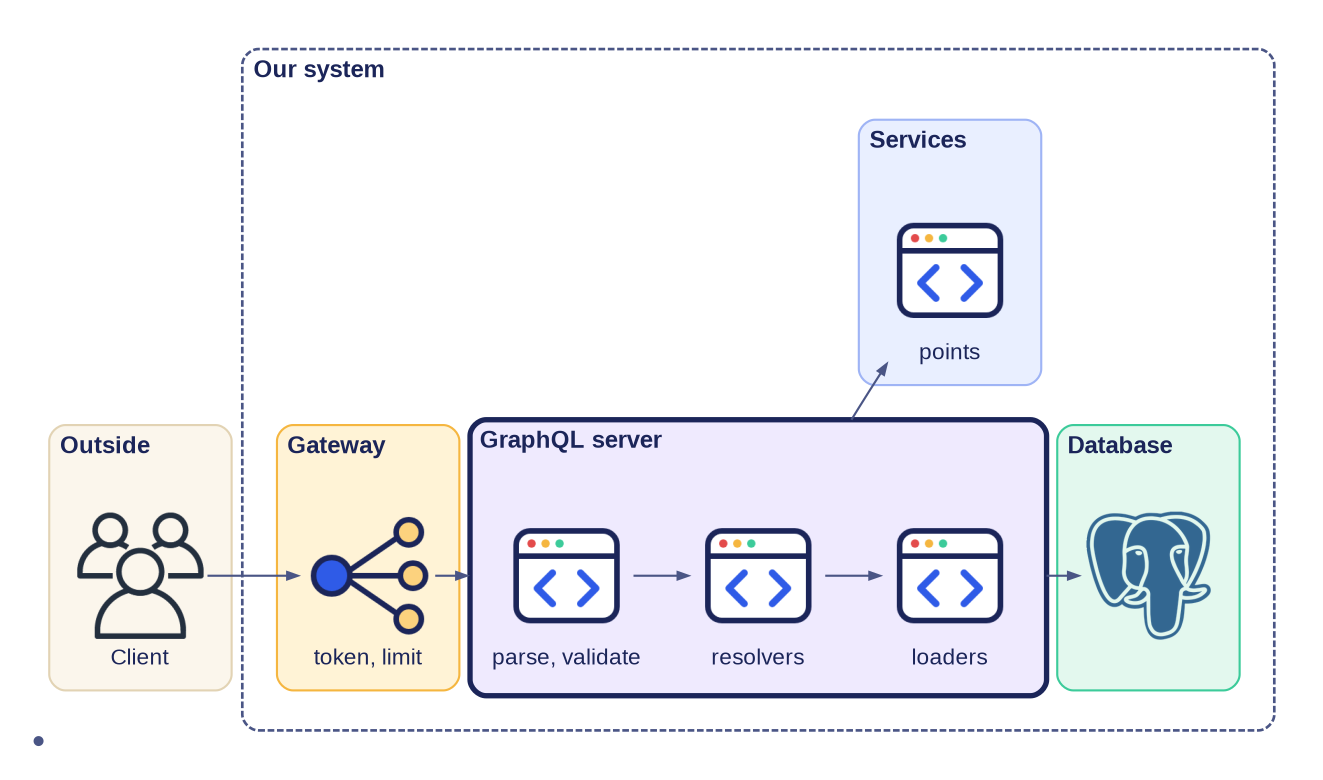
- 1
The client sends one request
Usually POST to /graphql with the query, variables and an operation name. GET is allowed for queries, never for mutations.
- 2
The gateway checks the caller
Token or session, a rate limit, and a log line.
- 3
Parse and validate
Is it valid GraphQL? Do the fields exist? Do types fit? Cost rules run here too, before any work.
- 4
Run the resolvers
From the root down. A child gets its parent's result. Fields that only read a property need no code.
- 5
Loaders batch
Keys asked for in the same moment become one database query.
- 6
Assemble
Values are put in the shape of the query. A field that fails becomes null, with an entry in errors.
One query through the server
The classic trap
N+1 and the DataLoader
A list of users, and the posts of each. The resolver for posts runs once per user, and each run asks the database. Twenty users make 21 queries. A hundred make 101.
Queries sent
import DataLoader from "dataloader";// Called once for EACH request: never share loaders between users.export function createLoaders(db: Db) { return { user: new DataLoader<string, User | Error>(async (ids) => { const rows = await db.usersByIds([...ids]); // WHERE id IN (...) const byId = new Map(rows.map((u) => [u.id, u])); // Same length and same order as the keys. return ids.map((id) => byId.get(id) ?? new Error("No user " + id)); }), // One to many, with the limit inside the database. postsByUser: new DataLoader<{ id: string; limit: number }, Post[], string>( async (keys) => { const limit = Math.max(...keys.map((k) => k.limit)); const rows = await db.topPostsPerAuthor(keys.map((k) => k.id), limit); return keys.map((k) => rows.filter((p) => p.authorId === k.id).slice(0, k.limit)); }, { cacheKeyFn: (k) => k.id + ":" + k.limit }, ), likedByMe: new DataLoader<string, boolean>(async (keys) => { const liked = new Set(await db.likesAmong([...keys])); // "userId:postId" return keys.map((k) => liked.has(k)); }), likeCount: new DataLoader<string, number>(async (ids) => { const counts = await db.likeCounts([...ids]); // GROUP BY post return ids.map((id) => counts.get(id) ?? 0); }), };}export const resolvers = { Query: { users: (_: unknown, a: { limit: number }, { db }: Ctx) => db.users(Math.min(a.limit, 100)), }, User: { posts: (u: User, a: { limit: number }, { loaders }: Ctx) => loaders.postsByUser.load({ id: u.id, limit: Math.min(a.limit, 50) }), }, Post: { author: (p: Post, _: unknown, { loaders }: Ctx) => loaders.user.load(p.authorId), likeCount: (p: Post, _: unknown, { loaders }: Ctx) => loaders.likeCount.load(p.id), isLikedByMe: (p: Post, _: unknown, { loaders, user }: Ctx) => user ? loaders.likedByMe.load(user.id + ":" + p.id) : false, },};How a loader waits
Protection
Limit what a query may cost
A short query can ask for a great deal: friends of friends of friends, or one field under fifty aliases. Counting requests is not enough. Refuse by shape before running anything.
Count the nodes
| Guard | Stops | Note |
|---|---|---|
| Page size maximum | Huge lists | Make first required |
| Depth limit | Circles such as friend, friend, friend | Set it from real queries |
| Breadth, alias and batch limits | One field fifty times, many operations in a request | Counts root fields too |
| Cost points | Expensive mixes | Rate limit by points, not by requests |
| Trusted documents | Everything unknown | For your own apps. Public APIs cannot use it |
| Timeouts | What slipped through | Pass them to the loaders |
May it run?
Turning off introspection in production hides the menu. It is no access control, so never rely on it alone. See rate limiting.
Access
Authorization and errors
The same user can be reached through me, through a comment's author, or through a follower list. So check where the object is loaded, in the business layer, and not at the entry point. Check sensitive fields, such as an email, on the field.
import { GraphQLError } from "graphql";import { z } from "zod";const fail = (message: string, code: string, extra: object = {}) => new GraphQLError(message, { extensions: { code, ...extra } });const NewPost = z.object({ title: z.string().min(1).max(200), content: z.string().min(1).max(10_000), published: z.boolean().default(false),});export const mutations = { createPost: (_: unknown, { input }: { input: unknown }, { user, db }: Ctx) => { if (!user) throw fail("Sign in first", "UNAUTHENTICATED"); const parsed = NewPost.safeParse(input); if (!parsed.success) throw fail("Check the fields", "BAD_USER_INPUT", { fields: z.flattenError(parsed.error).fieldErrors }); return db.createPost({ ...parsed.data, authorId: user.id }); }, deletePost: async (_: unknown, { id }: { id: string }, { user, db }: Ctx) => { if (!user) throw fail("Sign in first", "UNAUTHENTICATED"); const post = await db.post(id); if (!post) throw fail("No such post", "NOT_FOUND"); if (post.authorId !== user.id) throw fail("Not your post", "FORBIDDEN"); await db.deletePost(id); return true; },};{ "data": { "me": { "name": "Asha", "points": null } }, "errors": [{ "message": "Points are not available now", "path": ["me", "points"], "extensions": { "code": "UPSTREAM_DOWN" } }]}For expected outcomes, such as a name already taken, many schemas return a union of success and problem types, so that clients must handle both. Keep errors for what should not happen.
Caching
Three places to cache
Most requests are POSTs to one URL, so shared HTTP caches cannot help by themselves. That does not mean HTTP caching is impossible.
| Where | Key | How |
|---|---|---|
| Client | Type and id, such as Post:9 | Apollo Client and Relay store objects once and update every view |
| CDN | Hash of the query and the variables | Send the hash with GET, and set Cache-Control |
| Server | Object or field | Loaders for a request, Redis for longer |
An automatic persisted query
Public answers and answers for one user must not be mixed in a shared cache. The rules are in API caching.
Transport
HTTP, live events and files
The GraphQL over HTTP specification is still a draft. It asks servers to support the media type application/graphql-response+json, and forbids mutations over GET. Subscriptions have no fixed transport: graphql-ws uses a WebSocket and graphql-sse uses server-sent events. Each subscriber keeps a connection open, so plan limits, cleanup, and a pub/sub system that reaches every server. See real-time APIs.
Subscriptions, done well
- Check access at subscribe and at each event
- Filter on the server: only this post's comments
- Share events between servers with Redis or a queue
- Reload the state after a reconnect
Trouble
- In-memory PubSub with two servers
- A subscription where a poll each minute would do
- Filtering in the client
- No limit on connections for each user
Files. A signed upload URL from a mutation, then a direct upload, is the simple way: see file upload APIs. A community multipart request specification exists. It opens the door to cross-site requests unless the server demands a header that forces a preflight.
Growing
Evolve the schema, split the graph
Add fields freely: nobody receives what they did not ask for. To remove one, mark it @deprecated, measure who still selects it, then drop it. Changing a type, or making a nullable input required, still breaks clients. So "no versions" is a habit, not magic.
One graph, three teams
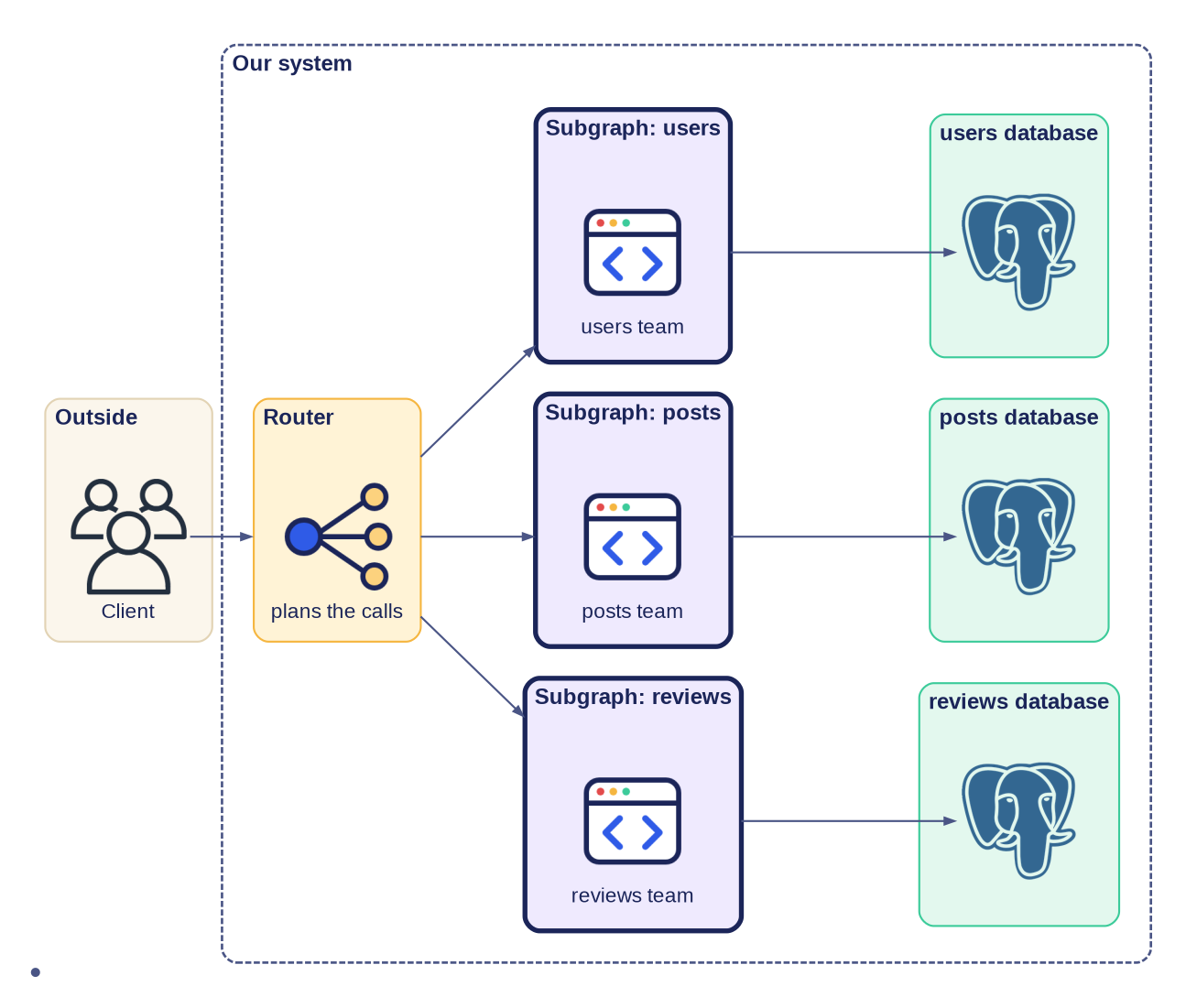
Lists deserve cursors from the first day: the connection shape above is the Relay convention. Compare the choices in API pagination.
Operate
Run it in production
| Watch | Because |
|---|---|
| Time and errors by operation name | All traffic has one URL |
| Resolver time and database queries per request | N+1 comes back quietly |
| Cost points by client | Find the expensive ones |
| Use of each field | You can remove what nobody selects |
| errors in 200 answers | HTTP status hides them |
| Open subscriptions | Memory and file handles |
Good
- No over-fetching: only the chosen fields.
- Single request: related data together.
- Self-documenting: the schema is the reference.
- Type safety: generated client types.
Costs
- Caching: needs design.
- N+1: every list is a risk.
- Limits: by cost, not by request.
- Learning: schema design takes practice.
Decide
When to use it
Choose GraphQL for
- Mobile apps that must save bytes and trips
- Many screens with different needs
- Frontend teams that move faster than the backend
- One entrance to several services
- A dashboard, a phone and a widget on the same data
- Live updates beside queries
Choose another for
- Simple CRUD: REST
- Mostly files and binary data
- Public reads that live from CDN caching
- Teams that cannot invest in limits and batching
- Third parties who expect plain HTTP
- Service to service calls: gRPC
Beside its neighbours
| GraphQL | REST | gRPC | tRPC | |
|---|---|---|---|---|
| Who shapes the answer | The client | The server | The contract | The server's function |
| Address | One endpoint | Many URLs | Service methods | Procedures |
| Contract | Schema | Often OpenAPI | .proto | TypeScript types |
| Languages | Any | Any | Many | TypeScript |
| Code generation | Common, not required | Optional | Yes | None |
| Live data | Subscriptions | Not part of it | Streams | Subscriptions |
| Change | Add and deprecate | Often versions | New field numbers | Both sides together |
| Good for | Varied clients | Public APIs, caching | Internal calls | One TypeScript codebase |
All three styles in depth: REST, GraphQL and gRPC.
Summary
The whole topic in one minute.
GraphQL gives clients one typed schema and lets them pick fields across related objects in one request. Three operations exist: query, mutation and subscription. The answer has the shape of the question, and errors can be partial.
What you save in round trips and endpoints you spend on the server: batch with a DataLoader for each request, limit depth, width and cost, allow only known queries for your own apps, authorize where data is loaded, and cache by object id or by the hash of the query. Change the schema by adding and deprecating.
- The client selects fields; the answer has the same shape.
- Every list needs a loader for each request and a maximum.
- Limit by cost, and use trusted documents for your own apps.
- Authorize where the object is loaded.
- Cache by object id, or by query hash over GET.
- Add, deprecate, measure, remove.