
File upload APIs
medium 26 minSmall files go up in one multipart request.
Video lesson · Chapter 1 of 6
One request for a small object
Large file uploads
1:23Reel
Theory
Read or listen first. About 2 min.
What it is
A file upload API takes bytes from a client and stores them. For a small picture that is one HTTP request. For a two-gigabyte video on a phone it is a conversation: start, send pieces, ask what arrived, send the rest, finish.
Two questions are separate. How do the bytes travel: in one request, in chunks, or with resuming? Where do they travel: through your servers, or straight to object storage with a signed URL?
Why it exists
Long transfers meet everything that can go wrong: phones lose signal, proxies close slow requests, servers run out of memory, users close the laptop. If a failure at 95% means starting again, large uploads may never finish.
Bytes are also expensive to carry. If every file passes through an application server, that server is busy moving data instead of running the product, and the same bytes cross your network twice.
A short history
1995
RFC 1867 adds file upload to HTML forms, with the multipart/form-data format that forms still use. RFC 7578 is its current description, from 2015.
2006
Amazon announces S3 on 13 March: storage reached over plain HTTP requests.
2010
S3 gains multipart upload on 10 November: parts in parallel, and a retry for only the part that failed.
2015
Version 1.0 of tus, an open protocol for resumable uploads, is announced on 16 November. An IETF working group is now writing a standard, still a draft in November 2026.
Words to know
- Multipart form data
- One request body with several parts, divided by a boundary.
- Chunk or part
- A numbered piece of a file that is sent and retried on its own.
- Offset
- How many bytes the server has stored. The next byte to send.
- Resumable
- Able to continue after a break, even after the app restarted.
- Signed URL
- A link that carries permission for one action on one object until a certain time.
- Object storage
- A service that keeps files as objects under keys, such as S3.
- Checksum
- A short value computed from bytes, used to notice damage.
How it works
Step through the idea, or press Play.
Ask to upload. The API checks who, how big and what type, and answers with an id or signed URLs
Understand it
Start here
A dinosaur for the museum
A museum is waiting for a dinosaur skeleton. You can put every bone into one giant crate, or into six numbered ones. The road is long, and things break.
The numbers on the crates do the work: they make order, retries and missing pieces easy.
Challenges
Why uploads are hard
Large files
Videos, backups and data sets can be many gigabytes.
Unreliable networks
Phones change cells and lose signal in lifts and trains.
Timeouts
Servers and proxies end requests that take too long.
Memory
A server cannot hold whole files in memory for many users at once.
How long is a 2 GB upload?
Overview
Four strategies
| Strategy | Idea | You see | After a failure |
|---|---|---|---|
| Multipart form | One request with fields and file | Content-Type: multipart/form-data | Start again |
| Chunked upload | Numbered pieces, several at once | PUT /uploads/{id}/chunks/{n} | Resend that piece |
| Resumable upload | The server remembers the offset | HEAD, then PATCH with Upload-Offset | Continue |
| Signed URL | Straight to object storage | PUT https://bucket.../key?X-Amz-Signature=... | As the method used with it |
One request
Multipart form data
POST /upload HTTP/1.1Host: api.example.comContent-Type: multipart/form-data; boundary=----Boundary7MA4YWxk------Boundary7MA4YWxkContent-Disposition: form-data; name="description"My holiday photo------Boundary7MA4YWxkContent-Disposition: form-data; name="file"; filename="photo.jpg"Content-Type: image/jpeg[binary file data]------Boundary7MA4YWxk--- 1
Boundary
A string that separates the parts. It must not appear inside the data, so browsers choose a random one.
- 2
Content-Disposition
Names the field, and for a file the file name. Treat that name as text from a stranger.
- 3
Content-Type of the part
What the client says it is. Check it yourself.
// <form action="/upload" method="POST" enctype="multipart/form-data">// <input type="text" name="description">// <input type="file" name="files" accept="image/*" multiple>// </form>const data = new FormData();for (const file of input.files) data.append("files", file);await fetch("/upload", { method: "POST", body: data });// Do not set Content-Type yourself: the browser adds the boundary.Good for
- Small files, below about 10 MB
- Plain HTML forms
- A file together with text fields
Limits
- No resume: a failure means a restart
- Progress needs JavaScript
- Long requests meet timeouts
- Careless code reads the whole file into memory. A streaming parser does not have to
Pieces
Chunked upload
Start, send, complete
How many chunks?
You gain
- Retry only the chunk that failed
- Use more of the bandwidth when one connection cannot fill the line
- Progress per chunk
- Checksums per chunk
You pay
- More code on both sides
- The server tracks which chunks it has
- Chunks must be joined
- Temporary storage, and a job to clean it
Chunk size
| Size | What happens |
|---|---|
| 100 KB | 20,000 requests for 2 GB. Headers, waiting and tracking dominate |
| 5 to 10 MB | 200 to 400 requests for 2 GB. A retry costs seconds. A good default |
| 100 MB | 20 requests, but on a slow line each fails often and is expensive to repeat |
The cost of one lost piece
Continue
Resumable upload
The server keeps how many bytes it has stored. After a break the client asks and continues from there, even after a restart of the app. The open protocol tus does this with a few HTTP requests. For the whole journey of one video, piece by piece, see how large uploads work.
tus, with a break at 60 MB
Two ways to say where you are
| Protocol | Header | Used by |
|---|---|---|
| tus | Upload-Offset: 60000000 | tus servers and clients |
| Range style | Content-Range: bytes 60000000-99999999/100000000 | Google's resumable uploads, for example YouTube |
{ "uploadId": "abc123", "fileName": "large-video.mp4", "totalSize": 100000000, "fileFingerprint": "size + last change + hash of the first MB", "createdAt": "2026-01-15T10:30:00Z"}Direct
Signed URLs
Through our server
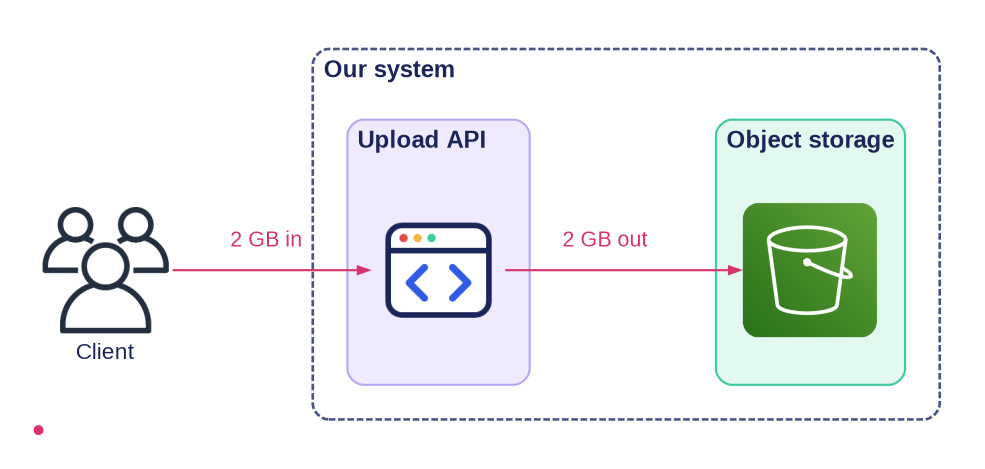
Straight to storage
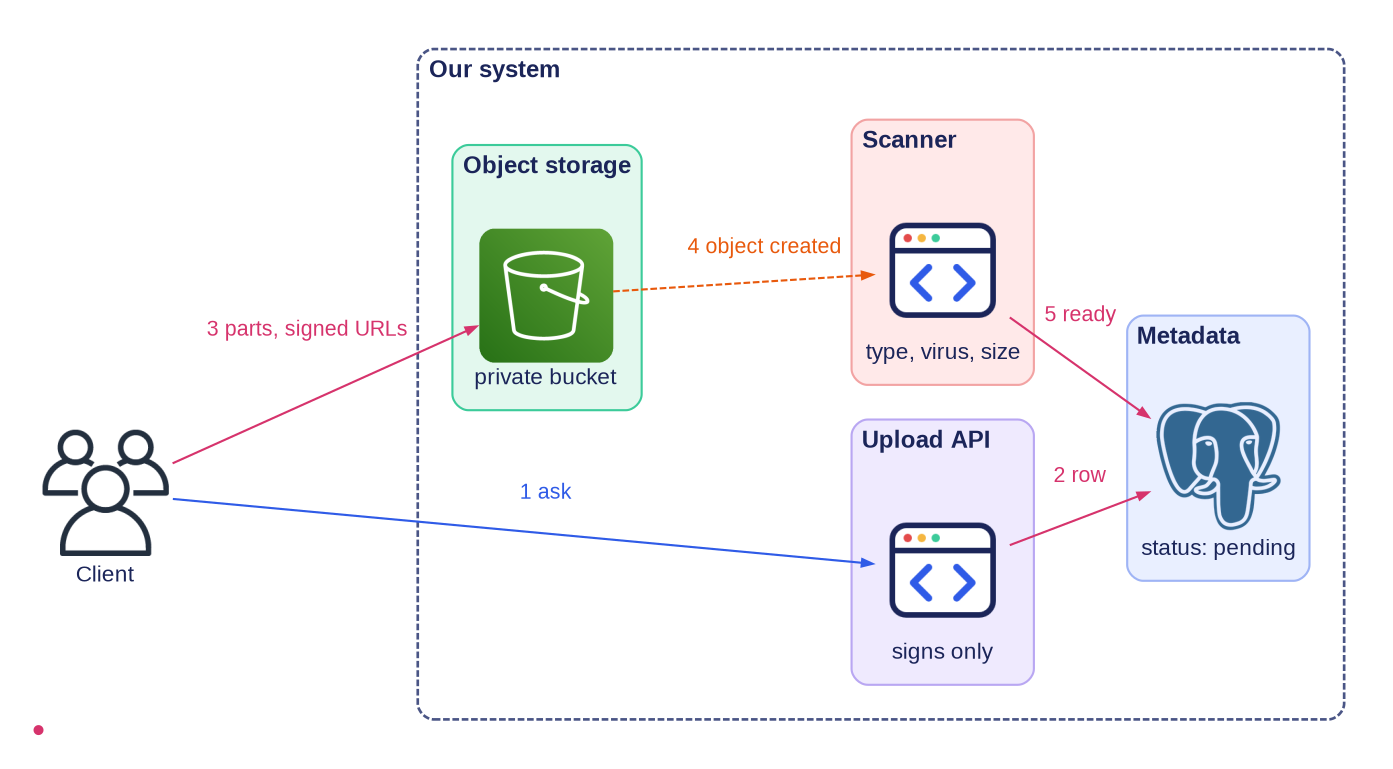
https://my-bucket.s3.amazonaws.com/raw/u1/3f2a-example ?X-Amz-Algorithm=AWS4-HMAC-SHA256 &X-Amz-Credential=EXAMPLE/20260115/us-east-1/s3/aws4_request &X-Amz-Date=20260115T120000Z &X-Amz-Expires=900 &X-Amz-SignedHeaders=content-length;content-type;host &X-Amz-Signature=FAKE...Benefits
- Servers carry no file bytes
- Less bandwidth to pay for and to size
- One hop fewer for the user
- Storage absorbs the peaks
- Works with parts: sign one URL per part
Be careful
- Short life: 5 to 60 minutes
- Exactly one key, chosen by you
- Sign the content type
- Limit the size: sign the length, or use a POST policy with a size range
- HTTPS only, never in logs: the URL itself is the permission
How do you learn that it arrived?
| Option | How | Judgement |
|---|---|---|
| Storage event | S3 notifies a queue, a function or your API | Best: works even if the client disappears. May arrive twice |
| Client callback | POST /uploads/complete with the key | Quick for the user. Check with storage, because clients lie or vanish |
| Polling storage | Look for expected objects | Not for normal use, but good as a daily repair job |
Decide
Which one when
| File size | Network | Use |
|---|---|---|
| Below 10 MB | Stable | One request |
| 10 to 100 MB | Stable | Chunked |
| Above 100 MB | Any | Resumable (chunks count, if the state survives) |
| Any | Mobile or unstable | Resumable |
| Any, high volume | Any | Signed URLs, plus chunks or resuming |
Two questions
Safety
Never trust an upload
Name
Store it as text for display only. Use a random key for storage, so no name can write outside the folder.
Type
Read the first bytes. An extension or header proves nothing. Serve user files from another domain.
Size
Refuse by Content-Length early, and count while streaming. Compressed files can grow: limit the unpacked size too.
Content
Scan in a separate place. Keep the status pending and the file private until it passes.
The life of an upload
State
Where the session lives
The next chunk may reach another server. So the upload id, size, owner and list of chunks belong in a database or in the storage service itself, never in one server's memory, and chunks never on one server's disk. Every request checks that the upload belongs to the user.
A chunk with the same number replaces itself, and completing twice gives the same file: this is idempotency. The storage event can arrive twice, like any webhook. For how often to retry a chunk see retries.
Numbers
What signed URLs save
Bytes through the application
Summary
The whole topic in one minute.
Choose how by size and network: one request for small files, numbered chunks for bigger ones, resuming for very large files or phones. Choose where by volume: with many uploads, sign a URL and let the bytes go straight to storage.
Whatever you choose, keep the state in a shared store, check size and type from the real bytes, verify checksums, scan before publishing, and clean up uploads that were never finished.
- One request for small files, chunks for bigger ones, resuming for large files and phones.
- Numbered chunks make order, retries and missing pieces simple. 5 to 10 MB is a good size.
- Resuming: ask the server for its offset, then continue from there.
- Signed URLs send bytes straight to storage. Keep them short, for one key, with type and size limited.
- Check real bytes, scan before publishing, keep state shared, and clean up what was never finished.