
Design a Group Chat App (Slack/Discord)
hard 45 minDesign team chat: channels, threads, unread badges, presence and search.
Video lesson · Chapter 1 of 5
A message leaves the grey sending state
Group chat in 90 seconds
1:30Reel coming soon
Theory
Read or listen first. About 2 min.
What it is
A group chat app lets the people of a team talk in shared rooms called channels. Anyone in the room sees each new message at once, and anyone who was away can read what they missed, in the same order as everyone else.
It is two systems that must agree. One is a log: a lasting, ordered record of each channel. The other is a loudspeaker: it tells connected people that the log has grown. The loudspeaker may miss someone. The log may not.
Why it exists
Work in a team needs shared memory. Email copies a conversation into many inboxes and nobody has the same picture. A channel keeps one copy that everyone reads, searches and links to.
It is asked often because it joins four hard ideas in a small product: open connections for millions of people, one message delivered to many, strict order, and counts such as unread badges that can cost more than the messages themselves.
A short history
1993
RFC 1459 (May) writes down Internet Relay Chat, with servers, channels and members.
2011
RFC 6455 (December) standardises WebSocket, so a web page can hold a two-way connection.
2013
Slack is launched in August as a searchable record of team conversation.
2017 to 2020
Slack moves its MySQL data to Vitess, so that tables can be split in other ways than by workspace.
Words to know
- Workspace
- One company or team: its members, channels and rules.
- Channel
- A named room inside a workspace. Public ones can be joined by any member; private ones need an invitation.
- Sequence number
- The place of a message in its channel: 1, 2, 3, with no gaps.
- Read position
- The last sequence number a member has read in a channel. Also called a cursor.
- Fan-out
- Turning one message into one delivery per listening screen.
- Gateway
- A server whose only job is to hold open connections.
- Presence
- Whether a person is active or away right now.
Solve it like an interview
New to it? Start with Approach. Revising? Go straight to the mock.
- 1ApproachWhat this question tests, where it gets hard, and how to spend the time.
- 2ScopeAsk what changes the design, then commit to a short list.
- 3NumbersWork out a number when the answer changes what you build.
- 4API and dataThe contract first, then the data that serves it.
- 5DesignStart with the smallest system that works. Change it only when something breaks.
- 6Deep divesCompare the options before you open them, then say which you would pick.
- 7Explain your choicesAnswer first. Then compare your reasoning.
- 8By levelThe same question is judged differently for mid, senior and staff.
- 9MockAnswer against the clock, then score yourself.
How it works
Step through the idea, or press Play.
Save. The message gets the next number in its channel
Understand it
Start here
The notes on the fridge door
Nobody needs to remember who heard the call. The door remembers everything.
The product
What we are building
A service like Slack for teams. This is an exercise inspired by well-known products, not a description of how any company does it. Where a company has published its own choice, we link to it.
Core features
Channels and direct messages
Public rooms, private rooms, one-to-one and small groups.
Threads
Replies that hang off one message and do not fill the room.
Unread and mentions
Badges, and a louder one when somebody names you.
Search
Every message you are allowed to see, and nothing else.
Files, reactions, pins
Upload, preview, respond with an emoji, keep the important ones.
Apps and calls
Incoming messages from tools, and short voice calls.
Similar applications
| Service | Known for |
|---|---|
| Slack | Team collaboration |
| Microsoft Teams | Chat inside Microsoft 365 |
| Google Chat | Part of Google Workspace |
| Mattermost, Rocket.Chat | Teams that host their own |
| Zulip | Conversations by topic |
| Discord | Communities and voice |
| Telegram, WhatsApp groups | Personal group chat |
The hard part
Being away is the normal case
Sending to people who are connected is easy to draw. But phones sleep, trains enter tunnels and laptops close. At any moment most members of a large channel are not listening. The design is good when a person who returns after a minute, or a month, sees exactly what everyone else sees.
Two paths, one truth
The finished system
Where the design ends up
This is the last version. The Design tab starts with one service and one database and shows what forces each extra box.
The whole system
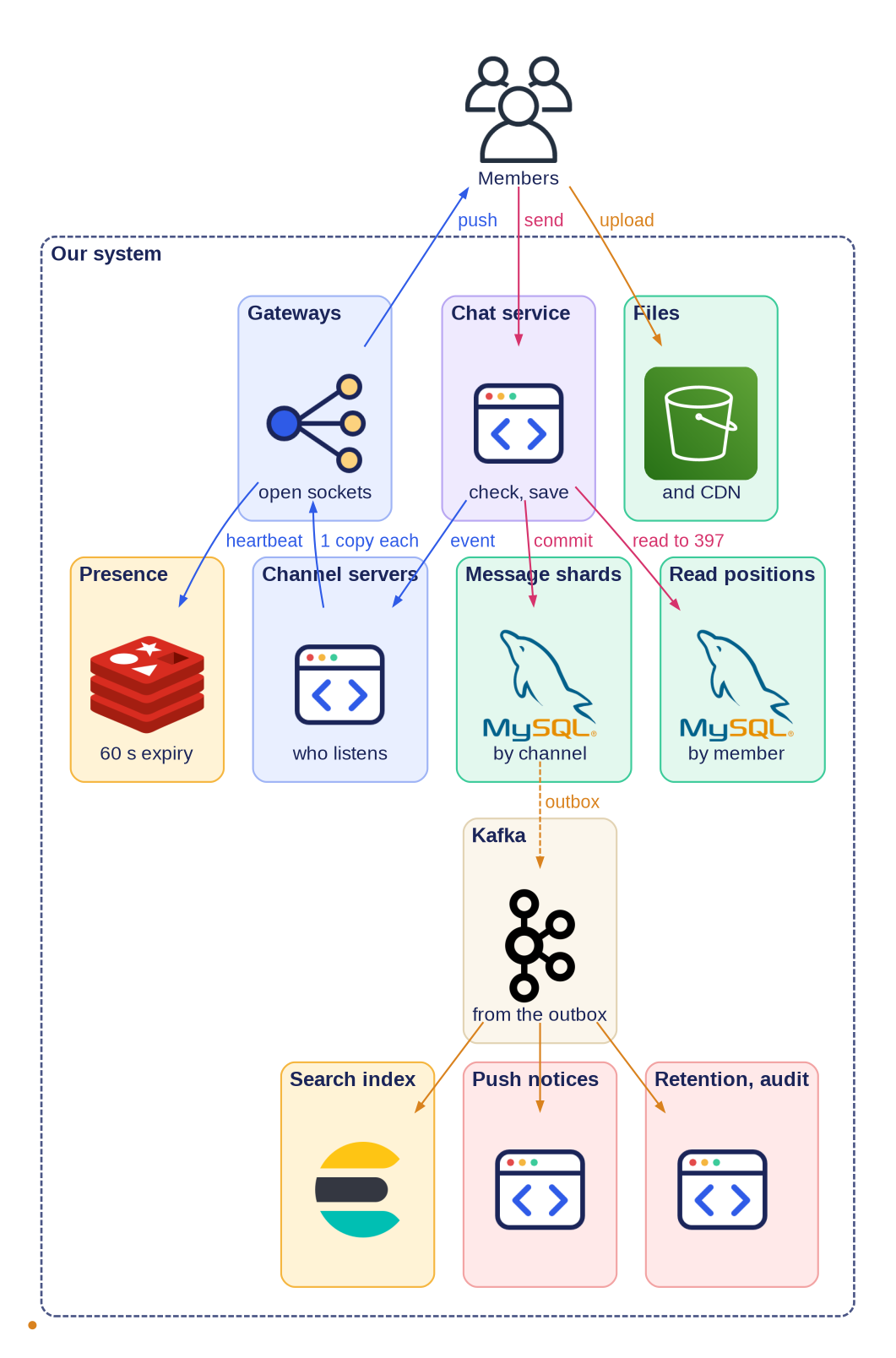
Where things live
Ideas this page borrows
| Idea | Its own page |
|---|---|
| Sockets, long polling, server events | real-time APIs |
| Publish and subscribe | pub-sub |
| Safe retries | idempotency |
| Splitting data | sharding |
| Finding the owner of a channel | consistent hashing |
| Text search | full-text search |
| Voice rooms, huge communities, roles | Design Discord |
Summary
The whole topic in one minute.
Save first, then shout. A message gets its number and its place in the channel inside one database transaction. Only after that do channel servers push it to the gateways that asked for that channel.
Being away is normal, so the client keeps the last number it saw and asks for the rest. Unread counts come from one read position per member per channel, never from a counter written for every member.
- Save, then shout: the log is the truth and the push is a hint.
- One number per message per channel gives order, gap detection and unread counts.
- Push to the gateways that subscribed. Do not load a member list for every message.
- Store one read position per member and channel. Never write one row per member per message.
- Send presence only for people who are on the screen.
- Check permission when someone reads or searches, not only when they send.