
Sharding & replication
medium 30 minScale a database past one machine by splitting rows over shards, and keep it available by copying every shard.
Video lesson · Chapter 1 of 5
Follow a single profile update
The shard key
1:15Reel
Theory
Read or listen first. About 2 min.
What it is
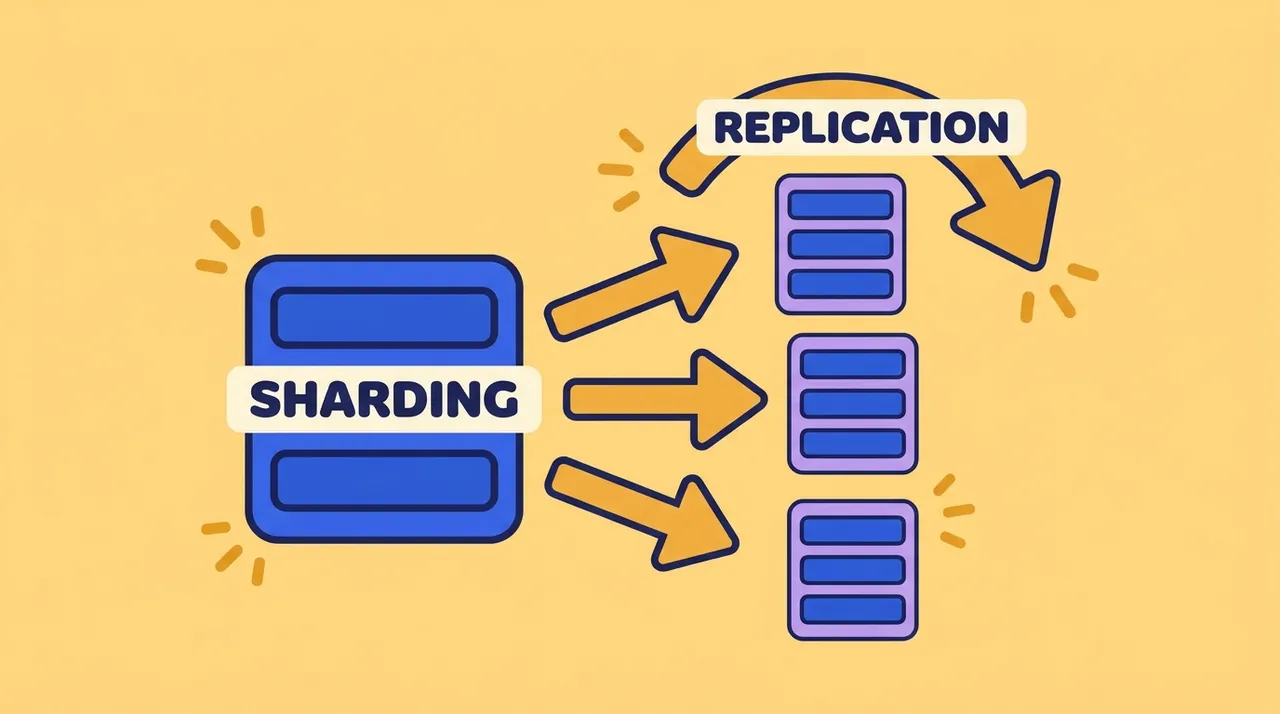
Sharding splits one large set of data into parts, called shards, and stores each part on a different machine. A rule on a chosen field, the shard key, says which machine holds which row.
Replication is the partner idea: keeping copies of the same data on several machines. Sharding makes room. Replication keeps data available and spreads reads.
Why it exists
A single database machine has a limit on how much it can store and how many writes it can take. When the largest practical machine is too small, the data has to live in more than one place.
Splitting brings new problems: queries that need several shards, transactions that cross them, one shard far busier than the rest, and moving data when shards are added. That is why it comes after simpler steps.
With more machines, some machine is broken more often. So every shard is also copied. Sharding without replication makes the system less available than one server was.
A short history
1997
Karger and colleagues publish consistent hashing, which moves little data when machines are added or removed.
2006
Google describes Bigtable, which splits tables into ranges of rows called tablets.
2007
Amazon describes Dynamo, with data spread by consistent hashing and copied to several nodes.
2010
MongoDB 1.6 calls its built-in sharding ready for production. In the same year work on Vitess starts at YouTube.
2012
Google publishes Spanner, a database that is split across the world yet offers transactions.
Words to know
- Shard key
- The field that decides where a row lives.
- Logical shard
- One of many small, fixed parts. A map places several on each machine.
- Hot shard
- A shard with far more traffic than the others.
- Primary and follower
- The copy that takes writes, and the copies that repeat them.
- Replication lag
- How far a follower is behind.
- LSN
- Log sequence number: a position in the primary's log of changes.
- Rebalancing
- Moving data so that shards stay even.
- Scatter-gather
- Asking every shard and merging the answers.
- Two-phase commit
- A protocol that makes several machines commit together or not at all.
How it works
Step through the idea, or press Play.
Route by shard key. The app or a routing proxy turns the shard key into a shard
Understand it
Start here
The choir on the buses
A choir has twelve singing groups and needs more than one bus. The interesting part is the seating rule: where does a group sit, how do you find it, and who has to move when one more bus arrives?
The number of groups never changes. Only the place of a group changes.
Architecture
When one machine is full
Every single-node database meets a hardware limit: indexes no longer fit in memory, the disk reaches its limit of operations a second, or writes use up the processor. Scaling up delays the moment. Past it, data must be divided over several independent machines, and the copies must sit in different places so that one fault cannot take them all.
There are two directions to divide in. The details are in data partitioning:
- Vertical partitioning: split by tables or columns. Busy or wide columns move to their own nodes. Joins between the parts become the application's work.
- Horizontal partitioning (sharding): spread the rows of one table over servers with the same schema. Each server holds a subset.
One write, its shard and its follower
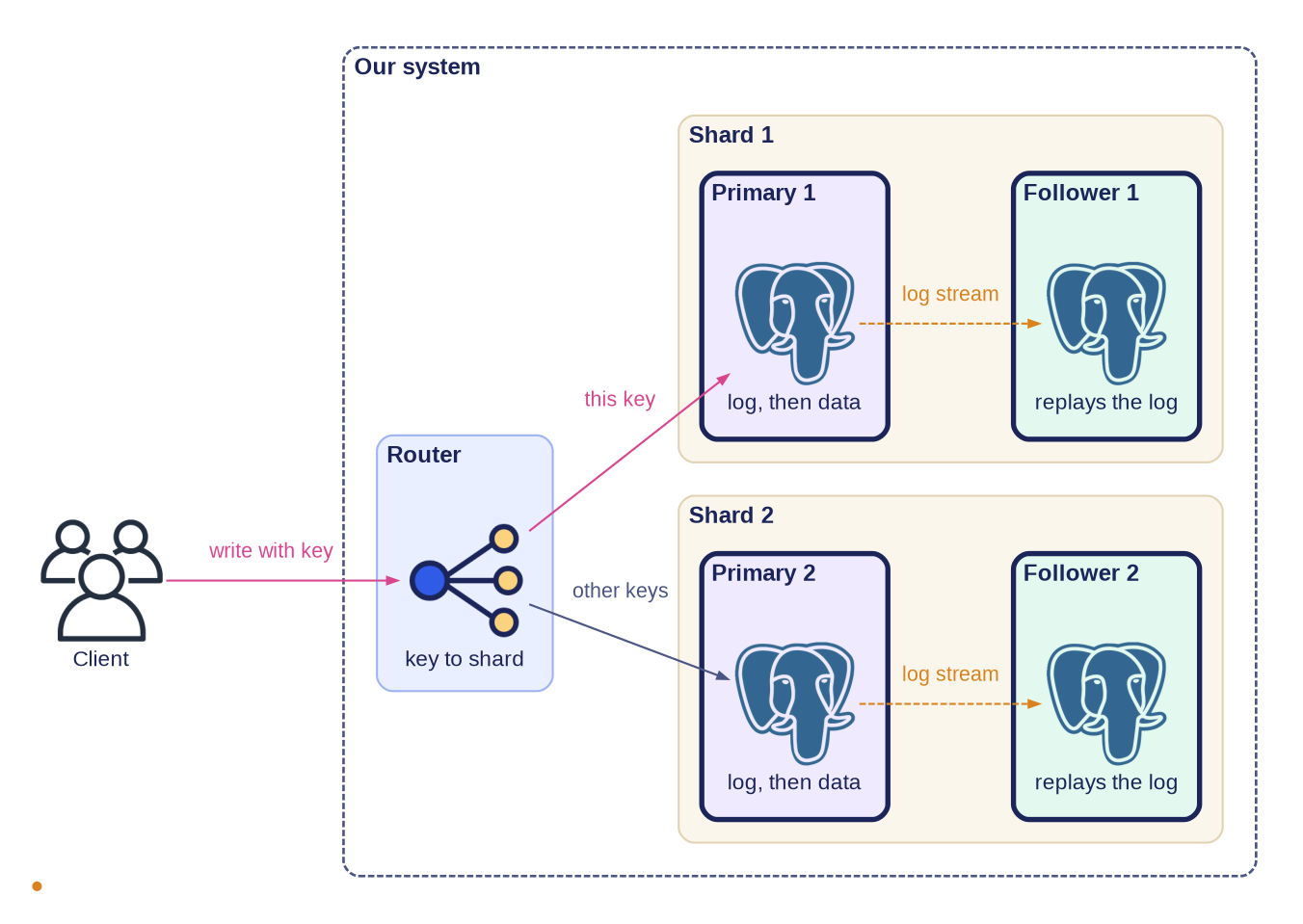
hash(key) mod N or asks a directory. The primary logs first (WAL), then applies. Followers replay the log and advance their position.What each idea buys
| Sharding | Replication | |
|---|---|---|
| Each machine holds | Different rows | The same rows |
| Adds storage | Yes | No |
| Adds write capacity | Yes | No, every copy repeats each write |
| Adds read capacity | Yes, for queries with the key | Yes, if slightly old data is fine |
| Survives a lost machine | No, its rows are gone | Yes |
Sharding strategies
Three ways to place rows
Selecting a distribution pattern
- 1
Range
Shards own neighbouring keys, for example ids 1 to 10,000 on shard 0 and 10,001 to 20,000 on shard 1. Good for ordered scans. Keys that only grow, such as timestamps or counters, send every write to the last shard.
- 2
Hash
A fixed hash function such as MurmurHash3, CRC32 or MD5 spreads keys evenly, by
hash(key) % N, a hash ring or fixed slots. Neighbouring keys are scattered, so a range query asks every shard. One very busy key is still one busy key. - 3
Directory (list)
A lookup service maps a key or tenant to a shard. It allows placing a customer in a region or moving one tenant alone. The directory must be highly available and cached.
Each strategy has its own page: partitioning strategies. Rings and virtual nodes are in consistent hashing.
The map
Logical shards: the rule that never changes
Put a fixed, generous number of logical shards between the key and the machines. The key always hashes to the same logical shard. A small map says which machine holds it. Growth changes the map.
Key, logical shard, machine
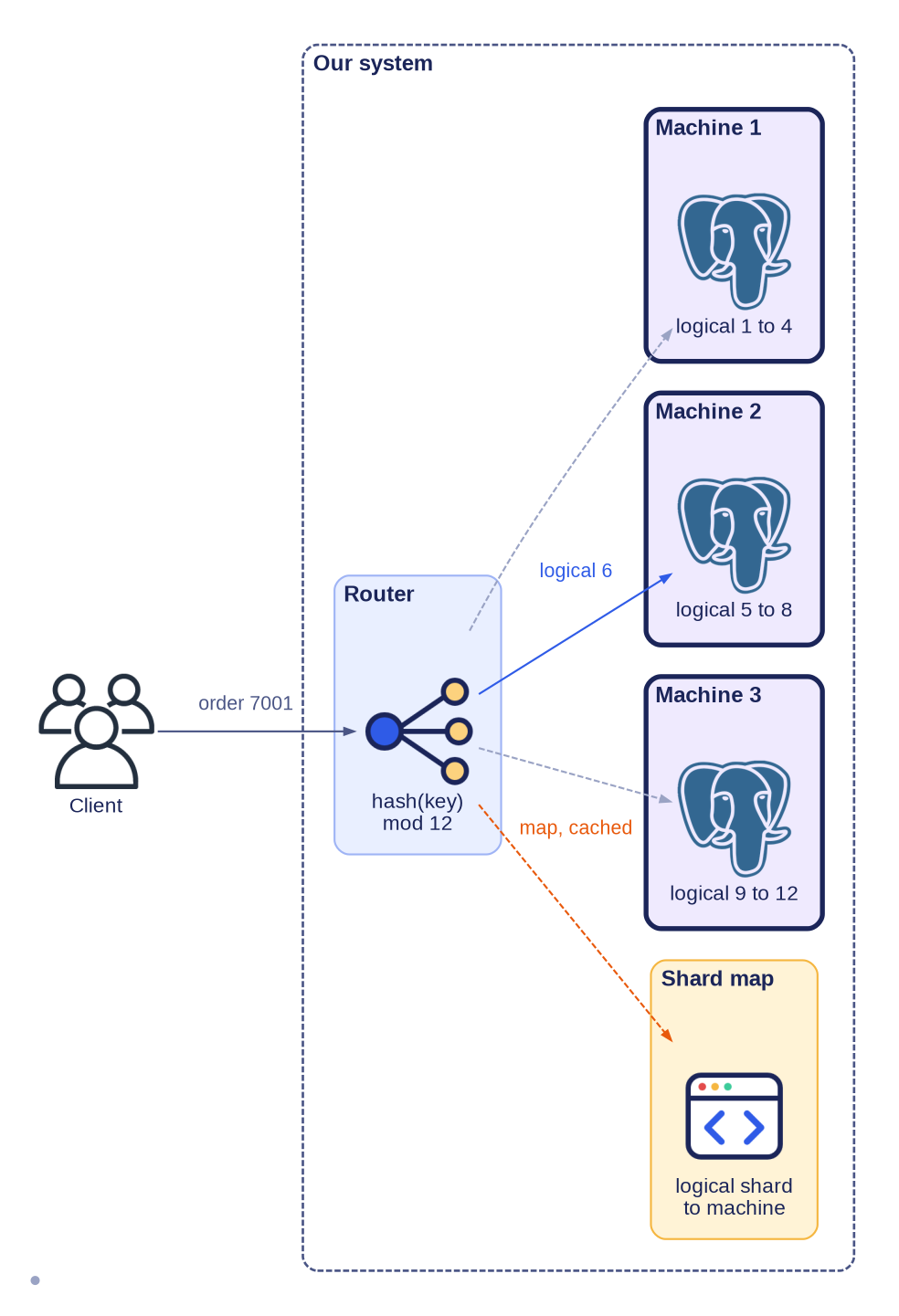
How much moves from 3 to 4 machines?
The same idea in real systems
| System | Fixed parts | How a key finds its part |
|---|---|---|
| Redis Cluster | 16,384 hash slots | CRC16 of the key, modulo 16,384 |
| Notion's PostgreSQL | 480 logical shards | Workspace id; 15 logical shards on each of 32 databases |
| MongoDB | Ranges, 128 MB by default | Shard key or its hash falls in a range |
| Vitess | Ranges of keyspace ids | A function turns a column into a keyspace id |
Key
Choosing the shard key
Write down the queries first. Assume a shop with these three: a customer's order history (70% of requests), one order by its id (25%), and a merchant's sales (5%).
Three candidate keys for orders
| Key | History | Order by id | Merchant sales | Risk |
|---|---|---|---|---|
| customer_id | 1 shard | 1 shard if the id carries the customer's shard | All shards | Low |
| order_id | All shards | 1 shard | All shards | Low |
| merchant_id | All shards | All shards | 1 shard | A huge merchant |
One table, two access patterns
Keep rows that are used together under the same key: the order, its lines and its payment share customer_id, so they share a shard. Then one local transaction can change all three.
Trade-offs
Targeted or scattered
Targeted routing
- The query includes the shard key and goes to one node.
- Little network work, and steady response times.
- Transactions and constraints hold inside the shard.
- Capacity grows with the number of shards.
Scatter-gather
- The query lacks the key and goes to every shard.
- The slowest shard decides the response time.
- Joins pull data to the app or to temporary tables.
- A change over several shards needs two-phase commit, with more ways to fail.
Why the slowest shard matters
Will this query be cheap?
Growth
Adding a machine without stopping
Moving logical shard 4
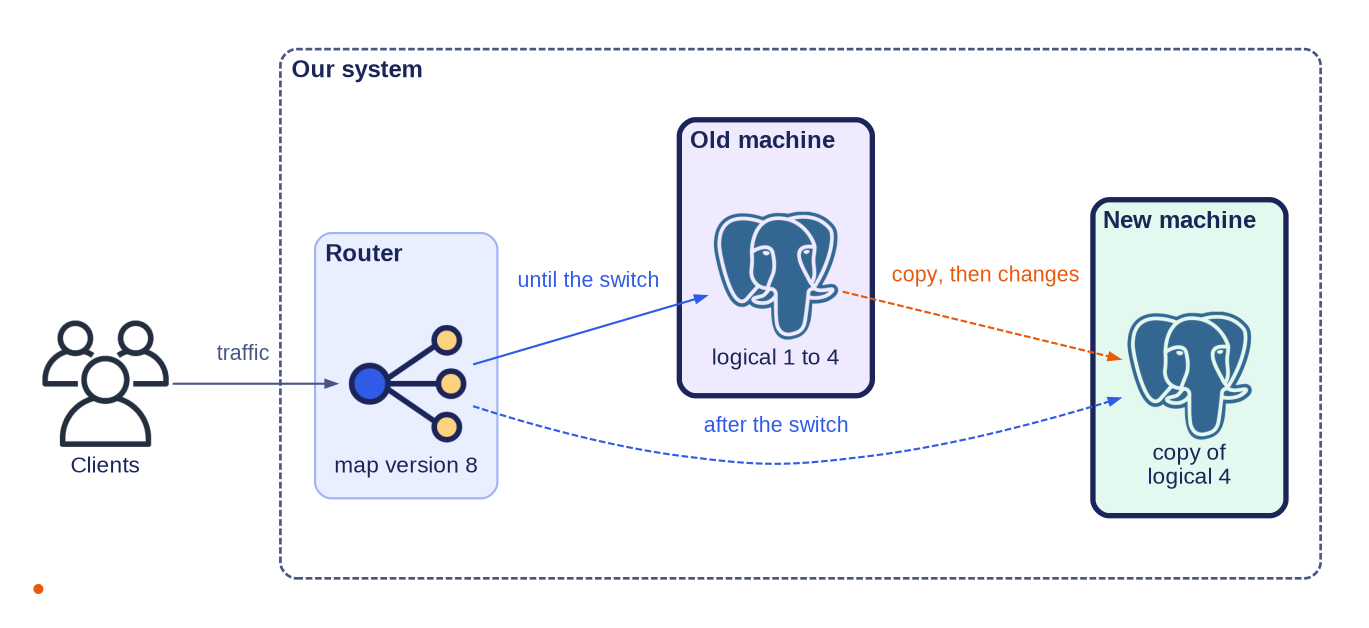
- 1
Add the machine
It starts empty and receives a snapshot of the logical shard.
- 2
Stream changes
Every write made after the snapshot follows, until the lag is close to zero.
- 3
Check
Compare row counts and checksums before anyone depends on the copy.
- 4
Switch
Pause writes to that logical shard for a moment, wait for the last change, publish the new map.
- 5
Clean up later
Keep the old copy for a while as a way back, then delete it.
The switch, message by message
Splitting ranges, hot keys and throttled moves are in advanced partitioning.
High availability
Replication: how changes travel
How state reaches the replicas
- 1
Statement-based
The primary sends the SQL text. Small on the wire, but NOW(), RAND() or an update without a strict order can give a different result on each copy.
- 2
Row-based (logical)
The primary sends which rows changed and how. The result is the same everywhere, and PostgreSQL's logical replication can copy between different major versions.
- 3
Write-ahead log (physical)
The primary ships its log of disk changes. Simple and cheap to replay, but the copy must run a compatible version with the same data layout.
When does a write count as done?
| Mode | Primary waits for | If the primary dies | Cost |
|---|---|---|---|
| Asynchronous | Nobody | The last writes can be lost | Fastest writes |
| Semi-synchronous | Some replicas to receive it | Safe while one of those survives | A network round trip |
| Synchronous | Every chosen replica | No acknowledged write is lost on them | The slowest one sets the pace |
Choosing leaders, quorums and failover are in data replication.
Consistency
Replication lag and what users see
Lag is the time between a commit on the primary and its replay on a follower. It causes three well-known surprises:
- Stale reads: a person saves a profile, the page reloads from a lagging follower, and the old profile is back.
- Going back in time: two refreshes reach followers with different lag, and a post appears and then disappears.
- Effect before cause: a comment is visible on a follower before the post it answers.
Reading your own write
More guarantees are in consistency models. What a broken network forces you to give up is in the CAP theorem.
Numbers
How many shards?
Assume 6 TB today, doubling each year, and 900 million writes a day. Assume one shard is comfortable with 2 TB and 5,000 writes a second.
Size for two years
Four costs to say out loud
Joins
Keep related rows under one key, or copy what you need.
Ids
No shared counter. Put the shard number in the id, or use UUIDs.
Uniqueness
A unique email over all shards needs its own table, sharded by email.
Operations
Backups, schema changes and upgrades happen on every shard.
Summary
The whole topic in one minute.
Sharding divides data between machines by a key. Replication copies it. Most large systems use both.
Choose a key that spreads load and matches your main query, because changing it later is expensive. Put many fixed logical shards between the key and the machines, so that growth moves only a few of them. Before sharding, try indexes, a bigger machine, replicas and a cache.
- Sharding adds write and storage capacity. Replication adds durability, fault tolerance and read capacity.
- Choose a key with many values that matches the most frequent query, to avoid scatter-gather.
- Avoid plain key % N. Use consistent hashing or fixed logical shards.
- Physical log replication is cheap to replay. Row-based logical replication can cross versions.
- Handle lag with positions, sticky routing or reads from the primary.