
How DNS works
medium 25 minResolution turns a name into an address by checking caches first and then following referrals from the root to the owner's servers.
Video lesson · Chapter 1 of 5
A name the laptop has never seen
A DNS lookup in 90 seconds
1:30Reel coming soon
Theory
Read or listen first. About 2 min.
What it is
DNS resolution is the work of turning a name into an answer. Your computer does very little of it. It asks one server, the recursive resolver, and waits.
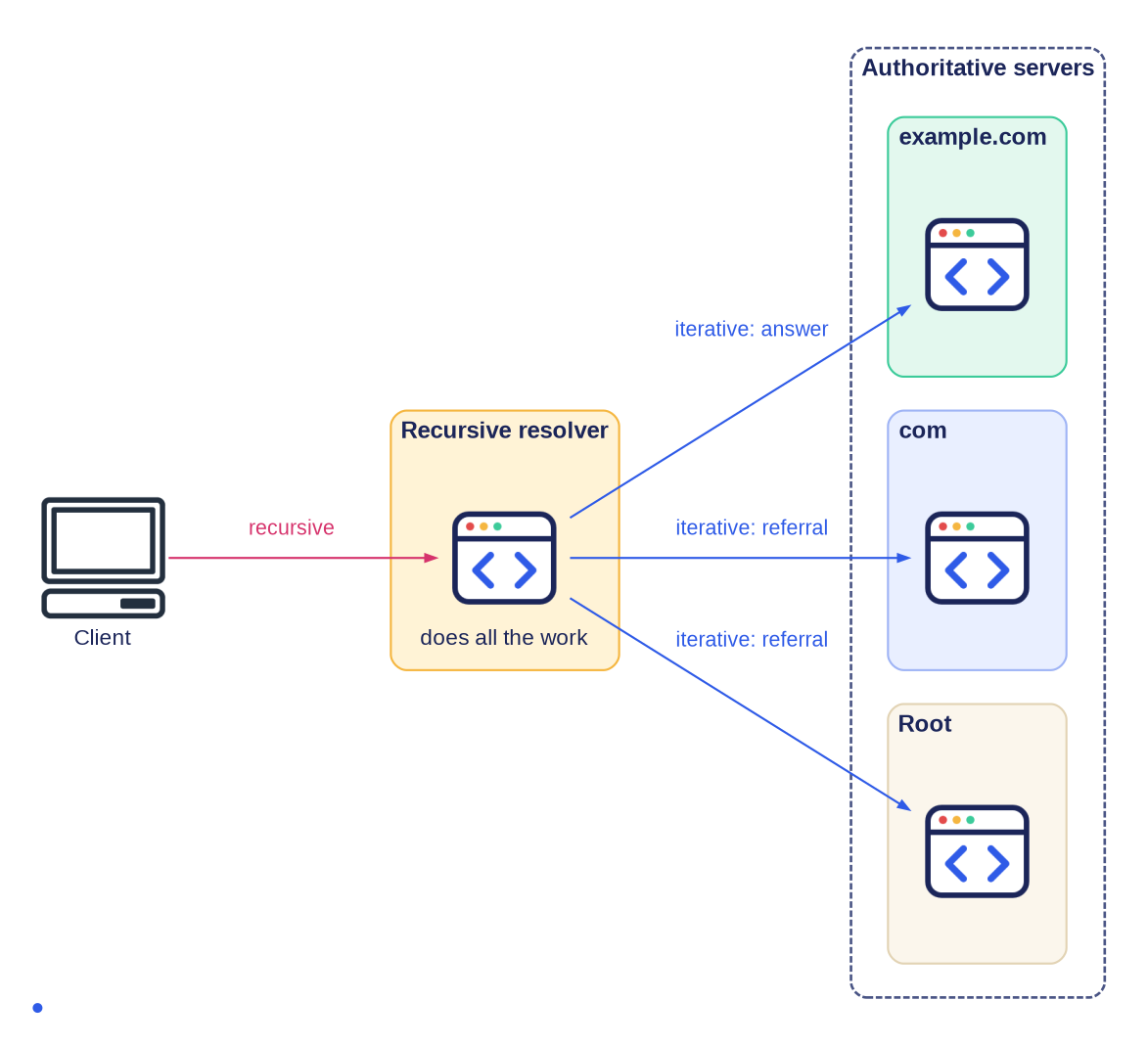
The resolver starts from what it has cached. If it knows nothing, it asks a root server, which says who runs the top-level domain. That server says who runs the domain, and the domain's own server gives the answer. Each server either answers or points to a server that is closer to the answer.
Why it exists
No server could hold every name, and no owner wants to ask a central office for each change. Referrals let each server know only its own part.
Walking the whole path for every page would be slow and would flood the root. So every answer, including "this name does not exist" and every referral, carries a time to live and is cached. Most lookups never leave the nearest cache.
DNS was designed without proof of who is answering and without privacy. Both were added later, and knowing which protection does what is a favourite interview question.
A short history
November 1987
RFC 1034 describes recursive and non-recursive service, referrals and caching.
March 1998
RFC 2308 defines how long a negative answer may be cached.
March 2005
RFC 4033 introduces the current DNSSEC, which signs records and deliberately does not hide them.
January 2009
RFC 5452 asks resolvers to use unpredictable source ports, which makes forged answers much harder.
May 2016
RFC 7858 specifies DNS over TLS, on port 853.
October 2018
RFC 8484 specifies DNS over HTTPS.
March 2020
RFC 8767 describes serving stale answers when the owner's servers cannot be reached.
November 2021
RFC 9156 describes sending each server only the part of the name it needs.
Words to know
- Stub resolver
- The small DNS client in your operating system. It asks and does not walk.
- Recursive resolver
- The server that does all the work and caches the result.
- Referral
- An answer that says: ask these servers instead.
- Glue
- The address of a name server, sent with the referral so that it can be reached.
- NXDOMAIN
- The name does not exist.
- SERVFAIL
- The resolver could not get a usable answer.
- RRSIG
- The DNSSEC signature over a set of records.
- DoH, DoT
- DNS over HTTPS and DNS over TLS: encryption between you and your resolver.
How it works
Step through the idea, or press Play.
Check caches. Browser, operating system, perhaps a router, then the resolver
Understand it
Start here
Asking from station to station
Imagine you need the platform of the Lake train. You ask one person, the master of your home station. That master does not know, but knows whom to ask, and sends a message from station to station until somebody knows.
Notice who sent every message: the home master. Asha asked only once.
The walk
Eleven steps for www.example.com
| # | Step | What happens |
|---|---|---|
| 1 | User request | You type www.example.com |
| 2 | Browser cache | The browser looks at recent answers |
| 3 | System cache | The operating system looks at its hosts file and its cache |
| 4 | Ask the resolver | "What is the address of www.example.com?" |
| 5 | Ask root | The resolver asks a root server |
| 6 | Root refers | "Ask a.gtld-servers.net", a com server |
| 7 | Ask com | The resolver asks that server |
| 8 | com refers | "Ask ns1.example.com", with its address |
| 9 | Ask the owner | The resolver asks ns1.example.com |
| 10 | Answer | 192.0.2.10 with a TTL of 3600 |
| 11 | Cache and return | The resolver keeps it and replies to you |
The same walk as messages
Two kinds of question
Recursive and iterative
One recursive question, three iterative ones
| Recursive | Iterative | |
|---|---|---|
| In words | Give me the final answer | Give me the answer or point me closer |
| Who does the work | The resolver | The one who asks |
| Reply | Answer or error | Answer or referral |
| Used between | Client and resolver | Resolver and authoritative servers |
| Good for | Simple clients, one shared cache | Servers that stay simple and cheap |
Caches
Where answers are remembered
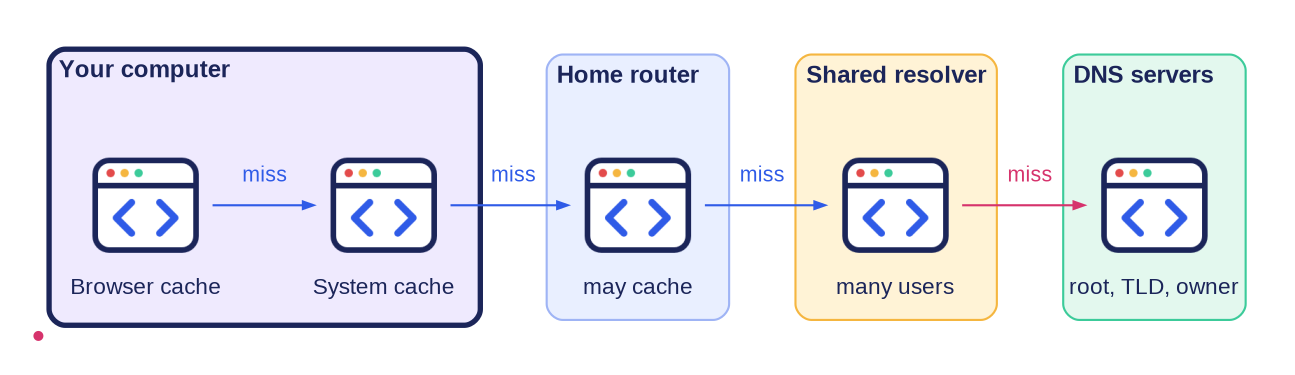
Caches in the order they are asked
Four cache layers
| Layer | Keeps | For how long |
|---|---|---|
| 1. Browser | Recent lookups of this browser | Its own rule, often about a minute |
| 2. Operating system | Lookups of every program | The TTL, if it caches at all |
| 3. Router | Lookups of the home or office | The TTL; some only pass questions on |
| 4. Resolver | Lookups of all its users | The TTL, within its own limits |
Is the answer still good?
The average lookup
No is an answer too
Negative caching
"This name does not exist" is cached as well. The time is the smaller of two numbers in the zone's SOA record: the record's own TTL and its last field, called minimum (RFC 2308). That is why a name you created a moment after asking for it can stay invisible.
How long a missing name stays missing
Three answers that are not addresses
| Reply | Means | Typical cause |
|---|---|---|
| NXDOMAIN | The name does not exist | Typing error, or an expired domain |
| NOERROR, no data | The name exists, not with this type | Asked AAAA where only A exists |
| SERVFAIL | The resolver failed | Servers unreachable, or a bad signature |
Transport
UDP, TCP and size
Questions normally travel in one UDP packet to port 53. The original limit is 512 bytes. A longer reply is cut and marked truncated, and the client asks again over TCP. EDNS lets the client announce that it can take larger UDP replies. So both UDP and TCP port 53 must be open.
A reply that does not fit
Threats
What can go wrong on purpose
Cache poisoning
A false record gets into a resolver's cache and misleads all its users until it expires.
Spoofing
Somebody forges a reply that looks as if it came from the right server.
Denial of service
Servers are flooded so that names can no longer be found.
Loss of privacy
Plain DNS lets the network, for example your provider, read every question.
Which protection does what
| Protection | Stops | Does not stop |
|---|---|---|
| DNSSEC | False or changed records | Reading the question |
| DoT and DoH | Reading or changing it on the way to the resolver | A resolver that lies, or that keeps logs |
| Random source ports | Guessing a forged reply | An attacker who sees the traffic |
| Response rate limiting | Use of your server as an amplifier | Large floods by themselves |
| Anycast and many servers | Loss of one site | A mistake copied to all of them |
Proof
How DNSSEC works
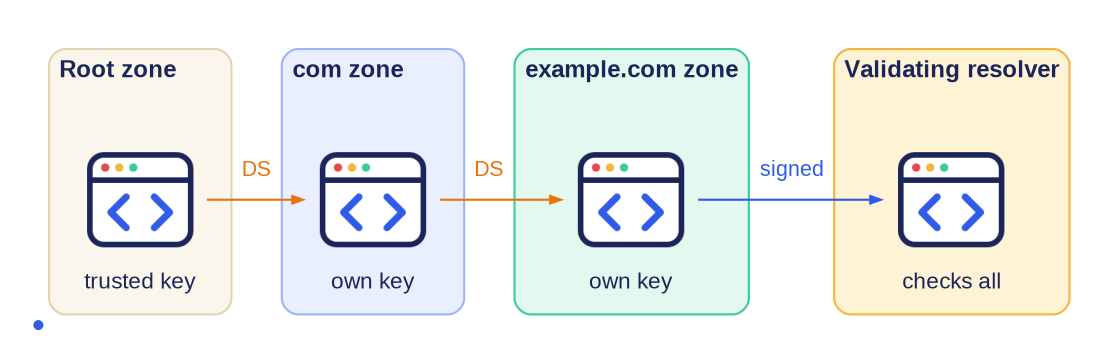
A chain of trust
- 1
Sign the zone
The owner signs each set of records with a private key.
- 2
Publish the signature
An RRSIG record travels with the answer, and the public key is in a DNSKEY record.
- 3
Link to the parent
The parent holds a DS record, a fingerprint of the child's key.
- 4
Verify
The validating resolver checks signatures up to the root key. If one fails, it answers SERVFAIL.
Change
Propagation is expiry
Nothing is pushed through the Internet when you edit a record. Your own servers change at once, and every cache keeps the old answer until its copy expires. What people call propagation is many clocks running down.
Three caches, one change at noon
Tools
Troubleshooting
nslookup example.com # short question and answerdig example.com +short # only the valuesdig example.com MX +short # another record typedig example.com @9.9.9.9 # ask one particular resolverdig +trace example.com # walk root, TLD, owner yourselfdig example.com SOA # serial and negative TTLEmpty the local cache
| System | Command |
|---|---|
| Windows | ipconfig /flushdns |
| macOS | sudo dscacheutil -flushcache and sudo killall -HUP mDNSResponder |
| Linux with systemd-resolved | resolvectl flush-caches |
Common problems
| You see | Likely cause | Try |
|---|---|---|
| NXDOMAIN in the browser | The name does not exist | Spelling, registration, negative cache |
| SERVFAIL | Servers unreachable or DNSSEC broken | Another resolver, then the owner's server |
| Slow first visit | Distant or overloaded resolver | Measure, then a nearer resolver |
| Old server still used | An old answer in a cache | Compare TTLs, flush, wait |
| Only some users fail | Broken AAAA or split DNS | Ask for A and AAAA separately |
Is it DNS?
Summary
The whole topic in one minute.
Clients ask recursively: give me the final answer. Resolvers ask iteratively: tell me the answer or who is closer. The order is browser cache, system cache, resolver cache, root, top-level domain, authoritative server, and each step stops as soon as something is known.
DNSSEC proves that records are genuine but hides nothing. DoH and DoT hide the question on the way to the resolver but do not prove the record. To debug, compare the answer from your resolver with the answer from the authoritative server, and look at the TTL.
- The client asks once, recursively. The resolver asks many times, iteratively.
- Order: browser, system, resolver, root, TLD, authoritative.
- Answers, referrals and "does not exist" are all cached.
- DNSSEC proves, DoH and DoT hide. They solve different problems.
- Propagation is old answers expiring, one cache at a time.
- To debug, compare the resolver's answer with the owner's.