
Introduction to DNS
easy 25 minDNS is the distributed database that turns names such as www.example.com into addresses computers can connect to.
Video lesson · Chapter 1 of 6
Follow a lookup across authorities
DNS in 80 seconds
1:20Reel coming soon
Theory
Read or listen first. About 2 min.
What it is
Computers find each other by numeric address, such as 192.0.2.10. People remember names. The Domain Name System, or DNS, is the service that answers the question: which address belongs to this name?
It is not one big list in one place. It is a tree of names, and every branch is looked after by the organisation that owns it. The company that owns example.com runs the list for example.com, and nobody else has to be asked when that list changes.
The answers are called records. One kind holds an IPv4 address, another holds an IPv6 address, another names the mail server, and so on. Each record says how long it may be remembered.
Why it exists
Addresses change. A server is replaced, a provider is switched, a second data centre opens. If programs stored the address, each change would break them. If they store the name, the owner changes one record and everyone follows.
One central list could not keep up with the whole Internet, neither in size nor in the number of changes. Dividing the tree among its owners, and letting everyone cache answers for a while, is what made it grow.
Because every visit starts with a name, DNS is also the first place where traffic can be steered: to another server, another region or another company's network.
A short history
Before 1983
Every host on the network copied one file, HOSTS.TXT, from a central information centre. RFC 1034 describes why that stopped working.
November 1983
Paul Mockapetris publishes RFC 882 and RFC 883, the first description of domain names.
November 1987
RFC 1034 and RFC 1035 replace them. They are still the base of DNS today.
April 1995
RFC 1794 describes using DNS answers to spread requests over several servers.
October 2003
RFC 3596 settles the AAAA record for IPv6 addresses.
2010
The root zone is signed, so DNSSEC can be checked from the top of the tree.
Words to know
- Domain name
- A list of labels separated by dots, read from right to left, such as www.example.com.
- Zone
- The part of the tree that one owner manages as a unit.
- Record
- One fact about a name: its type, its value and its TTL.
- Resolver
- The server that looks answers up for you and remembers them.
- Authoritative server
- A server that holds the real records of a zone.
- TTL
- Time to live: how many seconds an answer may be cached.
- Delegation
- A parent zone naming the servers that run a child zone.
How it works
Step through the idea, or press Play.
Ask. A program asks a resolver for the records of a name
Understand it
Start here
Asking for a house by name
Imagine a village where every house has a number. You want to visit Noor, but you only know the name. So you ask the village clerk, who keeps a book of names and house numbers. DNS is that book for the Internet.
The name stayed the same while the house changed. That is the whole point of a name.
Why
Life without DNS, and with it
With DNS
- You remember example.com
- The same name works for IPv4 and IPv6
- The owner changes one record and clients follow
- Answers can differ by health, weight or place
Without DNS
- You memorise 192.0.2.10 for every site
- IPv6 is worse: 2001:db8::1 is a short one
- The address changes and you lose access
- There is nowhere to steer traffic before a connection starts
From a name to a connection
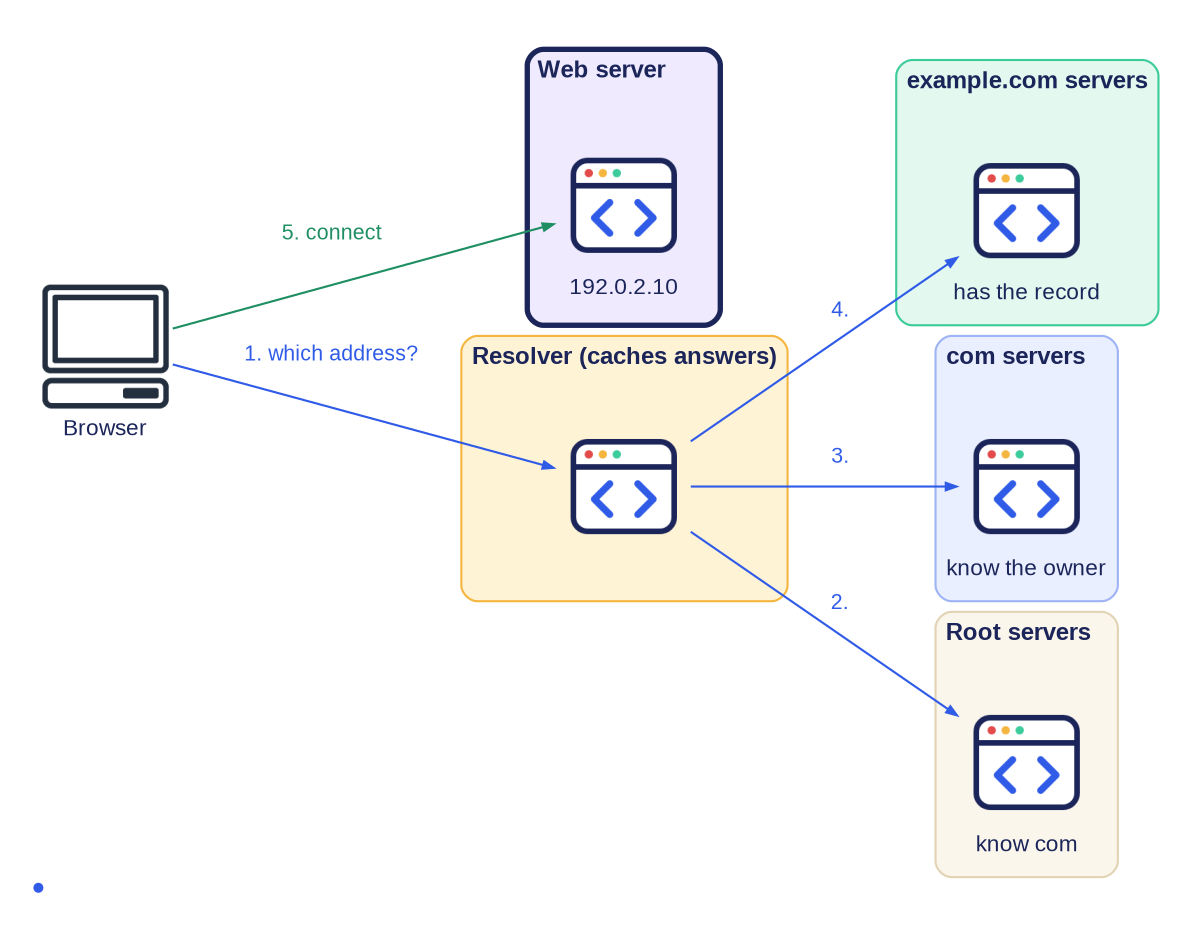
How each step of that walk works is the subject of How DNS works. This page is about the database itself.
The tree
The DNS hierarchy
DNS is an upside-down tree. The root is at the top, and each level delegates responsibility for the names below it.
An inverted tree
Anatomy of www.example.com.
| Part | Called | Looked after by |
|---|---|---|
| the final dot | Root (usually not typed) | Root server operators |
| com | Top-level domain (TLD) | The com registry |
| example | Second-level domain | Whoever registered it |
| www | Subdomain | The same owner, in their own zone |
Parts
Who does what
Resolver
Takes your question, finds the answer and caches it. Usually run by your Internet provider, your company or a public service.
Root server
Knows which servers run each top-level domain. It never knows the final address.
TLD server
Knows which servers run each domain under com, org, net, io or a country code.
Authoritative server
Holds the actual records of a zone. It is the final source of truth.
One complete question, in seven steps
- 1
User request
The browser asks for the address of www.example.com.
- 2
Local caches
The browser and the operating system look at answers they already have. A home router may cache too.
- 3
Recursive resolver
The resolver checks its own cache and starts the lookup if needed.
- 4
Root server
It answers with the servers of com.
- 5
TLD server
It answers with the servers of example.com.
- 6
Authoritative server
It answers with the address itself, 192.0.2.10.
- 7
Response cached
The resolver and the machines below it keep the answer for its TTL.
Data
Record types
| Type | Says | Example |
|---|---|---|
| A | The IPv4 address of a name | example.com is 192.0.2.10 |
| AAAA | The IPv6 address of a name | example.com is 2001:db8::10 |
| CNAME | This name is an alias of another name | www is an alias of example.com |
| MX | The mail server, with a preference number | 10 mail.example.com |
| TXT | Free text: SPF, DKIM, DMARC, ownership proofs | v=spf1 and the allowed senders |
| NS | The name servers of a zone | ns1.example.com |
| SOA | Facts about the zone, such as its serial number | One per zone |
| PTR | Address back to name (reverse lookup) | 192.0.2.10 is example.com |
| SRV | Host and port of a service | Port 5060 on sip.example.com |
| CAA | Which authorities may issue certificates | One named authority |
Which record do I need?
Ownership
Zones and delegation
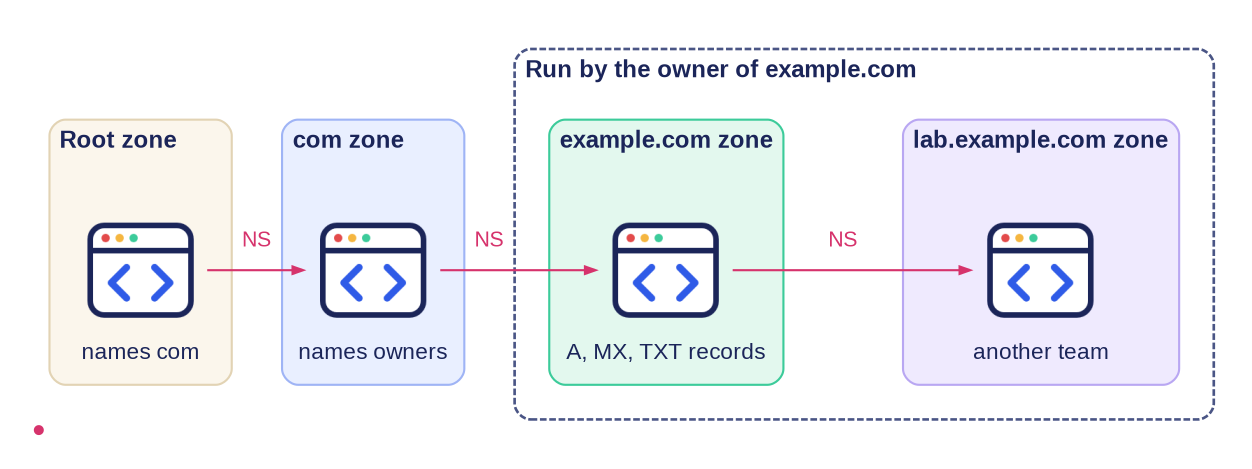
A zone is what one owner manages. A parent zone does not copy the child's records. It only holds NS records that say who runs the child. That is why you can change your own records without asking com, and why com must be told when you move to another DNS provider.
Each zone names the next one
Changing your DNS provider safely
TTL
How long to remember
Choosing a TTL
| TTL | Means | Use it for |
|---|---|---|
| 86,400 s | 24 hours | Records that hardly ever change, such as NS |
| 3,600 s | 1 hour | Ordinary records |
| 300 s | 5 minutes | Records you may have to change today |
| 60 s | 1 minute | Failover, where a fast change is worth more queries |
What a TTL costs
How long the old answer can live
Uses
What teams do with DNS
Spread load
Return several addresses for one name, often in changing order (round-robin DNS).
Geographic routing
Give users in Europe the European address and users in America the American one (GeoDNS).
Mail safety
SPF, DKIM and DMARC are TXT records that let receivers check who may send mail for a domain.
Joining a CDN
static.example.com is a CNAME to a name that the content network controls.
Proving ownership
A certificate authority or a service asks you to publish a TXT record only the owner can create.
Finding services
Inside a cluster, names point at services instead of at single machines.
More on these: global and local load balancing, content delivery networks and service discovery.
Round-robin DNS and a dead server
Limits
What DNS is bad at
Good at
- Giving a stable name to a moving thing
- Coarse steering between sites
- Working at enormous scale through caching
- Surviving the loss of some servers
Bad at
- Instant changes
- Even load: one resolver may stand for thousands of users
- Knowing how busy a server is
- Moving connections that are already open
For per-request decisions put a load balancer behind the name.
Public resolvers
Resolvers anyone may use
| Service | IPv4 address | Notes |
|---|---|---|
| Cloudflare | 1.1.1.1 | Does not pass your network on to the owner's server, with one documented exception |
| Google Public DNS | 8.8.8.8 and 8.8.4.4 | Supports EDNS Client Subnet |
| Quad9 | 9.9.9.9 | Run as a free security and privacy service |
In code
Good habits
Do
- Cache answers for their TTL, and no longer
- Configure at least two resolvers
- Back off and retry with limits when a lookup fails
- Validate names that users give you
- Measure how long resolution takes
Do not
- Hard-code IP addresses
- Ignore lookup failures
- Set a TTL of 0: every request becomes a query
- Block a hot path on a synchronous lookup
- Trust an answer as proof of identity. Use TLS for that
Summary
The whole topic in one minute.
DNS maps names to records. The tree starts at the root, continues with top-level domains such as com, and is delegated label by label to the owner of each name, whose authoritative servers hold the truth.
Use A and AAAA for addresses, CNAME for aliases, MX for mail, TXT for proofs and policies and NS for delegation. Choose the TTL by asking how fast you need to change the answer, and remember that DNS steers new lookups only: it cannot move a connection that is already open.
- DNS maps names to records through a tree of zones, each run by its owner.
- Root, TLD and authoritative servers each know only the next step.
- A and AAAA for addresses, CNAME for aliases, MX for mail, TXT for proofs, NS for delegation.
- The TTL decides how long an old answer can survive a change.
- DNS steers new lookups. Per-request decisions belong to a load balancer.