
LSM tree
hard 28 minA log-structured merge tree collects writes in memory, flushes them as sorted files and merges those files in the background.
Video lesson · Chapter 1 of 5
Accept a burst without updating a tree on disk
Log, sort, merge in 80 seconds
1:20Reel coming soon
Theory
Read or listen first. About 2 min.
What it is
An LSM tree, short for log-structured merge tree, is a way to organise a whole storage engine. A write is appended to a log and put into a sorted table in memory. When that table is full it is flushed to disk as an SSTable. Background compaction merges these files.
Files are arranged in levels. New files arrive in level 0, where key ranges overlap. In the common leveled form, each deeper level is about ten times larger and its files do not overlap.
Why it exists
An update in place must find and rewrite a page for each small change. With scattered keys and more data than memory, that means many random reads and writes. An LSM tree never updates in place: it turns many small writes into a few large sequential ones.
The price is paid elsewhere. A read may have to look in several files, old versions take space until they are merged, and the merging writes the same data again. An LSM tree is a deal between these three costs.
A short history
1996
Patrick O'Neil, Edward Cheng, Dieter Gawlick and Elizabeth O'Neil publish "The log-structured merge-tree" in Acta Informatica.
2006
Google's Bigtable paper describes a store built from a commit log, a memtable, SSTables and compactions.
2011
LevelDB is written by the Bigtable authors as an open library with the same general design.
2012
RocksDB is created at Facebook as a fork of LevelDB for server workloads.
2016
WiscKey, presented at FAST, separates keys from values so that compaction moves less data.
Words to know
- Memtable
- The sorted table in memory that takes all writes.
- Immutable memtable
- A full memtable that is being flushed while a new one takes writes.
- Level 0
- The newest files on disk. Their key ranges may overlap.
- Compaction
- Merging files to drop old versions and keep reads cheap.
- Tombstone
- A marker that says a key was deleted.
- Write amplification
- Bytes written to storage for each byte written by the application.
- Read amplification
- Disk reads for one lookup.
- Space amplification
- Bytes on disk for each byte of live data.
How it works
Step through the idea, or press Play.
Log and memtable. Append for safety, insert into a sorted table in memory
Understand it
Start here
The post office story
Letters arrive all day. Walking to the right shelf for each one would take forever, so the clerk sorts them in a tray on the desk. A full tray is sealed in a box. When too many boxes stand around, they are merged into well-ordered ones. Collecting trading cards works the same: first a pile, then a small sorted box, then a bigger one.
Quick now, tidy later. The tidying has to keep up.
The idea
Architecture
One LSM storage engine
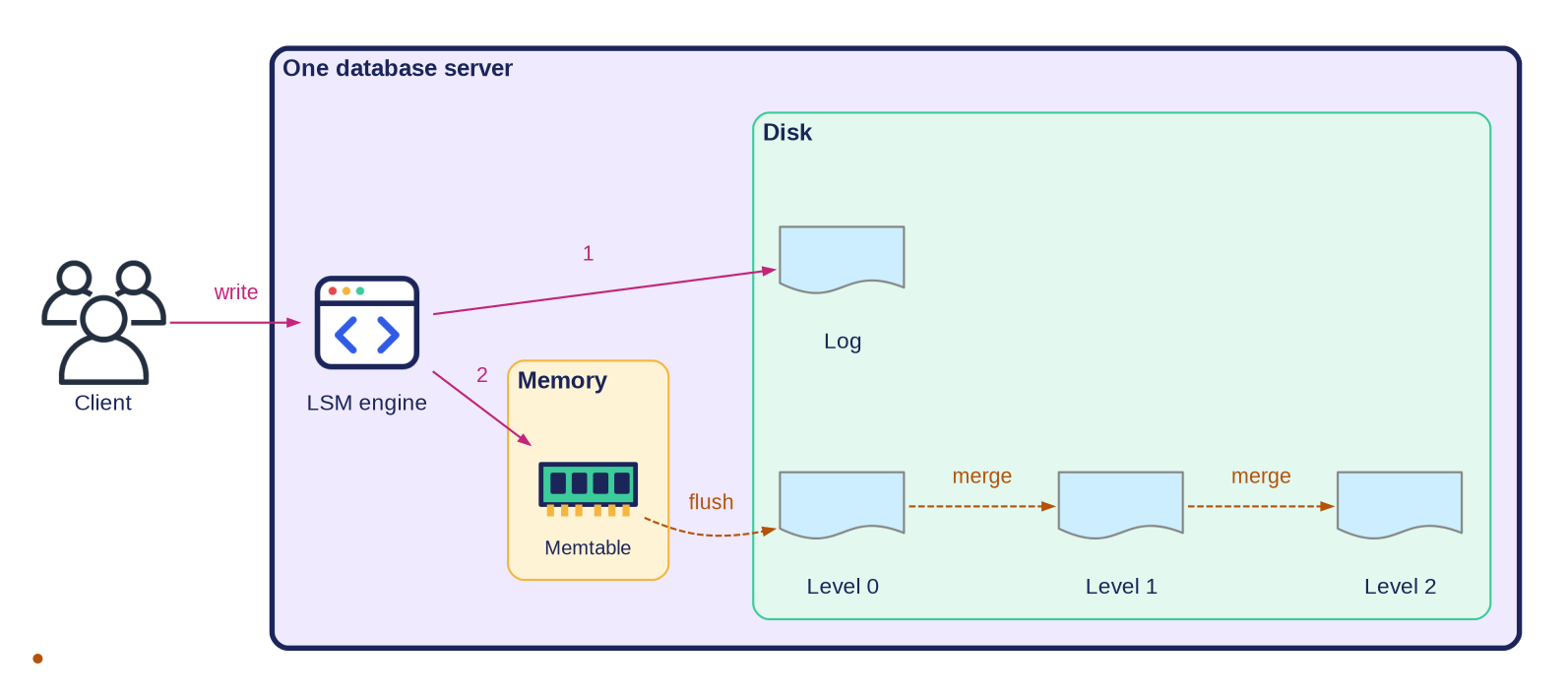
The levels in leveled compaction
| Place | Key ranges | Size, RocksDB defaults |
|---|---|---|
| Active memtable | Everything new | 64 MB |
| Immutable memtable | Being flushed | 64 MB |
| Level 0 | Overlap | Compaction starts at 4 files |
| Level 1 | No overlap: a-f, g-m, n-s, t-z | 256 MB |
| Level 2 | No overlap, finer pieces | 10 times level 1 |
| Level 3 and deeper | No overlap | 10 times the level above |
Fast writes
An append and an insert in memory.
Growing levels
Each about ten times the one above.
Background work
Flush and compaction run beside the traffic.
No update in place
A newer version hides an older one.
Write path
What a write does
- 1
Append to the log
So the write survives a crash. How safe it is depends on when the log is flushed.
- 2
Insert into the memtable
A sorted structure in memory, O(log n).
- 3
Confirm
The client gets its answer. No data file was touched.
- 4
Flush, later
A full memtable is written as a new file in level 0. Then its part of the log can go.
- 5
Compact, later
Files are merged so that reads stay cheap.
The write path
Why it is quick
Sequential log
Only appended.
Memory
The insert needs no disk.
No random writes
Nothing on disk is changed in place.
Batching
Thousands of writes become one file.
Sorted structures for a memtable
| Structure | Where | Why |
|---|---|---|
| Skip list | Default in RocksDB; LevelDB too | Simple, and friendly to many readers |
| Red-black tree | Some engines | Balanced, O(log n) |
| AVL tree | Rare | Stricter balance, more work on insert |
| Vector, hash variants | Options in RocksDB | Bulk loading, or no ordered scans |
Read path
What a read does
- 1
Memtables
The active one, then the immutable ones. Found: done.
- 2
Level 0
All files whose range holds the key, newest first, because they overlap.
- 3
Level 1 and deeper
At most one file in each level. A binary search over the ranges finds it.
- 4
Not found
No level had the key, or the newest version is a tombstone.
A lookup stops at the newest version
What keeps reads cheap
| Help | Effect |
|---|---|
| Bloom filter | Skips files that certainly do not hold the key; see SSTable |
| Block cache | Hot blocks stay in memory |
| Index in memory | One disk read for each file that is really searched |
| Compaction | Fewer places to look |
Expected disk reads for one key
A range scan cannot use these filters. It opens an iterator on every memtable, every level 0 file and every level, and merges them: from the memtable a, c, e, g, from level 0 b, d, f, from level 1 h, i, j, so the result is a to j in order.
Compaction
Keeping order
Without compaction there would be thousands of small files, and a read would have to check them all. Compaction merges files, drops versions that were replaced and removes deleted keys when that is safe.
Leveled
- Levels without overlap, each 10 times larger
- At most one file per level for a key
- Little extra space, about 11% in a steady state
- More rewriting
- Default in RocksDB; also LevelDB
Size-tiered
- Merge files of similar size, such as four of 1 MB into one of 4 MB
- Less rewriting
- More files for a key
- A big merge may need as much free space as its input
- Cassandra's default when no strategy is named
Level 0 into level 1
Other strategies exist. Time-window compaction groups data by time, so old windows can be dropped whole. Cassandra's current documentation recommends its unified strategy for most workloads, because it can be tuned to behave like the others.
Three costs
Write, read and space amplification
Write amplification, leveled, worst case
| Leveled | Size-tiered | |
|---|---|---|
| Write amplification | High, about the factor times the levels | Lower, about one per tier |
| Read amplification | Low: one file per level | Higher: several files per tier |
| Space amplification | About 1.1 | Up to 2 and more during a big merge |
| Choose for | Reads, updates, tight space | Heavy inserts |
Deletes
Tombstones
A file cannot be changed, so a delete writes a tombstone: key user:1, value deleted. A read that meets the tombstone first answers not found, although an older file may still hold Alice.
When may a tombstone go?
In a replicated system a node that was away may not know about the delete. Cassandra therefore keeps tombstones for ten days by default (gc_grace_seconds = 864,000). Many tombstones in one range make scans slow, because each must be read and skipped.
Trouble
When compaction falls behind
From busy to stalled
What to watch
| Signal | Meaning | Move |
|---|---|---|
| Level 0 files rise | Compaction is too slow | More compaction threads, limit the writers |
| Pending compaction bytes rise | Debt is building | Add disk bandwidth or nodes |
| Latency peaks every few minutes | Compaction competes with reads | Rate limit compaction |
| Disk fills during a merge | Inputs and outputs exist together | Keep free space, or leveled compaction |
| Scans slow after mass deletes | Tombstones | Compact that range, drop by time window |
Compare
LSM tree or B-tree?
| LSM tree | B-tree | |
|---|---|---|
| Writes | Very fast: sequential, batched | Slower when keys are scattered |
| Reads of one key | Good with filters, several places | One path, steady |
| Range scans | Merge of several sources | Follow linked leaves |
| Write amplification | Compaction: roughly 10 to 37 leveled | Whole page for a small change: up to 80 for 100 bytes in 8 KB |
| Space | Old versions until merged | Partly empty pages |
| Background work | Compaction must keep up | Checkpoints |
Choose
LSM tree when
- Logs, metrics, sensor data, messages
- Time series that are mostly appended
- High ingest rates
- Compression matters
- Some extra read latency is fine
B-tree when
- Reads dominate, as in many OLTP systems
- Latency must be steady
- Point lookups and ranges are everything
- Many short transactions
- Nobody wants to tune compaction
Summary
The whole topic in one minute.
Log, sort, merge: append to a log, sort in memory, flush a file, merge later. Writes are quick because nothing is updated in place and many of them share one sequential write.
Reads go from the newest data to the oldest and use Bloom filters to skip files. Compaction decides between rewriting, reading and space: leveled compaction favours reads and space, size-tiered favours writes. If compaction falls behind, reads slow down and then writes must wait.
- Log, memtable, flush, compaction.
- Level 0 overlaps; deeper levels in leveled compaction do not.
- Reads go from new to old; Bloom filters skip files.
- Deletes are tombstones until compaction may drop them.
- Leveled favours reads and space, size-tiered favours writes.
- Compaction must keep up, or writes stall.