
SSTable
medium 24 minA sorted string table is a file of key-value pairs in key order that never changes after it is written.
Video lesson · Chapter 1 of 5
Seal a sorted fruit catalog
A sorted, sealed file in 75 seconds
1:15Reel coming soon
Theory
Read or listen first. About 2 min.
What it is
An SSTable, short for sorted string table, is a file that holds key-value pairs sorted by key. It is written once from start to end and never changed. The word string means a string of bytes: keys and values can be anything.
The file is cut into blocks of a few kilobytes. A small index says which block holds which keys, and a Bloom filter can tell that a key is certainly not in the file.
Why it exists
Changing a sorted file in place is slow: a new key in the middle would move everything behind it. So writes are collected in memory, sorted there and written as a new file in one sequential pass.
Because a finished file never changes, readers need no locks, copies are always consistent, and caches never hold stale data. The price comes later: several files may hold versions of one key, so they must be merged.
A short history
1970
Burton Howard Bloom describes the filter that now sits inside many SSTables.
2006
Google's Bigtable paper describes the SSTable file format: a persistent, ordered, immutable map from keys to values.
2008
Cassandra is released. Its storage engine keeps memtables in memory and immutable SSTables on disk.
2011
LevelDB is written in the style of the Bigtable tablet stack, without sharing its code.
Words to know
- Memtable
- The sorted structure in memory that becomes an SSTable when it is full.
- Data block
- A few kilobytes of neighbouring entries. Read, cached and compressed as one piece.
- Sparse index
- One entry for each block, not for each key.
- Footer
- A fixed-size end of the file that says where the index is.
- Bloom filter
- A compact bit array that answers "certainly not here" or "maybe here".
- False positive
- The filter says maybe, and the key is not there.
- Merge
- Reading several sorted files side by side and writing one, keeping the newest version of each key.
How it works
Step through the idea, or press Play.
Sort in memory. The memtable collects writes in key order
Understand it
Start here
The photo album story
Somebody collects photos and sorts them by name. When there are five, they go into an album, and the album is sealed: nothing is added or moved. It is like a toy list in alphabetical order on paper. You can jump straight to R for robot, and nobody edits the paper.
Album 1 is never changed. A newer photo of Cem simply goes into a later album.
The idea
Why sorted and why sealed
Immutable
Never modified after creation. No locks for readers.
Sorted
Binary search, ranges and merging all work.
Sequential write
The whole file is written in one pass.
Easy to copy
A finished file is the same everywhere, so backups and replicas are simple.
From memory to file
Structure
Inside the file
One SSTable and what stays in memory
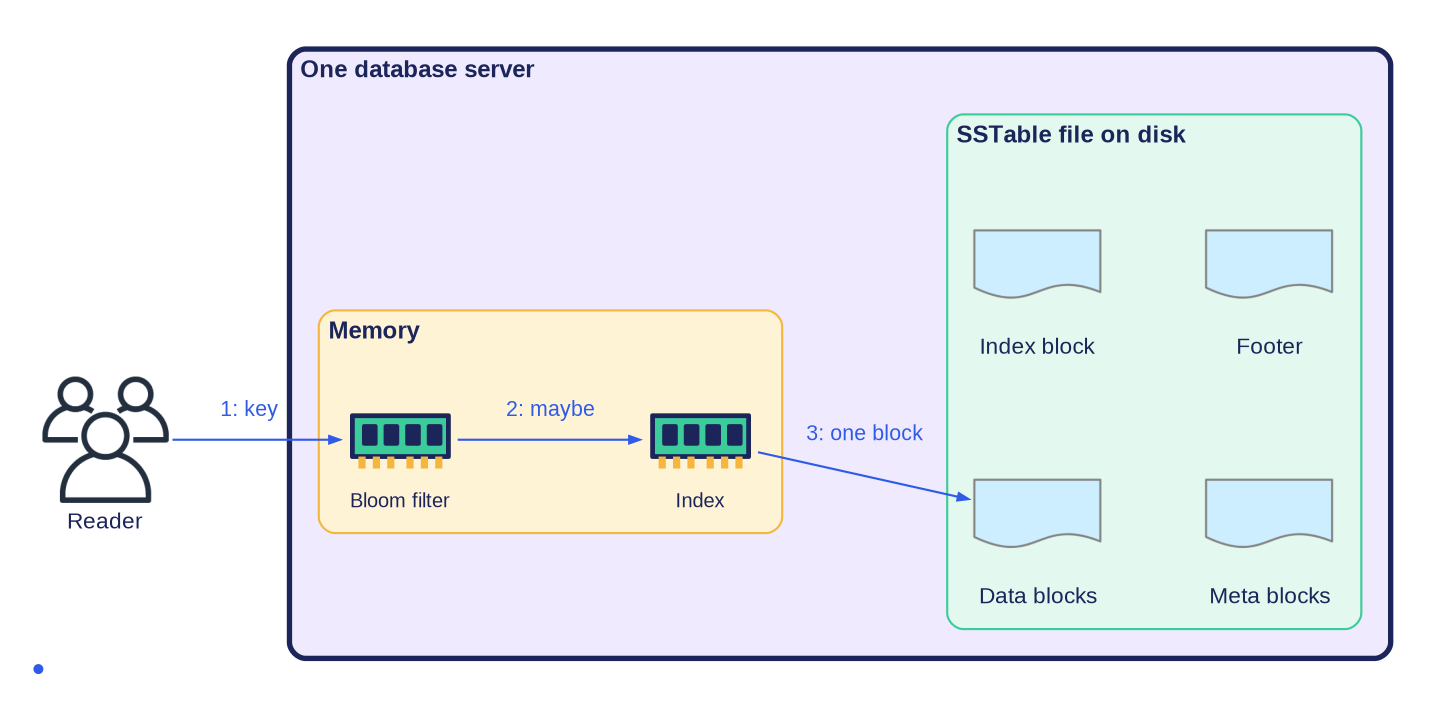
| Part | Holds | Example |
|---|---|---|
| Data blocks | Sorted entries | Block 0: a to d, 1: e to k, 2: l to q, 3: r to z |
| Meta blocks | Bloom filter, statistics, compression details | One filter for the file |
| Index block | A key and a position for each block | a at 0, e at 1, l at 2, r at 3 |
| Footer | Positions of the index and the meta blocks, and a magic number | Fixed size, at the end |
Inside one data block
- 1
Length of the key
4 bytes in the simple format used in the Code tab. Real formats use numbers of variable length.
- 2
Length of the value
Another 4 bytes.
- 3
Key, then value
As many bytes as the lengths say, followed directly by the next entry.
- 4
Checksum
Real formats add one for each block, to notice damage.
Block compression
- Each block is compressed on its own
- Only one block is unpacked for a lookup
- LZ4 and Snappy are quick, Zstandard is smaller
- How much it saves depends on the data
Prefix compression
- Neighbouring keys look alike: user:1001, user:1002
- Store only the part that differs
- Saves most when keys share long prefixes
- A full key now and then keeps search possible
How small is the index?
Write
Creating a table
- 1
Collect
Entries gather in the memtable, sorted by key.
- 2
Flush
When the memtable is full, a new file is started.
- 3
Data blocks
Written one after the other. The first key of each block is remembered.
- 4
Filter and index
Written after the data, because now the positions are known.
- 5
Footer
Written last. Only then is the file made visible to readers.
The write is sequential, so it runs at the speed of the device for large writes. That is the reason for the whole design: many small random writes became one large sequential one.
Read
Finding one key
Point lookup
The index is sparse. To find grape, take the last block whose first key is not larger than grape. If the key exists in this file, it is in that block.
Range scan from user:100 to user:200
Skip
The Bloom filter
A Bloom filter behaves like a magic ball that says "definitely not here" or "might be here". It is never wrong about not here. It is an array of bits: to add a key, several hash functions each set one bit. To ask, check the same bits. One zero means the key was never added.
16 bits, 3 hash functions
| Step | Bits | Result |
|---|---|---|
| Add apple | 2, 7, 14 | All three are set |
| Add banana | 5, 7, 11 | 7 was already set, 5 and 11 are new |
| State | 2, 5, 7, 11, 14 are 1 | Five bits for two keys |
| Ask cherry | Bit 3 is 0 | Certainly not in the set |
| Ask another key | 5, 7, 14 are all 1 | Maybe. Here it would be a false positive |
False positive rate
| Bits per key | Hash functions | False positives | Memory for 1M keys |
|---|---|---|---|
| 8 | 6 | 2.2% | 1 MB |
| 10 | 7 | 0.8% | 1.25 MB |
| 12 | 8 | 0.3% | 1.5 MB |
| 16 | 11 | 0.05% | 2 MB |
Good
- About 10 bits per key, whatever its length
- A check takes k bit tests
- No false negatives, ever
- With 1% false positives, 99 of 100 useless file reads are avoided
Limits
- False positives, so a read can still be wasted
- Single keys cannot be removed
- Keys cannot be listed
- Size and accuracy must be balanced
Merge
Several files become one
Merge, newest wins
Because every input is sorted, the merge reads each file once from start to end and needs little memory. When to merge which files is called compaction, and it belongs to the LSM tree. So does the question of how deletes work.
Compare
SSTable or B-tree page?
| SSTables | B-tree | |
|---|---|---|
| Write pattern | Sequential, whole files | Scattered pages |
| Read of one key | Maybe several files | One path |
| Extra space | Old versions until merged | Partly empty pages |
| Rewriting | Merging repeats the same data | A small change rewrites a page |
| Best for | Write-heavy work | Read-heavy work |
Is it a good fit?
Numbers
Defaults you can quote
| Setting | Value | From |
|---|---|---|
| Block size | 4 KB | RocksDB and LevelDB default |
| Block size | 64 KB | Bigtable paper, typical; HBase default |
| Target file size | 64 MB | RocksDB, first level |
| Target file size | 2 MB | LevelDB |
| File size, leveled | 160 MB | ScyllaDB |
| Bloom filter | about 10 bits per key | RocksDB's example setting |
Summary
The whole topic in one minute.
An SSTable is written in one pass from sorted data and then sealed. A reader loads the footer, the index and the filter once; after that a lookup costs about one block read, or none when the filter says no.
Sorting pays off three times: binary search works, ranges are read in sequence, and several files can be merged in one pass. Immutability makes concurrency and copying easy and makes merging necessary.
- An SSTable is sorted, sealed and written in one pass.
- Data blocks, meta blocks with a filter, an index block, a footer.
- Lookup: filter, sparse index, one block.
- A Bloom filter is never wrong about no; 10 bits per key give about 1% wrong yes.
- Sorted files merge in one pass; the newest version wins.