
Object storage
easy 26 minObject storage keeps files as objects: the bytes, some metadata and a unique key, in a flat bucket reached over HTTP.
Video lesson · Chapter 1 of 5
Give a photograph an address
Object storage in 90 seconds
1:30Reel coming soon
Theory
Read or listen first. About 2 min.
What it is
Object storage, also called blob storage, manages data as objects. An object is three things: the content, metadata about it, and a unique key. Objects live in buckets, and you reach them with HTTP requests such as PUT and GET.
There are no real folders. A key like images/2024/photo.jpg is one name that happens to contain slashes. This flat design is what lets the store spread over very many machines.
Why it exists
Applications collect large files that rarely change: pictures, videos, backups, logs. A disk on one server fills up and fails with the server. A database is made for small records and costs more for each byte.
Object storage takes over the hard parts: copies in several places, growth, and access from anywhere. In return you give up what a disk does well: changing a few bytes in the middle, and very low delay.
A short history
1996
Object storage is proposed as a research project at Garth Gibson's laboratory at Carnegie Mellon University.
13 March 2006
Amazon announces S3: storage for the internet, with a simple web interface to write and read any amount of data.
1 December 2020
S3 begins to give strong read-after-write consistency for all requests.
5 January 2023
S3 starts to encrypt every newly uploaded object by default.
2 December 2025
S3 raises the largest object from 5 TB to 50 TB.
Words to know
- Object
- Content, metadata and a key, stored and replaced as one piece.
- Bucket
- A named container of objects. Azure calls it a container.
- Key
- The unique name of an object inside its bucket.
- Prefix
- The beginning of a key, used like a folder when listing.
- Storage class
- A price plan: cheaper to keep, dearer or slower to read.
- Presigned URL
- A link that allows one operation on one object for a limited time.
- Multipart upload
- Sending one large object in parts that can be retried one by one.
- Durability
- How sure you are that the data is not lost. Different from being reachable now.
Understand it
Start here
Self-storage with a label on each door
Imagine a self-storage building. Anything fits into a unit: skis, a tent, old toys. Every door has a label. You do not walk through rooms inside rooms. You say the label, and the clerk opens that door.
Real systems often store coded pieces instead of full copies, but the idea is the same: losing one place loses nothing.
The idea
Three kinds of storage
| File | Block | Object | |
|---|---|---|---|
| You see | Folders and files | Numbered blocks | Keys in a bucket |
| Example | /home/user/docs | Block 001, block 002 | images/photo.jpg in a bucket |
| Access | File system calls | A disk; needs a file system on top | HTTP requests |
| Change | Any byte | Any block | The whole object |
| Good for | Shared folders | Databases and boot disks | Media, backups, data lakes |
Key
images/2024/profile-photo.jpg: the unique name inside the bucket.
Data
Any bytes. S3 allows up to 50 TB in one object.
Metadata
Content-Type image/jpeg, size 2.4 MB, and your own fields such as x-amz-meta-user: alice.
Benefits
Very large scale, pay for what you use, reachable over HTTP, and 11 nines of designed durability.
Structure
Buckets and flat keys
Account, buckets, objects
Object storage: flat
- One lookup by full key
- No directory that can become a bottleneck
- A prefix is enough to list
- Renaming a folder means copying every object
File system: a tree
- Walks root, images, 2024, photo
- A record on disk for every file and directory
- Directories with millions of files are slow
- Renaming a folder is one small change
A normal S3 bucket name must be unique over all AWS accounts in a partition. Choose names that are hard to guess, and never put secrets or personal data in a key.
Inside
How a request travels
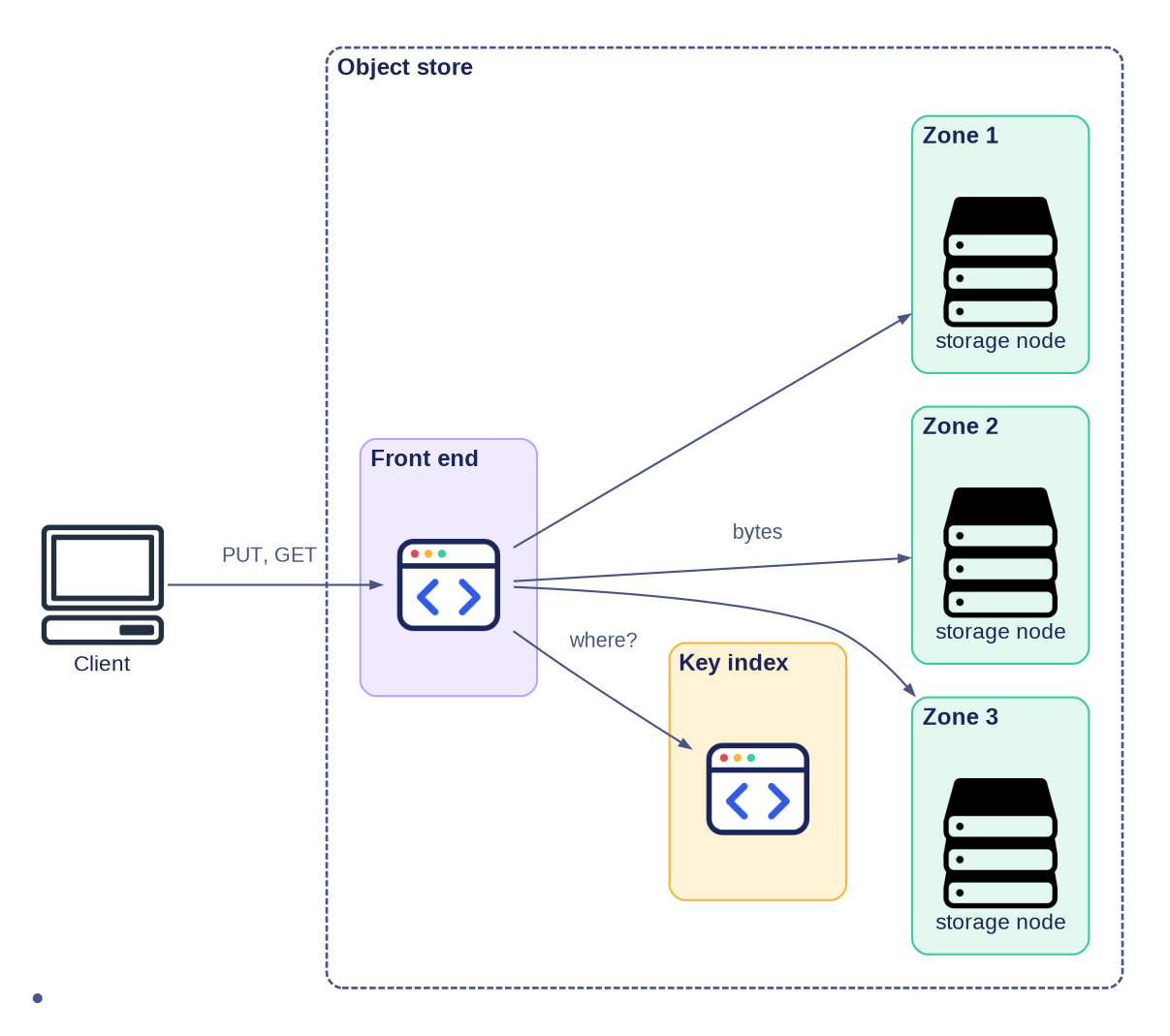
Front end, index, storage nodes
The parts on the way
| Part | Job |
|---|---|
| Client | Sends PUT or GET with a bucket and a key |
| CDN edge | Answers popular reads close to the user |
| Load balancer | Spreads requests over front ends |
| Front end | Checks identity and permission |
| Index service | Knows where the bytes of each key are |
| Storage nodes | Hold the bytes, in several zones |
One PUT
Durability
Eleven nines
Amazon designs S3 for 99.999999999% durability over a year. Most classes store data redundantly in at least three Availability Zones. It is a design goal for hardware loss, not a promise against your own mistakes.
What eleven nines means
Copies or coded pieces
Consistency
What you can rely on
S3 gives strong read-after-write consistency: after a successful PUT or DELETE, the next read sees it. Two writers to the same key: the last one wins. If that is not acceptable, use a conditional write. The header If-None-Match refuses to overwrite an existing key.
Money
Storage classes
Amazon S3 classes
| Class | For | First byte | Price to keep |
|---|---|---|---|
| Standard | Read often | Milliseconds | Highest of these |
| Intelligent-Tiering | Unknown or changing pattern | Milliseconds, unless archive tiers are on | Moves by itself |
| Standard-IA | Read about monthly, needed at once | Milliseconds | Lower, plus a fee to read |
| One Zone-IA | The same, and easy to make again | Milliseconds | Lower; one zone only |
| Glacier Instant Retrieval | Archive, rare but quick | Milliseconds | Low |
| Glacier Flexible Retrieval | Archive, can wait | Minutes to about 12 hours | Lower |
| Glacier Deep Archive | Kept for years | 12 to 48 hours | Lowest |
A lifecycle rule
# Terraformresource "aws_s3_bucket" "assets" { bucket = "my-app-assets"}resource "aws_s3_bucket_versioning" "assets" { bucket = aws_s3_bucket.assets.id versioning_configuration { status = "Enabled" }}resource "aws_s3_bucket_lifecycle_configuration" "assets" { bucket = aws_s3_bucket.assets.id rule { id = "archive-old" status = "Enabled" filter {} transition { days = 30 storage_class = "STANDARD_IA" } transition { days = 90 storage_class = "GLACIER" } expiration { days = 365 } abort_incomplete_multipart_upload { days_after_initiation = 7 } }}Choosing a class
Safety
Versions, encryption and access
Versioning keeps the old ones
| Version | Date | Size | State |
|---|---|---|---|
| v1 | 1 January | 1.2 MB | kept |
| v2 | 5 January | 1.4 MB | kept |
| v3 | 10 January | 1.3 MB | current |
| Topic | Options |
|---|---|
| Encryption by the store | SSE-S3 with keys of the service (the default), SSE-KMS with keys in a key service, SSE-C with keys you send |
| Encryption before upload | Client-side: the store never sees the content |
| Who may do what | IAM policies for users and roles, bucket policies on the resource |
| Old way | ACLs on single objects: disabled by default on new buckets |
| Temporary access | Presigned URLs |
| No change allowed | Object Lock: write once, read many, for a set time |
Patterns
Uploads and downloads
Direct upload with a presigned URL
The whole subject, with resuming, checks and virus scanning, is in file upload APIs. One fact to remember: whoever has the URL can use it until it expires. A signature made with IAM user keys can last at most 7 days, and one made with temporary credentials ends with them.
Multipart upload
- 1
Start
Ask for an upload and receive an upload id.
- 2
Send parts
Parts of 5 MiB to 5 GiB, up to 10,000 of them, in parallel. Retry only a part that failed.
- 3
Track
Each part is stored and answered with an ETag. You pay for parts already stored.
- 4
Complete
Send the list of part numbers and ETags. The store joins them.
- 5
Clean up
A lifecycle rule removes uploads that were never completed.
Photos in an application
Static site
Files in a bucket, a CDN in front for speed and HTTPS.
Data lake
Devices, logs and APIs write to raw. Jobs make processed and curated. Analytics, BI tools and ML training read.
Backups
Database dumps, snapshots and recovery logs, copied to another region.
Compliance archive
Deep archive with Object Lock, for example for seven years when a rule demands it.
Many analytics engines read files in the lake directly; see OLAP. S3 Select, which filtered inside one object, is no longer open to new customers.
Speed
Performance
Numbers for S3
| Fact | Value |
|---|---|
| Largest object | 50 TB (written as 48.8 TiB in the limits table) |
| Largest single PUT | 5 GB |
| Multipart parts | 5 MiB to 5 GiB each, at most 10,000 |
| When AWS advises multipart | From about 100 MB |
| Requests per partitioned prefix | At least 3,500 writes or 11,000 reads a second |
Read large objects in ranges and in parallel. Put many tiny records into one larger object, because each request costs money and time. Files with a version in the name can be cached for a long time, since they never change.
import jsonimport boto3from boto3.s3.transfer import TransferConfigs3 = boto3.client("s3")s3.upload_file("local-file.txt", "my-bucket", "remote-key.txt")s3.put_object( Bucket="my-bucket", Key="data/file.json", Body=json.dumps({"ok": True}), ContentType="application/json", Metadata={"processed": "true"},)s3.download_file("my-bucket", "remote-key.txt", "local-file.txt")# A listing has pages of at most 1,000 keys, so use a paginatorpages = s3.get_paginator("list_objects_v2").paginate( Bucket="my-bucket", Prefix="images/2024/")for page in pages: for obj in page.get("Contents", []): print(obj["Key"], obj["Size"])# Multipart from 100 MB, ten parts at a times3.upload_file( "large-file.zip", "my-bucket", "backups/large-file.zip", Config=TransferConfig(multipart_threshold=100 * 1024 * 1024, max_concurrency=10),)Products
Providers
| Amazon S3 | Azure Blob Storage | Google Cloud Storage | |
|---|---|---|---|
| Container name | Bucket | Container | Bucket |
| Designed durability | 11 nines | 11 (LRS), 12 (ZRS), 16 (GRS) nines | 11 nines |
| Largest object | 50 TB | About 190.7 TiB for a block blob | 5 TiB |
| Colder tiers | IA, Glacier family | Cool, Cold, Archive | Nearline, Coldline, Archive |
| Automatic tiering | Intelligent-Tiering | Lifecycle rules | Autoclass |
| Around it | CloudFront, Athena, Lambda events, AWS Backup | Data Lake Storage Gen2, Functions, immutable blobs | BigQuery, Cloud CDN, function triggers |
For your own machines, Ceph offers object storage through its RADOS Gateway with S3 and Swift compatible interfaces. MinIO is a well known S3-compatible server; its community repository was archived in April 2026, so check the support you would get before choosing it.
Use it for
- Pictures, video, documents
- Backups and archives
- Logs and data lake files
- Files of a web site
Do not use it for
- Rows that change every second: use OLTP
- A database file that is edited in place
- Queries by many attributes: keep them in a database
- Very low delay for tiny values: use a key-value database
Summary
The whole topic in one minute.
Object storage keeps whole objects under keys in flat buckets and is reached over HTTP. It is extremely durable because each object is stored redundantly in several places, and it is cheap because you can choose a storage class that fits how often you read.
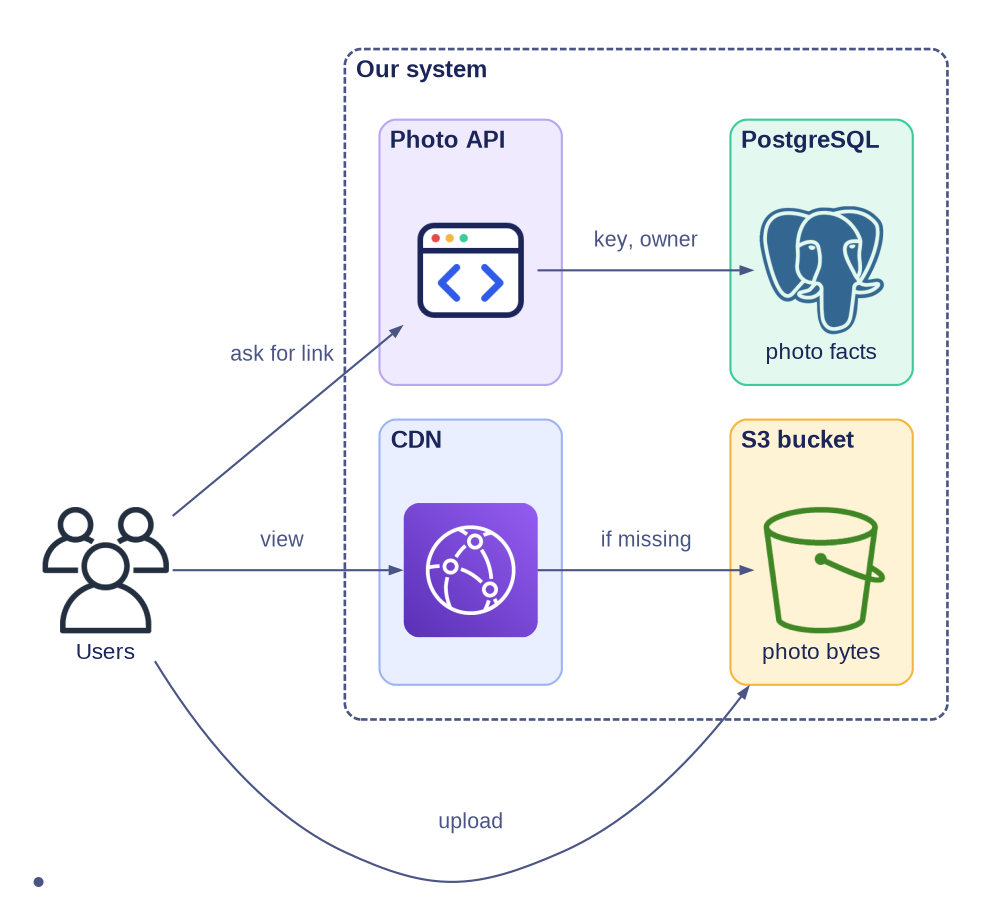
Upload large files directly with presigned URLs and multipart uploads, serve them through a CDN, keep facts about them in a database, and let lifecycle rules move or delete old ones. Do not use it as a disk or a database.
- An object is content, metadata and a key in a flat bucket.
- Objects are replaced as a whole; folders are only prefixes.
- Durability comes from redundancy over zones, protection from mistakes comes from versioning.
- Cheaper classes cost more to read, in money or time.
- Presigned URLs and multipart move large files without your servers.