
Push and pull
easy 25 minWhen data moves between two parts of a system, somebody has to start the transfer.
Video lesson · Chapter 1 of 5
Is the train platform ready for a new notice?
Push or pull in 75 seconds
1:15Reel coming soon
Theory
Read or listen first. About 2 min.
What it is
Data has to travel from the part that has it, the producer, to the part that wants it, the consumer. The question of this topic is who starts the journey. If the consumer asks for it, that is pull. If the producer sends it without being asked each time, that is push.
The question is not about direction. In both models the data flows from producer to consumer. Only the first move is different, and that first move decides who must know about whom, who sets the pace, and how old the data is when it arrives.
Why it exists
A consumer that asks cannot know when something new exists, so it asks too often or too late. A producer that sends knows the moment something happens, but it has to remember every consumer, reach them all, and cope with those that are slow or gone.
Each model therefore moves the work to the other side. Naming the model early in a design tells you which problem you have chosen: empty requests and delay, or connections and overload. Many real systems use a little of both.
A short history
October 1984
RFC 918 describes the Post Office Protocol, with which a workstation fetches mail from a mailbox server. The mail program asks: a pull.
May 1996
RFC 1945 documents HTTP 1.0. The client sends a request and the server answers it, so the web starts as a pull system.
April 2009
The W3C publishes the first working draft of Server-Sent Events: one HTTP response that stays open so that the server can keep sending.
April 2011
RFC 6202 writes down the known issues and best practices of long polling and HTTP streaming, which pages had been using to imitate push.
December 2011
RFC 6455 standardises the WebSocket protocol: two-way messages over one connection.
December 2016
RFC 8030 standardises Web Push, so a push service can deliver messages to a browser on behalf of an application.
Words to know
- Producer and consumer
- The part that has new data, and the part that wants it.
- Polling
- Asking again and again on a timer. Also called short polling.
- Long polling
- Asking once, while the server keeps the request open until there is something to say or a time limit passes.
- Subscription
- A record that says this consumer wants this kind of event.
- Cursor
- The position of the last event a consumer has handled, sent with the next request.
- Back-pressure
- A signal from a consumer that it cannot keep up, so the producer must slow down, store or drop.
- Fan-out
- One event that has to reach many consumers.
How it works
Step through the idea, or press Play.
Ask who starts. The consumer asks (pull), or the producer sends (push)
Understand it
Start here
The bread story
Asha wants fresh bread. They can walk to the bakery to ask, or the bakery can bring the bread. Picture a morning of each.
The bread always travels from the bakery to Asha. What changes is who makes the first move.
Pull
The consumer asks
In a pull system the client sends a request whenever it wants data, and the server answers only when asked. The server does not have to know who its clients are, so any server behind the load balancer can answer.
Pull
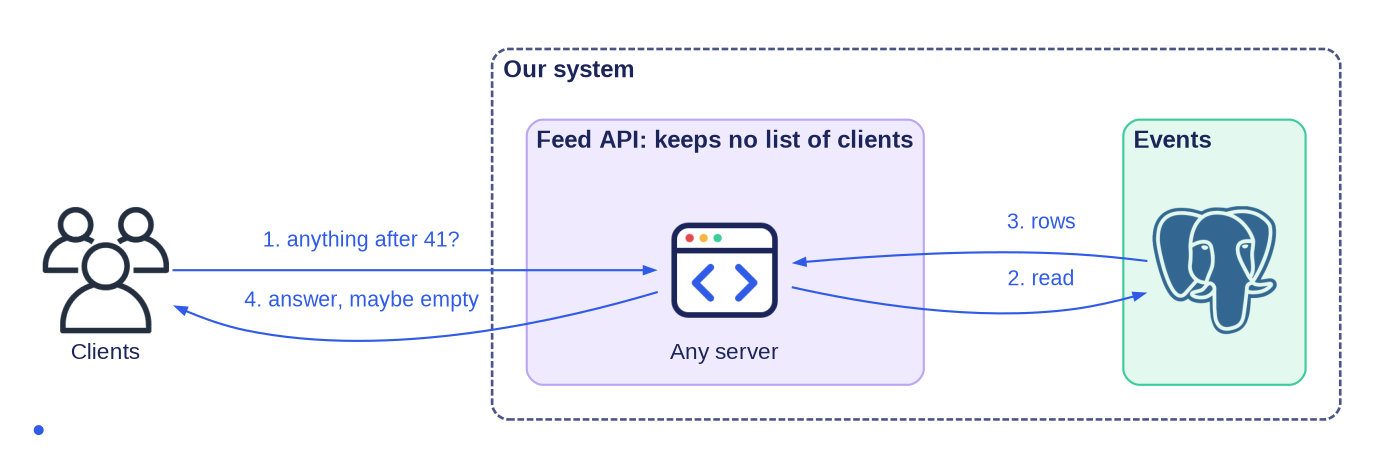
Where you meet pull
HTTP and REST calls
A page load, a search, a form: the browser asks and the server answers.
GraphQL and database queries
The caller describes what it wants and waits for it.
File downloads
The reader picks the moment and can pause.
Polling endpoints
The same question on a timer, such as: is my export ready?
Pull
Short polling and long polling
Short polling repeats the request at a fixed interval. It is simple, and it wastes requests whenever nothing is new. Long polling sends one request, and the server holds it until there is data or a time limit passes. Then the client asks again at once.
Short polling
Long polling
Numbers
What polling costs
Request rate
Delay and empty answers
Choosing a poll interval
| Interval | Use it for | Trade-off | 100,000 clients send |
|---|---|---|---|
| 100 ms to 1 s | Near real-time dashboards | High server load | 1,000,000 to 100,000 per second |
| 5 to 30 s | Status updates, feeds | Balanced | 20,000 to about 3,300 per second |
| 1 to 5 min | Background sync | Low load, older data | about 1,700 to 330 per second |
| On demand | The user presses refresh | Lowest load, the user decides | only what people ask for |
Push
The producer sends
In a push system the client connects or registers once and says what it wants. After that the server starts every transfer, as soon as there is something to send.
Connect, subscribe, receive
Push
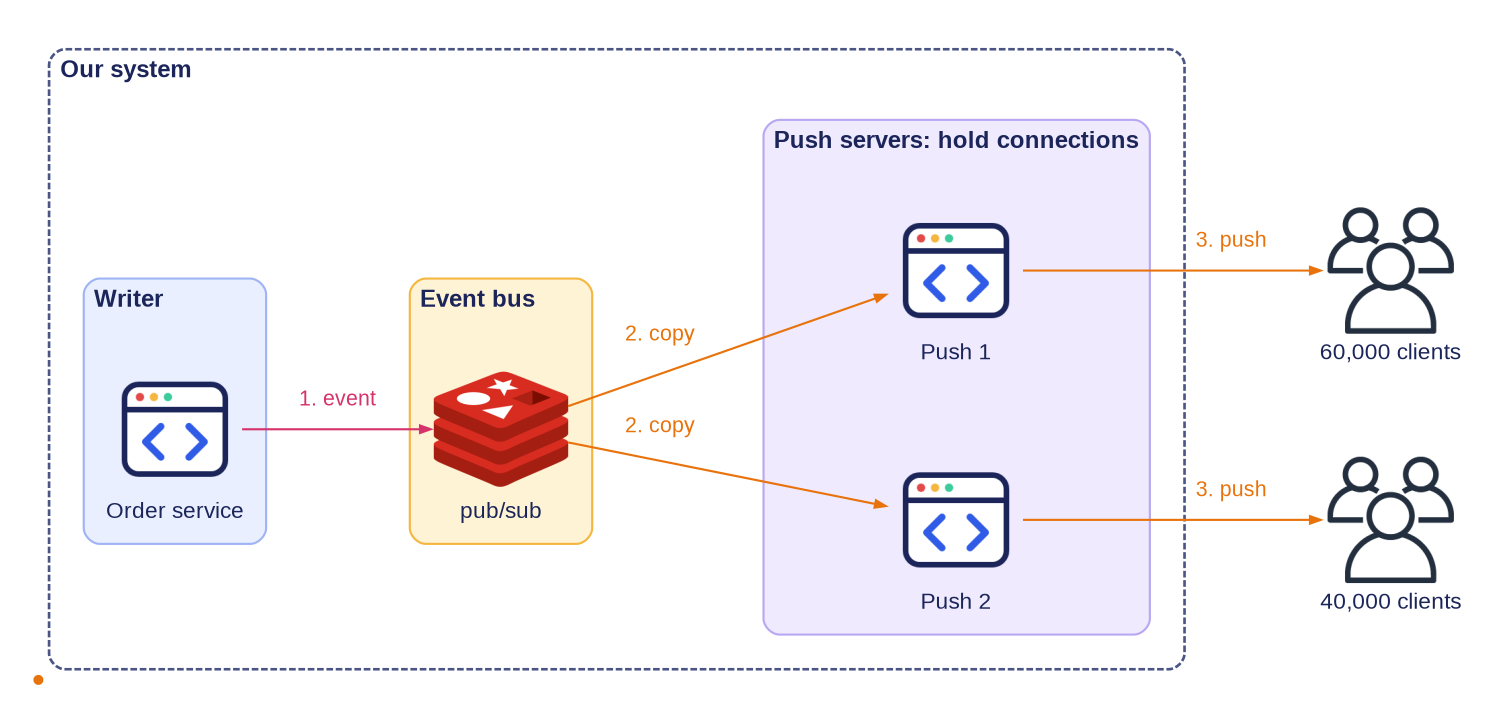
Four ways to push
| Technology | What it is | Good | Costs |
|---|---|---|---|
| WebSocket | Two-way messages over one TCP connection | Both sides can send at any time, low delay | Connection state on one server, heartbeats and reconnects to manage |
| Server-Sent Events | One long HTTP response, server to client | Simple, and the browser reconnects by itself | One direction only, and a proxy that buffers responses can hold events back |
| Push notification | The platform's service delivers it: APNs, FCM or Web Push | Works while the app is closed, saves battery | Different per platform, small payloads, no promise of delivery time |
| Webhook | An HTTP request from one server to another | Fits events between companies | The receiver must expose an endpoint, and the sender must retry |
Trade-offs
What each side gains and pays
Pull: gains
- Simple to build.
- Works with ordinary HTTP everywhere.
- The client decides when, and how much.
- No subscription to remember.
- Any server can answer, so it is easy to scale.
Pull: costs
- Empty answers when nothing is new.
- Later than push by up to one interval.
- Load grows with clients, not with news.
- Never quite real time.
- Bandwidth spent on headers and empty bodies.
Push: gains
- Data arrives about one network trip after it exists.
- The lowest delay you can get.
- No empty requests.
- The server knows its subscribers, so it can count and target them.
Push: costs
- Connection or subscription state to keep.
- Many idle connections still use memory and file handles.
- A slow client can be overwhelmed.
- Networks drop connections, so messages get lost unless you can replay them.
Side by side
| Push | Pull | |
|---|---|---|
| Who starts | The server or producer | The client or consumer |
| Delay | Lowest, about one network trip | Up to one interval |
| Resources | Open connections | Work per request |
| Scaling | Connections and fan-out need care | Stateless servers, easy |
| Complexity | Higher: state, reconnects, overload | Lower: request and answer |
| Proxies and firewalls | May need settings for long connections | Works almost everywhere |
| Who sets the pace | The producer, unless you add back-pressure | The consumer |
| Best for | Live updates | On-demand data and APIs |
The same 100,000 clients, with push
Overload
Back-pressure: when the consumer is slower
A pull consumer is safe by nature: it asks for the next batch when it is done with the last one. A push consumer is not. If events arrive at 100 per second and the consumer handles 60, the gap of 40 per second has to go somewhere.
How long does a buffer last?
Four things a push system can do
Slow down
The consumer grants credits: it says it can take 50 more, and the producer stops at 50.
Buffer
Keep items for a while, with a limit. Without a limit the buffer is a memory leak.
Drop or merge
For prices and positions only the newest value matters, so older ones may be replaced.
Disconnect
Close the slowest client and let it catch up by pulling from its cursor.
Push to a log, pull from the log
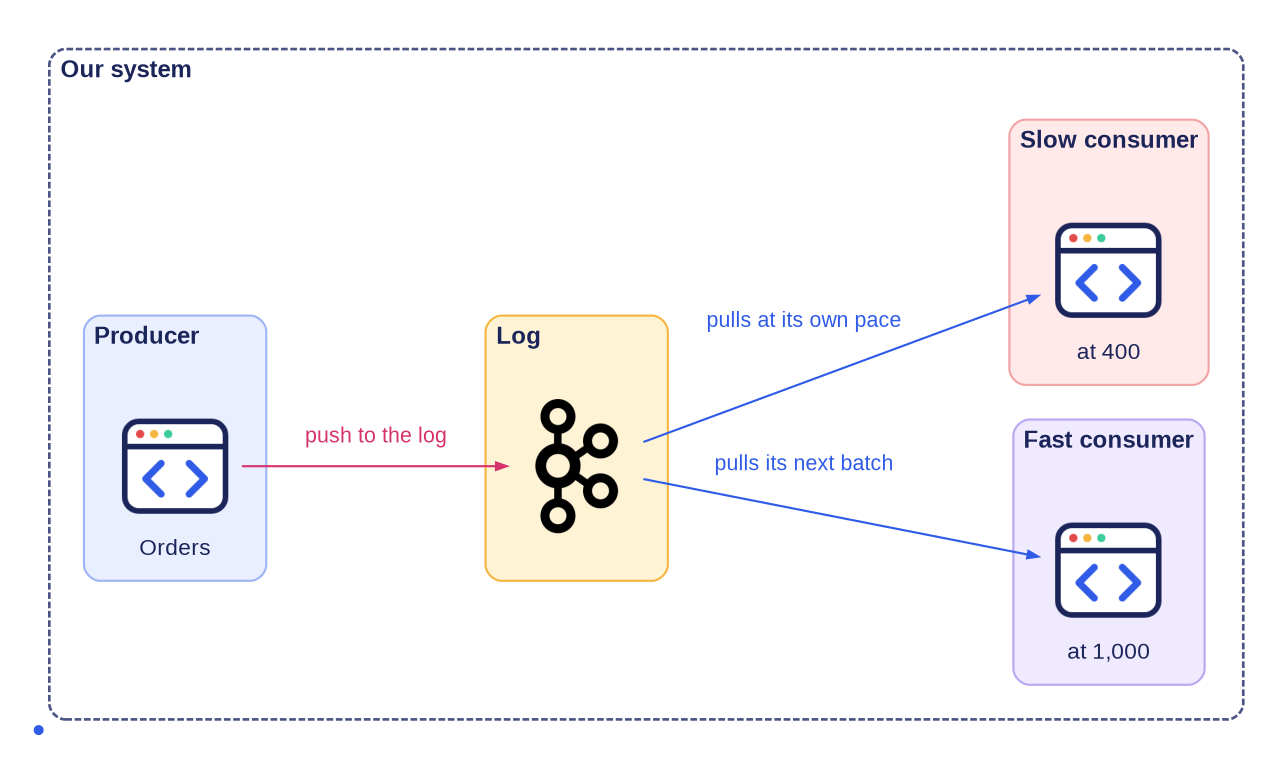
Kafka works this way: producers push to the broker, and consumers pull from it. Its documentation names the reason, that a pushed consumer can be overwhelmed, while a pulling one simply falls behind and catches up. The pull can wait for data, so it is a long poll. Delivery and consumer groups belong to asynchronous communication and queues.
Both
Hybrid patterns
Three combinations
- 1
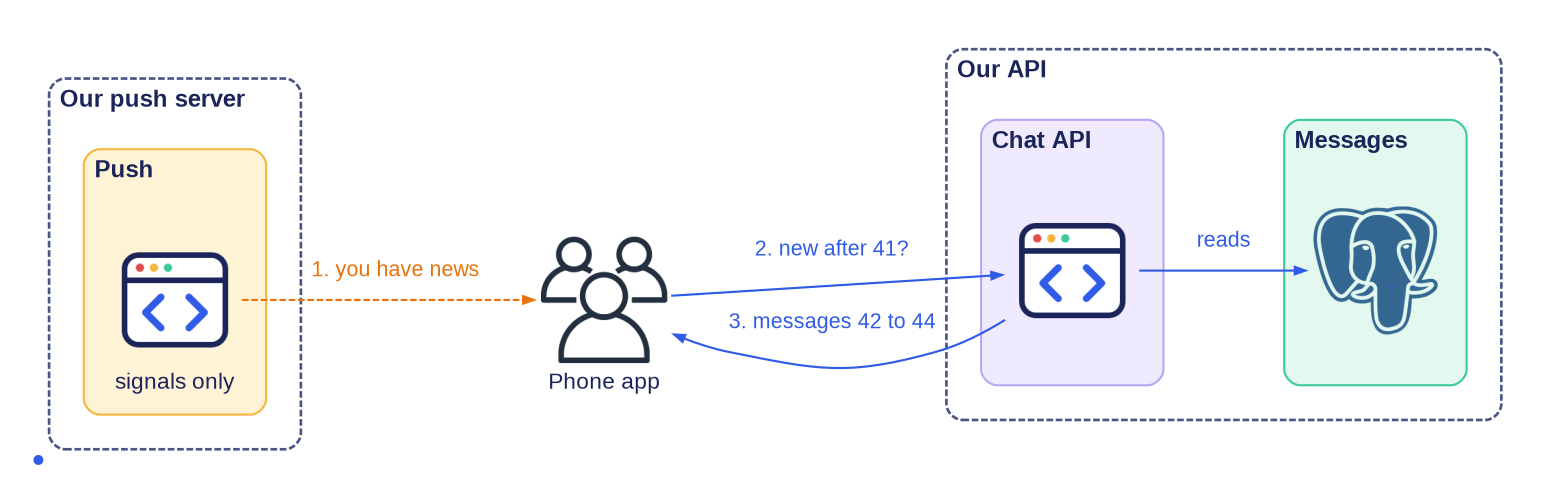
Push a signal, pull the data
The server pushes a tiny note such as: new message in chat 7. The client then asks for everything after its cursor. Good when notifications are size-limited, as in chat apps.
- 2
Start with long polling, then upgrade
Begin with the transport that works almost everywhere, test for WebSocket, and switch when it works. Socket.IO upgrades its connections like this by default.
- 3
Push with a pull fallback
Push gives fresh updates, and a slow periodic pull with a cursor repairs whatever push missed.
Push the signal, pull the data
From long polling to WebSocket
When a hybrid is worth it
- 1
Old or strict networks
You need fresh updates, but some clients cannot keep a WebSocket open.
- 2
Size limits
Push notifications carry only a few kilobytes.
- 3
Unreliable networks
Phones lose connections, so a message must survive without one.
- 4
Nothing may be missed
You want the delay of push and the certainty of a stored list.
Reconnects
Never miss an event
Every push connection breaks at some point. Between the break and the reconnect, events happen. The cure is a cursor: number the events, let the client remember the last number it handled, and send it when connecting again.
Catch up after a break
Feeds
Push or pull inside a feed
The same choice appears inside a system. When somebody posts, you can push the post into every follower's list (fan-out on write), or let each follower pull it when they open the app (fan-out on read).
| Push on write | Pull on read | |
|---|---|---|
| Writing a post with 200 followers | 200 inserts | 1 insert |
| Writing a post with 1,000,000 followers | 1,000,000 inserts | 1 insert |
| Opening a feed that follows 300 people | 1 list read | up to 300 reads to merge |
| Wasted work | Lists of people who never open the app | The same merge again and again |
Decide
Which one?
Decision guide
Examples
| Situation | Model | Why |
|---|---|---|
| Simple create, read, update, delete | Pull | The user starts every action |
| Search, page loads, downloads | Pull | Nothing to send until somebody asks |
| Stock tickers, games | Push | Frequent changes, and only the newest counts |
| Live chat, notifications | Push, with a pull to catch up | Delay matters and nothing may be lost |
| Many clients, rare updates | Push | Polling would be almost all empty, if idle connections are affordable |
| Email clients, social feeds | Hybrid | Signal first, content on open |
| Shared documents, live dashboards | Hybrid | Push changes, pull the whole state on load and after a break |
Summary
The whole topic in one minute.
Pull means the consumer asks. It is simple, keeps no state about clients and lets each consumer set its own pace, but the answer is often empty and always a little late.
Push means the producer sends. It is fast and sends nothing when nothing happens, but it must track consumers, reconnect them, and protect the slow ones. The common middle way is to push a small signal and pull the data with a cursor, so a lost signal costs only time.
- Push and pull differ in who starts the transfer, not in which way the data flows.
- Polling costs clients divided by interval, and the data is half an interval old on average.
- Push sends nothing when nothing happens, but must track, reconnect and protect consumers.
- Long polling is a pull that waits. Kafka consumers pull.
- Push a signal and pull with a cursor when speed matters and nothing may be lost.