
Webhooks
easy 24 minA webhook is an HTTP request that another system sends to your URL when something happens, so you do not have to keep asking.
Video lesson · Chapter 1 of 6
Wait for changes or receive them
Webhooks
1:17Reel
Theory
Read or listen first. About 2 min.
What it is
Normally your program calls another company's API. A webhook turns that around: you give the other company a URL, and their system sends an HTTP POST to it each time something you care about happens. It is sometimes called an HTTP callback or a reverse API.
The sender is a client and your server is the one being called. That small change brings three new duties: prove that the call is genuine, accept it quickly, and cope when the same call arrives twice, late or in the wrong order.
Why it exists
A shop needs to know when a payment succeeded. Asking every few seconds wastes calls on both sides and still hears the news late. Being told costs one call per event and takes about one network trip.
It also joins companies that share nothing else. No common database, no common queue, no library: only HTTPS, which every system already speaks.
A short history
1997
RFC 2104 describes HMAC, a way to sign a message with a shared secret. Most webhook signatures today use it.
2007
Jeff Lindsay coins the term webhook, from the programming word hook: a place where you can attach your own code.
2024
RFC 9421 standardises signatures for HTTP messages in general. Many webhook senders still use their own header.
Words to know
- Event
- A record that something happened, with an id, a type, a time and some data.
- Endpoint
- The public HTTPS URL that receives the events.
- Subscription
- The saved wish: this URL, these event types, this secret.
- HMAC
- A signature made from a message and a shared secret. Without the secret it cannot be made.
- At least once
- Every event arrives one or more times. Removing the extra ones is the receiver's job.
- Replay
- Sending an old event again: on purpose by a person, or by an attacker who copied it.
How it works
Step through the idea, or press Play.
Register. Tell the sender your URL, the event types and keep the secret
Understand it
Start here
Are we there yet?
On a long drive a child can ask the same question every few minutes, or make a deal: tell me when we arrive. The second way is quieter, and the news comes at exactly the right moment. But now the child must know that the voice is really the driver's.
One difference: a real signature never sends the secret itself. It sends a proof that only someone with the secret can make.
The idea
Asking or being told
Your shop needs to know when a payment is successful. With polling you send GET /payment/status?id=123 every 5 seconds and read pending a hundred times. With a webhook you do nothing until one POST arrives.
Webhook (push)
- The news arrives at once
- No wasted requests: one per event
- Lower cost for both sides
- You need a public, secured endpoint
Polling (pull)
- Most calls say nothing new
- Late by up to one interval
- Load grows with how often you ask
- Simple: no public endpoint, nothing to verify
What polling costs
The general choice between asking and telling, including feeds and notifications, has its own page: push vs pull. For telling a browser or a phone, see real-time APIs.
Set up
Registering a webhook
- 1
You register
Call me at this URL when X happens. In a dashboard: settings, webhooks, add endpoint, enter the URL, select events, copy the signing secret.
- 2
An event occurs
A payment succeeds, an order ships, code is pushed.
- 3
You are notified
A POST with the event data reaches your URL.
POST /api/webhooks HTTP/1.1Content-Type: application/json{ "url": "https://shop.example/webhooks/payments", "events": ["payment.succeeded", "payment.failed", "refund.created"]}HTTP/1.1 201 Created{ "id": "we_demo_1", "secret": "whsec_FAKE_shown_only_once" }Event names that explain themselves
| Area | Events |
|---|---|
| Orders | order.created, order.paid, order.fulfilled, order.cancelled, refund.created, inventory.low |
| Payments | payment.pending, payment.succeeded, payment.failed, subscription.created, subscription.cancelled, dispute.opened |
Receive
Accept fast, work later
The receiver
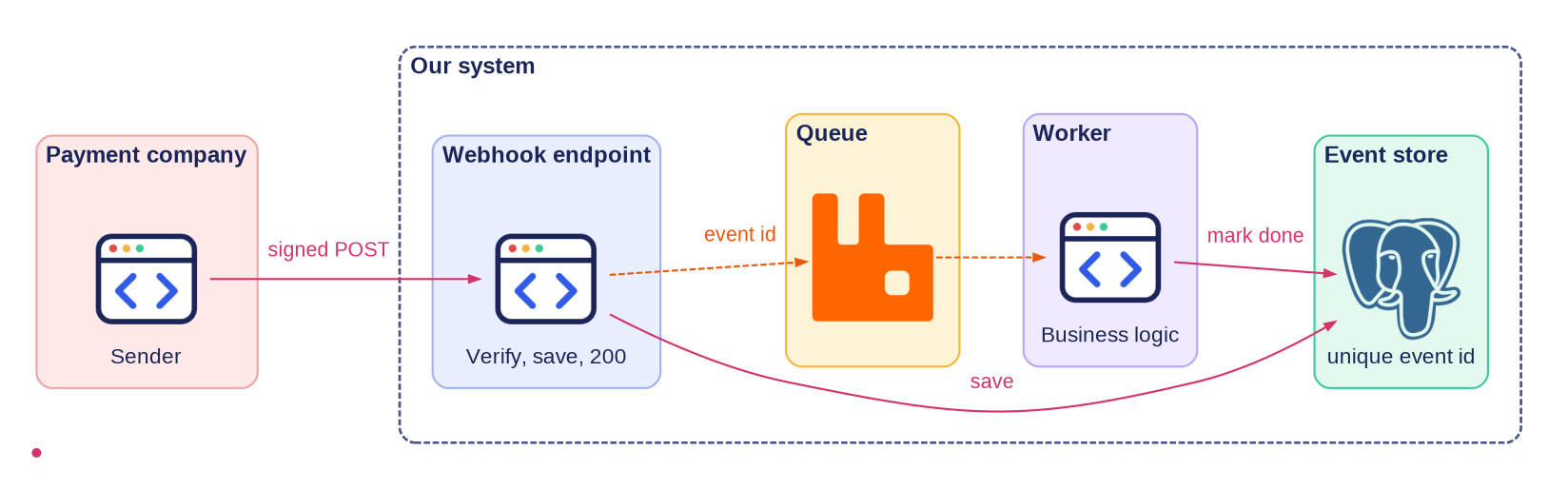
Endpoint
Public HTTPS URL. Checks the signature, saves, answers 200 within milliseconds.
Queue
Redis, RabbitMQ or SQS. Separates receiving from processing, absorbs spikes, allows retries.
Worker
Runs the business logic at its own speed. Can retry, and scales on its own.
Event store
Every event with its status. Removes duplicates, allows replay and debugging, and is the audit trail.
The handler, message by message
Trust
Check the signature
Your URL is public. Anyone who learns it can post "order 88 is paid" and receive free goods. So every event carries a proof.
- 1
The sender signs
signature = HMAC-SHA256(secret, time + "." + body) - 2
It sends the proof in a header
For Stripe:
Stripe-Signature: t=1700000000,v1=9c1d...(values shortened). - 3
You compute the same
With your copy of the secret, over the raw request bytes.
- 4
Compare in constant time
Equal means trusted. A constant-time comparison does not leak how many characters were right.
Why guessing does not work
Accept or refuse
Signatures of well-known senders
| Sender | Header | Method |
|---|---|---|
| Stripe | Stripe-Signature | HMAC-SHA256 of time and body |
| GitHub | X-Hub-Signature-256 | HMAC-SHA256 |
| Shopify | X-Shopify-Hmac-SHA256 | HMAC-SHA256, base64 |
| Twilio | X-Twilio-Signature | HMAC-SHA1 of URL and parameters by default; SHA-256 with a shared key |
| PayPal | PAYPAL-TRANSMISSION-SIG | SHA-256 with a certificate (public key) |
More layers
Time check
Refuse events older than 5 minutes, so a copied message cannot be replayed later. The sender signs each retry with a new time.
Event ids
Keep the ids you handled. The same event is never processed twice.
HTTPS only
The body may hold personal data. Plain HTTP shows it to anyone on the path.
Known addresses
If the sender publishes its IP ranges, allow only those at the network edge. An extra layer, never the only one.
Reliability
Retries with growing waits
A typical schedule
| Attempt | Wait before it | Time since the first |
|---|---|---|
| 1 | none | 0 |
| 2 | 1 minute | 1 min |
| 3 | 5 minutes | 6 min |
| 4 | 30 minutes | 36 min |
| 5 | 2 hours | 2 h 36 min |
| 6 | 1 day | 26 h 36 min |
What counts as a failure
| Answer | Meaning for most senders |
|---|---|
| 2xx | Delivered. Stop. |
| No answer in time, connection refused, DNS failure | Failed. Retry. |
| 5xx | Failed. Retry. |
| 4xx | Failed. Most senders retry this too, because your bad deployment may be fixed soon. The Standard Webhooks specification suggests that a sender stops after 410 Gone. |
| 3xx | Usually a failure. Redirects are not followed. |
The life of one delivery
Correctness
Twice, late and out of order
The sender cannot tell a lost event from a lost answer, so it sends again. That makes delivery at least once. Two rules make it harmless.
- 1
Let a unique key decide
Insert the event id into a table with a unique constraint. If the insert is refused, answer 200 and stop. A read followed by a write has a gap in which two copies can pass.
- 2
Compare versions, not arrival times
Apply an event only if it is newer than what you have. If it has no version, use it as a hint and fetch the current object from the sender's API.
- 3
Retry your own failures
A failed event must be taken again from the queue. If you only look whether the id exists, a failed event is skipped for ever.
A lost answer makes a duplicate
More about keys, races and crashes: idempotency.
Send
When you are the sender
The sender
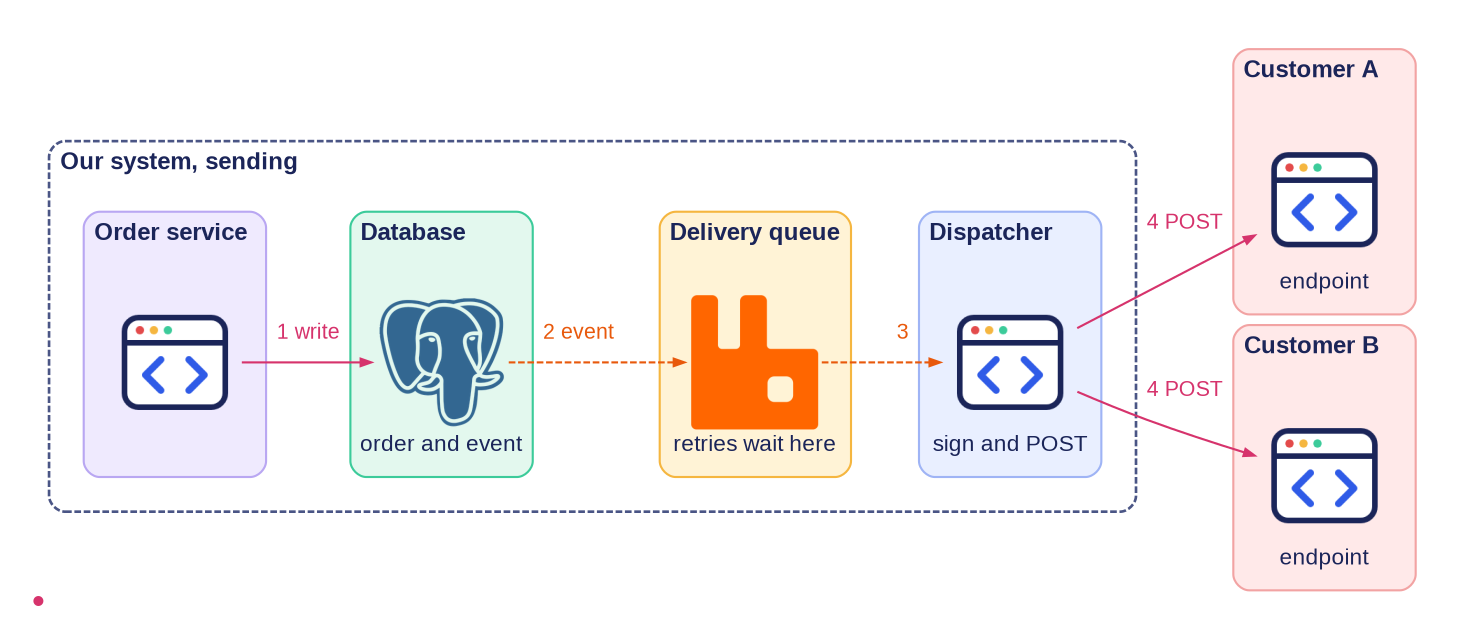
Outbox
Write the event in the same transaction as the change. A relay then moves it to the queue.
One lane per customer
A customer who answers slowly must not delay the others. Limit concurrent calls per endpoint.
Safe URLs
A customer's URL could point at your internal network. Resolve it, refuse private addresses, do not follow redirects.
A delivery log
Show attempts, answers and a replay button. Customers can then help themselves.
Operate
Watch, log and test
| Alert on | Measure | Log |
|---|---|---|
| A jump in signature failures | Events received a minute | Payload, without secrets and personal data |
| More processing errors | Share processed successfully | Processing time |
| Queue getting longer | Average and p99 processing time | Errors with stack traces |
| Slower answers | Share of duplicates | Event id as correlation id |
Testing
- 1
On your machine
A tunnel such as
ngrok http 3000gives your local server a public HTTPS address. - 2
From the command line
Many senders have a tool, for example
stripe listen --forward-to localhost:3000/webhooks. - 3
Replay
Most dashboards can send an old event again.
- 4
Reconcile
Once a day list the objects changed at the sender and compare with yours. This finds events that were missed for good.
Do
- Use a queue for the work
- Verify every signature
- Store the event id and remove duplicates
- Keep the raw payload, protected, for debugging
- Monitor and alert
- Use HTTPS only
- Answer 200 as soon as it is saved
Do not
- Process before you answer
- Trust a request because it found the URL
- Assume events come in order
- Ignore duplicates
- Put secrets in code or logs
- Use plain HTTP
- Answer an error for an event you already handled
Numbers
Size the receiver
After an outage of one hour
Who uses it
Common senders
| Sender | Typical events |
|---|---|
| Stripe, PayPal | Payments, refunds, subscriptions, disputes |
| GitHub | Pushes, pull requests, issues, releases |
| Shopify | Orders, customers, inventory |
| Twilio | Messages received, calls, delivery status |
| Slack | Messages, reactions, channels |
| SendGrid | Email delivered, opened, bounced |
| Zoom | Meeting started, ended, joined |
Summary
The whole topic in one minute.
A webhook replaces asking with being told. The sender posts a signed event to a URL you registered. Your endpoint checks the signature over the raw bytes, inserts the event under its unique id, puts it on a queue and answers 200. A worker does the rest.
Delivery is at least once and not in order. So duplicates must be harmless, old news must be ignored, and a regular comparison with the sender's API must find whatever was missed for good.
- A webhook is a POST to your URL when something happens: being told instead of asking.
- Check the HMAC signature over the raw bytes, and the time, before anything else.
- Save the event once under a unique id, queue it, answer 200, and work later.
- Delivery is at least once and unordered, so duplicates and old news must be harmless.
- Senders use an outbox, growing waits, one lane per customer and a replay button.