
Session persistence
medium 25 minSession persistence, also called sticky sessions or affinity, makes a load balancer send the same client to the same server.
Video lesson · Chapter 1 of 5
A logged-in shopper loses the cart on the next request
Sticky sessions in 75 seconds
1:15Reel coming soon
Theory
Read or listen first. About 2 min.
What it is
HTTP has no memory between requests. A session is the data an application keeps so that it can treat several requests as one visit: who is logged in, what is in the basket, which step of a form comes next.
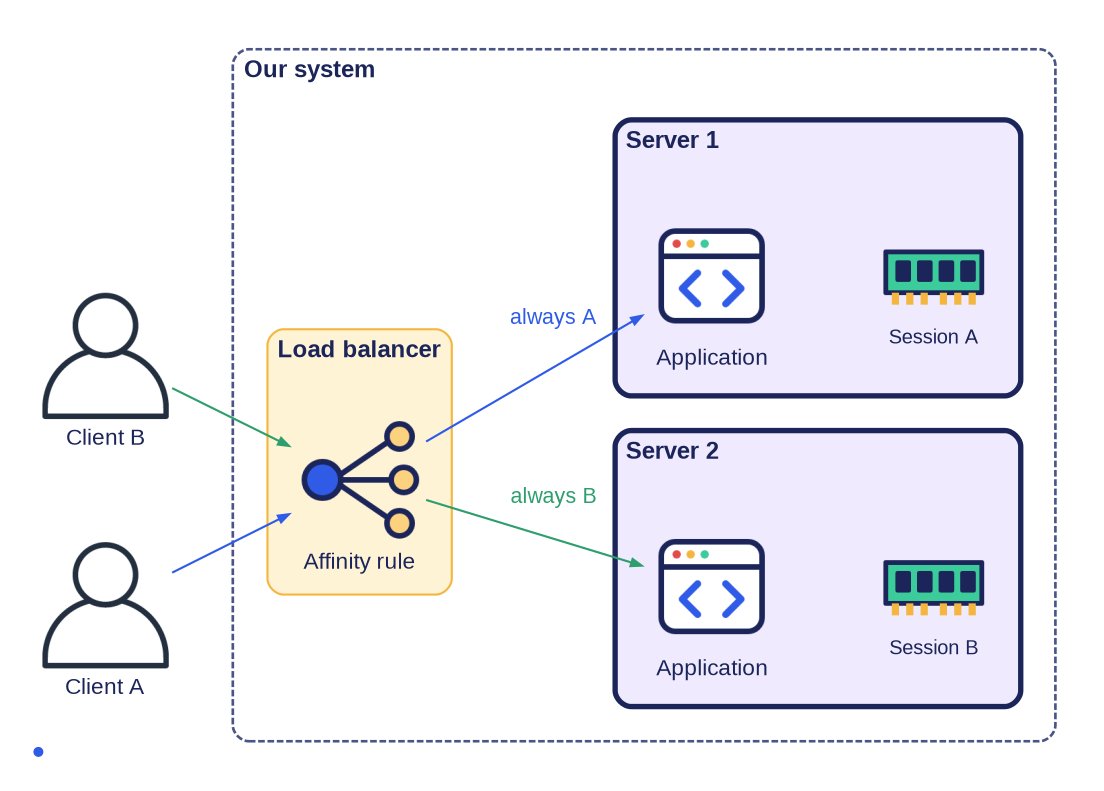
If that data lives in the memory of one server, the next request must reach the same server. Session persistence is the load balancer rule that makes it happen. Sticky sessions, session affinity and load balancer affinity are other names for the same idea.
Why it exists
With several servers and a rule such as round robin, the second request often reaches a server that has never seen the user. The basket looks empty or the user is asked to log in again.
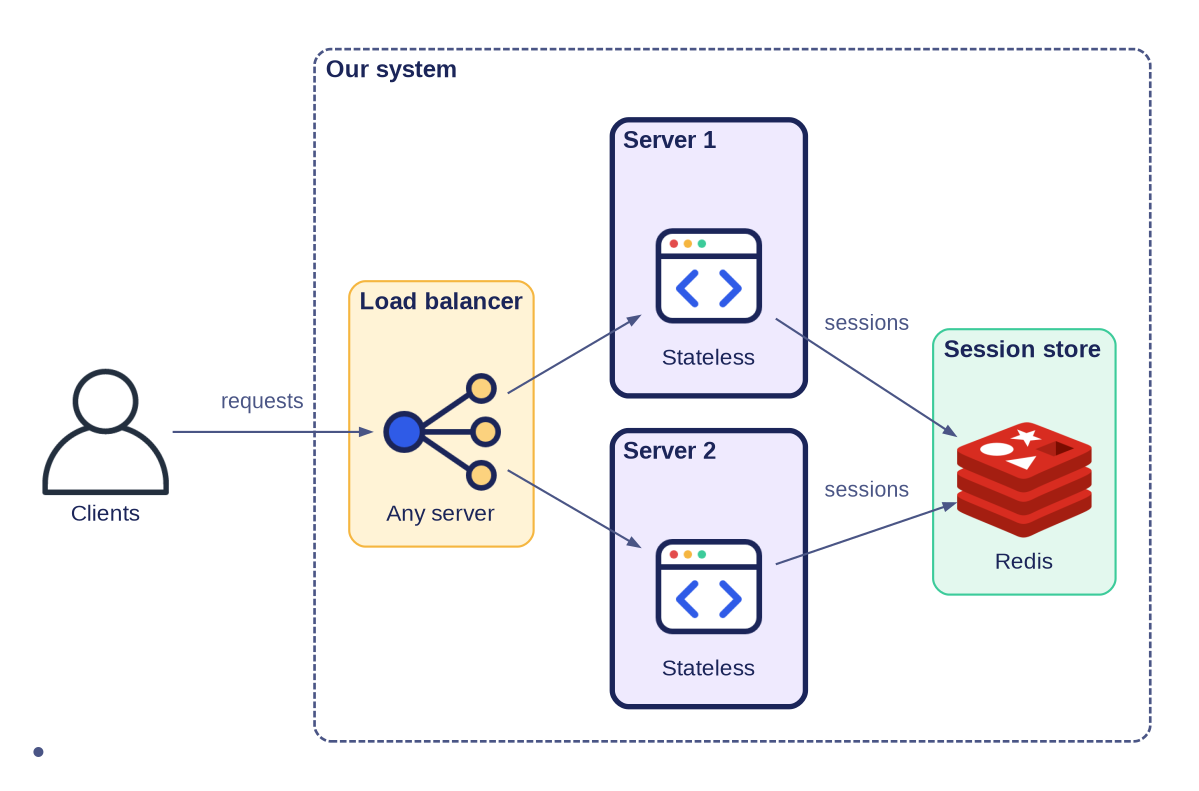
There are two ways out. Keep sending the user to the same place, or let every server reach the same session data. The first is quick to add to an old application. The second lets any server fail, restart or be added without a user noticing.
A short history
February 1997
RFC 2109 describes cookies for HTTP: a server asks the browser to send a small value back with later requests.
January 2008
RFC 5077 describes TLS session tickets, which let a server resume a TLS session without remembering it. Tracking clients by TLS session ID becomes less dependable.
April 2010
AWS adds sticky sessions to Elastic Load Balancing.
August 2018
TLS 1.3 (RFC 8446) replaces the old session ID and ticket resumption with pre-shared keys.
Words to know
- Session
- Data an application keeps about one visit over several requests.
- Affinity
- The tie between a client and one server.
- Affinity table
- The balancer's list of which client is tied to which server, and until when.
- Affinity cookie
- A cookie that tells the balancer which server to use. It need not hold any session data.
- Stateless server
- A server that keeps nothing a later request needs. It can still use a database.
- Draining
- Letting existing sessions finish on a server while no new ones start there.
- Failover
- Moving a client to another server when its own is not healthy.
How it works
Step through the idea, or press Play.
First request. Choose a healthy server and remember the choice
Understand it
Start here
The hairdresser story
Imagine you always go to the same hairdresser, who remembers how you like your hair. It works very well, until that person is away.
A familiar hairdresser is pleasant. A shared notebook keeps the salon working when anyone is away.
The problem
Why a second request can fail
Without persistence
Where it hurts
Shopping baskets
Items must stay the same from one page to the next.
Logins
The user must stay logged in for the whole visit.
Forms in steps
Answers from page one are needed on page three.
Open connections
A WebSocket lives on one server until it closes.
State
Stateless and stateful servers
Stateless servers
- No session data kept between requests
- The request or a shared store has what is needed
- Any server can answer
- Simple to add and remove servers
- Losing a server loses no session
- No stickiness needed
Stateful servers
- Session data in the server's own memory
- The server remembers the client
- The same server must answer
- Adding servers does not move old sessions
- Losing a server loses its sessions
- Simpler to write at first
Sticky: each server keeps its own sessions
Shared store: any server can answer
Where can session data live?
| Place | Good | Watch out |
|---|---|---|
| Server memory | Fastest, nothing to run | Needs stickiness. Lost with the server |
| Shared store, such as Redis | Any server works, easy to expire | One more system to keep available |
| Database | Durable, already there | Slower, adds load for every request |
| Signed value held by the client | No lookup needed | Size, hard to cancel early, do not put secrets in it |
| Copied between servers | Survives one failure | Traffic and memory grow with every server |
Mechanisms
Four ways to recognise a client
| Way | Good | Not so good |
|---|---|---|
Cookie set by the balancer, such as SERVERID | Works behind shared addresses, survives a changed IP address, easy to expire | HTTP only, the client must keep cookies, include it in your cookie notice review |
| Source IP address | No cookie, works with any protocol, simple | Many people behind one address, phones change address, uneven |
| Header or URL value | The application controls it, works without cookies | Application must add it. Values in links leak into logs and shared links |
| TLS session ID | Could work without decrypting, no application change | Not dependable: IDs change, browsers differ, and TLS 1.3 resumes another way |
A cookie tie
Affinity
Rules for the tie
- 1
How long
A fixed time such as 30 minutes, until the connection closes, or longer than one browser visit.
- 2
What renews it
Every request can push the end forward (sliding), or the end can stay fixed.
- 3
What if the server is down
Choose another healthy server and tie the client to that one, or return an error. The first is the usual answer.
- 4
What if it returns
Keep the client where it is now. Moving back breaks a second session.
- 5
Who stores the tie
A table in the balancer, or the value inside the cookie. With several balancers a table must be shared.
An affinity table
| Client | Server | Created | Ends |
|---|---|---|---|
sess_abc123 | Server 1 | 10:30:00 | 11:00:00 |
203.0.113.10 | Server 2 | 10:31:15 | 11:01:15 |
sess_xyz789 | Server 3 | 10:32:45 | 11:02:45 |
What the balancer does
Numbers
Three sums worth knowing
How many sessions does one failure lose?
Why a plain hash moves people
Memory on each server
Trade-offs
What you gain and what you pay
Gains
- Runs stateful software without changes
- Warm local caches for each user
- The same user sees the same data
- No session store to run
- Session read from memory, no network call
Costs
- Load can become uneven
- Sessions are lost with a server
- New servers get only new sessions
- Deployments must drain
- Busy servers run short of memory
Local caching is a good reason to be sticky even when sessions are shared. If the tie breaks, the user loses only a little speed. Cache consistency explains what else local copies cost.
Operations
Scaling, deploying, failing
Taking a server out gently
Good habits
- 1
Prefer stateless
Design new applications so that any server can answer.
- 2
Use a shared store
Redis or Memcached, with an expiry on every session.
- 3
Copy sessions if you must keep them local
Replication or persistence lowers the loss when a server fails.
- 4
Set sensible lifetimes
Long enough for a visit, short enough to rebalance.
- 5
Watch the spread
Sessions, requests and memory per server, and the number of broken ties.
- 6
Rehearse failure
Stop a server in a test and see what users notice.
Security
Make the cookies safe
| Choice | Why |
|---|---|
| Random session IDs from a secure generator | So that nobody can guess one. OWASP asks for at least 64 bits of entropy |
Secure | Sent only over HTTPS |
HttpOnly | Page scripts cannot read it |
SameSite=Lax or Strict | Limits sending from other sites. Strict can log people out when they follow a link to you |
| New session ID after login | Stops someone planting a known ID before login |
| Sign the affinity value | So that a client cannot choose a server |
Decide
Do you need to be sticky?
A short decision
Choose stateless for new work, APIs, microservices and anything that must scale or survive failures. Choose sticky for legacy applications, for software you cannot change, and for local caches that only save time. WebSockets stay on their server by nature while they are open, and need sticky rules only if a library makes several HTTP requests before the upgrade.
Summary
The whole topic in one minute.
Sticky sessions tie a client to one server with a cookie, a source address, a header or URL value, or the connection itself. A cookie is the usual choice for browsers, because many people can share one address.
The tie is a preference, not a backup. When the server dies, its local sessions die too. Prefer stateless servers with a shared store. If you must be sticky, set a lifetime, watch the balance, drain before you stop a server and rehearse losing one.
- Sticky means the same client reaches the same server.
- Cookies suit browsers. Source addresses are shared and change.
- A tie is not a backup: local sessions die with the server.
- Adding a server does not move existing sessions.
- A shared session store lets any server answer.