
Design an Ad Click Aggregator
hard 75 minTurn ten billion clicks a day into fast dashboards and exact bills: a durable log, event time, deduplication, totals and a daily recount.
Video lesson · Chapter 1 of 5
The advertiser sees two clicks, but the invoice says one
Theory
Read or listen first. About 1 min.
What it is
An ad click aggregator records that somebody clicked an ad, then answers questions such as: how many valid clicks did campaign 789 receive each hour, by country?
It produces two kinds of answer from one history. A provisional count appears in seconds. A final count comes after late clicks, checks and a recount, and may become money on a bill.
Why it exists
Reading billions of raw rows for every dashboard is slow and costly. Summing as clicks arrive makes the dashboard small and quick.
Counting is difficult because networks retry, messages arrive late, workers restart and people or programs click repeatedly. A wrong count can overcharge an advertiser or lose income.
A short history
February 1998
GoTo.com shows a pay-per-click search idea at the TED conference.
October 2000
Google introduces AdWords, where advertisers create text ads beside search results.
2007
Philippe Flajolet and colleagues publish HyperLogLog, a small sketch for counting distinct items.
2013
Google's Photon paper describes joining search and ad-click streams, with exactly-once results eventually.
Words to know
- Event time
- When a click was received by our trusted edge.
- Processing time
- When a worker happens to process it.
- Tumbling window
- A fixed time box, such as 10:01:00 up to 10:02:00.
- Watermark
- A worker's estimate that earlier event times are mostly complete.
- Idempotent
- Doing it again has the same effect as doing it once.
- Checkpoint
- A saved, matching view of worker state and input positions.
- Sketch
- A small approximate summary that can be merged.
- Reconciliation
- Recount from raw data and compare.
Solve it like an interview
New to it? Start with Approach. Revising? Go straight to the mock.
- 1ApproachWhat this question tests, where it gets hard, and how to spend the time.
- 2ScopeAsk what changes the design, then commit to a short list.
- 3NumbersWork out a number when the answer changes what you build.
- 4API and dataThe contract first, then the data that serves it.
- 5DesignStart with the smallest system that works. Change it only when something breaks.
- 6Deep divesCompare the options before you open them, then say which you would pick.
- 7Explain your choicesAnswer first. Then compare your reasoning.
- 8By levelThe same question is judged differently for mid, senior and staff.
- 9MockAnswer against the clock, then score yourself.
Understand it
Story
The maze with bells
What we build
Fast counts and final counts
The example is inspired by services such as Google Ads, Meta Ads, Amazon Ads, X Ads, LinkedIn Ads and TikTok Ads. Assumption: ten billion clicks a day from many publishers. The exercise does not claim to describe those companies' private systems.
Eight abilities
Record clicks
Accept and save each click.
Quick totals
Show counts within a minute.
Dashboard
Choose time, campaign, place and device.
Invalid traffic
Mark suspicious clicks with reasons.
Billing
Produce checked totals and corrections.
Attribution
Provide clicks to a later conversion join.
Distinct people
Approximate reach without storing identities forever.
Exploration
Run larger approved queries in the background.
The hard part
Exactly once means a precise rule
A network message may appear twice. A person may press twice. They are different problems. Transactions make worker results safe across restarts. A business rule decides whether two real presses should both count. We need both.
The finished system
Where the design ends up
The whole system
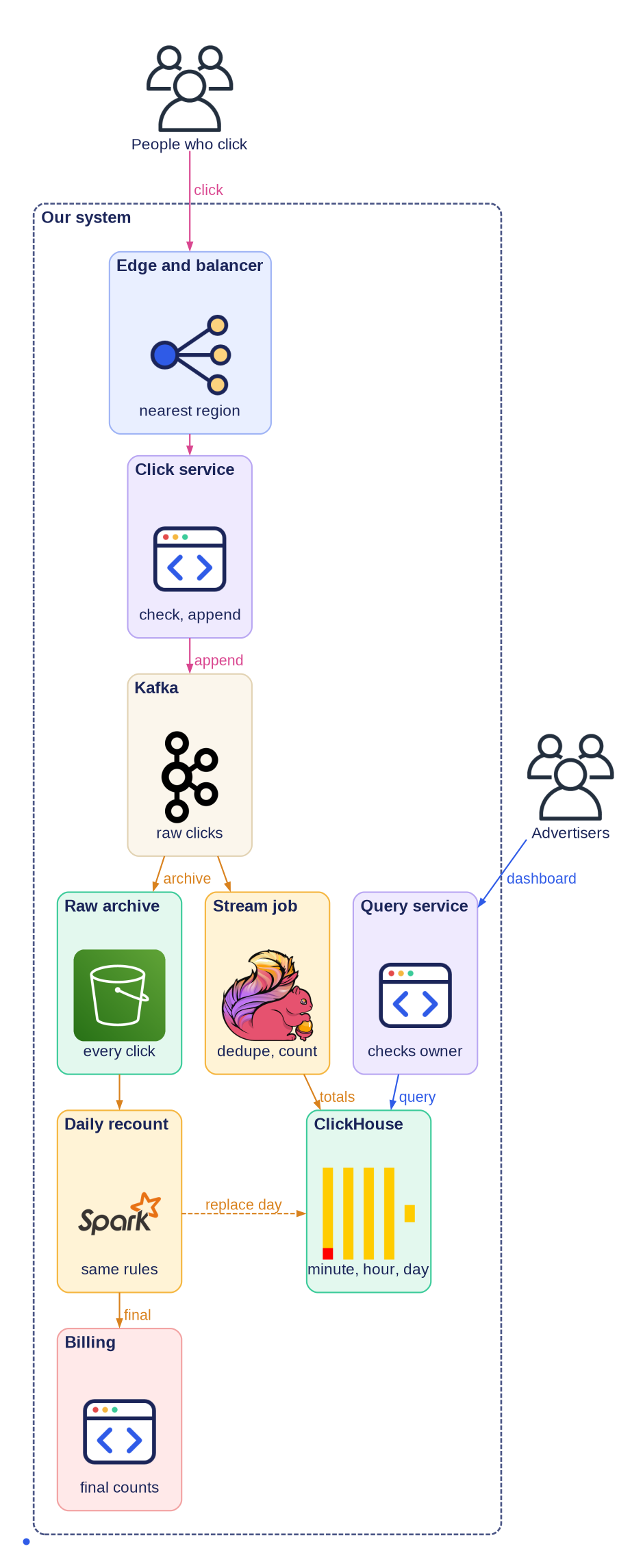
Read on
| Place | For |
|---|---|
| Interviews tabs | Targets, sums, API, five versions, deep dives and mock |
| Visualize | Record, aggregate, read, check fraud, deduplicate and recount |
| Stream processing | Windows, watermarks and checkpoints |
| Log-based queues | Partitions, replay and consumer positions |
| Idempotency | Safe repeated work |
| OLAP | Columns, rollups and analytics reads |
| Sharded counters | Hot counts |
| Fraud detection | Rules, models, reviews and feedback |
| Top K trends | Finding the largest groups |
Summary
The whole topic in one minute.
Save before counting. The click service appends a signed click to a replicated log, then sends the person onward. One stream supplies quick totals and the immutable archive supplies final ones.
Define a valid click exactly: here, at most one for each visitor, ad and calendar minute. Use the same rule in the stream and the recount. Write absolute totals so a retry replaces, rather than adds.
Show freshness and status. Dashboards can change for five minutes. Billing waits for the daily result and records any later correction.
- Append before you redirect or acknowledge.
- Partition by ad and visitor, so one worker sees their repeats.
- Use trusted event time. A watermark is an estimate, not a lost-data detector.
- Commit input positions and state together, and replace absolute totals.
- Keep all raw clicks. Mark invalid ones; do not silently erase them.
- One counting rule, two runs: quick stream and daily recount.