
Stream processing
medium 30 minStream processing handles events one after another as they arrive, without waiting for the data to end.
Video lesson · Chapter 1 of 5
Count a live crowd through a moving gate
Stream processing in 80 seconds
1:20Reel coming soon
Theory
Read or listen first. About 2 min.
What it is
Stream processing treats data as a flow of events that has no end. A program reads each event soon after it happens, updates something it remembers, and sends results on. It does not stop when it has finished, because it never has.
An event is a small record of something that happened: a click, a payment, a temperature reading. It carries the time when it happened. Because events travel over networks, that time can differ from the time the program sees it.
In plain words: data comes in like a river, not in buckets. You handle each drop as it passes, and the answer is ready in milliseconds to minutes instead of the next morning.
Why it exists
Some answers lose their value quickly. A payment that looks like fraud must be stopped before it completes. A machine that overheats must be switched off now, not in tomorrow's report.
Other work is simply smoother when it is spread over the day. A job that handles each event once does not need to read a whole day of data again at night. The price is that a program running for months must cope with late data, growing memory and crashes.
A short history
1985
Chandy and Lamport publish a way to take a consistent snapshot of a running distributed system. Flink's documentation names it as the basis of its checkpoints.
2003
The Aurora paper in the VLDB Journal describes a database system built for monitoring data streams instead of stored tables.
2013
Google publishes MillWheel, a framework for low-latency processing, at VLDB. The Discretized Streams paper, on running a stream as many small batches, appears at SOSP.
January 2015
Apache Flink is announced as a top-level project of the Apache Software Foundation.
2015
Google's Dataflow Model paper gives the questions many systems use: what to compute, where in event time, when to show results, and how to correct them.
2017
Kafka 0.11 adds transactions, so reading from a topic, computing and writing to another topic can be done exactly once inside Kafka.
Words to know
- Unbounded data
- Data with no known end.
- Event time
- When the event happened, written inside the event.
- Processing time
- What the clock of the machine says when it handles the event.
- Window
- A finite piece of the stream that can be counted or added up.
- Watermark
- The job's estimate of how far event time has come: older events are not expected any more.
- State
- What the job remembers between events, such as a count per user.
- Checkpoint
- A saved copy of the state together with the position in the input.
- Backpressure
- A slow step making the steps before it slow down too.
- Sink
- Where results go: a database, a topic, an alert.
How it works
Step through the idea, or press Play.
Events flow into a log. The log keeps them, so they can be read again
Understand it
Start here
Boats under the bridge
Noor stands on a bridge over a brook. Children upstream launch paper boats and write the minute of the launch on each one. Noor must say how many boats were launched in each minute.
Counting is easy. Deciding when a minute is complete is the hard part of stream processing.
The idea
What a streaming system looks like
Source, log, processor, sinks
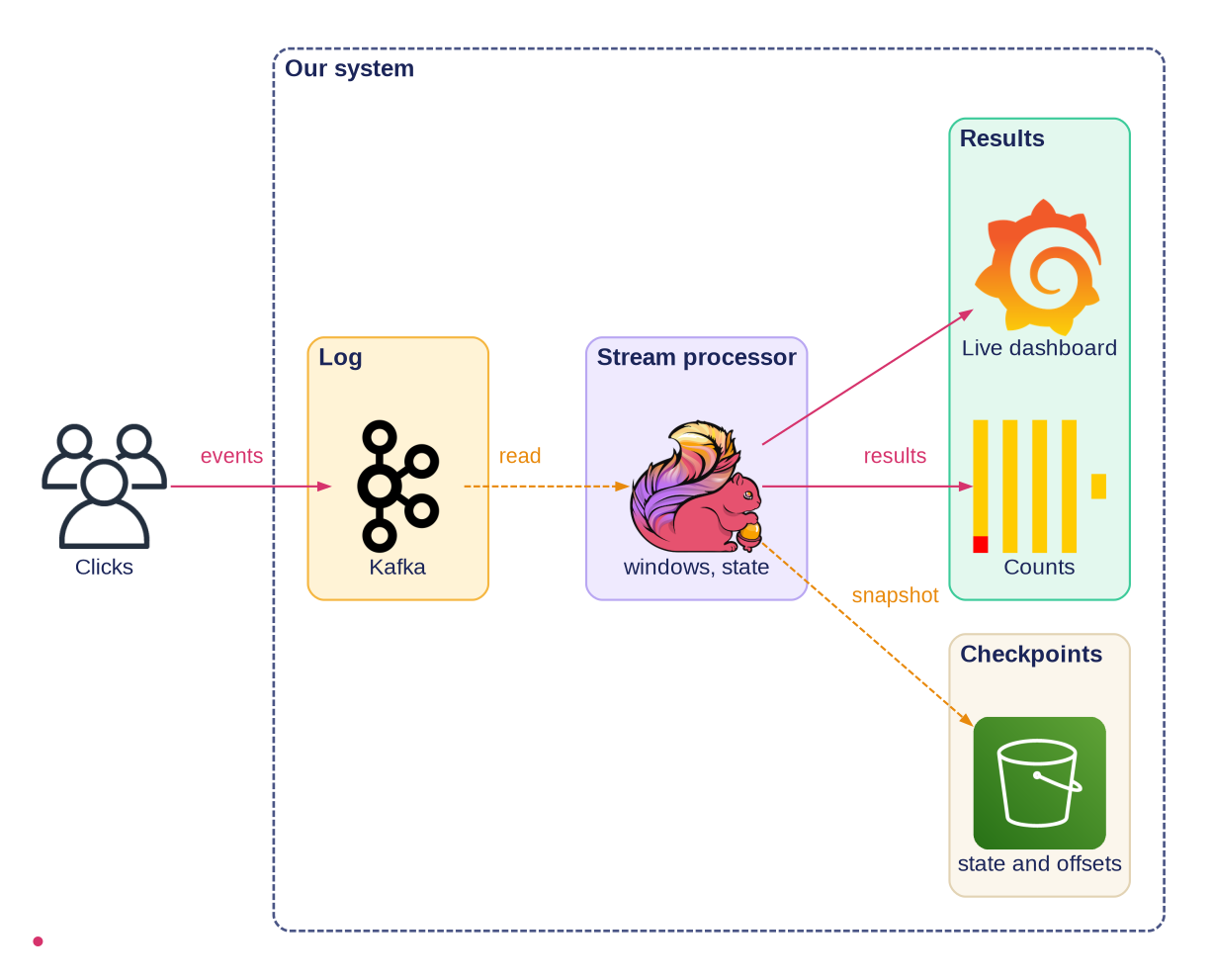
| Part | Job | Examples |
|---|---|---|
| Source | Produces events | Sensors, clicks, application logs, database changes |
| Log | Keeps events in order and lets them be read again | Kafka, Pulsar: see log-based queues |
| Processor | Filters, joins, counts, remembers | Flink, Kafka Streams, Spark Structured Streaming |
| Sink | Receives results | Database, dashboard, alert, another topic |
Low latency
Results in milliseconds to minutes, depending on the window and the wait for late events.
Unbounded data
There is no last event, so you can never say: read everything, then sort.
Continuous
The job runs day and night. A deployment is a pause and a restart from a snapshot.
Scalable
Events are split by key over many parallel tasks.
Fault tolerant
State is saved and the input can be read again.
Event time
Results depend on when things happened, not on when the network delivered them.
The loop that never ends
Time
Two clocks
Event time
- When the event happened
- Written in the event: 10:00:00
- The same after a replay
- Needs a way to handle late events
Processing time
- When the machine handles it: 10:00:05
- Nothing to wait for, so the fastest
- Changes when the job is slow or replays
- Fine for health checks of the job itself
The gap between the two clocks is seconds on a good day and hours when a phone was in a tunnel or a job was down. A report by processing time would show a false dip during the outage and a false peak after it.
Out of order is normal
Time
Watermarks: when is a window complete?
A watermark with time t says: the job believes that event time has reached t, and no more events at or before t are expected. Flink defines it in these terms. A common rule is to take the newest event time seen and subtract a fixed bound.
Bounded out-of-orderness
What to do with an event after its window closed
| Choice | Result | When |
|---|---|---|
| Drop it | Simple, slightly low counts | Metrics that tolerate gaps. Flink does this unless you change it: allowed lateness is 0 by default |
| Allow lateness | The window stays a while and sends a corrected result | The sink can overwrite an earlier answer |
| Side output | Late events go to a separate stream | You must not lose them: count them later or inspect them |
| Recompute | Run the affected hours again from the log or files | Money and legal reports |
Windows
Tumbling, hopping, session
| Window | Size | Overlap | Use |
|---|---|---|---|
| Tumbling | Fixed, for example 5 s: 0 to 5, 5 to 10, 10 to 15 | No: each event is in one window | Five-minute counts, hourly reports |
| Hopping (Flink says sliding) | Fixed, for example 10 s every 5 s: 0 to 10, 5 to 15 | Yes: an event is in several | Rolling averages, trends |
| Session | Grows with activity, ends after a quiet gap | No, per key | One visit of one user |
Which window?
The price of overlap
State
State per key
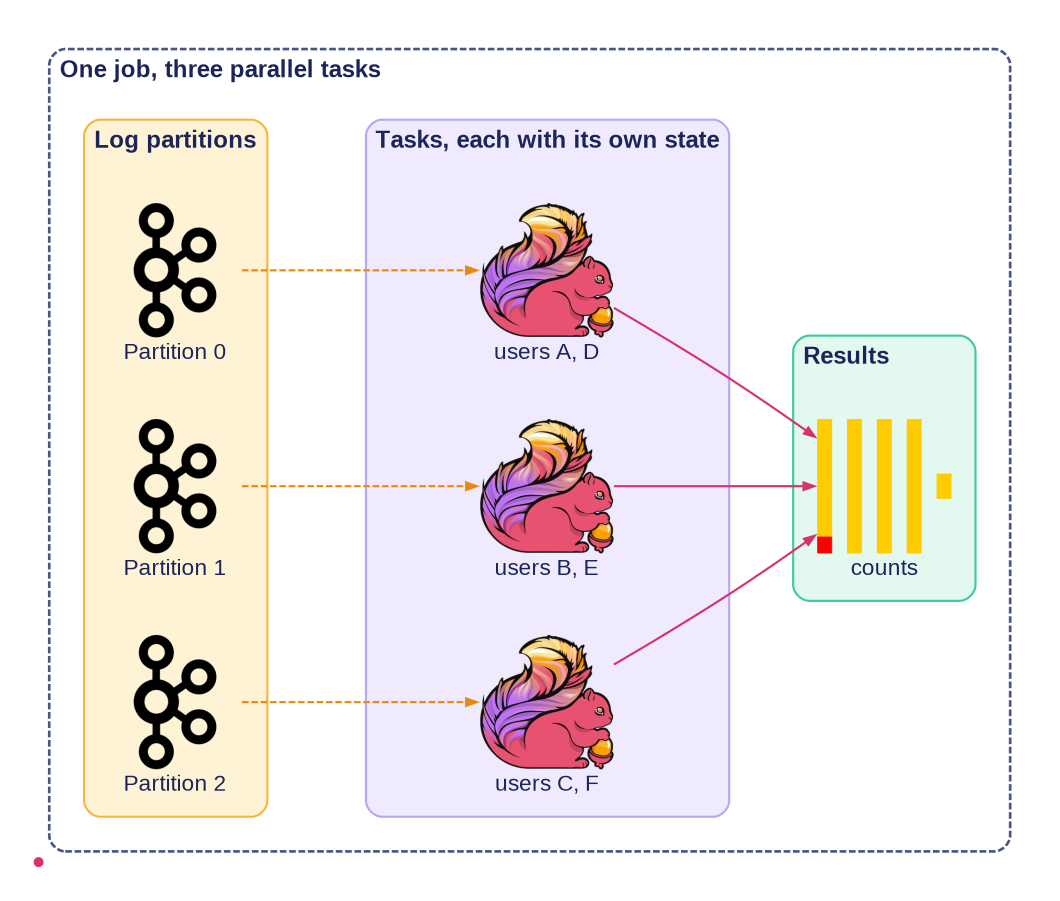
Counting, joining and finding patterns need memory. The stream is split by a key, such as the user, so that one task sees all events of a key and can keep their state locally without locks.
Same key, same task
How much state?
Healthy state
- A key is deleted after a time without events
- A window is deleted after it closes
- Counts and sketches instead of raw events
- Keys spread evenly
Trouble
- One entry per user, for ever
- A join that waits for a partner without a limit
- All events of a window kept in a list
- One key with half of the events
Guarantees
At most once, at least once, exactly once
| Guarantee | Meaning | Good | Cost | Use |
|---|---|---|---|---|
| At most once | 0 or 1 time | Fastest, nothing to repeat | Events can be lost | Metrics that tolerate gaps |
| At least once | 1 or more times | No loss | Duplicates | Idempotent work |
| Exactly once | The effect counts 1 time | Accurate | Snapshots, transactions, some latency | Money, billing |
How it works
- 1
Checkpoint
The job regularly saves its state and its positions in the log to durable storage, as one consistent snapshot. Markers called barriers flow with the events, so the job does not have to stop.
- 2
Safe sink
Results are either committed in a transaction when the checkpoint completes, or written with a key so that a repeat overwrites the same row.
- 3
Recovery
After a failure the job loads the last snapshot and reads the log again from the saved positions.
Crash and recovery
Operations
Backpressure, lag and bad events
When a sink is slow, its inputs fill up, and the slowness travels upstream to the source. Flink's documentation describes exactly this direction. Because the source is a log, the events wait there, and the lag grows instead of events being lost.
Time to catch up
Do
- Use event time for results
- Plan for late events
- Turn on checkpoints
- Make operations idempotent
- Monitor backpressure and lag
Do not
- Keep unbounded state without cleanup
- Ignore watermarks and order
- Use processing time for totals
- Let one poison event stop the job
- Assume the sink is exactly once by itself
Numbers
A first estimate
100 million clicks a day, 200 bytes each (assumed)
| Question | Arithmetic | Answer |
|---|---|---|
| Average rate | 100,000,000 / 100,000 | about 1,000 a second |
| Peak | 3 x 1,000 | 3,000 a second |
| Data a day | 100,000,000 x 200 bytes | 20 GB |
| Log for 7 days, 3 copies | 20 GB x 7 x 3 | 420 GB |
| Catch up after 1 hour down at peak | 10,800,000 / (9,000 - 3,000) | 1,800 s if the job can do 9,000 a second |
When to use it
How fresh must the answer be?
Typical targets, as a design assumption
| Use | Target | Consequence |
|---|---|---|
| Trading decisions | Under a millisecond or a few | Usually special software, not a general stream processor |
| Fraud check inside a payment | Under 100 ms | State must be local, no window to wait for |
| Live analytics | Under 1 s to a few seconds | Early results, corrected later |
| Monitoring and alerts | Under 5 s | Short windows |
| Loading a warehouse | Under 1 min or a few | Small batches are enough |
Where it is used
Real-time analytics
Live dashboards, click streams, business numbers, engagement.
Fraud detection
Watching payments, finding patterns and unusual behaviour, scoring risk.
Sensors and monitoring
Device data, infrastructure, maintenance before something breaks, alerts.
Event-driven services
Orders, stock, notifications and keeping copies of data in step.
Compare the two ways of working in batch or stream. If one system must give both a quick and an exact answer, see Lambda architecture and Kappa architecture.
Summary
The whole topic in one minute.
Stream processing answers questions about data that never ends. Events are read from a log, assigned to windows by the time they happened, combined into state per key, and sent on when the watermark says a window is probably complete.
Correct results after a crash need three things together: a log that can be read again, a snapshot that holds state and position as one, and a sink that can take the same result twice. Start with the question of how fresh the answer must be. If hours are fine, a batch job is simpler.
- A stream has no end, so windows cut it into pieces.
- Use event time for results. Watermarks estimate when a window is complete.
- Decide what happens to events that come after that.
- State is kept per key and must be limited.
- Replayable log, snapshot of state and offset, safe sink: together they give exactly-once effects.
- Lag and spare capacity decide how fast you recover.