
Amazon Kinesis Data Streams
medium 26 minKinesis Data Streams is a managed log on AWS.
Video lesson · Chapter 1 of 5
A click chooses a shard
Kinesis shards in 75 seconds
1:15Reel coming soon
Theory
Read or listen first. About 1 min.
What it is
Amazon Kinesis Data Streams is a managed service for collecting and reading streams of records in real time. A stream is made of shards, and each shard is an append-only log with a fixed capacity.
Producers send a record and a partition key. The key decides the shard. Consumers read each shard in order and remember how far they got. Reading does not remove anything: records stay until the retention period ends.
Why it exists
Clicks, logs and sensor readings arrive all the time and several teams want the same data. A shared log lets each team read at its own pace and read again after a bug fix. The general idea is in log-based queues.
Running such a log yourself means brokers, disks, replication and upgrades. Kinesis takes that work away. In exchange you accept its limits, its API and its place: one AWS Region.
A short history
November 2013
AWS announces Amazon Kinesis for real-time processing of streaming data.
August 2018
Enhanced fan-out arrives: each registered consumer gets its own read throughput, pushed over HTTP/2.
November 2020
A large Kinesis event in us-east-1 becomes a well-known lesson. It has its own page.
Words to know
- Shard
- The unit of capacity and of order: 1 MB/s or 1,000 records/s in, 2 MB/s out.
- Partition key
- Text of up to 256 characters that is hashed with MD5 to choose a shard.
- Sequence number
- The position Kinesis gives a record inside its shard.
- Enhanced fan-out
- A dedicated, pushed 2 MB/s per shard for one registered consumer.
- KPL and KCL
- AWS libraries: the Producer Library packs records, the Client Library shares shards among workers.
- Checkpoint
- The last sequence number a consumer has finished.
- Resharding
- Splitting or merging shards to change capacity.
How it works
Step through the idea, or press Play.
Put with a key. The hash of the key chooses one shard
Understand it
Start here
The canal with locks
Imagine a canal with a lock. The sign says how many boats it lets through each minute. When too many boats come, the canal is split into two lanes, each with its own lock. The colour of a boat decides its lane.
Boats of one colour keep their order. Between lanes there is no order at all.
What you get
Why teams choose it
No cluster
No brokers, disks or upgrades. You choose a capacity mode and a retention.
Low delay
About 70 ms on average with enhanced fan-out. About 200 ms for one shared consumer, more with several.
Durable
Each record is copied synchronously to three Availability Zones.
Elastic
On-demand streams accommodate up to twice the peak write rate of the last 30 days.
Good fits are clickstreams, log and metric collection, device telemetry and live dashboards: many small records, several readers, and the wish to replay.
Architecture
From producer to consumer
One stream, several readers
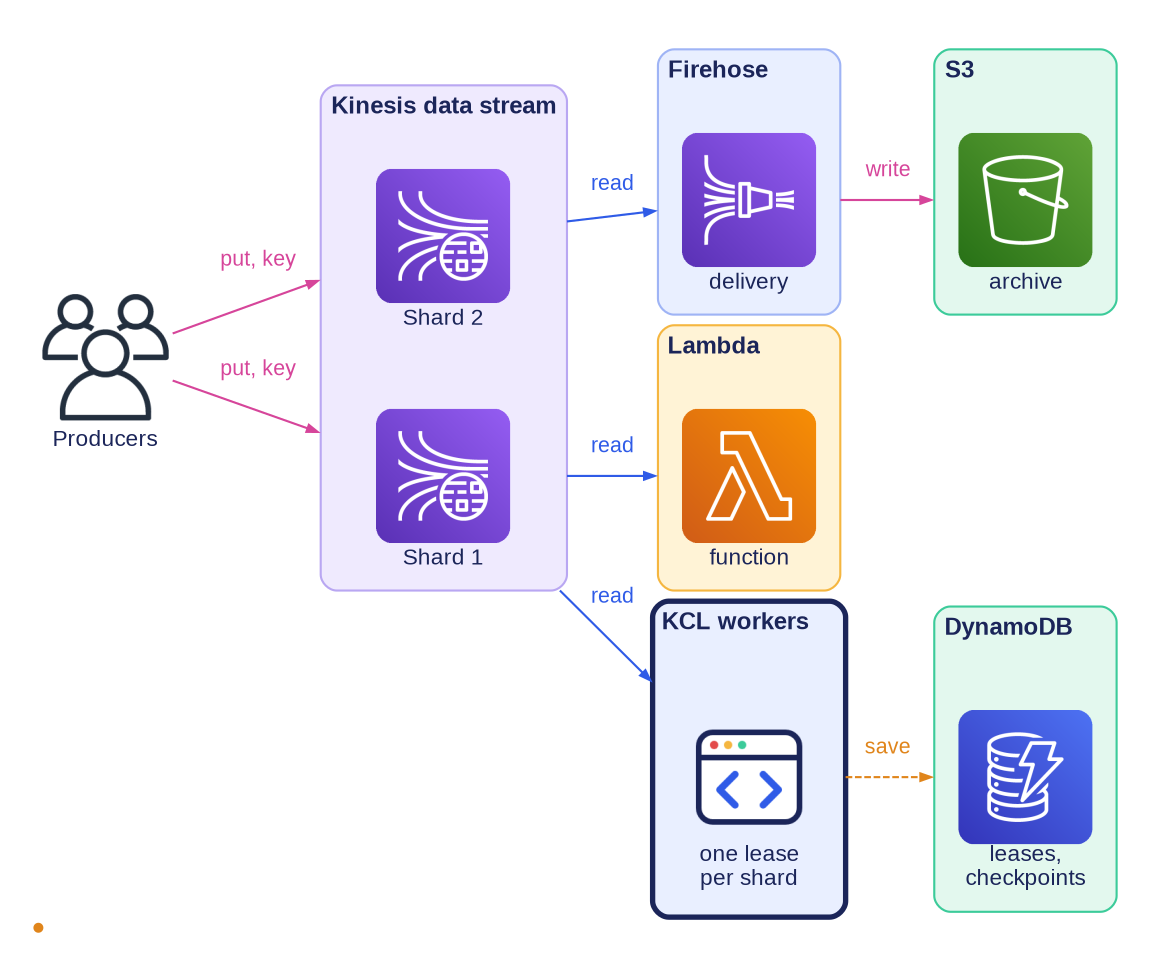
- 1
Put
The producer calls PutRecord or PutRecords with data and a partition key, or uses the KPL.
- 2
Route
The key is hashed with MD5 to a 128-bit number. The shard whose range contains it takes the record.
- 3
Store
The record is replicated across three zones. The answer holds the shard id and the sequence number.
- 4
Read
A consumer gets an iterator and polls with GetRecords, or receives pushed records with SubscribeToShard.
- 5
Checkpoint
After processing, the KCL writes the sequence number to a DynamoDB table. On failover another worker starts there.
One write
Keys
Partition keys decide everything
Key strategies
| Key | Order | Spread | Use it for |
|---|---|---|---|
| User id | Per user | Good unless one user is huge | Clickstreams, sessions |
| Random | None | Best | Independent events |
| User id plus a salt | Per salted part only | Splits hot users | Known heavy users |
| Minute | Per minute | Terrible: one shard at a time | Almost never |
| Hash of the id, modulo 10,000 | Per bucket | Same as the id | Rarely useful: Kinesis hashes anyway |
A shard is throttling
Capacity
How many shards?
Shards for a provisioned stream
Why packing small records matters
Capacity modes
| Mode | You choose | Scaling | Fits |
|---|---|---|---|
| Provisioned | Shard count | You: UpdateShardCount, SplitShard, MergeShards | Steady, predictable load |
| On-demand Standard | Nothing | Automatic, from 4 MB/s write by default | Unknown or spiky load |
| On-demand Advantage | An account setting per Region | Automatic, plus warm throughput you set ahead of an event | Large or many streams; a minimum commitment applies |
On-demand splits a shard within 15 minutes when traffic passes 500 KB/s on it. Traffic that more than doubles the old peak inside 15 minutes can still be throttled. Retry with backoff.
Resharding
Split and merge
A split
- 1
Split one shard in two
SplitShard, with the hash key where the second child begins.
- 2
Merge two into one
MergeShards works only on shards whose ranges touch.
- 3
Or set a number
UpdateShardCount goes to at most double or at least half of the current count in one call.
- 4
Wait
Resharding is asynchronous. The stream is UPDATING until it is ACTIVE again.
- 5
Read parents first
To keep the order of a key, finish the parent before its children. The KCL does this for you.
Reading
Shared polling or a dedicated pipe
Two kinds of stream consumer
| Shared (GetRecords) | Enhanced fan-out | |
|---|---|---|
| Throughput | 2 MB/s per shard for all together | Up to 2 MB/s per shard for each |
| Delivery | Pull, 5 calls per second per shard | Push over HTTP/2, SubscribeToShard |
| Average delay | About 200 ms alone, about 1 s with five | About 70 ms |
| How many | Limited by the shared rate | 20 registered, or 50 with On-demand Advantage in supported Regions |
| Extra cost | None | Per consumer-shard hour and data in most modes |
A worker reads a shard
Where an iterator can start
- 1
TRIM_HORIZON
The oldest record still kept.
- 2
LATEST
Only records written from now on.
- 3
AT or AFTER_SEQUENCE_NUMBER
At a known position, or just after it.
- 4
AT_TIMESTAMP
At a moment in time. Useful for replays.
Guarantees
Order, duplicates and retention
Kinesis guarantees
- Records of one shard are read in order
- The same key goes to the same shard, until a reshard
- A successful write is stored in three zones
- Records stay for the whole retention period
Kinesis does not
- Order records across shards
- Deduplicate: a producer retry stores a second copy
- Deliver exactly once
- Compact: it cannot keep only the last value per key
Duplicates come from two places: a producer that retries after a timeout, and a consumer that restarts from its last checkpoint. Put your own unique id inside the record, because a retry gets a new sequence number. Then make the write conditional on that id. See idempotency.
Retention is 24 hours by default and can be raised to 365 days. Longer history belongs in S3, through Firehose or the built-in delivery to S3 and Iceberg tables.
Numbers
Limits to know
| Limit | Value |
|---|---|
| Write per shard | 1 MB/s or 1,000 records/s, whichever comes first |
| Read per shard | 2 MB/s shared, up to 2 MB/s per enhanced fan-out consumer |
| GetRecords | 10,000 records or 10 MB per call, 5 calls per second per shard |
| After a 10 MB GetRecords call | Calls in the next 5 seconds fail |
| Record size | 1 MiB by default, can be raised to 10 MiB for occasional large records |
| Iterator lifetime | 5 minutes |
| Retention | 24 hours to 365 days |
| Shard quota | 20,000 in three large Regions, 1,000 or 6,000 elsewhere, adjustable |
| On-demand ceiling | 10 GB/s write in three large Regions, 200 MB/s elsewhere by default |
| Service level agreement | 99.9% monthly uptime per Region |
Errors you will meet
| Error | Meaning | Do |
|---|---|---|
| Provisioned Throughput Exceeded | A shard limit was hit | Back off with jitter, look for hot keys |
| Expired Iterator | More than 5 minutes old | Ask for a new one from the checkpoint |
| KMS Throttling | The encryption key is called too often | Raise the KMS quota, batch records |
| Resource In Use | Stream is updating, or a second subscription came too soon | Wait and retry |
Operations
Running it
aws kinesis create-stream --stream-name my-events \ --stream-mode-details StreamMode=ON_DEMANDaws kinesis wait stream-exists --stream-name my-eventsaws kinesis put-record --stream-name my-events \ --partition-key user-7 --cli-binary-format raw-in-base64-out \ --data '{"event":"click"}'# keep a week, then change capacity of a provisioned streamaws kinesis increase-stream-retention-period \ --stream-name my-events --retention-period-hours 168aws kinesis update-shard-count --stream-name my-prov \ --target-shard-count 8 --scaling-type UNIFORM_SCALINGWhat to watch
- 1
IteratorAgeMilliseconds
How far the slowest reader is behind. If it nears the retention period, data will be lost.
- 2
Write throttles
WriteProvisionedThroughputExceeded, and the same per shard with enhanced monitoring.
- 3
Bytes and records per shard
Enhanced monitoring shows a hot shard that the stream average hides.
- 4
Consumer errors
A bad record in a batch can block a shard in Lambda. Set retries, bisecting and an on-failure destination.
Disaster
Another Region
A stream lives in one Region and has no built-in copy elsewhere. You build the copy: a Lambda function or another consumer reads stream A and writes to stream B.
Copy to a standby Region
Warm standby runs consumers in both Regions and switches quickly. Cold standby only copies data and starts consumers when needed. Firehose can archive records to S3, but it does not write into another data stream.
Choose
When Kinesis, and when not
Choose Kinesis
- Several consumers read the same live data
- You are on AWS and use Lambda, Firehose or managed Flink
- Load varies and nobody wants to run brokers
- Clicks, devices, logs, metrics
- You want to replay days or months
Choose something else
- Strict order over everything
- Built-in exactly-once transactions
- Very low volume: SQS or SNS is simpler
- Several clouds or your own data centre
- Log compaction
- Full control of the cluster
- A tight budget for a large, steady stream
The alternatives
| Tool | Same | Different | Best for |
|---|---|---|---|
| Apache Kafka | Partitioned log, many readers | You run it. Compaction, transactions, no fixed partition rate | Control, any cloud, ecosystem |
| Amazon MSK | Managed on AWS | Kafka API. Brokers to size, or a serverless form | Kafka compatibility |
| Amazon SQS | Managed, scales | A queue: a message is removed after processing, FIFO queues for order | Tasks and decoupling |
| Google Pub/Sub | Managed, many subscribers | Ordering keys, no shards to size | Google Cloud |
Strengths
- Nothing to patch or replicate
- Lambda, Firehose and CloudWatch fit directly
- On-demand growth
- Three-zone storage
- Up to a year of replay
Costs
- A proprietary API
- Fixed limits per shard
- At-least-once only
- No compaction
- Shard hours, retention and fan-out add up at scale
Summary
The whole topic in one minute.
A Kinesis stream is a set of shards. The MD5 hash of the partition key picks the shard, order holds only inside a shard, and records stay for 24 hours by default and up to 365 days. A write is stored in three Availability Zones.
Plan for the limits: 1 MB or 1,000 records per second into a shard, 2 MB per second out of it, shared unless consumers use enhanced fan-out. Delivery is at least once, so consumers must be idempotent. On-demand mode adds shards for you, but nothing rescues a single key that is hotter than a shard.
- The partition key hash chooses the shard. Order exists only inside it.
- A shard takes 1 MB/s or 1,000 records/s and gives 2 MB/s.
- Shared consumers divide that 2 MB/s. Enhanced fan-out does not.
- Expect duplicates and partial failures. Use your own event id.
- More shards never fix one hot key.
- Watch the iterator age against the retention.