
Apache Kafka
medium 34 minApache Kafka is a distributed log for events.
Chapter mnemonic
Six Kafka terms
Two Pirates Order Burgers, Produce Cookies.
What gives a record its position on a single rail?
Its offset within that partition.
Video lesson · Chapter 1 of 5
A receipt at offset seven
Kafka in 90 seconds
1:30Reel coming soon
Theory
Read or listen first. About 2 min.
What it is
Apache Kafka is a server program that stores streams of events and hands them to other programs. An event, called a record, has a key, a value, a timestamp and optional headers. Records are added to the end of a topic, and a topic is split into partitions. Each partition is one ordered log.
A Kafka cluster is a set of servers called brokers. Each partition is stored on several of them. Programs that write are producers and programs that read are consumers. A consumer remembers a position in each partition, so reading removes nothing.
Around the log there is an ecosystem: Kafka Connect moves data in and out of other systems, and Kafka Streams is a library that computes new streams from old ones.
Why it exists
A company has many programs that produce data and many that need it. Connecting every pair by hand soon becomes a web nobody can change. A shared log cuts it to one connection each: producers write once, and a new reader needs no change on the writing side.
A log is also fast and patient. It writes at the end of files, sends data to readers straight from the operating system's page cache, and keeps records for days. A slow reader does not slow a fast one, and a reader that had a bug can go back and read again.
A short history
January 2011
LinkedIn releases Kafka, built in-house, as open source. It later becomes an Apache Software Foundation project.
18 March 2025
Kafka 4.0: the first major release that runs without ZooKeeper. Kafka's own controllers hold the metadata. The new consumer rebalance protocol is generally available.
February 2026
Kafka 4.2 declares share groups, also called Queues for Kafka, ready for production.
22 October 2026
Kafka 4.4.0 is released. Defaults on this page are from its documentation.
Words to know
- Broker
- One Kafka server. It stores partitions and answers clients.
- Topic and partition
- A named stream, and one of the ordered logs it is split into.
- Offset
- The number of a record inside its partition.
- Leader and follower
- The copy of a partition that takes writes, and the copies that fetch from it.
- In-sync replicas
- The ISR: copies that have kept up with the leader, the leader included.
- High watermark
- The point up to which records are committed. Consumers read no further.
- Consumer group
- Consumers that share the partitions of a topic, each partition having one reader in the group.
- Lag
- How many records a group still has to read: log end minus committed position.
- Controller
- A server of the metadata quorum, called KRaft. One of them is active and elects partition leaders.
- Tombstone
- A record with a key and no value. It tells compaction to delete that key.
How it works
Step through the idea, or press Play.
Write. The key picks a partition; its leader appends and copies to followers
Understand it
Start here
The model railway wall
Imagine a museum wall with model railway tracks. Wagons are added at the end of a track and never leave the display when somebody looks at them. Visitors walk along at their own pace.
The display is about time and numbers, not about who has looked.
The ideas underneath have their own pages: log-based queues (segments, offsets, compaction), queues, publish and subscribe and stream processing. Here we look at the product.
Purpose
What it is good for
High throughput
Appends at the end of files, batches, and zero-copy sends with
sendfile. Partitions spread the work over brokers.Durable and replayable
Records stay for a set time or size, on several brokers. Read them again after a bug, or from the start in a new service.
Decoupling
Writers do not know the readers. Either side can be added, stopped or scaled alone.
Exactly-once pipelines
Idempotent producers and transactions make a read, process, write loop inside Kafka all or nothing.
Typical uses: activity streams, log and metric collection, change data capture, event sourcing and CQRS, analytics and ETL pipelines, and events between microservices.
Architecture
Brokers, partitions and controllers
One topic, two partitions, three copies
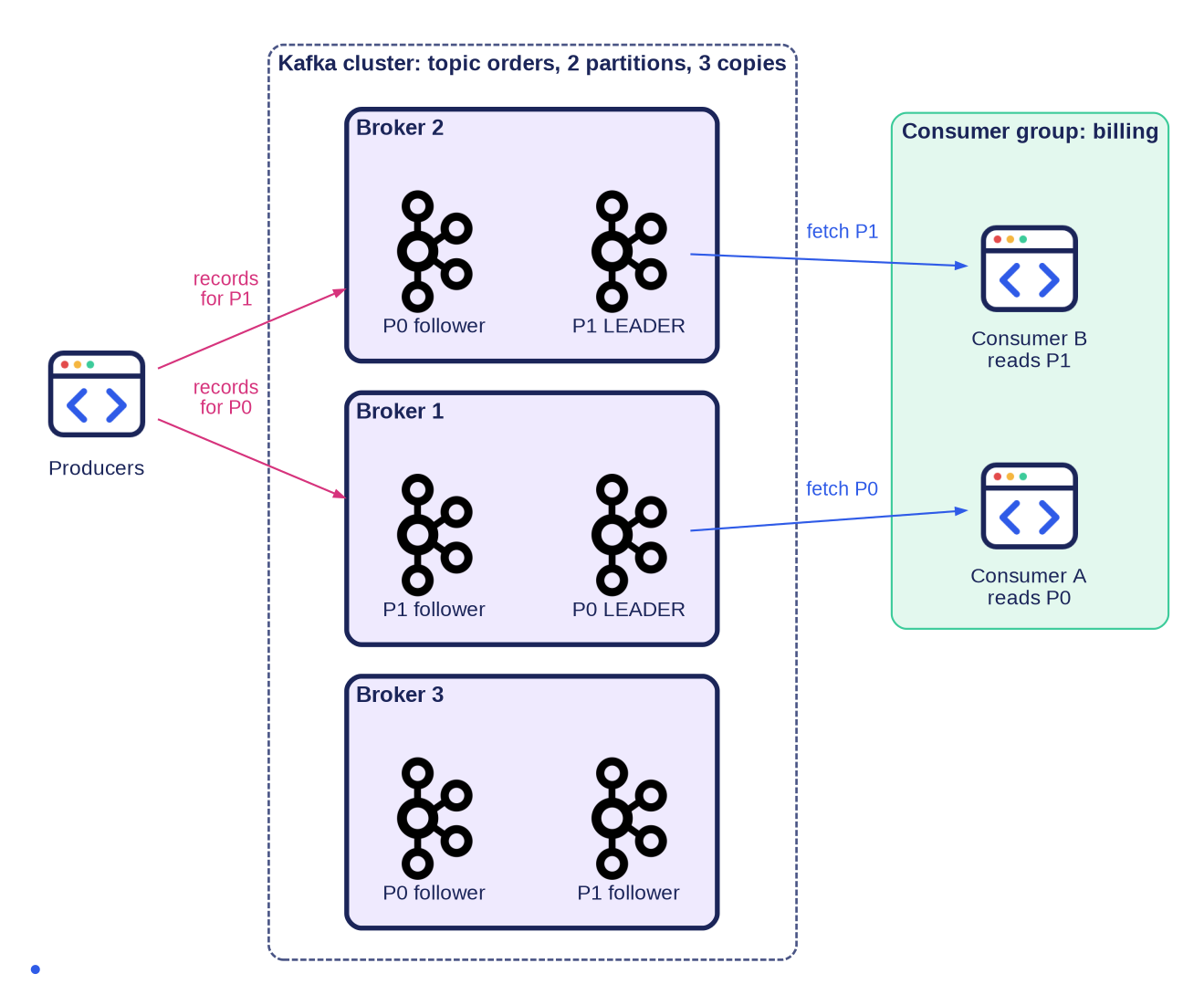
The parts
| Part | What it does |
|---|---|
| Producer | Chooses the partition, batches, compresses, retries |
| Broker | Appends to segment files, serves fetches, copies partitions it follows |
| Log segment | One file of a partition, 1 GiB by default, with small index files to find an offset |
| Consumer | Pulls from its partitions and commits positions to __consumer_offsets |
| Group coordinator | The broker that manages the members of one group |
| Transaction coordinator | The broker that decides the outcome of one producer's transactions |
| Controllers | 3 or 5 servers that keep the metadata in a replicated log and elect partition leaders |
The path
One record, step by step
Produce, copy, acknowledge, fetch, commit
- 1
Send
The producer serializes the record, picks the partition and adds it to a batch.
- 2
Append
The leader appends the batch to its log, in order, and assigns offsets. Records are immutable.
- 3
Replicate
Followers pull. One that has not caught up for 30 seconds leaves the in-sync set.
- 4
Acknowledge
At once, after the leader, or after all in-sync copies: that is
acks. - 5
Fetch
The consumer that owns the partition polls. It sees records up to the high watermark.
- 6
Commit
It saves the next position. After a restart the group resumes there.
Keys
Partitions, order and hot keys
Records with the same key go to the same partition, so they stay in order. Records with no key stick to one partition until about a batch is filled, then move to another. Order across partitions does not exist: total order means one partition, and one partition means one reader per group.
Which key?
A hot key over four partitions
| Key | P0 | P1 | P2 | P3 |
|---|---|---|---|---|
| post, one post is 90% of traffic | 90% | 3% | 3% | 4% |
| post plus bucket 0 to 3, evenly spread | 25% | 25% | 25% | 25% |
Durability
Copies and acknowledgements
What the producer waits for
| Setting | Waits for | Can lose an acknowledged record when | Use |
|---|---|---|---|
acks=0 | Nothing | Anything goes wrong; there are no real acknowledgements | Rarely |
acks=1 | The leader's append | The leader dies before a follower copied it | Logs and metrics that may have gaps |
acks=all | Every in-sync copy | All of those copies are lost | The default, for data you need |
acks=all waits for the copies that are in sync now. If followers fall away, that set could shrink to the leader alone. min.insync.replicas sets the floor. Its default is 1, so set it to 2 with replication factor 3: below two, the leader refuses the write.
How many brokers may fail?
Can this write succeed?
Unclean election is off
A copy outside the in-sync set is not elected by default, because it may lack committed records. Turning
unclean.leader.election.enableon trades data for availability.Eligible leader replicas
Since 4.0, and by default on new clusters since 4.1, the controller remembers copies that left the in-sync set but still hold all committed data, so it has more safe leaders to choose from.
Idempotent producer
On by default. The broker uses a producer id and sequence numbers to drop a retried batch it already has, and keeps order with up to 5 requests in flight.
Producers
Batching and compression
When does a batch leave?
Producer defaults in 4.4
| Setting | Default | Meaning |
|---|---|---|
acks | all | Wait for the in-sync copies |
enable.idempotence | true | No duplicates from retries |
batch.size | 16,384 bytes | Largest batch for one partition |
linger.ms | 5 | Wait for more records; it was 0 before 4.0 |
compression.type | none | gzip, snappy, lz4 or zstd work on whole batches |
delivery.timeout.ms | 120,000 | Two minutes to succeed or report failure |
max.request.size | 1 MiB | Cap on a request; the broker's batch limit is about 1 MB too |
linger.ms of 20 to 100, and lz4 or zstd, then measure. Put big files in object storage and send a reference.Compression depends on the data: measure your own ratio. Batching helps it, because a whole batch is compressed together. A longer linger can even lower latency under load, because fewer requests queue up.
Consumers
Groups, positions and rebalances
One group splits the work: each partition has one reader, so consumers compete like on a queue. Several groups each receive everything, like publish and subscribe. With 10 partitions, 10 consumers of one group read one each, and an 11th waits.
Consumer defaults worth knowing
| Setting | Default | Meaning |
|---|---|---|
enable.auto.commit | true | Positions are saved in the background |
auto.offset.reset | latest | Where a group without a position starts; earliest reads from the beginning |
max.poll.records | 500 | Most records from one poll |
max.poll.interval.ms | 5 minutes | Longer between polls and the member is out |
session.timeout.ms | 45 seconds | No heartbeat for this long and the member is out (classic protocol) |
group.protocol | classic | Set it to consumer for the newer protocol |
offsets.retention.minutes | 7 days | A broker setting: an empty group's positions are then forgotten |
A rebalance with the consumer protocol
Keep a group calm
- 1
Use the consumer protocol
The broker plans, members change step by step, and there is no global barrier.
- 2
Give members a fixed name
group.instance.idmakes a member static. A quick restart, for example of a pod in a StatefulSet, keeps its partitions. - 3
Poll in time
Fetch fewer records or move slow work so
max.poll.interval.msis never reached. - 4
Handle the poison record
Retry a few times, then write it to a dead-letter topic and move on, or the partition waits forever.
Guarantees
At most once, at least once, exactly once
| Guarantee | How | Price |
|---|---|---|
| At most once | Commit before the work, or acks=0 and no retries | Records may be lost |
| At least once | acks=all, retries, commit after the work | Records may repeat; make effects idempotent |
| Exactly once, inside Kafka | Idempotent producer, transactions, read_committed readers | Extra work per transaction; readers wait for the commit |
Read, process, write in one transaction
Storage
Retention, compaction and tiered storage
| Policy | Keeps | Good for |
|---|---|---|
delete by time | 7 days by default | Events, logs, metrics, audit trails |
delete by size | No limit by default; set per partition | A cap on disk use |
compact | At least the latest value of each key | Current state, change data capture, reference data |
compact,delete | Latest values, until they are too old | State that expires |
A compacted topic is like a changelog of a key-value table. It is not a database: you cannot ask it for one key without reading it into something else.
Tiered storage
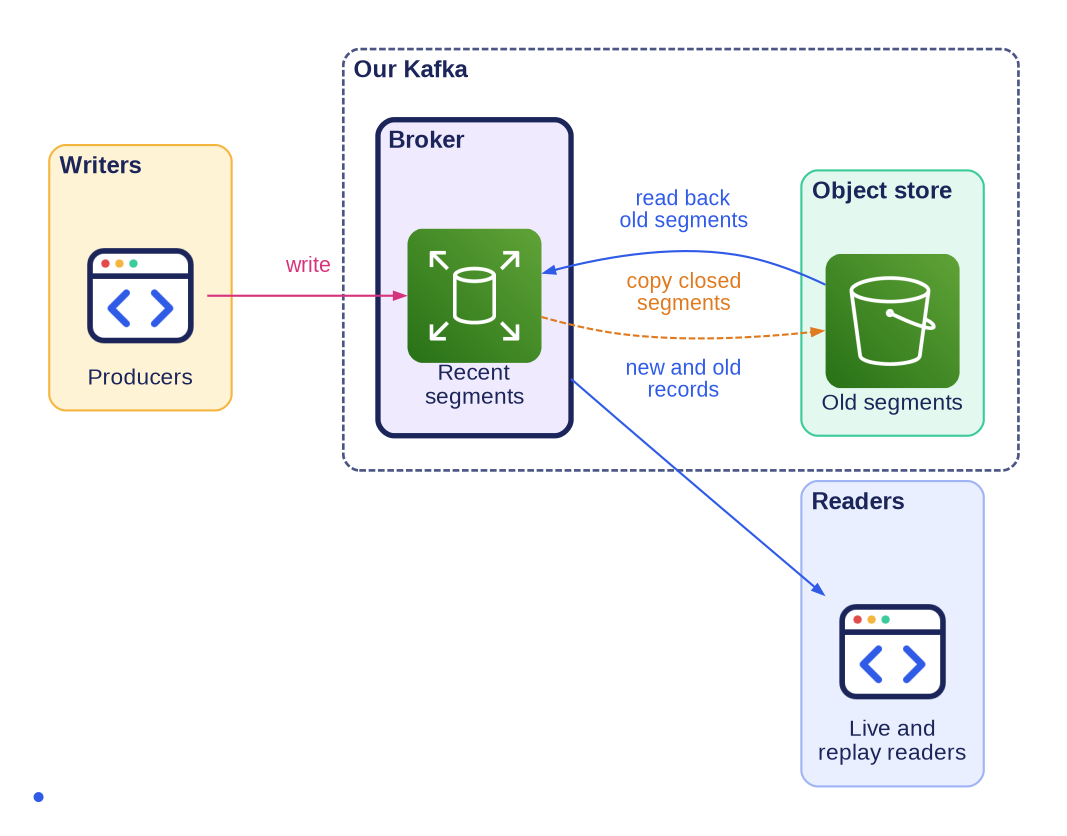
local.retention.ms decides what stays on the broker, retention.ms how long a record lives in all. Readers notice only that old data is slower.Tiered storage makes long retention cheaper and new brokers quicker to fill, since little data lives on them. Limits: the plug-in that talks to your object store is not included, and compacted topics are not supported. A common split: a few days on the broker for live readers, a year in the object store for replay and audits.
Ecosystem
Processing streams
| Tool | Runs as | Choose it for |
|---|---|---|
| Kafka Streams | A Java library inside your service; state in local stores backed by topics | Kafka in, Kafka out: filter, enrich, join, count |
| Apache Flink | Its own cluster | Large state, event time, complex patterns, many sources |
| Spark Structured Streaming | Spark jobs, in small batches by default | Teams that already use Spark for batch, or write Python |
| Kafka Connect | Workers with ready-made connectors | Moving data in and out, without code |
Capacity
Size a cluster
Example, with assumed numbers: peak 100 MB/s of records after compression, so an average of about 33 MB/s (peak is 3x average). One consumer handles 10 MB/s of one partition, measured. Keep 7 days, 3 copies, 2 reading groups, disks at most 60% full, 12 TB of disk per broker.
Partitions
Disk and brokers
Network at the peak
At 1 GB/s of producing, 3 copies mean 3 GB/s of writes. With 250 MB/s of writes per broker (an assumption to replace by a test), that is 12 brokers for throughput alone. At 50 MB/s each, at least 20 partitions.
Operations
Run it
What to watch
| Signal | Healthy | When it is not |
|---|---|---|
| Consumer lag, per partition | Small and falling | Work too slow, or one hot partition |
| Under-replicated partitions | 0 | A broker, disk or network is in trouble |
| Under min ISR partitions | 0 | Writes with acks=all are failing now |
| Offline partitions | 0 | No leader: nobody can read or write |
| Active controllers | Exactly 1 in the cluster | Metadata changes stop |
| ISR shrinks per second | Near 0 | Followers cannot keep up |
| Produce and fetch time, p99 | Inside your own target | Look at queue, disk and network time |
| Disk space and bytes in and out | Headroom for one lost broker | Add brokers or shorten retention |
Trouble and first moves
| Trouble | Look at | Then |
|---|---|---|
| Lag grows | Is it every partition, or one? | Faster work, batch writes downstream, more consumers up to the partition count |
| Under-replicated | Broker logs, disk space, network | Fix the cause before you restart anything |
| Producer timeouts | Broker load, in-sync copies, quotas | Relieve the broker; a longer timeout only hides it |
| Rebalance storms | Poll time, heartbeats, deploys | Static members, smaller polls, consumer protocol |
| Uneven brokers | Leaders and bytes per broker | Elect preferred leaders, reassign partitions with a throttle |
Decide
When to choose it, and when not
Choose Kafka
- High-rate event streams
- Several teams need the same events
- Replay of history
- Event sourcing, CQRS, change data capture
- Log and metric collection
- Stream processing with Kafka Streams or Flink
Choose something else
- Request and reply: use HTTP or gRPC
- A few jobs a minute: a simpler queue
- Rich routing or per-message delay: RabbitMQ
- Sub-millisecond delivery
- Transactions with other systems that can roll back
- Nobody to operate it: a managed service
Four neighbours
| Kafka | RabbitMQ | Amazon SQS | Apache Pulsar | |
|---|---|---|---|---|
| Model | Partitioned log | Queues behind exchanges; streams too | Managed queue | Log, with several subscription types |
| Delivery | Consumer pulls | Broker pushes | Consumer polls | Broker pushes into a receive queue |
| After reading | Stays | Queue deletes on ack; a stream keeps | Deleted by the consumer | Kept as retention says |
| Order | Per partition | Per queue | FIFO queues, per group | Per partition or key |
| Storage | Broker disks, optional tier | Node disks | Hidden | Separate layer, BookKeeper |
| Run by | You or a vendor | You or a vendor | AWS | You or a vendor |
| Choose for | Streams, replay, ecosystem | Routing, job queues, request and reply | Simple queues on AWS | Many tenants, geo-replication |
Kafka or not?
Summary
The whole topic in one minute.
Kafka is a partitioned, replicated log. A key chooses the partition, the partition gives order, and the number of partitions is the ceiling for a consumer group. Writes are safe when replication factor is 3, min.insync.replicas is 2 and the producer waits with acks=all, at the price of refusing writes when only one copy is left.
Commit after the work for at least once, use transactions when everything stays inside Kafka, and make outside effects safe to repeat. Size from measured rates, watch lag and in-sync copies, and prefer a work queue when jobs need their own routing, delay or priority.
- A topic is split into partitions; order and parallel reading both come from them.
- Replication factor 3, min.insync.replicas 2 and acks=all survive one broker.
- Reading removes nothing: groups hold positions, retention deletes.
- Commit after the work, and make effects safe to repeat.
- Transactions are exactly once inside Kafka only.
- Watch lag and in-sync copies; plan partitions early.