
Apache Pulsar
medium 28 minApache Pulsar separates serving from storing: brokers talk to clients and keep no data of their own, Apache BookKeeper stores each topic as many small replicated segments.
Video lesson · Chapter 1 of 5
An order finds its broker and its journal
Brokers and bookies in 75 seconds
1:15Reel coming soon
Theory
Read or listen first. About 2 min.
What it is
Pulsar is an open-source system for messaging and event streaming. Producers publish to a topic, and each subscription on the topic gets every message. How a subscription shares messages among its consumers is a choice: one reader, one active reader with stand-bys, everybody in turn, or by key.
Its special idea is the split into layers. A broker accepts and delivers messages. A bookie, a storage server of Apache BookKeeper, keeps them. A topic is a chain of segments called ledgers, and every ledger is written to a few bookies. A metadata store remembers who owns what.
Pulsar was built for many teams on one cluster. Names have a tenant and a namespace, as in persistent://shop/orders/created, and policies such as retention, quotas and access hang on them.
Why it exists
In a log where the broker also owns the disk, moving a partition means copying its data. If serving and storing are separate, a topic can move to another broker in a moment, because there is nothing to copy. New storage servers take new segments at once.
A second reason is one system for two shapes of work: task queues with individual acknowledgements and ordered streams with replay. General ideas are on queues, log-based queues and pub-sub. This page is about the product.
The cost is a larger system. A production cluster has brokers, bookies and a metadata store, each with its own way to fail and to be upgraded. Many teams do not need that.
A short history
2015
Yahoo deploys its first Pulsar instance in the second quarter, according to its case study on the project's site.
June 2017
Pulsar enters the Apache Incubator.
September 2018
Pulsar graduates to a top-level Apache project.
May 2023
Pulsar 3.0 is the first release of the long-term support model.
October 2024
Pulsar 4.0 (LTS) reworks Key_Shared delivery to keep order when consumers come and go.
October 2026
Pulsar 5.0 (LTS) brings scalable topics and a new client API, first in Java.
Words to know
- Broker
- Serves topics to clients. Keeps a cache but no durable data.
- Bookie
- A BookKeeper storage server. It stores parts of many ledgers.
- Ledger
- An append-only segment with one writer. Once closed it never changes.
- Managed ledger
- The chain of ledgers that makes one topic.
- Cursor
- The stored position of a subscription, with its single acknowledgements.
- Subscription
- A named reader group with a delivery type.
- Bundle
- A range of topic hashes in a namespace, the unit that moves between brokers.
- Namespace
- A group of topics inside a tenant that shares policies.
How it works
Step through the idea, or press Play.
Publish. The owner broker appends the message to bookies
Understand it
Start here
The radio desk and the vault
Imagine a radio station. Announcers sit at desks and speak, but they keep nothing at the desk. Every sentence is recorded on two tapes in a separate vault before it counts as said. When an announcer leaves, another desk takes the channel. No tape has to move.
The desk can change in a moment, because the memory is in the vault.
What you get
Why teams choose it
Serve and store apart
Add brokers for traffic and bookies for space, each on its own.
Queue and stream
Four subscription types on the same topic.
Tenants
Tenants and namespaces with quotas, policies and access rules.
Many topics
The project claims over a million topics in a cluster.
Geo-replication
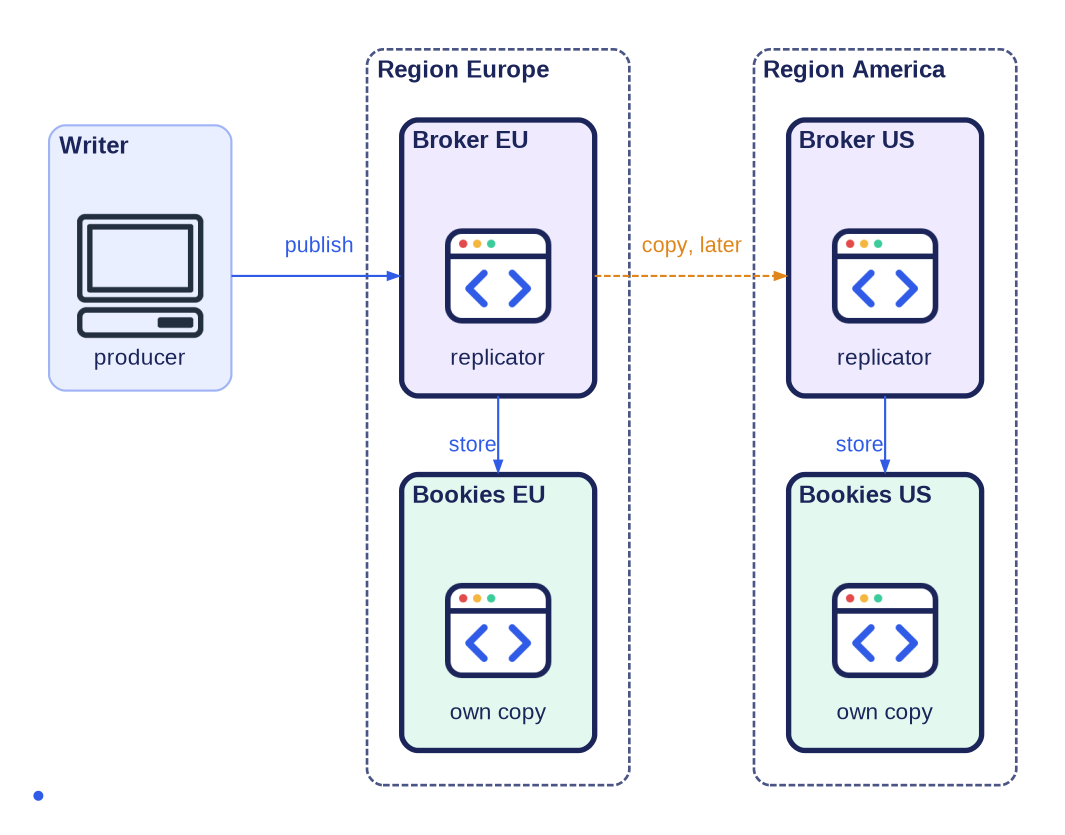
Built in, between clusters, per namespace or topic.
Tiered storage
Closed ledgers can move to object storage and stay readable.
Architecture
Brokers, bookies, metadata
A Pulsar cluster
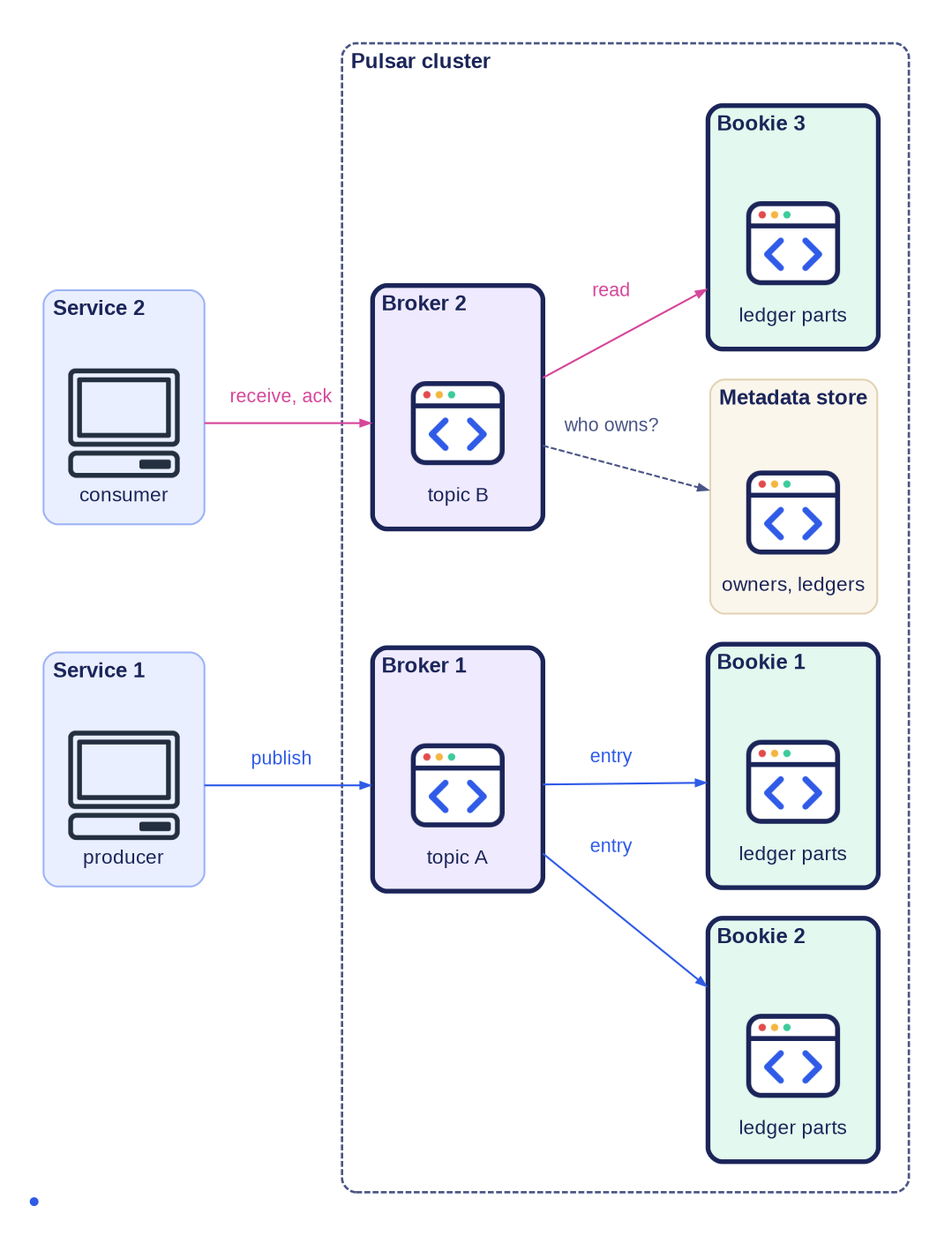
The parts
| Part | Job | If one dies |
|---|---|---|
| Broker | Lookup, publish, dispatch, cache | Its bundles move to other brokers |
| Bookie | Journal and entries of ledgers | Writers replace it, lost copies are rebuilt |
| Metadata store | Owners, ledger lists, policies | Needs a quorum. Without it no new owner can be chosen |
| Proxy (optional) | One address in front of all brokers | Use several |
| Configuration store | Tenants and namespaces across clusters | Policy changes wait |
One publish
The key idea
A topic is a chain of ledgers
A partition in a broker-owned log lives on a fixed set of machines. A Pulsar topic is cut into ledgers, and each ledger may choose other bookies. Three numbers describe a ledger.
| Number | Meaning | Default in broker.conf |
|---|---|---|
| Ensemble, E | Bookies that share the ledger | 2 |
| Write quorum, Qw | Copies of each entry | 2 |
| Ack quorum, Qa | Copies on disk before the confirmation | 2 |
Where entry i is stored
How much disk?
A broker fails
What the split makes easy
- Moving a topic is a change of owner
- New bookies take new ledgers at once
- A topic is not limited by one disk
- Closed ledgers can be offloaded
What it costs
- An extra network hop on a write
- Three kinds of servers
- More metadata to keep
- Reads of old data go broker to bookie
Reading
Four subscription types
| Type | Who gets a message | Order | Cumulative ack |
|---|---|---|---|
| Exclusive (default) | The only consumer | Yes | Yes |
| Failover | The active consumer, per partition | Yes, duplicates possible at a switch | Yes |
| Shared | Any consumer, in turn | No | No |
| Key_Shared | The consumer that owns the key | Per key | No |
Queue and stream on one topic
Acknowledge, refuse, retry
- 1
Ack one by one
In Shared and Key_Shared each message is acknowledged alone. The cursor stores the holes.
- 2
Negative ack
Asks for redelivery, after 1 minute by default in the Java client. The redelivery counter lives in memory and can be reset, for example by a broker restart.
- 3
Ack timeout
Off by default. Without it a message comes back only when the consumer disconnects or refuses it.
- 4
Retry topic
reconsumeLater with enableRetry stores the count with the message. The documentation calls it the only way that guarantees your maximum is honoured and the dead letter topic is reached.
- 5
Dead letter topic
For Shared and Key_Shared. Create a subscription on it, or the dead letters may be lost.
Keeping data
Retention, TTL, quota: three different things
| Setting | Question it answers | Default |
|---|---|---|
| Retention | How long do acknowledged messages stay? | 0: not kept |
| Message TTL | When is an unacknowledged message given up? | 0: never |
| Backlog quota | How large may the backlog be? | No limit |
| Quota policy | What happens at the limit? | Producers are held |
| Maximum message size | How large may one message be? | 5 MB, chunking above that |
When may a ledger go?
Compaction is a separate tool. It keeps the latest message per key in a compacted copy, for readers that want a current table instead of the history.
Scaling
Partitions, bundles and scalable topics
- 1
Bundles
Topics of a namespace are hashed into bundles, 32 by default since 5.0. Bundles are assigned to brokers and can be split and moved.
- 2
Partitioned topics
A topic with a fixed number of parts, for more throughput than one broker gives. The number can grow but never shrink, and growing can send a key to another partition and break its order.
- 3
Scalable topics (5.0)
Addressed as
topic://. The key space is cut into segments that the broker splits when hot and merges when cold. Ordered consumers read the old segment to its end before the new one.
Partitioned or scalable?
| Partitioned topic | Scalable topic | |
|---|---|---|
| Available in | All versions | 5.0 and later, on by default |
| Capacity | You choose and raise it | Splits and merges by itself |
| Shrink | Not possible | Yes |
| Key order when resized | Can break | Kept for stream consumers |
| Clients | All | v5 API, currently the Java client |
| Geo-replication | Yes | Not supported |
| Consumers | Four subscription types | Stream, queue, checkpoint |
Guarantees
Duplicates, transactions, regions
- 1
At least once
The normal case for persistent topics with acknowledgements. Make consumers idempotent.
- 2
Producer deduplication
Off by default. The broker drops a repeated sequence id of a producer, per topic partition.
- 3
Transactions
Consume, process and produce as one unit across topics. The coordinator is off by default (transactionCoordinatorEnabled). The documentation lists Java, Go and .NET clients.
- 4
Non-persistent topics
Messages are not stored. Fast, and lost when nobody is listening.
- 5
Delayed messages
A message can be delivered later. Only Shared and Key_Shared subscriptions respect the delay.
Asynchronous geo-replication
Operations
Running it
# a tenant, a namespace and its policiesbin/pulsar-admin tenants create shop --allowed-clusters eubin/pulsar-admin namespaces create shop/orders --bundles 64bin/pulsar-admin namespaces set-retention shop/orders --size 100G --time 7dbin/pulsar-admin namespaces set-message-ttl shop/orders --messageTTL 1209600bin/pulsar-admin namespaces set-backlog-quota shop/orders \ --limit 50G --policy producer_request_hold# a partitioned topic, then look at itbin/pulsar-admin topics create-partitioned-topic \ persistent://shop/orders/created --partitions 8bin/pulsar-admin topics partitioned-stats persistent://shop/orders/createdbin/pulsar-admin topics subscriptions persistent://shop/orders/created# broker.conf, a common choice for three or more bookiesmanagedLedgerDefaultEnsembleSize=3managedLedgerDefaultWriteQuorum=3managedLedgerDefaultAckQuorum=2# on by default in 5.0, off means: no topic:// at allscalableTopicsEnabled=true# off by default, needed for transactionstransactionCoordinatorEnabled=trueRed flags
| You see | Cause | Remedy |
|---|---|---|
| Disk grows, nobody reads | A forgotten subscription | Delete it, set TTL and a quota |
| Producers hang | Backlog quota with hold | Fix the consumer, raise or change the policy |
| A consumer of a Shared subscription gets nothing more | Too many unacknowledged messages | Acknowledge or refuse each message |
| Failing messages never reach the dead letter topic | Counter reset with negative acks | reconsumeLater with enableRetry |
| One broker is hot | A large bundle or a hot topic | Split the bundle, partition the topic |
| Write latency jumps | Slow journal disk on a bookie | Separate disks, ack quorum below write quorum |
Before production
- 1
Choose a version with a future
5.0 and 4.0 are long-term support releases. 5.0 has active support until October 2028. Active support of 4.0 ended in October 2026, with security fixes until October 2027.
- 2
Spread bookies
Put them in three zones and make placement aware of zones.
- 3
Create subscriptions first
Before the first message, or set retention.
- 4
Watch
Backlog per subscription, publish latency, bookie disk and journal, ledger under-replication.
- 5
Check the ecosystem
The open-source Kafka-on-Pulsar repository was archived in November 2026. Do not plan a migration on it.
Choose
When Pulsar, and when not
Choose Pulsar
- Many teams or customers on one platform
- Work queues and ordered streams of the same events
- Very many topics
- Long retention with cheap storage
- Replication between regions out of the box
Choose something else
- A small team with one queue: SQS or RabbitMQ
- The Kafka ecosystem is the reason: Kafka
- No one to run three layers: a managed service
- Only routing inside one data center: RabbitMQ
- Heavy stream computation: Flink, with any log
Pulsar and Kafka
| Pulsar | Kafka | |
|---|---|---|
| Who stores | Bookies, per segment | Brokers, per partition |
| Adding storage | New ledgers use it at once | Partitions are reassigned |
| Queue style | Shared, single acks | Consumer groups, share groups in newer versions |
| Coordination | Oxia or ZooKeeper | KRaft inside Kafka |
| Tenants | Built into names and policies | By convention, quotas and ACLs |
| Ecosystem | Smaller | Much larger |
Summary
The whole topic in one minute.
A broker owns a topic for a while, appends each message to several bookies and answers when enough of them have it on disk. If the broker dies, another one takes the topic, closes the last ledger safely and opens a new one. No message is copied for that. Adding a bookie helps at once, because new ledgers use it.
Subscriptions decide the shape: Exclusive and Failover keep order, Shared spreads work, Key_Shared keeps order per key. Messages are kept until every subscription has acknowledged them, and then deleted unless you set retention. Choose Pulsar for many tenants, queue plus stream, or geo-replication, when you can operate three kinds of servers.
- Brokers serve, bookies store, the metadata store remembers owners.
- A topic is a chain of ledgers, each on its own set of bookies.
- A broker failure changes the owner. No data moves.
- Exclusive and Failover keep order, Shared spreads, Key_Shared keeps order per key.
- No subscription keeps nothing. A forgotten one keeps everything.
- Scalable topics (5.0) split and merge by themselves, with limits.