
The AWS DynamoDB DNS outage of 2025
hard 32 minOn October 19 and 20, 2025 two automatic programs raced while updating the DNS record of DynamoDB in the N.
Video lesson · Chapter 1 of 5
A service loses its address
The empty DNS record in 75 seconds
1:15Reel coming soon
Theory
Read or listen first. About 2 min.
What it is
DNS turns a name into addresses. Programs that use DynamoDB, a database service of AWS, ask DNS for the name of the regional endpoint and then connect to one of the addresses. If the answer holds no address, nothing can connect, even when every database server is healthy.
AWS keeps these records up to date with automation: one component plans, another applies the plan. On October 19, 2025 at 11:48 PM Pacific time, a rare order of events between two copies of the applying component left the record of the regional endpoint in N. Virginia (us-east-1) empty, in a state that the automation could not repair.
Other services in the region depend on DynamoDB. When it came back, some of them had so much work waiting that they could not recover without help. All facts and times here are from the summary that AWS published. Ideas of our own are marked.
Why it exists
It is a clear example of a check that is too old when it is used. The program asked whether its plan was newer, was delayed, and then wrote as if the answer were still true. You meet the same mistake in booking seats, moving money and editing documents.
It shows that clean-up is as dangerous as change. The overwrite alone would have left an old but working list of addresses. Deleting the plan that was in use removed them all.
And it shows that the cause and the length of an outage are two different things. The cause was repaired in 2 hours and 37 minutes. Most of the time went to systems that had fallen behind.
A short history
March 1998
RFC 2308 defines how DNS resolvers cache negative answers, including an answer that has no records.
October 19, 2025, 11:48 PM PDT
The regional DynamoDB record becomes empty. New connections fail.
October 20, 2025, 2:25 AM PDT
All DNS information is restored.
October 20, 2025, 2:20 PM PDT
The event ends, 14 hours and 32 minutes after it began.
October 2025
AWS publishes its summary and disables the DNS Planner and DNS Enactor worldwide until they are fixed.
Words to know
- Endpoint
- The name a program connects to, such as the regional name of DynamoDB.
- DNS plan
- For each endpoint a set of load balancers and weights.
- DNS Planner
- Watches load balancers and writes new plans.
- DNS Enactor
- Applies plans in Route 53. Three run independently, in three Availability Zones.
- Stale check
- A test whose answer is no longer true when you act on it.
- Droplet
- A physical server that hosts EC2 instances.
- DWFM
- DropletWorkflow Manager. It holds a lease for each droplet.
- Congestive collapse
- So much work is waiting that each piece expires before it finishes.
- Network Manager
- Sends network settings to EC2 instances and devices.
How it works
Step through the idea, or press Play.
Race. An old plan overwrites a newer one
Understand it
Start here
Two helpers and one signpost
Walkers find a lake with the help of one signpost. Two helpers repaint it whenever the office prints a new plan.
The check was correct when it was made. It was used too late.
What happened
The timeline
October 19 and 20, 2025, Pacific time
| Time | What happened |
|---|---|
| 11:48 PM | Empty DNS record; new connections to DynamoDB fail |
| 12:38 AM | DNS state identified as the source |
| 1:15 AM | Temporary fixes let some internal services connect |
| 2:25 AM | All DNS information restored |
| 2:32 AM | Global table replicas fully caught up |
| 2:40 AM | Cached DNS answers have expired; DynamoDB recovered |
| 2:25 AM on | EC2 launches fail: droplet leases cannot be renewed |
| 4:14 AM | Engineers throttle work and restart DWFM hosts |
| 5:28 AM | All leases back; launches begin to succeed |
| 5:30 AM | Some Network Load Balancers show connection errors |
| 6:21 AM | Network settings arrive late at new instances |
| 6:52 AM | Monitoring detects load balancer health check failures |
| 9:36 AM | Automatic health check failover disabled |
| 10:36 AM | Network settings arrive at normal speed |
| 11:23 AM | Request throttles are relaxed step by step |
| 1:50 PM | EC2 fully normal |
| 2:09 PM | Automatic failover enabled again |
| 2:20 PM | Containers recovered; end of the event |
Three periods, three causes
| Period | What failed | Why |
|---|---|---|
| 11:48 PM to 2:40 AM | DynamoDB API | Empty DNS record |
| 2:25 AM to 10:36 AM | New EC2 instances | Leases, then network backlog |
| 5:30 AM to 2:09 PM | Some Network Load Balancers | Health checks ran before network settings arrived |
How long was each part?
How it works
How the DNS records are managed
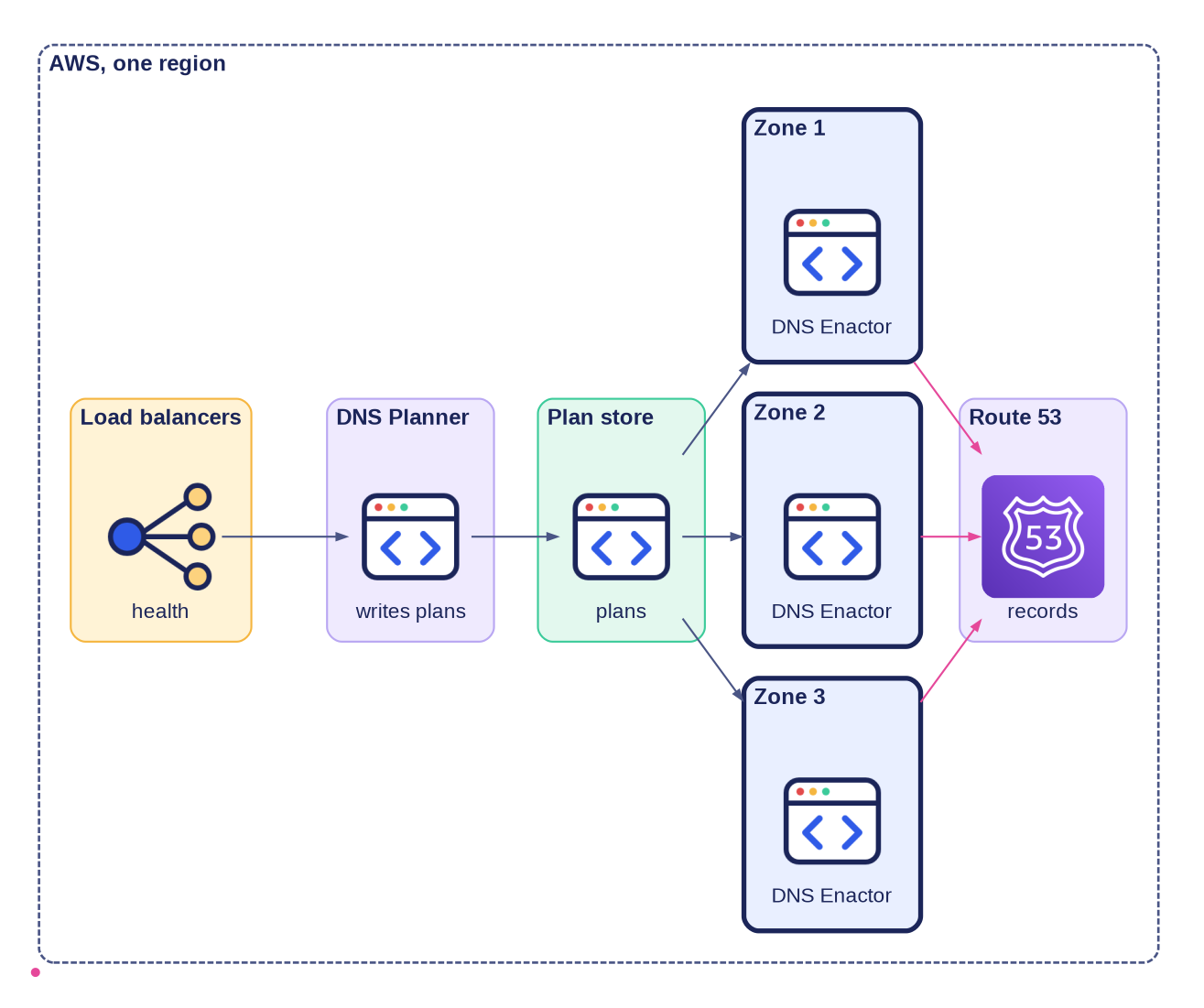
DynamoDB keeps hundreds of thousands of DNS records for its many load balancers. A human could not do that, so two separate components do. They are separate on purpose: the applying part should work even when much else is broken.
One planner, three enactors
| Component | Does | Safety it had |
|---|---|---|
| DNS Planner | Writes a new plan for all endpoints from time to time | One regional plan, simple to reason about |
| DNS Enactor | Applies the newest plan to each endpoint | A check at the start; a transaction per endpoint; retries |
| Clean-up | Deletes plans many generations old | Compares with the plan just applied |
One normal round
The race
Step by step to an empty record
Two enactors at the same time
Four conditions had to meet
- 1
Unusual delay
One Enactor needed many retries on several endpoints.
- 2
Many new plans
The Planner kept producing generations, so the waiting plan became very old.
- 3
A fast second Enactor
It applied a new plan everywhere and started the clean-up.
- 4
The same moment
The old plan landed on the regional endpoint while the clean-up was deciding what to delete.
The rule that was missing
How would you stop an old writer?
BreaksCheck once, then write
- How
- Read the applied version, compare, do the work.
- Limit
- The answer can be stale after any delay.
- Choose when
- Only for a single writer.
WorksA lock with a time limit
- How
- Take a lease before writing, renew it while working.
- Limit
- A paused holder may wake up after the lease ended and still write.
- Choose when
- Together with a version check.
StrongVersion check inside the write
- How
- The store accepts a write only if its number is higher (a fencing token).
- Limit
- Each record needs a number and the store must compare it.
- Choose when
- Several writers with delays, which is every distributed system.
The spread
Who depends on DynamoDB
From one record to many services
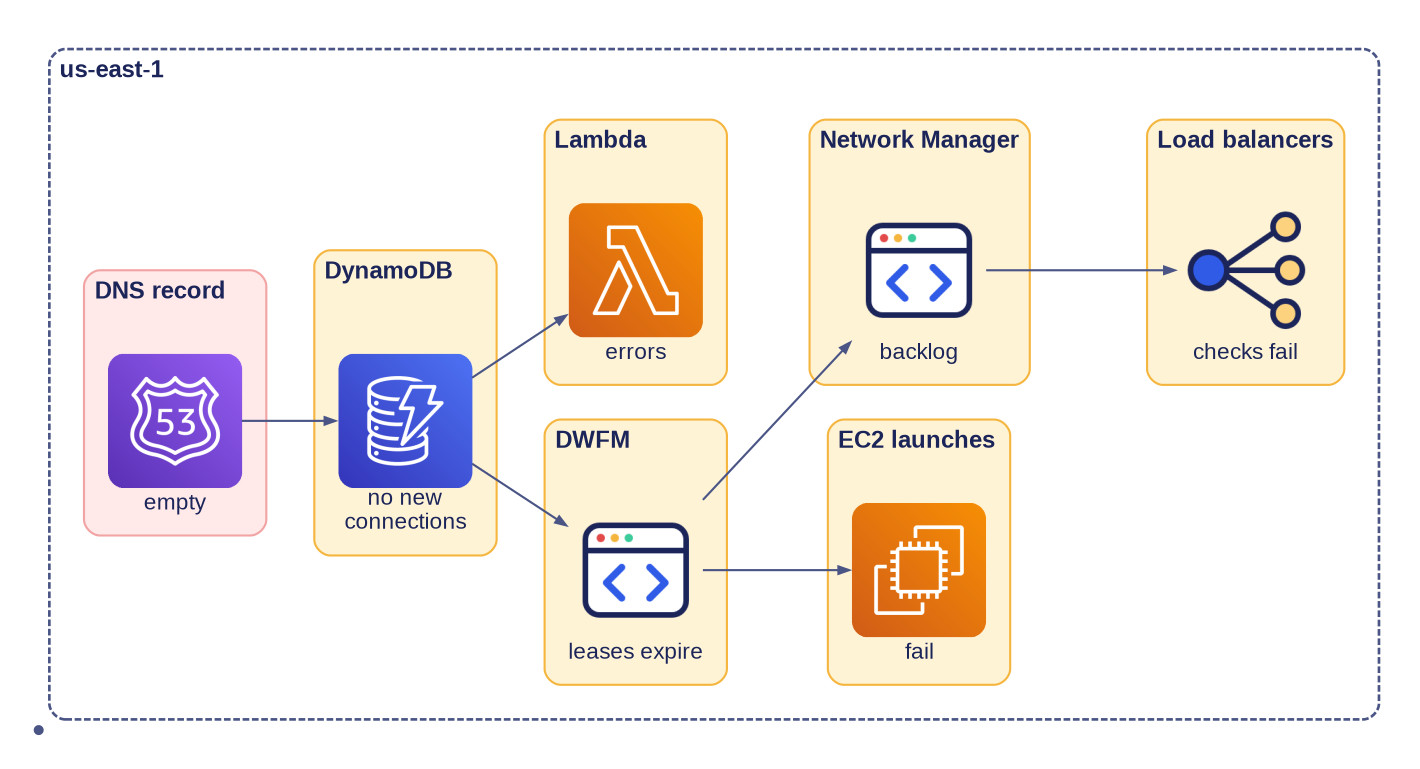
Lambda
Creation, updates and event sources failed first. Later some internal systems were too small, and asynchronous calls were throttled to protect synchronous ones. Normal at 2:15 PM.
Containers
ECS, EKS and Fargate had launch failures and slow scaling until 2:20 PM.
Sign-in
IAM users in the region had failures until 1:25 AM. STS recovered at 1:19 AM, with a second period from 8:31 to 9:59 AM.
Redshift
Query and cluster errors. Customers in all regions could not use IAM credentials for queries until 1:20 AM, because of a call to the API in N. Virginia.
Connect
Calls, chats and cases failed at two different times, the second through load balancers and Lambda.
Support
The support console failed over as planned, but an account system gave wrong answers, and legitimate users were blocked until 2:40 AM.
Customers with global tables could use their replicas in other regions, with a delay in replication to and from N. Virginia. That is the practical value of a second region: it works only if the application is ready to switch.
The collapse
Why EC2 could not recover alone
A manager called DWFM keeps a lease for each physical server, the droplet. It checks in every few minutes, and the check uses DynamoDB. During the outage the leases ran out. A droplet without a lease is not used for new instances, so launches reported insufficient capacity, although the machines were there.
When a backlog cannot drain (our example)
Congestive collapse
DNS and clients
Why an empty answer is so hard
| Situation | What the client sees | What helps |
|---|---|---|
| Addresses, some dead | Some connections fail, others work | Retry another address |
| Empty answer | No address at all | A last known good address, with care |
| Old cached answer | Works until it expires | It hides the start of the problem |
| Cached empty answer | Fails after the repair | Wait for the cache to expire |
For the basics see how DNS works and service discovery. Open connections do not ask DNS again, so connection reuse also softens the start of such an event.
Impact
What we leave out
The AWS summary gives no number of affected services, companies or dollars, and no list of customers. Press lists differ, so this page names services only as AWS does. The race was in the DNS automation, not in table metadata or scaling, as early descriptions on the web claimed.
The repair
What AWS announced, and what to design
| Area | Announced by AWS | General idea |
|---|---|---|
| DNS automation | Disabled worldwide; fix the race and add protection before it returns | Stop the machine that can do harm |
| Network Load Balancer | Limit how much capacity one balancer can remove in a failover | Velocity control |
| EC2 leases | A test suite for the DWFM recovery workflow | Test recovery at full scale |
| EC2 network data | Throttle by the size of the waiting queue | Admit only what can be finished |
May this plan be written?
What to copy into your own designs
- 1
Fence every write
Number the plans. The store refuses a lower number at the moment of the write.
- 2
Protect what is in use
Clean-up asks for references first, keeps the last few generations, and runs apart from applying.
- 3
Refuse absurd results
An empty set of addresses for a live endpoint is never right. Stop and alert instead.
- 4
Limit the speed of removal
Automation may remove a small share in a period. The rest needs a person.
- 5
Admission control in recovery
Give work that can be finished a place, reject the rest early, prefer new work over expired work.
- 6
Static stability
What runs should keep running when the control part is down. Existing instances did.
- 7
Practise
Rehearse DNS failure, a full backlog and a switch of region.
For customers of a cloud
- Know which calls leave your region
- Replicas in a second region, and a tested switch
- Timeouts, retry budgets, circuit breakers
- Alarms that work without the same region
Common traps
- A second region that needs an API in the first one to start
- Scaling up during the event as the only plan
- Endless retries
- Trusting that DNS cannot be empty
Read on: retries, circuit breaker, timeouts, concurrency control, failure detection.
Summary
The whole topic in one minute.
A slow Enactor checked that its plan was newer, then waited. A fast Enactor applied a much newer plan and started the clean-up. The slow one overwrote the regional endpoint with its old plan, and the clean-up deleted that old plan. The record was empty and later updates could not be applied.
DNS was restored at 2:25 AM. Leases between EC2's manager and its servers had expired meanwhile, and renewing them took longer than their lifetime: a collapse that ended with throttling and restarts. Network settings then lagged, so health checks of load balancers failed and recovered in turn, and healthy capacity was taken out of service.
Compare versions at the moment of writing, never delete what is in use, limit how fast automation can remove capacity, and test recovery from a full backlog.
- A stale check let an old plan overwrite a new one.
- The clean-up deleted the plan that was in use: the record was empty.
- DNS was restored in 157 minutes; the whole event lasted 14 hours and 32 minutes.
- Leases that expire faster than they are renewed cause a collapse. Less work at a time ends it.
- Check versions at the write, never delete what is in use, limit the speed of removal, test recovery.