
Service discovery
medium 30 minService discovery turns a service name into the address of a running, healthy copy of that service.
Video lesson · Chapter 1 of 5
Find a kitchen after its address changes
How services find each other, in 80 seconds
1:20Reel coming soon
Theory
Read or listen first. About 2 min.
What it is
A service usually runs as several identical copies, called instances, each with its own address and port. Service discovery is the part of a system that answers one question: where can I reach a healthy instance of this service right now?
It has two sides. On one side instances become known and are removed again: registration and health checks. On the other side callers look them up and choose one: discovery and load balancing. Between the two sits a service registry, a list from names to addresses.
Why it exists
When servers were bought and named, an address could stand in a configuration file for years. Today instances are created by autoscalers, replaced at every release and moved when a machine fails. A written-down address is wrong within hours.
A name that always leads to a healthy instance makes growth, failover and releases routine. The hard part is time: the list is always a little behind reality, so good callers expect some addresses to be wrong.
A short history
November 1983
RFC 882 introduces domain names. It explains that the central table of hosts, the file HOSTS.TXT, was close to the limit of what could be managed.
November 1987
RFC 1035 specifies the domain name system in the form still used, including how long an answer may be cached.
February 2000
RFC 2782 defines the SRV record, which gives the host, the port, a priority and a weight for a named service.
17 April 2014
The first release of Consul, 0.1.0: a registry with health checks and a DNS interface.
6 June 2014
The first commit of Kubernetes reaches GitHub. Its Services give a changing set of containers one stable name and address.
24 May 2017
Istio 0.1 is announced. In a service mesh, proxies receive the addresses and the application only knows names.
Words to know
- Instance
- One running copy of a service, with an address and a port.
- Service registry
- The list from service names to instances and their health.
- Heartbeat
- A message an instance sends regularly to say that it is alive.
- Lease
- A registration that ends by itself unless it is renewed.
- TTL
- Time to live: how long an answer may be kept before asking again.
- Readiness
- Whether an instance should receive traffic now.
- Liveness
- Whether a process should be restarted.
How it works
Step through the idea, or press Play.
Register. An instance tells the registry its name, address and health check
Understand it
Start here
The street market
Traders at a market take a different pitch each day. Imagine you want cheese. Nobody can tell you the pitch in advance, but there is a board at the entrance.
Sign in, ask, walk, check, and keep a note. Every discovery system does these five things.
The idea
Register, discover, call
The registry between both sides
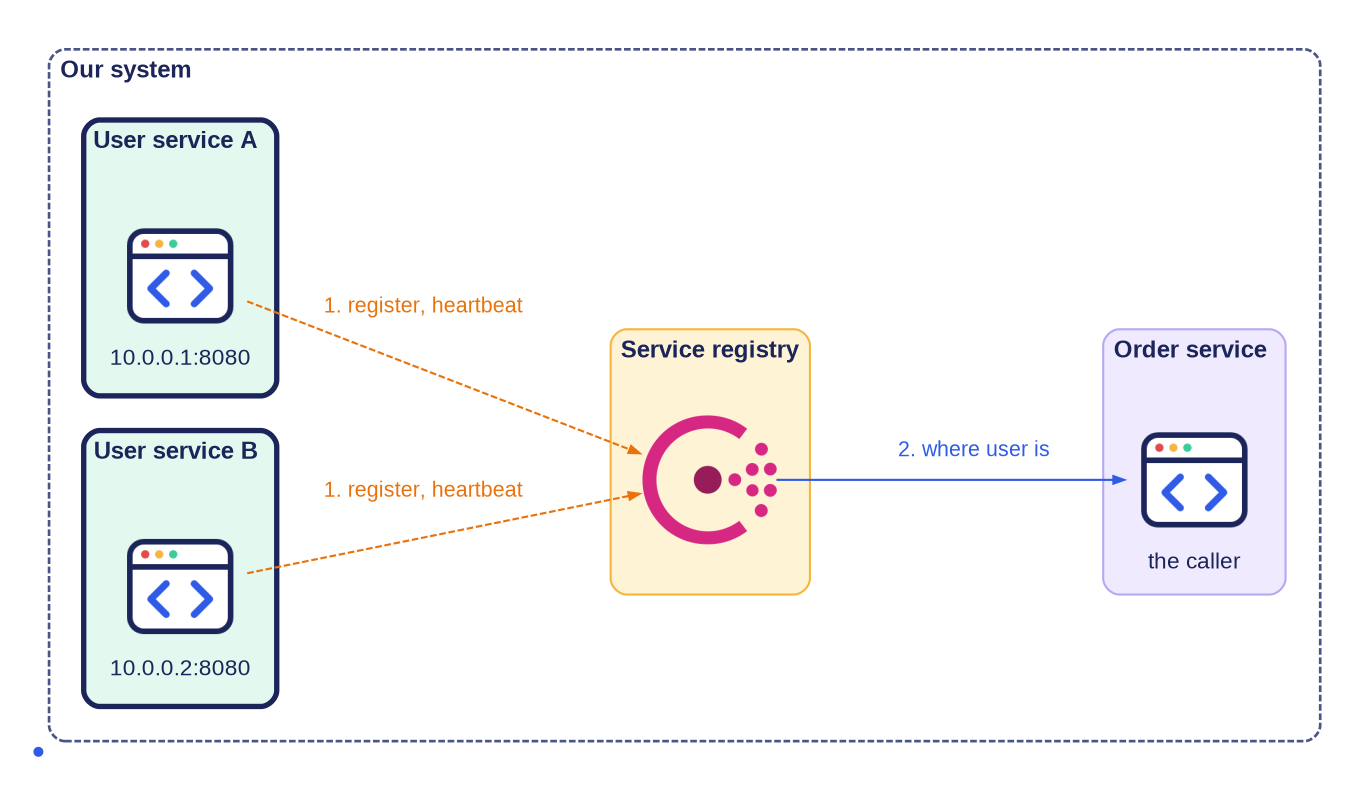
From start to call
- 1
The service starts
An instance comes up and checks that it can work.
- 2
It registers
Name, address, port and health check go to the registry.
- 3
The registry keeps watch
It renews or removes the entry.
- 4
A caller discovers
It asks for the name and gets healthy addresses.
- 5
The caller calls
It picks one and sends the request.
What you gain
- Services are found while addresses change.
- Failover without a person.
- Load balancing over all healthy instances.
- Elastic scaling: new instances get traffic by themselves.
- Simpler releases.
Without it
- Addresses in configuration files.
- A release of the caller when the other service moves.
- Traffic to dead machines.
- New instances that nobody uses.
What a registry stores
| Field | Example | Used for |
|---|---|---|
| Service name | user-service | The question callers ask |
| Instance id | user-service-7f3a | Replace or remove exactly this entry |
| Host and port | 10.0.0.1:8080 | Where to connect |
| Health check | GET /health every 10 s | Keep or remove |
| Metadata | version 2, zone b, weight 3 | Same-zone routing, gradual releases |
Getting in
Registration
Self-registration
The service registers itself at start and deregisters at stop. Simple, but every language needs the code, and a crash deregisters nothing.
Third-party registration
A separate registrar, such as a platform, watches instances and writes the entries. The service knows nothing about it. Kubernetes and Docker Swarm work like this.
The life of an entry
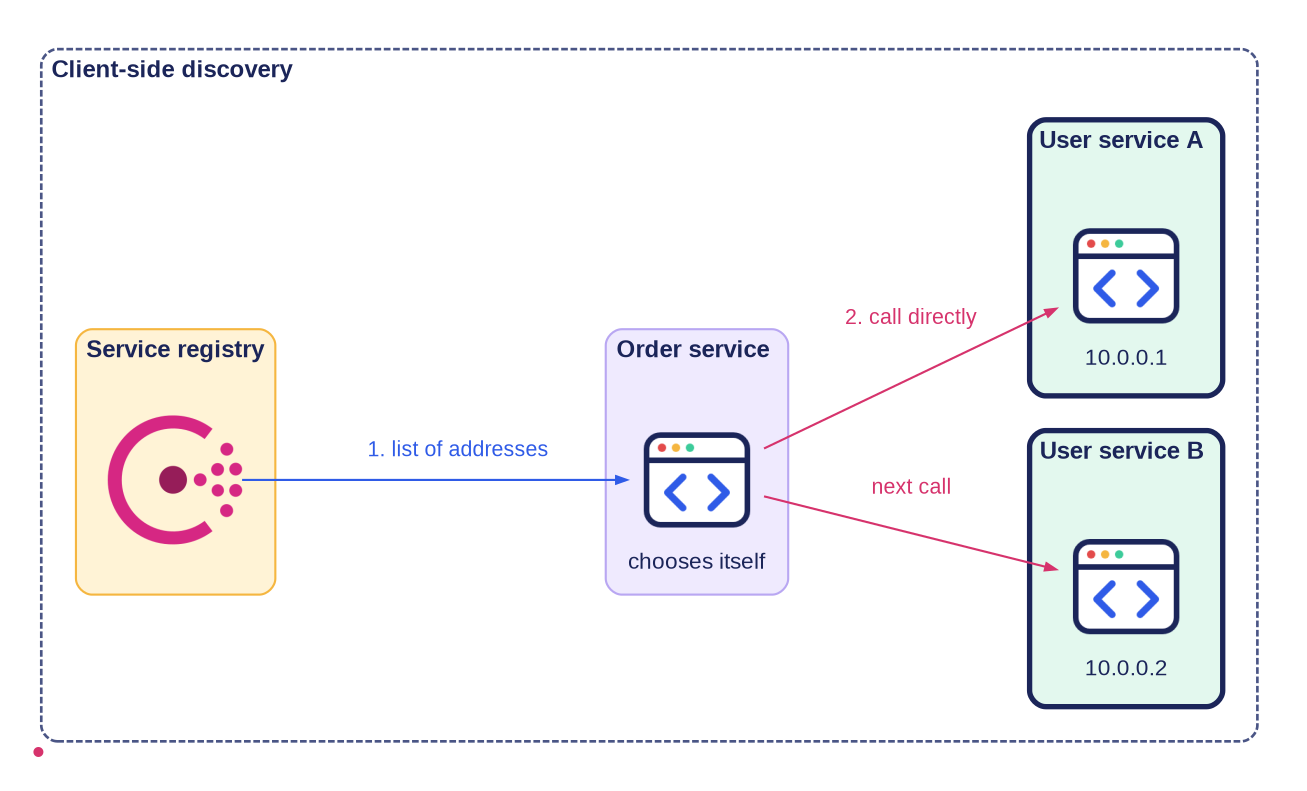
Way 1
Client-side discovery
The caller asks the registry, keeps the list and chooses an instance itself. Netflix's Eureka with a client library is the well-known example.
The caller chooses
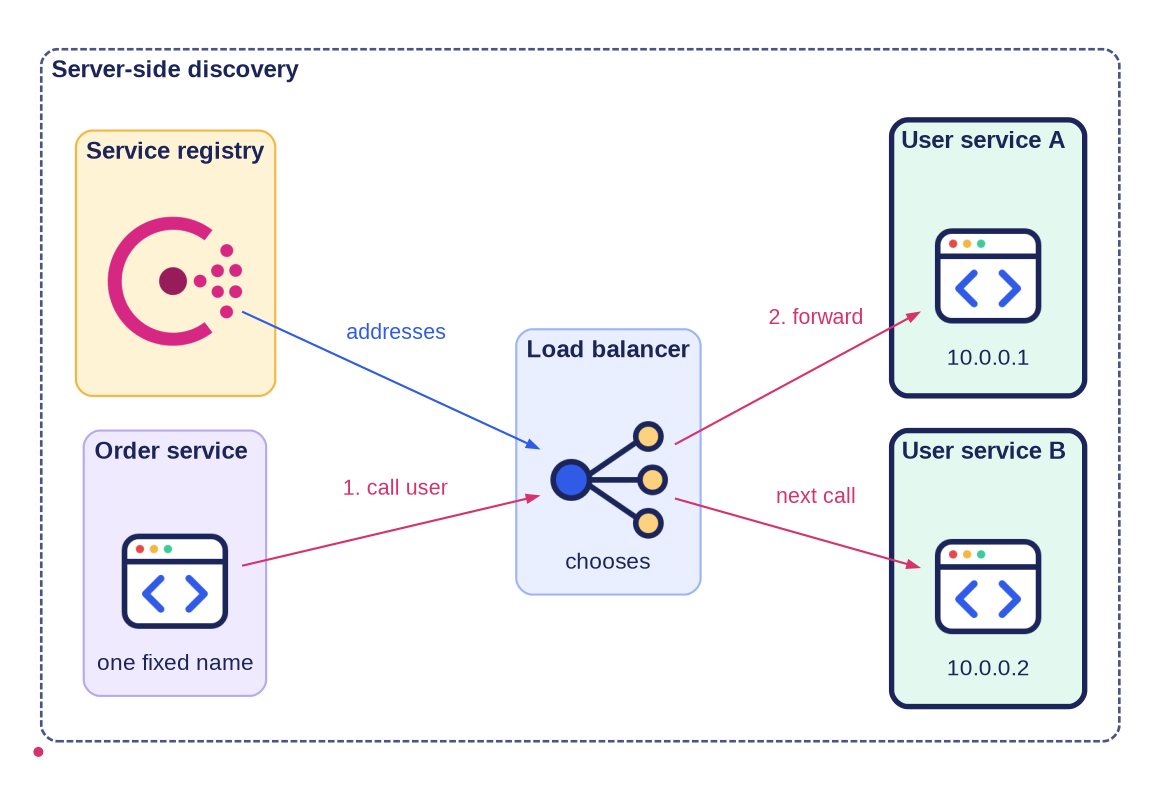
Way 2
Server-side discovery
The caller uses one fixed name or address. A load balancer behind it knows the instances and passes the request on.
The load balancer chooses
Way 3
DNS
Every language can look up a name. The registry answers DNS queries with the addresses of healthy instances. An address record holds no port. An SRV record does, with a priority and a weight, but many client libraries never ask for it.
A DNS answer that is out of date
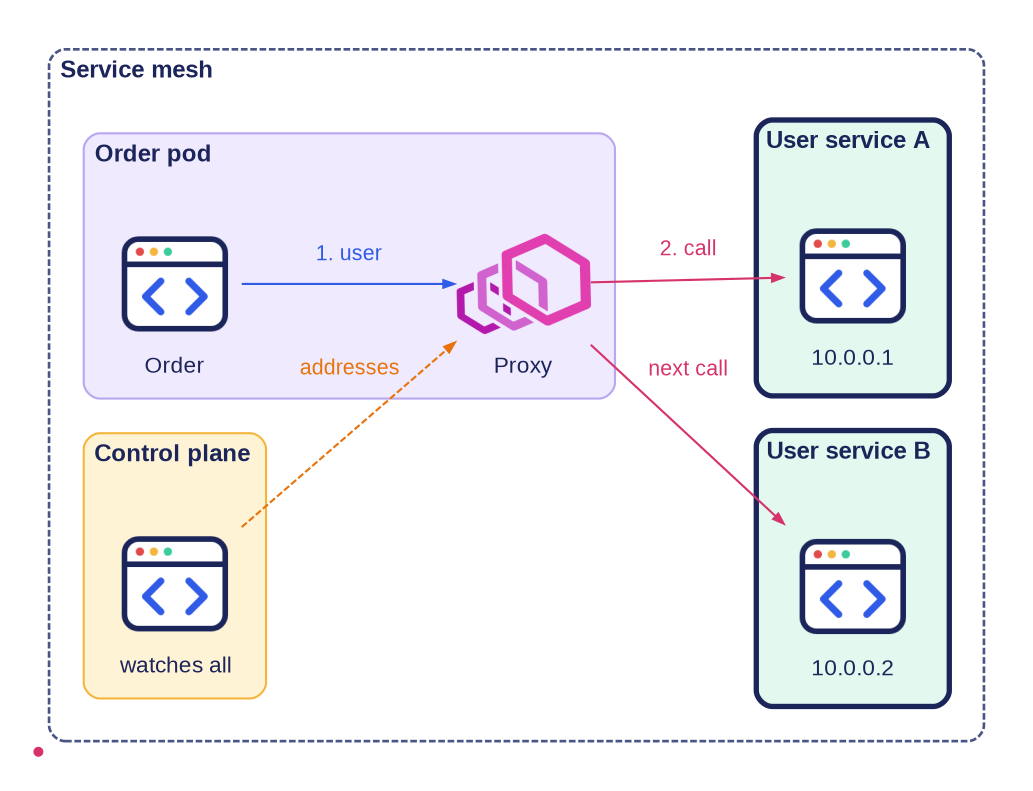
Way 4
Service mesh
A proxy beside each service receives the addresses from a control plane and makes the calls. The application only uses names. More about meshes is in microservice communication.
The proxy chooses
Compare
Four ways side by side
| Way | Who chooses | Good | Costs |
|---|---|---|---|
| Client-side | The caller | No extra hop, the caller can choose cleverly | A library per language, logic in every caller |
| Server-side | A load balancer | Simple callers in any language | Extra hop, the balancer must be redundant |
| DNS | The caller, from the answer | Standard, works everywhere | Kept answers, little metadata |
| Service mesh | A local proxy | Full control and measuring, no code | Complexity, extra memory and CPU per proxy |
Common tools
| Tool | What it is | How callers use it |
|---|---|---|
| Consul | Registry with health checks, by HashiCorp | DNS, HTTP API or mesh |
| etcd | Consistent key-value store, first made at CoreOS | Building block: you write the registry on top, with leases and watches |
| Eureka | Registry by Netflix | Client library, REST |
| Kubernetes Services and DNS | Built into the platform | A name with one stable virtual address |
| AWS Cloud Map | Managed registry | API calls or DNS |
Which way?
Staying in
Health checks
| Kind | Who starts | Example | Finds |
|---|---|---|---|
| Active check | The registry or balancer asks | GET /health gives 200 OK | Instances that run but do not answer |
| Heartbeat | The instance reports | PUT /heartbeat every 10 s | Instances that stopped or lost the network |
| Watching real traffic | Caller or proxy counts errors | 5 failures in a row | Instances that look fine but fail real requests |
{ "status": "healthy", "checks": { "database": "ok", "cache": "ok", "disk": "ok" }}Liveness: restart me?
- Is this process stuck?
- Keep it shallow: no database, no other service.
- Failing means the process is restarted.
Readiness: send me traffic?
- Is start-up finished and is there capacity?
- May check what only this instance needs.
- Failing means no traffic, but no restart.
Numbers
How old can the list be?
Worst time to a dead instance being forgotten
What callers feel, and what a retry does
Why callers keep a cache
Choosing
Pick one instance
| Strategy | How | Fits |
|---|---|---|
| Round robin | In turn, one after the other | Equal machines, similar requests |
| Random | Any healthy one | Many callers, no shared counter |
| Weighted | More to the stronger | Different machine sizes, gradual releases |
| Least connections | The one with the fewest active requests | Requests of very different length |
One call, step by step
Failure
When the registry is down
- 1
Callers use their cached list
Old addresses are nearly always better than none. Log that the list is old, and keep retrying the registry with backoff.
- 2
The registry runs in several copies
Three or five servers that agree, or copies in each zone that replicate.
- 3
It prefers old answers to no answers
When many instances vanish at once, the cause is often the network and not the instances. Eureka has a self-preservation mode that stops removing entries in that case.
- 4
New instances wait
While the registry is down nothing new can join, so autoscaling and releases stop.
Leaving
Graceful shutdown
Leave before you stop
Platform
Kubernetes in one picture
A Service has a stable name and, normally, a stable virtual address. The platform keeps the list of ready pods in EndpointSlices and updates it whenever the set changes. Cluster DNS turns the name into the virtual address, and rules on each node pass connections on to a pod.
From name to pod
Practice
Good habits
Cache results
Less load on the registry and faster calls. Refresh in the background, with jitter.
Shut down gracefully
Deregister first, serve a little longer, then stop.
Meaningful health checks
Check that real work is possible, but do not let a shared dependency remove everyone.
Survive without the registry
Use the last known list, with a retry on another instance.
Protect registration
Only a proven service may register under a name. Otherwise anyone on the network can receive its traffic.
Summary
The whole topic in one minute.
Service discovery maps a name to healthy addresses. Instances register or are registered, leases and health checks remove the dead, and callers find them by a client library, a load balancer, DNS or a sidecar proxy.
The list is always slightly old. Add the detection time and the cache time to know how old, and cover the gap with retries on another instance, graceful shutdown and a cache that still works when the registry does not.
- Service discovery turns a name into healthy addresses.
- Instances register, leases and checks remove the dead.
- The caller, a load balancer, DNS or a proxy makes the choice.
- The list is always old by the detection time plus the cache time, so retry on another instance.
- Deregister before stopping, and keep working when the registry is down.