
Monitoring client-side errors
medium 32 minSome errors never reach your servers: a name that does not resolve, a blocked connection, a script that breaks in the browser.
Video lesson · Chapter 1 of 6
Observe a failed interaction
Theory
Read or listen first. About 2 min.
What it is
Client-side errors happen on the user's device or on the way to you: in the browser, in the app, in the network, in the name system. Your servers do not see them, because no request arrives or because the request was fine.
Client-side monitoring lets the browser tell you. A small script catches errors, notes what happened before, measures how fast the page felt, and sends this to a collector.
Why it exists
Server charts can be perfectly green while nobody can use the site. A wrong DNS entry makes traffic fall, and zero requests have zero errors.
Much of a web page runs in the browser, in thousands of combinations of device, browser, network and extension. A fault in one of them cannot be found on your own machine.
And users rarely write. If a button does nothing, most of them leave.
A short history
September 2017
React 16 brings error boundaries. An error that none of them catches removes the whole tree from the page.
March 2024
Interaction to Next Paint (INP) replaces First Input Delay (FID) among Google's Core Web Vitals.
December 2024
Ecma publishes ECMA-426, a standard for the source map format.
May 2025
Version 5 of the web-vitals library removes the function for FID. The W3C publishes a new working draft of Network Error Logging.
Words to know
- RUM
- Real User Monitoring: data from real visitors in production.
- Synthetic check
- A robot that uses the site on a schedule.
- Breadcrumbs
- The last actions before an error.
- Source map
- A file that translates positions in minified code to your own lines.
- Error boundary
- A React component that catches errors while its children are drawn.
- NEL
- Network Error Logging: the browser reports failed connections by itself.
- Beacon
- A small message the browser sends even when the page closes.
- Core Web Vitals
- LCP for loading, INP for reacting, CLS for calm layout.
- Session replay
- A reconstruction of what a user saw, made of page changes.
Understand it
Start here
The stuck garden gate
A complaint box in the kitchen cannot tell you that nobody can get in.
| In the garden | In the system |
|---|---|
| Kitchen | Your servers |
| Stuck gate | DNS, certificate, network |
| Box outside | Collector on another domain |
| Letter | Error report |
| Tester | Synthetic check |
| Footprints | Breadcrumbs |
The idea
Two points of view
Only the client sees
- What the user really experienced.
- The speed on this device.
- Delay of this place and network.
- Actions before the error.
- Broken layout.
The server cannot see
- Errors of scripts in the browser.
- Browsers that behave differently.
- Slow drawing, a frozen page.
- Network faults of the user.
- Scripts of other companies.
Three groups of faults
Cannot reach
DNS, certificate, blocked network, dead CDN. No request arrives.
Arrives, breaks
A script error, a missing file, an API that answers unexpectedly.
Works, too slow
Loading, reacting, jumping layout.
A collector with a life of its own
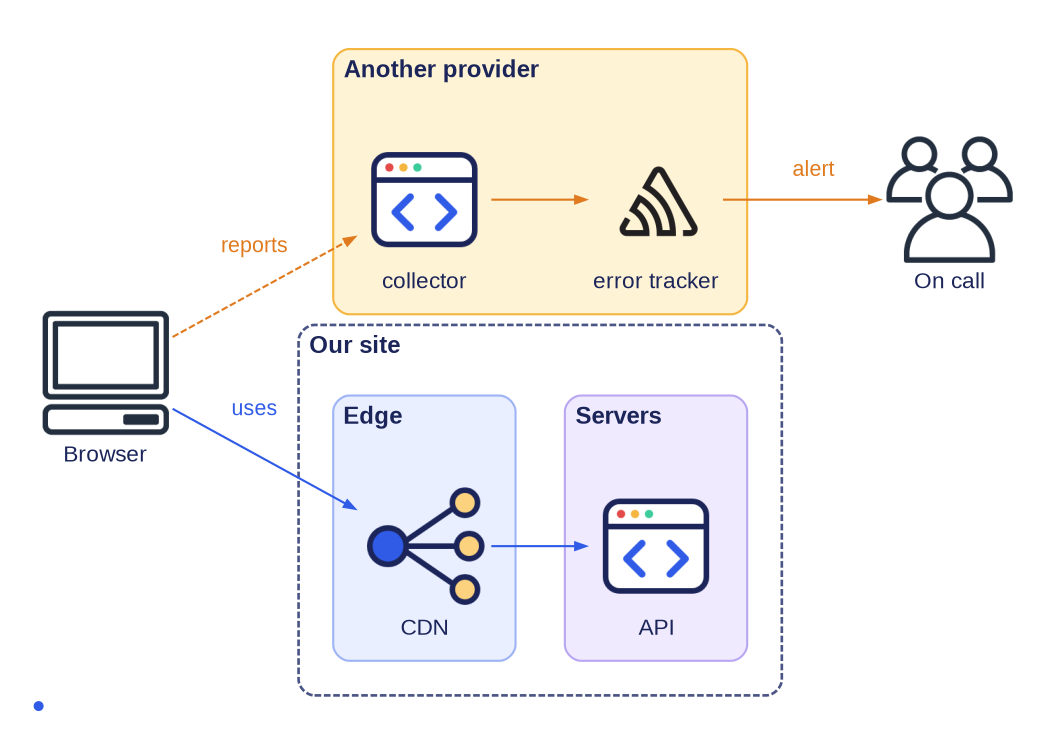
Group 1
When nobody reaches you
| Fault | The user sees | Your servers see |
|---|---|---|
| DNS failure | Site not found | Less traffic |
| Certificate expired | A warning page | Failed handshakes at the edge, no requests |
| Network path broken | Timeout | Less traffic from one region |
| CDN or edge down | Error page of the CDN | Nothing |
| Offline | Nothing works | Nothing |
| CORS refused | A function does nothing | Often a normal request, sometimes only a preflight |
Traffic fell. Whose problem?
Three nets catch this group. Browsers report it themselves (NEL). Probes in several networks try the site every minute. And an alert on missing traffic compares with the same hour last week.
Report-To: {"group": "net", "max_age": 2592000, "endpoints": [{"url": "https://collect.example.net/nel"}]}NEL: {"report_to": "net", "max_age": 2592000, "success_fraction": 0.001, "failure_fraction": 1.0}The browser remembers this for max_age seconds, here 30 days, and reports for example dns.name_not_resolved later, when it has a connection. Two limits: a person who never reached you has no policy yet, and not every browser supports it. It is a working draft.
Names and their failures are explained in DNS, the edge in CDN operations.
Group 2
When the page breaks
| Error | Example | Usual cause |
|---|---|---|
| TypeError | Cannot read properties of undefined | Missing data |
| ReferenceError | foo is not defined | Script not loaded, name wrong |
| SyntaxError | Unexpected token | Old browser, or HTML instead of a script |
| RangeError | Maximum call stack size exceeded | Endless recursion |
| ChunkLoadError | Loading chunk 5 failed | An outdated page: its files are gone after a release |
| Resource | Image, script or style missing | Blocker, CDN, wrong address |
| API | 4xx or 5xx, timeout | See the server's errors |
Where to catch them
| Place | Catches | Mind |
|---|---|---|
window error event | Errors nobody caught | Scripts of other origins give only Script error without CORS |
unhandledrejection | Promises nobody handled | Async code needs this one |
| try and catch | Code you expect to fail | Report it, do not swallow it |
| Error event with capture | Images, scripts, styles that did not load | These events do not bubble, so listen in the capture phase |
| React error boundary | Errors while drawing | Not event handlers, not async code |
14:32:01 navigation /checkout14:32:03 click Add to cart14:32:04 request POST /api/cart 20014:32:06 click Checkout14:32:07 request POST /api/payment 50014:32:07 error TypeError: Cannot read properties of undefined (reading 'card')Here the trail tells the story: the server answered 500, and the page read a card from an answer that was not there. Two faults: the server's, and a page that did not expect it.
From a click to an issue
Send
Getting the report out
| Way | Good | Limit |
|---|---|---|
sendBeacon | Sent in the background, also when the page closes | 64 KiB in the queue, no answer |
fetch with keepalive | Own headers, also when the page closes | Also limited in size |
| Kept on the device | Offline | Sent at the next visit, if there is one |
Limit the number of reports per page, for example ten. A fault in a loop would otherwise send thousands. Group on the device: the same stack again raises a counter instead of sending.
How much arrives
The collector is public, so anybody can send nonsense. Limit by address, check the shape, cut long fields, and never trust a field when showing it on an internal page.
Translate
Source maps
Scripts are sent minified. A stack says app.5abc.js:1:48213. The source map of that release says checkout.ts, line 45, function pay. Upload the map to the tracker when you build, with the release name.
A page that is older than your server
| Step | What happens |
|---|---|
| 9:00 | A visitor opens the page. It knows the file 5.abc.js |
| 9:30 | You release. The file is now 5.def.js, the old one is deleted |
| 9:40 | The visitor opens a new part: loading chunk 5 failed |
Protect
Error boundaries
In React an error while drawing removes the whole page, unless an error boundary catches it. Put one around each independent part: a broken chart then shows a small message and the rest goes on.
A boundary does not catch errors in event handlers, in async code, on the server, or in itself. React 19 also has root options such as onUncaughtError to report what no boundary caught.
Who catches this error?
Group 3
How it feels: Core Web Vitals
| Vital | Question | Good | Needs work | Poor |
|---|---|---|---|---|
| LCP | When is the main content there? | up to 2.5 s | up to 4 s | over 4 s |
| INP | How fast does it react? | up to 200 ms | up to 500 ms | over 500 ms |
| CLS | Does the layout jump? | up to 0.1 | up to 0.25 | over 0.25 |
| Also useful | Meaning | Good |
|---|---|---|
| TTFB | First byte arrives | up to 0.8 s |
| FCP | First content drawn | up to 1.8 s |
Google says that its ranking systems use Core Web Vitals, and that good values alone do not guarantee a good rank. The better reason is the visitor. How to make things faster is in latency.
Real or robot
RUM and synthetic checks
RUM
- Real devices, networks and places.
- All browser versions.
- Shows how many are affected.
- Silent when nobody can come in.
Synthetic
- Robots from fixed places.
- Equal conditions, good for comparing.
- Works at night and before a launch.
- Tests only the paths you wrote.
| RUM collects | Examples |
|---|---|
| Speed | Load time, LCP, INP, resource times, long tasks |
| Errors | Exceptions, failed requests, missing files, console errors |
| Context | Browser, device, country, session, actions |
Do not average, take the 75th percentile
See
Session replay
- 1
Take the page
The structure of the page at the start.
- 2
Note changes
Each later change of the structure.
- 3
Note events
Mouse, scrolling, keys, without the typed text.
- 4
Rebuild
Play it in a closed frame. It is not a video, so it is much smaller than one.
An example: page load, scroll, click on a form, type an e-mail, click on send, error. You see at once that the button was hidden behind a banner.
Who is recorded
| Sessions | Share | Why |
|---|---|---|
| All | 10%, for example | General picture |
| With an error | 100% | The useful ones |
| Important customers | More | Support |
Known tools: Sentry for errors and replay, Datadog RUM, LogRocket, Fullstory. All of them receive data about your users, so your contract and your privacy notice must say so.
Decide
How bad is it?
Which reaction?
Summary
The whole topic in one minute.
Errors outside your servers come in three groups: nobody reaches you, the page breaks, or it is too slow. The first needs browser reports, probes from outside and an alert on missing traffic. The second needs handlers, breadcrumbs and source maps. The third needs measurements from real users.
The collector must not share the fate of the site: another domain, network and provider. Send little, hide personal data on the device, and count users, not events.
- Zero requests have zero errors: alert on missing traffic.
- The collector shares nothing with the site.
- Catch errors, promises, resources and drawing.
- Breadcrumbs, release, source map.
- LCP, INP, CLS at the 75th percentile of real users.
- Mask on the device, limit reports, count sessions.