
Docker
easy 26 minDocker packages a program with its files into an image and runs it as an isolated process called a container.
Video lesson · Chapter 1 of 5
What starts when the bakery opens?
Docker in 75 seconds
1:15Reel coming soon
Theory
Read or listen first. About 2 min.
What it is
Docker is a set of tools to build, share and run containers. An image is a read-only package: your program, its libraries and settings. A container is a running process that sees the image as its own file system and is separated from other processes on the same machine.
A container is not a small virtual machine. It has no kernel of its own. It is a normal Linux process that the host's kernel shows a private view of the world, with limits on what it may use.
Why it exists
Programs depend on versions of libraries, files in certain places, and settings. When those differ between a laptop and a server, the program breaks. An image carries everything above the kernel, so the same bytes that passed the tests run in production.
Starting a process is much cheaper than starting an operating system. So many containers fit on one machine, they start quickly, and a new version is simply a new image.
A short history
March 2013
Solomon Hykes shows Docker to the public in a talk at PyCon.
22 June 2015
Docker, CoreOS and others start the Open Container Initiative under the Linux Foundation, to standardise image and runtime formats.
29 March 2017
containerd, Docker's core runtime, joins the Cloud Native Computing Foundation.
2023
Docker Engine 23.0 makes BuildKit with Buildx the standard builder on Linux.
Engine 29
The containerd image store becomes the default on fresh installations.
Words to know
- Image
- A read-only package of layers plus settings, named by tag or digest.
- Container
- An isolated process with a thin writable layer above an image.
- Layer
- The file changes of one build step, identified by a hash.
- Registry
- A server that stores images, such as Docker Hub.
- Namespace
- A kernel feature that gives a process its own view: processes, network, files.
- cgroup
- A kernel feature that limits and counts CPU, memory and process numbers.
- Volume
- Storage that outlives the container.
- OCI
- Open standards for images and runtimes, so other tools can run Docker images.
How it works
Step through the idea, or press Play.
Build an image. Each file-changing instruction adds a layer
Understand it
Start here
Stackable lunch tins
A canteen packs lunch in tins that stack: rice below, vegetables above, curry on top. The tins are closed and never change. Each guest gets only one thin lid of their own to put things on.
If the rice tin changed, every tin above would have to be packed again.
Why
What it gives you
Same everywhere
The image that passed the tests is the one that runs. No more differences in libraries.
No conflicts
One program with Python 3.12 and another with 3.14 run side by side.
Fast starts
Only a process starts; no guest system boots. New copies and recovery are quick.
Dense
No operating system per program, so one machine runs more of them. How many depends on the programs.
One pipeline
Build once, promote the same digest through test, staging and production.
Service borders
Each service ships with its own dependencies and its own release.
Inside
What happens on docker run
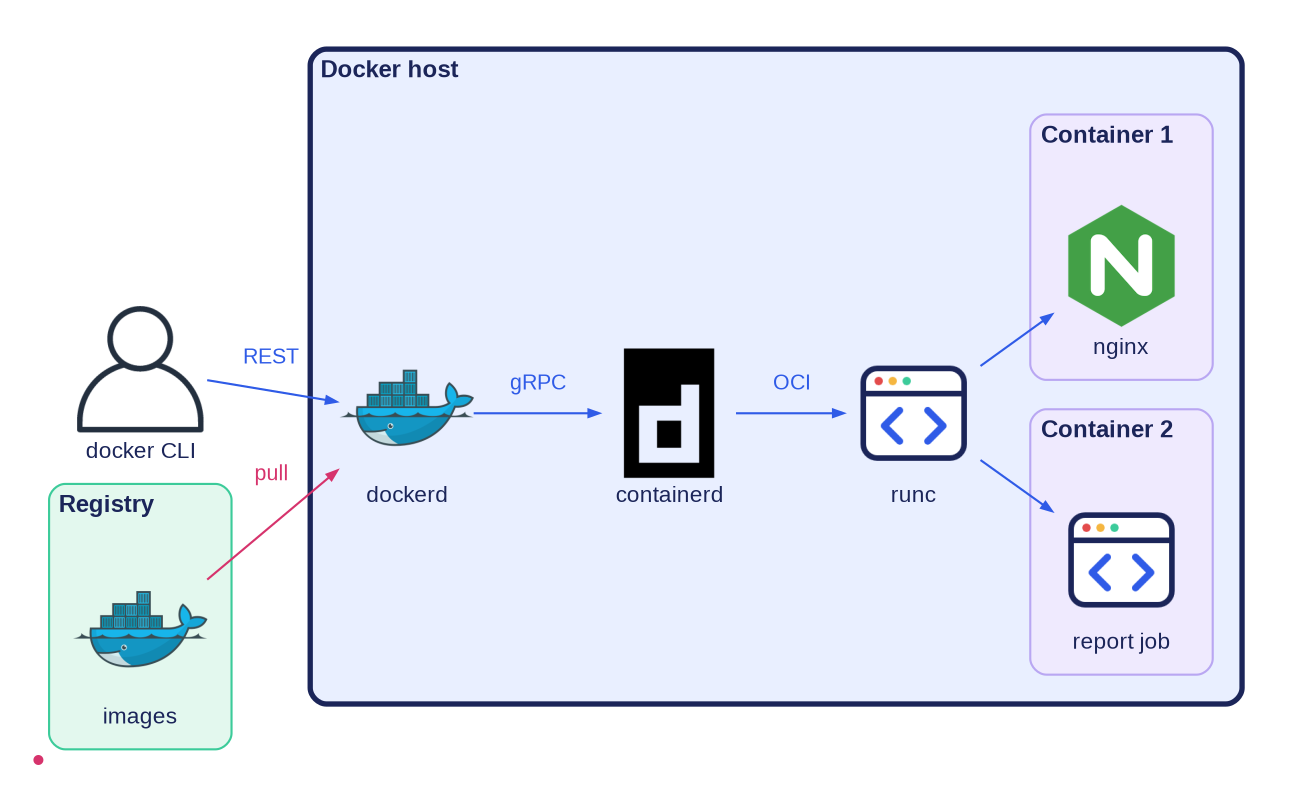
The engine
- 1
The command
docker run nginxbecomes a request to the daemon's REST API, normally over the Unix socket/var/run/docker.sock. - 2
Is the image here?
The daemon looks for the name and tag locally; without a tag,
latestis meant. - 3
Pull
Missing layers are downloaded from the registry over HTTPS, several at once, and checked against their SHA-256 digests. Shared layers are not downloaded again.
- 4
Create
An identifier, the settings, and a writable layer above the image, joined by a union file system such as OverlayFS.
- 5
Network
A virtual cable joins the container to a bridge with an address, often from
172.17.0.0/16. Firewall rules translate published ports. - 6
Mounts
Volumes are created if needed and mounted; bind mounts show a host directory; tmpfs lives in memory.
- 7
Start
dockerd calls containerd over gRPC; containerd uses runc with an OCI description.
- 8
Isolate
runc creates namespaces, applies cgroups, capabilities and the seccomp filter, then starts your program as process 1.
Who calls whom
Kernel parts of a container
| Part | Gives | Example |
|---|---|---|
| PID namespace | Own process list | Process 1 inside, 45892 on the host |
| NET namespace | Own interfaces and ports | Two containers both listen on 80 |
| MNT namespace | Own file system view | The image as / |
| UTS, IPC | Own host name, shared memory | hostname differs |
| USER namespace | Own user numbers | Not on by default; use rootless mode or userns-remap |
| cgroups | Limits and accounting | 512 MB, half a CPU |
| Capabilities, seccomp | Fewer powers, fewer system calls | The default filter blocks about 44 of over 300 calls |
Layers
Images, layers and copy on write
Instructions that change files (RUN, COPY, ADD) add a layer. Others, such as ENV, CMD or EXPOSE, only change settings. Layers are named by the hash of their content, so identical layers are stored and sent once. Reading looks from the top layer down. Writing copies the file up into the container's own layer first. Deleting writes a marker that hides the file; the bytes below remain.
Disk used by many containers
# bad: the package lists stay in the first layerRUN apt-get update && apt-get install -y curlRUN rm -rf /var/lib/apt/lists/*# good: created and deleted in one stepRUN apt-get update \ && apt-get install -y --no-install-recommends curl \ && rm -rf /var/lib/apt/lists/*Build
Fast builds: the cache
The builder reuses a step if its instruction and its input files are unchanged. Once one step changes, every step after it runs again. So put what rarely changes first: base, dependency list, install, then your code.
A code change, two Dockerfiles
# syntax=docker/dockerfile:1FROM node:24 AS builderWORKDIR /appCOPY package.json package-lock.json ./RUN npm ciCOPY . .RUN npm run buildRUN npm prune --omit=devFROM node:24-alpineWORKDIR /appENV NODE_ENV=productionCOPY --from=builder --chown=node:node /app/dist ./distCOPY --from=builder --chown=node:node /app/node_modules ./node_modulesUSER nodeEXPOSE 3000CMD ["node", "dist/server.js"]A multi-stage build compiles in a large image and copies only the result into a small one. Pulls are faster and an intruder finds no compiler. Modules with native code must be built for the same C library as the final image: Debian images use glibc, Alpine uses musl. When in doubt use the same family in both stages.
More build habits
- 1
Use .dockerignore
Leave out
node_modules,.git,.env, logs, coverage, Markdown and the Docker files themselves. Smaller context, fewer cache misses, no leaked secrets. - 2
Combine related steps
Update, install and clean up in one
RUN. - 3
Choose a small base
Slim, Alpine or distroless. Fewer packages mean fewer vulnerabilities to patch.
- 4
Pin versions
Use a precise tag or a digest.
latestmoves. Rebuild regularly to receive security fixes.
Network
How containers talk
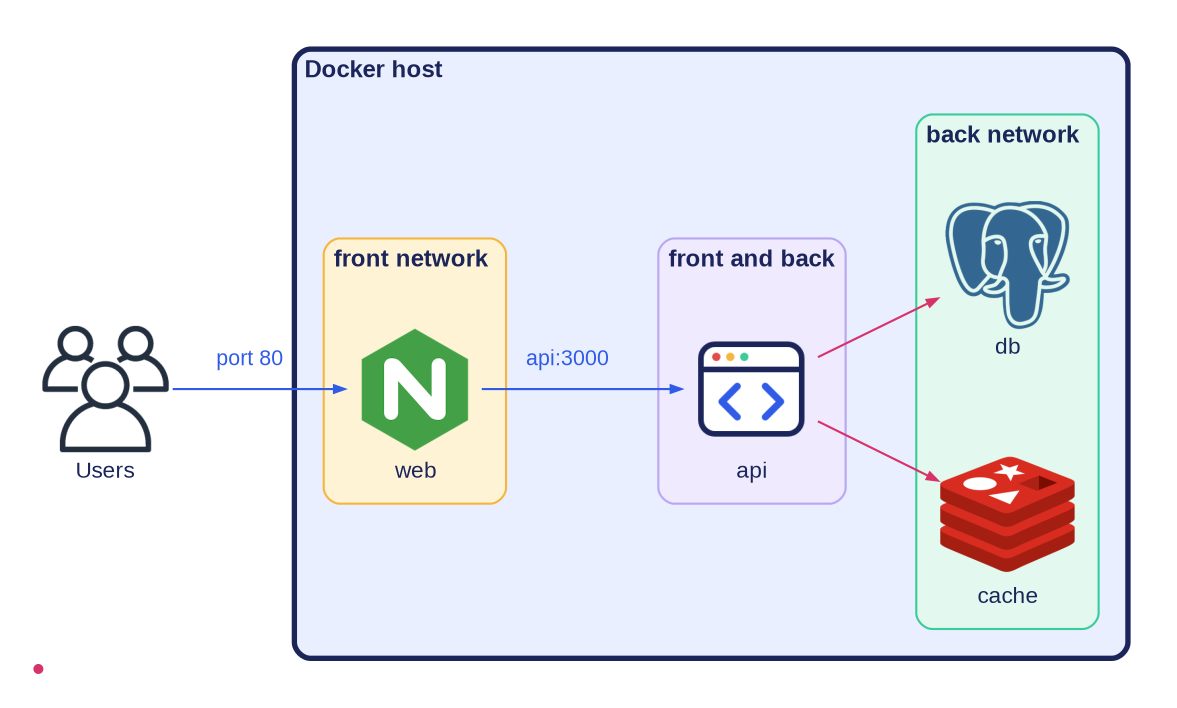
Two networks on one host
| Network | Use | Know this |
|---|---|---|
| User-defined bridge | The normal choice | Built-in DNS: containers find each other by name |
| Default bridge | Legacy | No DNS by name; everything without --network lands here |
| host | Highest network speed | No isolation, no port mapping |
| none | Jobs without network | Loopback only |
| overlay | Several hosts | Part of Swarm mode |
| macvlan, ipvlan | Own address in the local network | For special cases |
Data
Volumes and other mounts
| Kind | Where | Good for | Example |
|---|---|---|---|
| Writable layer | In the container | Temporary files | Gone with docker rm |
| Named volume | Managed by Docker | Databases, uploads | -v pgdata:/var/lib/postgresql |
| Bind mount | A host directory | Source code in development | -v ./src:/app/src |
| Read-only mount | Either | Configuration | -v ./conf:/app/conf:ro |
| tmpfs | Memory | Sensitive scratch files | --tmpfs /tmp |
/var/lib/postgresql. For 17 and older it is /var/lib/postgresql/data.Life of a container and its data
A volume is not a backup. It sits on one host, can be deleted, and does not follow a container to another machine. For important databases a managed service or a careful operator is often simpler.
Limits
CPU, memory, health and logs
What --cpus means
| Setting | Effect | Default |
|---|---|---|
-m 512m | Hard memory limit; above it the kernel kills a process | No limit |
--memory-reservation=256m | Soft limit under pressure | None |
--cpus=0.5 | Share of CPU time, in cores | No limit |
--pids-limit=100 | Number of processes | No limit on plain Docker |
--restart=unless-stopped | Start again after a crash or reboot | No restart |
HEALTHCHECK | Marks healthy or unhealthy | None |
docker stop | SIGTERM, then SIGKILL | 10 seconds of grace on Linux |
json-file logs | Stored on the host | No rotation; set max-size |
services: api: build: ./api ports: ["127.0.0.1:3000:3000"] environment: DATABASE_HOST: db DATABASE_PASSWORD_FILE: /run/secrets/db_password secrets: [db_password] depends_on: db: { condition: service_healthy } healthcheck: test: ["CMD", "wget", "-qO-", "http://127.0.0.1:3000/health"] interval: 30s timeout: 10s retries: 3 start_period: 40s deploy: resources: limits: { cpus: "0.5", memory: 512M } reservations: { cpus: "0.25", memory: 256M } logging: driver: json-file options: { max-size: "10m", max-file: "3" } networks: [backend] db: image: postgres:18 environment: POSTGRES_DB: app POSTGRES_PASSWORD_FILE: /run/secrets/db_password secrets: [db_password] volumes: ["pgdata:/var/lib/postgresql"] healthcheck: test: ["CMD-SHELL", "pg_isready -U postgres -d app"] interval: 5s retries: 10 networks: [backend]secrets: db_password: { file: ./secrets/db_password.txt }volumes: { pgdata: {} }networks: { backend: {} }The old top-level version line is obsolete. depends_on alone waits only for a start; service_healthy needs a health check on the other service. Keep the secrets file out of Git and out of the image.
Security
Harden a container
- 1
Image
Small base, pinned, scanned in the pipeline (for example
docker scout cves), rebuilt for fixes. - 2
User
USERin the Dockerfile or-u 1000:1000. Root in a normal container is root's number on the host. - 3
Powers
--cap-drop ALL, add back only what is needed, and--security-opt no-new-privileges. - 4
File system
--read-onlywith a tmpfs for/tmp. - 5
Limits and network
Memory, CPU and process limits; separate networks.
- 6
The daemon
The Docker socket is root on the host. Never mount it into a container you do not trust. Consider rootless mode.
docker run -d --read-only --tmpfs /tmp \ --cap-drop ALL --security-opt no-new-privileges \ -u 1000:1000 -m 512m --cpus=0.5 --pids-limit=100 \ myapp:1.0Decide
Containers, virtual machines, and the rest
Container and virtual machine
| Container | Virtual machine | |
|---|---|---|
| Kernel | Shared with the host | Its own |
| Border | Kernel features | Hypervisor and hardware |
| Start | A process start | A system boot |
| Overhead | Little above the process | Memory and disk of a whole system |
| Other systems | Same kernel family | Any |
| Choose for | Services, CI, many small programs | Untrusted code, other systems, strict rules |
What should run this?
Related tools
| Tool | Same | Different | Choose it for |
|---|---|---|---|
| Podman | Commands, images, volumes | No daemon, rootless by design, systemd | Linux servers without a root daemon |
| Kubernetes | Runs the same images | Many hosts, healing, rolling updates, scaling; uses containerd, not Docker Engine | Fleets of services |
| Firecracker | Fast, dense | MicroVM with its own kernel; boots in under 125 ms, under 5 MiB overhead | Many customers on one machine |
| AWS Lambda and similar | Can take an image | Someone else runs it | Events and quiet services |
Use Docker when
- Services have different dependencies
- A new developer should start with
docker compose up - The same build must pass through all environments
- Several programs share a host
- Stateless services scale by copies
Think again when
- State is complex: a managed database may be simpler
- A legacy program depends on fixed paths or a desktop
- One static program on one server: systemd is enough
- Programs need different kernels
- Every microsecond of network counts
- You run untrusted code without another wall
Run
Commands you will use
| Goal | Command |
|---|---|
| Build, push | docker build -t myapp:1.0 ., docker push repo/myapp:1.0 |
| Run | docker run -d -p 8080:80 nginx |
| Look | docker ps -a, docker logs -f --tail 100 app |
| Go inside | docker exec -it app sh |
| Stack | docker compose up -d, docker compose logs -f api, docker compose down |
| Copies | docker compose up -d --scale api=3 (no fixed host port) |
| Clean images | docker image prune; -a also unused tagged ones |
| Clean all | docker system prune |
| Clean volumes | docker volume prune removes unused anonymous ones; -a also named ones. Data is deleted |
Summary
The whole topic in one minute.
An image is a stack of read-only layers; a container adds one thin writable layer and an isolated process. Namespaces decide what the process sees, cgroups decide how much it may use, and everyone shares the host's kernel.
Order the Dockerfile from what rarely changes to what often changes, build in one stage and ship another, keep data in volumes, put services on user-defined networks, set limits, and run without root. Use Compose on one machine and an orchestrator for many.
- A container is a process; the kernel is shared.
- Namespaces show less, cgroups allow less.
- Images are shared read-only layers; each container adds one thin layer.
- Order builds by change; ship a second, small stage.
- Data in volumes, names through user-defined networks, secrets outside images.
- Limits, rotation, health checks and a non-root user are not defaults: set them.