
Kubernetes
medium 34 minKubernetes runs containers on many machines.
Video lesson · Chapter 1 of 5
A three-counter plan becomes three running processes
Kubernetes in 80 seconds
1:20Reel coming soon
Theory
Read or listen first. About 2 min.
What it is
A container packs a program with the files it needs (see Docker). Running one container is easy. Running hundreds on dozens of machines raises questions: which machine, what if it dies, how do callers find the copies, how do you replace a version without an outage? Software that answers these is a container orchestrator. Kubernetes, often written K8s, is the best known. It is open source under the Apache 2.0 licence.
Its central idea is desired state. You do not send orders such as "start a copy on machine 4". You store a description such as "three copies of api, version 1.0". Programs called controllers watch that description and the real world, and act whenever the two differ.
Why it exists
It automates work people used to do by hand: placing programs, restarting them, replacing a lost machine's share, rolling out versions, and adding copies under load. Because it is all described in files, changes can be reviewed, versioned and repeated.
The same description runs on AWS, Google Cloud, Azure or your own machines, and a large ecosystem builds on it: Helm, operators, service meshes such as Istio and Linkerd, Prometheus, Fluentd. Portability has edges, though: load balancers, disks, identity and node pools still differ per provider.
A short history
2014, June
The first commit of Kubernetes lands on 6 June. The project is announced on 10 June in a keynote at DockerCon by Eric Brewer of Google. It carries over lessons from Borg, Google's internal cluster manager.
2015, July
Version 1.0 is released on 21 July, and Google announces that the project will go to the new Cloud Native Computing Foundation.
2016 and 2018
The foundation accepts Kubernetes on 10 March 2016. On 6 March 2018 it reaches the graduated level.
2025, November
The project announces that the widely used Ingress NGINX controller will retire in March 2026. New work goes to the Gateway API.
2026, September
Three minor versions are supported: 1.37, 1.36 and 1.35. Each receives about one year of patches.
Words to know
- Cluster
- A control plane and a set of worker machines managed together.
- Node
- One worker machine, virtual or physical. It runs the kubelet, a container runtime such as containerd, and usually kube-proxy.
- Pod
- The smallest thing you deploy: one or more containers that share an IP address and can share storage.
- Controller
- A loop that compares desired state with actual state and acts on the difference.
- Service
- A stable name and address in front of a changing set of pods.
- Namespace
- A named section of a cluster, used to separate teams or environments and to attach quotas and permissions.
- Request and limit
- What a container is promised when it is placed, and the most it may use.
How it works
Step through the idea, or press Play.
Describe. Store the desired state through the API server
Understand it
Start here
The plan on the shed door
Picture a gardener who never tells helpers what to do. The gardener pins a plan to the shed door, and the helpers keep comparing the beds with the plan.
The helpers never store the truth. The plan on the door is the truth.
The idea
What it does, and what it leaves to you
Kubernetes does
- Place containers on machines
- Restart, replace and reschedule them
- Roll versions forward and back
- Give stable names and spread traffic
- Scale on CPU, memory or your own metrics
- Mount storage, settings and secrets
- Run custom resources through operators
Kubernetes does not
- Build your code or images
- Provide databases, queues or caches
- Make a program safe to run twice
- Choose your logging and monitoring
- Make one cluster survive losing its region
- Encrypt secrets at rest unless you switch it on
Why teams adopt it
Automated operations
Placement, health checks, scaling and failover stop being manual work.
Self-healing
Crashed containers restart. Pods of a dead node are replaced. The system moves towards the desired state.
Safe releases
Pods are replaced gradually and a new one gets traffic only when it is ready. Going back is one command.
Portable description
The same objects work on managed services and on your own machines.
Architecture
Inside a cluster
Everything meets at the API server
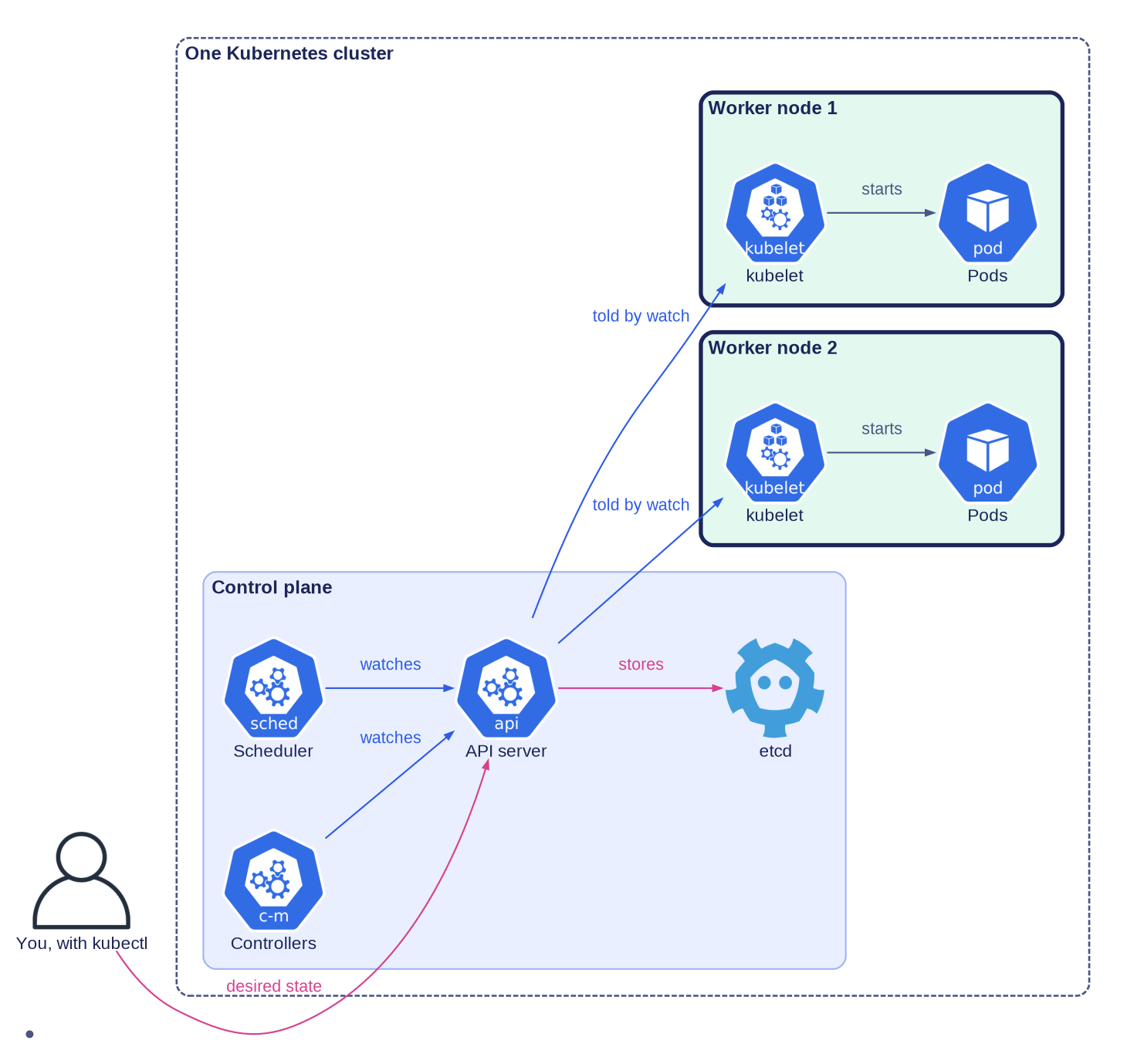
Who does what
| Part | Job | If it stops |
|---|---|---|
| API server | Authenticates, authorizes, runs admission checks, validates and stores. Stateless, so run several behind a balancer | No changes. Running pods keep running |
| etcd | Holds all cluster state, replicated with Raft | Without a majority nothing can be written |
| Scheduler | Chooses a node for each pod without one | New pods stay Pending |
| Controller manager | Runs the loops: Deployment, ReplicaSet, Node, EndpointSlice and more | Nothing is repaired or replaced |
| Cloud controller manager | Creates load balancers and checks machines with the provider | Cloud objects are not updated |
| kubelet | On each node: starts containers, runs probes, reports status | That node stops reporting |
| kube-proxy | On most nodes: turns Service addresses into pod addresses | Rules go stale; some network plugins replace it |
The core
The reconciliation loop
Each controller repeats three steps: observe, compare, act. A thermostat works this way. It does not remember that someone opened a window; it reads the temperature and heats. A loop that looks at the current state, rather than at each event, recovers after a crash by simply looking again.
Observe, compare, act
From kubectl apply to a running pod
Objects
Choosing a workload
What to run your program as
| Object | Promise | Use for |
|---|---|---|
| Deployment | N interchangeable pods, rolling updates, history | Stateless services and APIs |
| StatefulSet | Stable names (db-0, db-1), a volume per pod, ordered start and stop | Databases, Kafka, ZooKeeper |
| DaemonSet | One pod on every chosen node | Log collectors, monitoring agents |
| Job | Runs until it succeeds | Batch work, migrations |
| CronJob | Creates Jobs on a schedule | Nightly reports |
| Custom resource | Your own object type with your own controller (an operator) | A database that knows how to back itself up |
Most pods hold one container. A second one is a helper beside the main program, a sidecar: a proxy, a log shipper. Containers of one pod reach each other on localhost and are always placed together. For scheduled work in general see task schedulers.
Networking
Finding and reaching pods
Pods come and go, and their addresses change. A Service has a stable virtual address and a DNS name, and sends each connection to one of the ready pods that match its labels. CoreDNS is the usual name server.
A stable address in front of changing pods
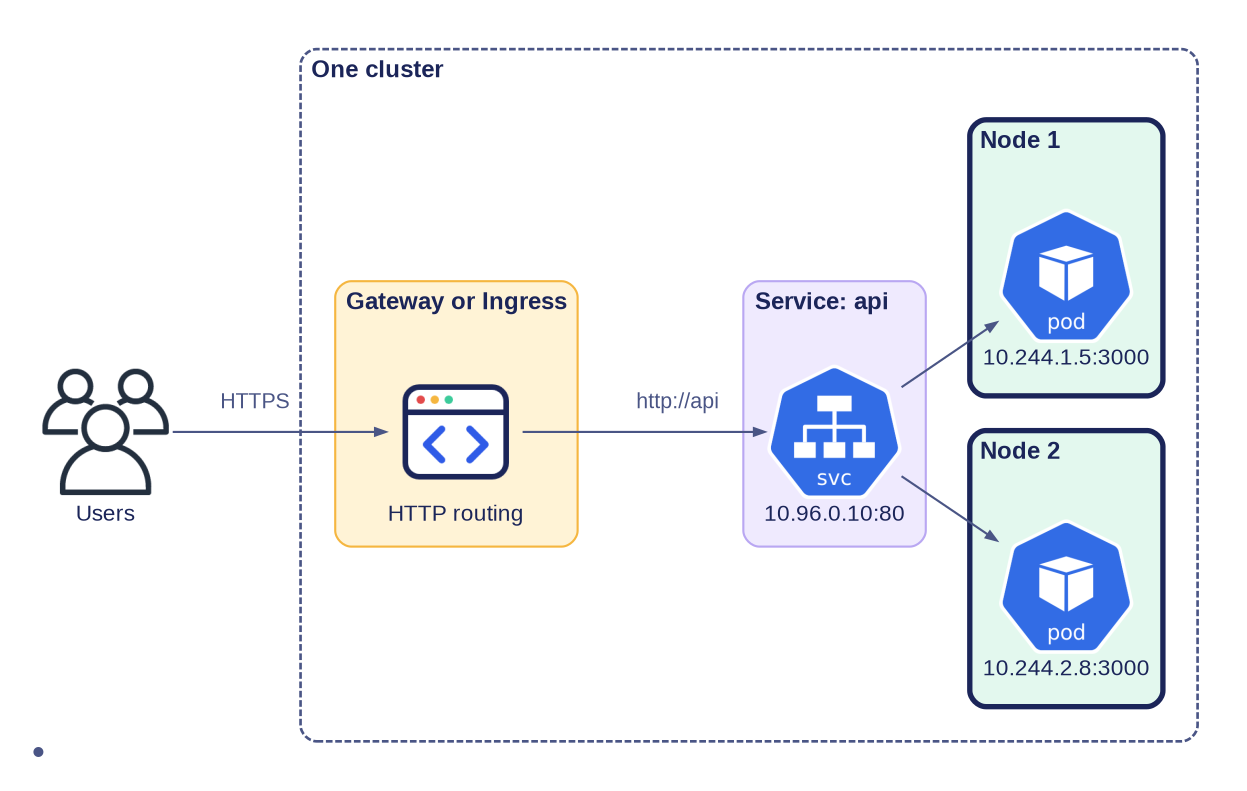
Service types
| Type | Reachable from | Note |
|---|---|---|
| ClusterIP | Inside the cluster | The default |
| NodePort | Every node, one port | Port 30000 to 32767 by default |
| LoadBalancer | Outside, through a cloud balancer | One balancer per Service |
| ExternalName | Inside | A DNS alias for an outside name |
| Headless | Inside | clusterIP: None: DNS returns the pod addresses; StatefulSets use it |
service.namespace.svc.cluster.local. Inside the same namespace service is enough.Which way in?
The Ingress API is frozen: it stays, but gets no new features, and the project recommends Gateway API. kube-proxy uses iptables by default, choosing a pod at random per connection; nftables is the planned default. A long-lived HTTP/2 or gRPC connection therefore stays on one pod, see load balancing in Kubernetes and service discovery.
Placement
Requests, limits and the scheduler
- 1
Filter
Drop nodes without enough unrequested CPU or memory, with a taint the pod does not tolerate, or outside its required affinity.
- 2
Score
Rank the rest: spread copies, prefer nodes that already hold the image, respect preferences.
- 3
Bind
Write the chosen node's name into the pod. The kubelet takes over.
How many pods fit on a node?
The scheduler counts requests, not real use. Use above a CPU limit is throttled: the program slows. Use above a memory limit ends in an out-of-memory kill. Resources of a running container can now be changed in place, without recreating the pod.
Health
Three probes, three questions
| Probe | Question | When it fails |
|---|---|---|
| Startup | Has it finished starting? | The container is restarted once the allowance is used. The other two wait until it succeeds |
| Readiness | May it receive traffic now? | The pod leaves the Service's endpoints. It is not restarted |
| Liveness | Is it stuck beyond repair? | The container is restarted |
Releases
Rolling updates
How far a rollout may swing
A rollout of three replicas
If new pods never become ready, the rollout stalls: old pods keep serving, and after 600 s the Deployment reports that progress stopped. Kubernetes does not roll back by itself. You, or a delivery tool, run kubectl rollout undo. Ten old revisions are kept by default. Choose the Recreate strategy only if two versions must never run together.
Scaling
More pods, bigger pods, more nodes
| Autoscaler | Changes | Part of Kubernetes? |
|---|---|---|
| HPA (horizontal) | Number of pods, from CPU, memory or custom metrics | Yes; needs Metrics Server, or an adapter for custom metrics |
| VPA (vertical) | Requests of each pod, from observed use | No, install it |
| Cluster Autoscaler or Karpenter | Number and kind of nodes | No, install it or use the provider's |
| KEDA | Pods, from events such as queue depth | No, a separate project |
The HPA formula
From load to a new machine
Failures
What happens when a node dies
A lost node
Spread copies over nodes and zones with topology spread constraints, so that one loss takes a fraction. A PodDisruptionBudget limits voluntary disruption such as draining a node for an upgrade; it cannot prevent a power cut. A pod that is asked to stop gets 30 s by default to finish its work.
Operate
Limits, upgrades, security and cost
Numbers to know (v1.37)
| What | Value |
|---|---|
| Nodes per cluster | Up to 5,000 in the project's supported design |
| Pods per cluster | Up to 150,000 |
| Containers per cluster | Up to 300,000 |
| Pods per node | 110 |
| etcd data | 8 GiB suggested maximum; busy clusters move events to a second etcd |
| Version skew | A kubelet may be up to three minor versions older than the API server, never newer |
Run it safely
| Area | Do |
|---|---|
| Access | RBAC with few rights per service account; no shared admin |
| Secrets | Stored unencrypted in etcd by default: turn on encryption at rest, limit who can read them |
| Network | A default-deny NetworkPolicy, then allow what is needed |
| Quotas | ResourceQuota and LimitRange per namespace |
| Backups | Snapshot etcd, store it elsewhere, rehearse the restore |
| Upgrades | Control plane first, then nodes, one minor version at a time |
| Configuration sprawl | Templates (Helm) or overlays (Kustomize), reviewed in Git |
The cost is people as much as machines: a control plane or a managed service fee, spare capacity on nodes, and a team that understands the platform. A namespace is not a hard security wall, because its pods share nodes and a kernel with others.
In practice
A small production setup
apiVersion: apps/v1kind: Deploymentmetadata: name: apispec: replicas: 3 selector: matchLabels: { app: api } template: metadata: labels: { app: api } spec: containers: - name: api image: registry.example.com/api:1.0 ports: - containerPort: 3000 resources: requests: { cpu: 100m, memory: 256Mi } limits: { memory: 512Mi } readinessProbe: httpGet: { path: /ready, port: 3000 } periodSeconds: 10 livenessProbe: httpGet: { path: /live, port: 3000 } periodSeconds: 20---apiVersion: v1kind: Servicemetadata: name: apispec: selector: { app: api } ports: - port: 80 targetPort: 3000Decide
When to choose it, and when not
Choose Kubernetes
- Many services (say ten or more) that ship and scale on their own
- Load that swings, such as a yearly sale
- Machine failures must need no person
- Several teams share machines
- Frequent releases with an easy way back
- The same platform on more than one cloud or on site
Choose something simpler
- One service on a few servers
- A small team without platform skills
- A monolith that scales up well
- A tight budget for machines and people
- Mainly databases: use a managed one
- Speed to a first release: a platform service or functions
Alternatives
| Option | Same | Different | Choose it when |
|---|---|---|---|
| Docker Swarm | Services, scaling, rolling updates, declared state | Built into Docker, simpler, few extension points, smaller ecosystem | Small cluster, simplicity first |
| AWS ECS, with Fargate | Containers at scale, autoscaling, balancers | AWS only, no control plane to run; Fargate removes the nodes too | All on AWS, few operators |
| HashiCorp Nomad | Scheduling, autoscaling, declared jobs | One binary; also runs plain programs, Java and VMs; works with Consul and Vault | Mixed workloads |
| Lambda, Cloud Run | Runs and scales your code | No cluster at all, billed by use, with more limits | Event-driven or very uneven load |
Summary
The whole topic in one minute.
Kubernetes stores the desired state in etcd behind one API server. Controllers create what is missing, the scheduler picks a node for each pod, and the kubelet on that node starts the containers. Services give stable addresses, probes decide who receives traffic, and autoscalers change the number of pods and nodes.
It suits many services that ship and scale separately, with people to run the platform. For one small service, a managed container platform is usually the better answer.
- Desired state in etcd, control loops that close the gap.
- Only the API server talks to etcd; the scheduler only picks a node; the kubelet starts containers.
- Requests decide placement and HPA percentages; readiness decides traffic; liveness decides restarts.
- A failed rollout stalls. Rolling back is your decision.
- A dead node's pods are replaced after about five minutes by default.