
Elasticsearch
medium 34 minElasticsearch is a distributed search and analytics engine built on Apache Lucene.
Video lesson · Chapter 1 of 5
Saved does not yet mean searchable
Theory
Read or listen first. About 2 min.
What it is
Elasticsearch is a search engine that runs on several machines. You send JSON documents over HTTP. It splits the text into words, keeps a list of documents for every word, and can then answer questions such as: which products mention wireless mouse, under 50, newest first, with counts per brand.
An index is cut into shards. Each shard is a complete small search engine (a Lucene index) with its own word lists. A search asks one copy of every shard and merges the answers.
Why it exists
A database can find a row by its key quickly, but finding words inside long texts, tolerating typing mistakes and ordering by relevance needs a different structure. So does counting millions of log lines by hour and error code.
One machine also has limits. With shards the data and the work are spread, and with replicas a machine can fail without losing the service. That is why logs, product search and site search often use it beside the main database.
A short history
January 2021
The OpenSearch project is announced as an open source fork of Elasticsearch and Kibana, from version 7.10.
July 2021
OpenSearch 1.0 is released.
February 2023
GitHub explains why code search moved from Elasticsearch to an engine of its own, Blackbird.
August 2024
Elastic announces the AGPL as a third licence choice for Elasticsearch, beside its own licence and the SSPL.
September 2024
OpenSearch moves to a foundation under the Linux Foundation.
Words to know
- Document
- One JSON object with an id. The unit you store and find.
- Index
- A named collection of documents, cut into shards.
- Shard
- A part of an index; a complete Lucene index. Primary or replica.
- Segment
- An unchangeable file inside a shard. Merged with others over time.
- Mapping
- The types of the fields: text, keyword, number, date.
- Analyzer
- The steps that turn text into searchable terms.
- Refresh
- Opening new segments so that new documents can be found.
- Translog
- The log on disk that keeps acknowledged writes safe before a Lucene commit.
- Coordinating node
- The node that received the request, asks the shards and merges.
How it works
Step through the idea, or press Play.
A document arrives. Its id chooses a primary shard; replicas get a copy
Understand it
Start here
The choir library
Imagine a choir library. The song sheets are spread over shelf sections, each section has its own box of cards that lists words and songs, and a runner asks all sections when somebody looks for a word.
Every section has only its own cards. That is why a search has to ask all of them.
The whole
Cluster, nodes and shards
Three data nodes, three shards, one replica each
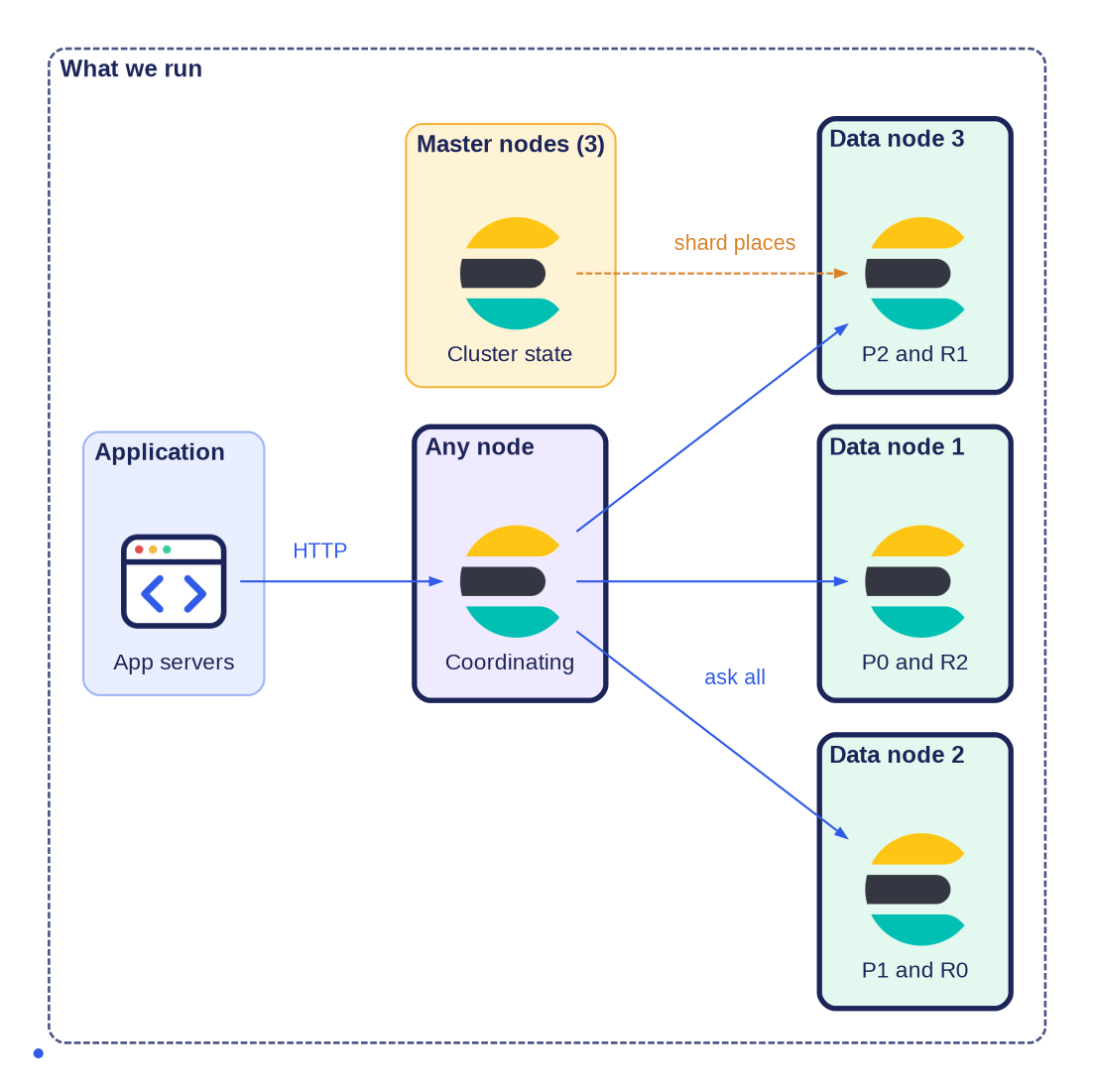
Who does what
| Node role | Work | Plan for |
|---|---|---|
| Master-eligible | Elects a master, keeps the cluster state: indexes, mappings, where shards are | Three, in separate zones. Two of three must agree |
| Data | Stores shards, indexes and searches | Disk, memory, CPU. Often split into hot, warm, cold, frozen |
| Ingest | Changes documents before indexing | CPU |
| Coordinating | Routes and merges. Every node can do it | Memory for large merges |
How a search travels
- 1
Request
HTTP with JSON, through a load balancer to any node. Clients exist, but curl works.
- 2
Coordinate
That node finds the shards of the index and chooses one copy of each. Adaptive replica selection prefers copies that have been answering well.
- 3
Run
Every chosen shard runs the query on its own segments, in parallel, and returns the ids and scores of its best hits.
- 4
Merge
The coordinating node sorts the hits, adds up aggregation buckets, and fetches the documents of the final page.
- 5
Answer
One JSON response. If a shard failed, the answer can be partial with status 200: check the
_shardspart andtimed_out.
Inside
From text to terms
Full-text search and search indexing explain inverted indexes, analysis and BM25 scoring. This is how they look here.
Three documents in one shard
Inverted index
A sorted dictionary of terms, each with its list of documents. Finding a term does not depend on reading the documents.
Positions
Where each term stands, so that phrases can be checked.
Doc values
Columns on disk by document, used to sort and to aggregate.
Segments
All of it is written into files that never change. An update marks the old document as deleted and adds a new one; merges clean up.
Because segments never change, adding documents is cheap and changing the same document all the time is not: each change rewrites the whole document and leaves work for a merge. A fast-changing counter does not belong here.
Schema
Mappings: text or keyword
| text | keyword | |
|---|---|---|
| Stored as | Terms from the analyzer | The exact value |
| Quick Brown Fox becomes | quick, brown, fox | Quick Brown Fox |
| Use for | Titles, descriptions, messages | Status, category, id, tag |
| Query | match, match_phrase | term, terms, prefix |
| Sort and aggregate | No, unless you pay for it in memory | Yes |
PUT /products{ "settings": { "number_of_shards": 3, "number_of_replicas": 1 }, "mappings": { "dynamic": "strict", "properties": { "name": { "type": "text", "fields": { "raw": { "type": "keyword" } } }, "description": { "type": "text", "analyzer": "english" }, "category": { "type": "keyword" }, "brand": { "type": "keyword" }, "price": { "type": "scaled_float", "scaling_factor": 100 }, "in_stock": { "type": "boolean" }, "created_at": { "type": "date" }, "reviews": { "type": "nested", "properties": { "stars": { "type": "byte" } } } } }}GET /products/_mappingGET /products/_settingsname, sort on name.raw. nested keeps the fields of each array entry together.Writing
What happens to a document
An acknowledged write
Two different moments
| Event | When | Means |
|---|---|---|
| Safe | Translog synced on primary and replicas, before the answer (durability: request) | Survives a crash of the process or machine |
| Searchable | At the next refresh, 1 second by default | Searches can find it. A GET by id sees it at once |
# bulk: one action line, one document line, newline at the endPOST /_bulk{"index":{"_index":"products","_id":"1"}}{"name":"Wireless mouse","category":"electronics","price":29.99,"in_stock":true}{"index":{"_index":"products","_id":"2"}}{"name":"Mechanical keyboard","category":"electronics","price":79.99,"in_stock":true}# wait until this one can be found (costs latency, not a forced refresh)PUT /products/_doc/3?refresh=wait_for{"name":"USB-C hub","category":"electronics","price":49.99,"in_stock":true}GET /products/_count# a first big load: no replicas, no refresh; put both back afterwardsPUT /products/_settings{ "index": { "refresh_interval": "-1", "number_of_replicas": 0 } }from datetime import datetime, timezonefrom elasticsearch import Elasticsearch, helperses = Elasticsearch("https://localhost:9200", ca_certs="http_ca.crt", api_key=API_KEY)es.index(index="products", id="1", document={ "name": "Wireless mouse", "category": "electronics", "price": 29.99, "in_stock": True, "created_at": datetime.now(timezone.utc)})def actions(products): for p in products: yield {"_index": "products", "_id": p["id"], "_source": p}ok, errors = helpers.bulk(es, actions(products), chunk_size=1000, raise_on_error=False)for e in errors: # one bad document does not stop the rest log.warning("not indexed: %s", e)Searching
Match, filter and score
The bool query
| Clause | Must match? | Affects the score? | Use for |
|---|---|---|---|
must | Yes | Yes | The words people typed |
filter | Yes | No | Category, price, status, dates |
should | No, if there is a must or filter; else at least one | Yes | Boosts: featured, recent |
must_not | Must not match | No | Discontinued, hidden |
GET /products/_search{ "size": 20, "query": { "bool": { "must": [ { "multi_match": { "query": "gaming laptop", "fields": ["name^3", "description"], "type": "best_fields", "fuzziness": "AUTO" } } ], "filter": [ { "term": { "category": "electronics" } }, { "range": { "price": { "gte": 500, "lte": 1500 } } }, { "term": { "in_stock": true } } ], "should": [ { "match_phrase": { "name": "gaming laptop" } } ], "must_not": [ { "term": { "category": "refurbished" } } ] } }, "highlight": { "fields": { "description": {} } }}name^3 counts a match in the name three times. fuzziness forgives typing mistakes. match with "operator": "and" needs every word; match_phrase needs them in order.Why page 500 is expensive
pit = es.open_point_in_time(index="products", keep_alive="1m")["id"]after = Nonewhile True: page = es.search(size=100, query={"match_all": {}}, pit={"id": pit, "keep_alive": "1m"}, sort=[{"created_at": "desc"}, {"_shard_doc": "asc"}], search_after=after) hits = page["hits"]["hits"] if not hits: break for h in hits: use(h["_source"]) after, pit = hits[-1]["sort"], page["pit_id"]es.close_point_in_time(id=pit)Counting
Aggregations and facets
Bucket aggregations group documents (terms, range, date_histogram). Metric aggregations calculate (avg, sum, cardinality). They nest: the average price inside each brand. One request returns hits and counts.
GET /products/_search{ "size": 0, "query": { "match": { "description": "laptop" } }, "aggs": { "brands": { "terms": { "field": "brand", "size": 20 }, "aggs": { "avg_price": { "avg": { "field": "price" } } } }, "prices": { "range": { "field": "price", "ranges": [ { "key": "under 500", "to": 500 }, { "key": "500 to 1000", "from": 500, "to": 1000 }, { "key": "over 1000", "from": 1000 } ] } } }}GET /logs/_search{ "size": 0, "aggs": { "per_hour": { "date_histogram": { "field": "@timestamp", "calendar_interval": "hour" } } }}Facets that still show the other brands
Typing
Autocomplete
Index the beginnings of words and search with the whole typed text. The index analyzer turns laptop into la, lap, lapt, lapto, laptop; the search analyzer must leave lap alone, or it would match everything that starts with la. The field type search_as_you_type sets this up, and the completion suggester is an alternative for a fixed list. Search autocomplete designs the whole system.
PUT /titles{ "settings": { "analysis": { "filter": { "starts": { "type": "edge_ngram", "min_gram": 2, "max_gram": 10 } }, "analyzer": { "typed": { "tokenizer": "standard", "filter": ["lowercase", "starts"] } } } }, "mappings": { "properties": { "title": { "type": "text", "analyzer": "typed", "search_analyzer": "standard" } } }}Sizing
How many shards?
500 GB with 20% overhead and 30 GB shards
Guidance
- 10 to 50 GB per shard
- Below 200 million documents per shard
- At most 1,000 non-frozen shards per node (a hard default limit)
- 1 GB of master heap per 3,000 indexes
Common mistakes
- Thousands of tiny shards: each costs memory and every search visits them
- One giant shard: slow to move and recover
- More shards than nodes "to be safe"
- A daily index for 100 MB a day
The number of primaries is fixed when the index is created, because the route of a document depends on it: hash(_routing) % number_of_shards. To change it you make another index: the split and shrink APIs do that for a read-only source, and reindex always works. Replicas can be changed at any time. Custom routing, for example by customer, lets a search ask one shard, at the risk of uneven shards. Scaling search goes further.
Failure
When a node dies
From green to yellow to green
Health
| Colour | Means | Do |
|---|---|---|
| Green | All primaries and replicas are assigned | Nothing |
| Yellow | All primaries, some replicas missing | Find out why; you have less safety |
| Red | At least one primary has no active copy | Part of the data cannot be read. Bring the node back, or restore a snapshot |
Time-based data
Logs and their lifecycle
Logs are written once and searched mostly while new. A data stream writes to one index at a time and rolls over to a new one. Old indexes move to cheaper nodes and are deleted whole, which is cheap. Deleting single documents is not.
Index lifecycle management
PUT /_ilm/policy/logs-90d{ "policy": { "phases": { "hot": { "actions": { "rollover": { "max_primary_shard_size": "50gb", "max_age": "1d" } } }, "warm": { "min_age": "7d", "actions": { "shrink": { "number_of_shards": 1 }, "forcemerge": { "max_num_segments": 1 } } }, "cold": { "min_age": "30d", "actions": { "set_priority": { "priority": 0 } } }, "delete": { "min_age": "90d", "actions": { "delete": {} } } } }}PUT /_index_template/app-logs{ "index_patterns": ["app-logs-*"], "data_stream": {}, "priority": 200, "template": { "settings": { "number_of_shards": 3, "number_of_replicas": 1, "index.lifecycle.name": "logs-90d" } }}freeze is no longer among the lifecycle actions and the rollover condition max_size is deprecated. The frozen phase uses searchable snapshots. Distributed log collection has the pipeline around it.Beside a database
Keeping the copy in step
Elasticsearch has no transactions over several documents, so the database stays the source of truth and the index is a copy that can be rebuilt. Writing to both from the application leaves them different when the second write fails. Send changes through change data capture or an outbox, use the database version as version with version_type=external so that late events lose, and rebuild into a new index behind an alias when the mapping changes. Search system design and the distributed search engine show complete designs.
One truth, one copy
Operations
Running it, and what it costs
| Watch | Rule |
|---|---|
| Heap | Let Elasticsearch size it, or at most half of the memory and below about 26 GB, so compressed pointers stay on. The rest serves the file cache |
| Disk | No new shards above 85%, moves away at 90%, indexes become read-only at 95% by default |
| Refresh | 1 s is the default. 30 s for heavy indexing that nobody needs at once |
| Shards | Count and sizes: _cat/shards, _cat/allocation |
| Rejections | Queue full, status 429: slow the writers down |
| Snapshots | To object storage, and try a restore. Replicas are not a backup |
The bill
| You get | You pay |
|---|---|
| Text search with relevance and typing mistakes | Analyzers and mappings to design and test |
| Scale by adding nodes | Shards to plan, memory and disk for replicas |
| Counts without preparing them | Memory, and approximate answers |
| Simple HTTP and JSON | Cluster skills: heap, merges, recovery |
| Failover inside the cluster | A copy that lags behind the database |
Decide
When to choose it
Choose it for
- Full-text search with ranking, typing mistakes, autocomplete
- Filters with counts in a shop
- Logs and events over time
- Geographic search
- Many different queries on the same data
Choose something else for
- The only copy of business data
- Transactions and joins
- Records that change all the time
- A reader who must see every write at once
- A small table: the database can search it
| Alternative | Same | Different | Choose it when |
|---|---|---|---|
| PostgreSQL full-text | Tokens, stemming, ranking | SQL, transactions, one primary | You already run it and the search is simple |
| Apache Solr | Lucene, distributed, facets | Older, several formats, its own cluster mode | You already use it |
| Algolia | Typing mistakes, ranking, autocomplete | Hosted service, less general analytics | You want a search box without operating one |
| OpenSearch | Forked from 7.10, similar interface | Apache 2.0, under a foundation, features differ more each year | The licence or your cloud decides |
Licence. Most of Elasticsearch's source is offered under your choice of AGPLv3, SSPL or Elastic License 2.0; some files are under the Elastic License only. The stack is Elasticsearch with Logstash, Kibana and Beats.
Summary
The whole topic in one minute.
Elasticsearch is many small search engines behind one address. Each shard has its own inverted index, and every search is a question to all shards followed by a merge.
That explains its strengths and its bill: fast text search and counting over large data, at the price of a refresh delay, whole-document updates, shard planning, memory and a second copy of the truth that must be kept in step with a database.
- Every shard is its own search engine; a search asks them all.
- Safe is not searchable: translog first, refresh later.
- text for words, keyword for exact values, sorting and counts.
- filter for yes or no, must for relevance.
- 10 to 50 GB per shard, and choose the number before you index.
- It is a copy. Keep the truth elsewhere and be able to rebuild.