
Scaling search and indexing
hard 28 minHow a search cluster grows: the right number and size of shards, replicas for reads and safety, safe placement, storage tiers for old data, rebuilding without downtime, and rules for scaling up and down.
Video lesson · Chapter 1 of 6
Split and replicate for different reasons
Theory
Read or listen first. About 2 min.
What it is
Scaling search means growing in three directions that need different tools. More data and more writes need more primary shards. More reads need more replicas. More of either needs more nodes to put them on.
It also means shrinking with age. Old data is read rarely, so it moves to cheaper machines and storage. And it means changing: an index that has the wrong number of shards is rebuilt next to the live one and swapped in.
Why it exists
Most search clusters do not die of too much traffic. They die of thousands of tiny shards, a full disk, or an index that was planned for last year's data. All three can be calculated beforehand.
Indexing and searching compete for the same CPU, memory and disk. A big load in the afternoon makes every search slow. Separating them, in time or on different machines, is the largest single improvement in many systems.
A short history
2003
Google's cluster paper describes index shards with many replicas on cheap machines: capacity grows by adding copies.
8 February 2010
The first Elasticsearch release places and moves shards on its own when nodes come and go.
2010
Google's Percolator paper shows indexing in small steps, so that fresh pages need not wait for a full rebuild.
Words to know
- Primary shard
- The copy that takes writes first. Their number is fixed for an index.
- Replica
- Another copy of a shard, for reads and for safety. Their number can change at any time.
- Rollover
- Start a new index when the current one is big or old enough.
- Alias
- A name that points to an index and can be moved in one step.
- Tier
- A group of machines for data of one age: hot, warm, cold, frozen.
- Watermark
- A disk level at which the cluster stops placing shards, or moves them away.
- Oversharding
- So many small shards that the overhead is larger than the work.
How it works
Step through the idea, or press Play.
Size. Primaries from data, replicas from reads
Understand it
Start here
The map makers
A town has a large map that many visitors read. The town grows, the visitors multiply, and streets change. The map makers must never take the map away.
How a question is asked of all sheets is the topic Inside a distributed search system.
Directions
What exactly is too small?
| Problem | Sign | Tool |
|---|---|---|
| Too much data | Large shards, full disks | More primaries, nodes, tiers |
| Too many writes | Indexing queue grows | More primaries on more nodes |
| Too many reads | CPU high, queue of searches | Replicas, on new nodes |
| A node fails | Missing results, slow recovery | Replicas in other zones |
| Traffic varies | Idle nights, full days | Scale replicas by the clock |
Sharding
Split the data.
Replication
Copy for reads and safety.
Autoscaling
Follow the load.
Tiers
Old data on cheap storage.
Balance
Even shards, even queries.
Lifecycle
Roll over, shrink, delete.
A bigger machine is also scaling, and often the first step. More memory for the file cache helps searches directly. See vertical scaling. It ends at one machine, and one machine can fail.
Shards
How many primaries, and how large
Documents are split by id, so each lives whole on one shard. Updates are easy and searches ask every shard. Why not by term is explained in indexing.
Sizing rules (Elasticsearch documentation, 8.19)
| What | Rule | Why |
|---|---|---|
| Shard size | 10 to 50 GB for many uses | Search speed and time to copy |
| Documents in a shard | Under 200 million | Search slows; the hard limit is 2,147,483,519 |
| Shards on a node | At most 1,000 (not frozen) | A limit, not a goal |
| Indices | Under 3,000 for each GB of heap on masters | Each has metadata |
Primaries from size
Why the number is hard to change
Replicas
Copies for reads and safety
Every copy in another zone
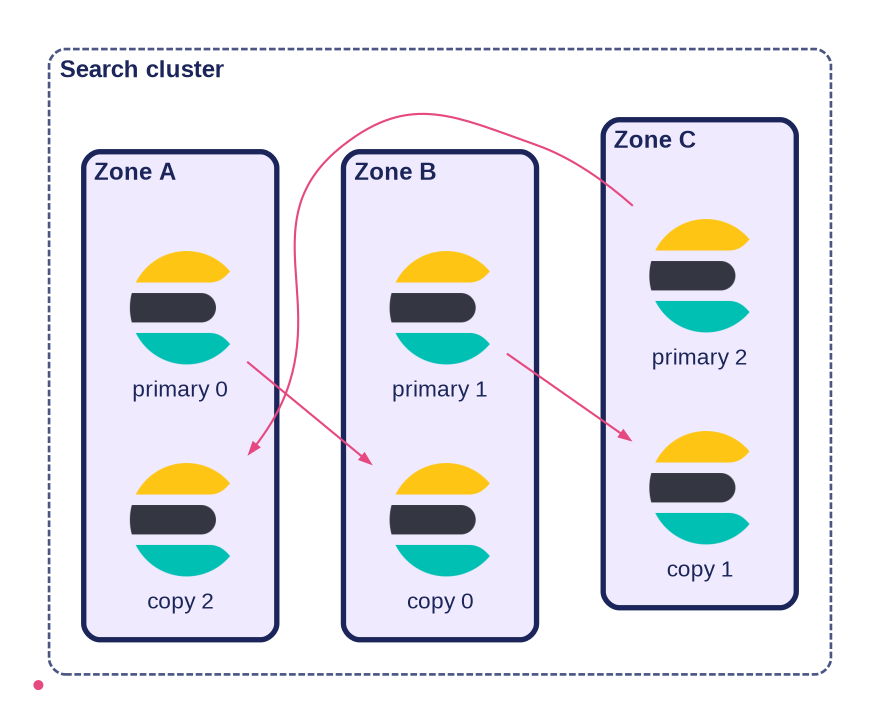
What replicas give
- A spare when a node dies
- More searches a second, if they are on extra nodes
- Upgrades node by node without downtime
- A copy near readers, when copied to another region
What they cost
- Disk: each copy is the full shard
- Indexing work again on each copy
- Writes wait for the copies in sync
- Asynchronous copies lag behind
- Network for copying
In Elasticsearch the primary sends each write to the replicas that are in sync and waits for them. A replica in another region is fed asynchronously, so it is a little behind.
Copies from read load
Placement
Where a shard may live
Choose a node for a copy
Disk watermarks (Elasticsearch defaults)
| Level | Used | What happens |
|---|---|---|
| Low | 85% | No more shards are placed here |
| High | 90% | Shards are moved away |
| Flood | 95% | Indices on it become read-only |
Nodes from disk
Time
Roll over and move down
Tiers for logs of 1 TB a day
| Tier | Age | Storage | Copies | Size |
|---|---|---|---|---|
| Hot | 0 to 7 days | SSD | 2 | 14 TB |
| Warm | 7 to 30 days | Cheaper disks | 2 | 46 TB |
| Cold | 30 to 90 days | Dense disks | 1, backed by a snapshot | 60 TB |
| Frozen | 90 to 365 days | Object storage | 1 | 275 TB |
{ "policy": { "phases": { "hot": { "actions": { "rollover": { "max_primary_shard_size": "50gb", "max_age": "7d" }, "set_priority": { "priority": 100 } } }, "warm": { "min_age": "7d", "actions": { "shrink": { "number_of_shards": 1 }, "forcemerge": { "max_num_segments": 1 }, "set_priority": { "priority": 50 } } }, "cold": { "min_age": "30d", "actions": { "set_priority": { "priority": 0 } } }, "delete": { "min_age": "365d", "actions": { "delete": {} } } } }}The life of one index
Change
Rebuild while visitors read
Reindex behind an alias
- 1
Make room
Both indices exist at the same time, so you need the disk for both.
- 2
Build with low priority
No replicas and no refresh during the load, throttled, in quiet hours or on separate nodes.
- 3
Catch up
Apply the changes from the queue since the snapshot.
- 4
Verify
Counts for each day or category, and sample queries with both indices.
- 5
Warm up
Replicas on, then replay popular queries, so that the first users do not read from cold disks.
- 6
Move the alias
And watch. Delete v1 after a few days.
Indexing apart from searching
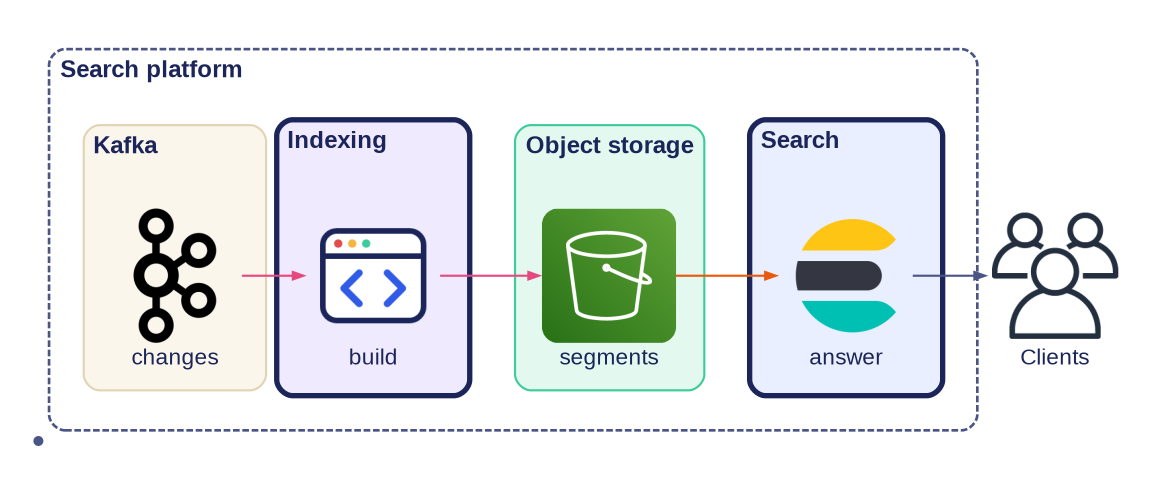
Speed
Cheaper work before more machines
| Measure | Does | Use it when |
|---|---|---|
| Force merge | One segment, faster reads | The index will not be written again |
| Index sorting | Documents stored in query order | Searches want the newest first |
| Filter cache | Remembers document sets | The same filters repeat |
| Column values | Values by document for sorting and counting | Many aggregations |
| Routing | One shard instead of all | Each query names a tenant |
| Bulk writes | Fewer round trips | Always for loads |
Autoscaling
Scale on the cause
| Seen | Check | Do |
|---|---|---|
| p99 over 200 ms, CPU high | Reads or merges? | Add nodes and replicas, or move loads |
| p99 over 200 ms, CPU low | Slow disk, one hot shard, heavy query | Fix that; more replicas do not help |
| CPU over 80% | All nodes or one? | Add nodes, or rebalance |
| Disk over 70% | Growth a day | Add nodes before 85% |
| CPU under 20%, p99 under 50 ms, for hours | Minimum copies | Remove one replica, never the last |
How long a new copy takes
What to add?
Rules
Do and do not
Do
- Keep shards between 10 and 50 GB
- Use replicas for reads
- Move old data to cheaper tiers
- Watch and scale before the peak
- Plan for a year of growth
Do not
- Create many small shards
- Put two copies on one node
- Ignore disk watermarks
- Add nodes and forget to rebalance
- Run on defaults that you have not read
Summary
The whole topic in one minute.
Plan primaries from next year's size divided by a target of 10 to 50 GB, and replicas from read load and safety. Place no two copies of a shard on one node, keep disks under the low watermark, and leave room for the loss of one node.
Time-based data rolls over into new indices and moves through tiers. Anything that fixes the shape of an index, such as its shard count or analyzer, is changed by building a new one and moving an alias. Scale on the cause, not only on the symptom: a replica without a spare node helps nobody.
- Primaries for data and writes, replicas for reads and safety, nodes for both.
- Size shards from next year's data, 10 to 50 GB each.
- More primaries make each search more expensive.
- Never two copies on one node. Keep disks under 85%.
- Roll over by size or age, move down the tiers, delete whole indices.
- Rebuild beside the live index and move an alias.