
Design Search Autocomplete (Typeahead)
medium 45 minSuggest ten likely searches before a person finishes typing, within 100 ms, for 700,000 requests a second.
Video lesson · Chapter 1 of 5
The second keystroke wins
Theory
Read or listen first. About 1 min.
What it is
Search autocomplete, also called typeahead, shows likely completions while you type. Type how to and a list appears with whole searches that many people have made.
It suggests queries, not documents. Running the chosen search is another system. Our job is a fast lookup: a few characters in, ten good queries out.
Why it exists
Typing is slow, especially on a phone. A good list saves keystrokes, avoids spelling mistakes and shows people words they did not know to use.
It is a useful interview problem because the obvious answer, searching for everything that starts with the text, is exactly the wrong work to do while someone waits.
A short history
1959 to 1960
René de la Briandais describes the tree of shared prefixes; Edward Fredkin describes it independently and names it the trie.
1967
Christopher Longuet-Higgins describes a computer-assisted typewriter that completes words.
10 December 2004
Google launches Google Suggest in Labs: search suggestions in real time, while you type.
2019
AbortController has been available across browsers since March 2019, so pages can cancel an outdated request.
Words to know
- Prefix
- The characters typed so far.
- Trie
- A tree where each step adds characters, so queries with the same beginning share a path.
- Radix tree
- A trie that joins chains of single children into one node. It is much smaller.
- Top-K list
- The best K completions of a prefix, computed in advance and stored at its node.
- Debounce
- Wait for a short pause in typing before sending a request.
- Snapshot
- A finished, read-only index file with a version number.
- Trending overlay
- A small, fresh list merged with the large, slow one.
Solve it like an interview
New to it? Start with Approach. Revising? Go straight to the mock.
- 1ApproachWhat this question tests, where it gets hard, and how to spend the time.
- 2ScopeAsk what changes the design, then commit to a short list.
- 3NumbersWork out a number when the answer changes what you build.
- 4API and dataThe contract first, then the data that serves it.
- 5DesignStart with the smallest system that works. Change it only when something breaks.
- 6Deep divesCompare the options before you open them, then say which you would pick.
- 7Explain your choicesAnswer first. Then compare your reasoning.
- 8By levelThe same question is judged differently for mid, senior and staff.
- 9MockAnswer against the clock, then score yourself.
Understand it
Story
The parrot that finishes your words
Scope
What are we building?
A service like the suggestion box of a large web search engine. The example scale is an assumption: one billion people a day, five searches each.
Six abilities
Prefix search
Match queries that start with the typed text.
Ranked
Ten results by popularity and relevance.
Fast
An answer within 100 ms.
Trending
News appears within minutes.
Personal
Your own past searches move up.
Forgiving
Common typos still find the word.
Where people meet it
| Place | Suggests |
|---|---|
| Web search, such as Google | Queries |
| Video, such as YouTube | Queries about videos |
| Shops, such as Amazon | Products and categories |
| Music, such as Spotify | Songs and artists |
| Work networks, such as LinkedIn | People and jobs |
| Social sites, such as X | Hashtags and accounts |
The hard part
Do the work before the question
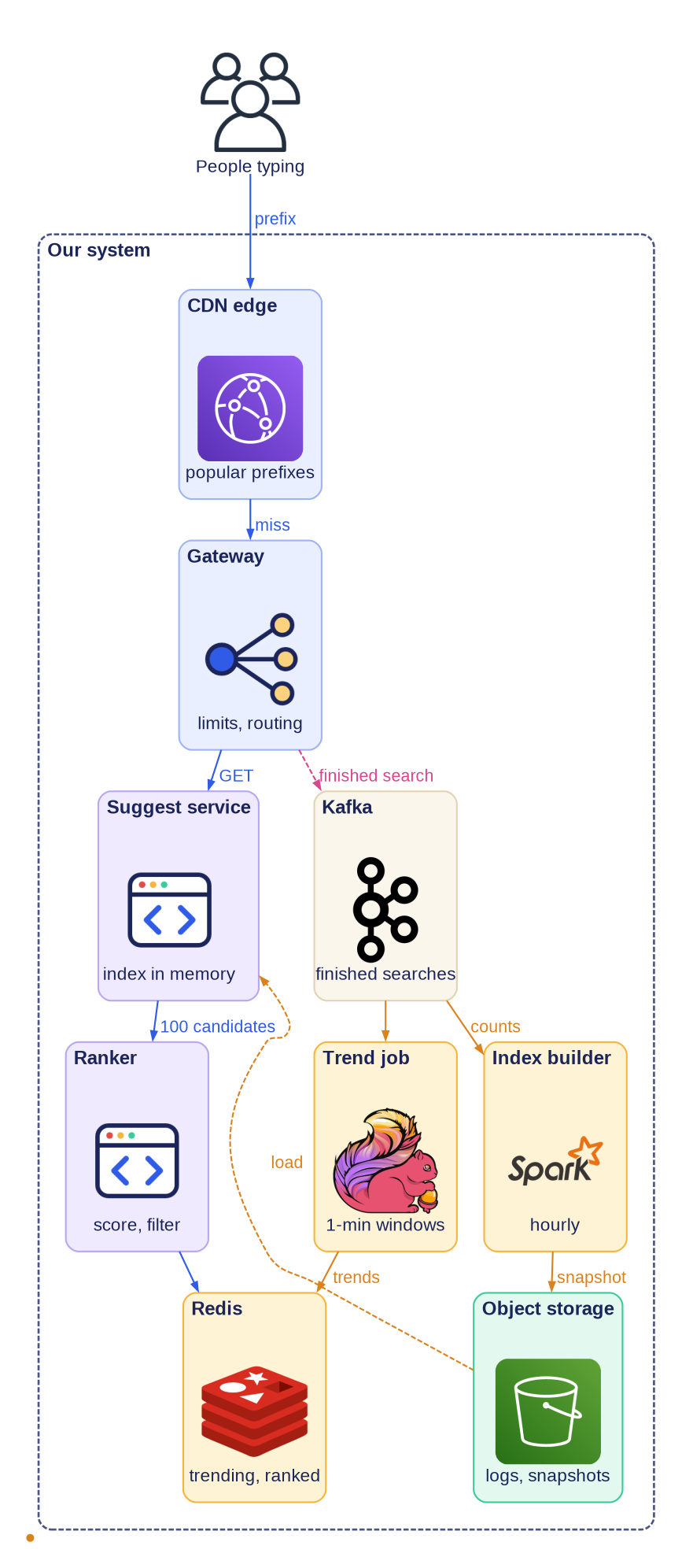
A single letter can match millions of queries. Finding and sorting them on every key press is hopeless, so each prefix carries its answer. The price is a large index and answers that are up to an hour old.
The finished system
Where the design ends up
The whole system
Read on
| Tab or page | For |
|---|---|
| Interviews: Scope, Numbers, API and data | Targets, arithmetic, endpoints and records |
| Interviews: Design, Deep dives | Six versions, index choices, sharding, ranking, trends and failures |
| Visualize | Every flow, one hop at a time |
| Search system design and full-text search | Finding documents, which is a different job |
| Trie | The data structure from zero |
| CDN, thundering herd, cache TTL | The edge, expiring keys, freshness |
| Stream processing, log-based queues | Windows and event logs |
| Circuit breaker, fallbacks, timeouts | Failing softly |
Summary
The whole topic in one minute.
Autocomplete is a read problem with a 100 ms budget. Store a ready answer at every prefix, keep the whole index in memory, put copies in each region and let the edge answer the popular prefixes.
Learning is separate from serving. Finished searches flow into an hourly build that makes a new snapshot, and a small trending overlay covers the news that cannot wait. When anything behind the index fails, show simpler suggestions or none. The search box must keep working.
- Store the top list at each prefix. A walk below the node is far too slow for short prefixes.
- About 23 GB holds 100 million queries, so replicate the index before you shard it.
- Debounce first, then the edge, then memory. Each step shrinks the next one's work.
- Serve from a read-only snapshot and swap it in one step. Never edit the live index.
- Batch for the normal, overlay for the new, on-device history for the personal.
- Suggestions are optional. Search itself must survive without them.