
How Large Uploads Work
easy 38 minA large file goes up in small numbered pieces.
Video lesson · Chapter 1 of 5
A train enters a tunnel
How a large upload continues
1:26Reel
Theory
Read or listen first. About 2 min.
What it is
An upload copies bytes from your device to another computer. A small photo can go in one request. A large video is better sent as a resumable upload: the file is cut into pieces, every piece has a fixed place, and the server remembers how much it has saved.
This page follows one file all the way: a 400 MB video, cut into 100 pieces of 4 MB. Here 1 MB means 1,000,000 bytes. Piece 73 starts at 288 MB and ends where piece 74 begins, at 292 MB. While piece 73 is travelling, the Wi-Fi dies. Everything interesting happens after that.
The whole method needs only three things: an upload ID that names this upload, an offset that says how many bytes the server has, and a rule: the server's number wins.
Why it exists
Networks break, and long transfers give them more time to do it. If an upload is one single request and it breaks at 72%, the 288 MB that already travelled may be thrown away. With pieces, at most one piece of 4 MB travels twice.
There is also a harder problem. When a connection dies, the client often cannot tell whether the request was lost or only the reply. In the first case the server has nothing new. In the second it has saved the piece. A good protocol makes both cases safe with the same action: send it again.
A short history
1981
RFC 793 describes TCP, published in September. It already says that an acknowledgment does not guarantee that data reached the end user, only that the receiving TCP took responsibility for it.
1995
RFC 1867, from November, adds a file field to HTML forms and defines multipart/form-data. A web page can now send a file, in one request.
2010
Amazon S3 introduces multipart upload on 10 November: one object sent as a set of parts.
2015
Version 1.0 of tus, an open protocol for resumable uploads over HTTP, is announced on 16 November.
2026
The IETF's own resumable upload protocol is still a draft. Version 16 is dated 23 November 2026.
Words to know
- Piece, chunk or part
- A slice of the file that is sent by itself. Products use different words for the same idea.
- Offset
- A distance from the start of the file, in bytes. Offset 288 MB means that 288 MB come before it.
- Upload ID or session
- The name of one upload on the server, and the state kept under that name.
- In flight
- Sent by one side and not yet known to have arrived.
- Idempotent
- Doing it twice has the same effect as doing it once.
- Checksum
- A short value computed from bytes. If the bytes change, the value almost certainly changes too.
- Fingerprint
- What the client uses to recognise the same file later: name, size, last change, and a hash of the first bytes.
- Atomic
- Happens completely or not at all. Nobody ever sees half of it.
- Lease or expiry
- The time after which the server may throw an unfinished upload away.
How it works
Step through the idea, or press Play.
Start. The server makes an upload ID. Its number is 0
Understand it
Start here
A wall across the river
Asha has 100 numbered stones on the left bank of a river. Lee is building a wall with them on the right bank. A basket on a rope carries one stone at a time. Asha keeps a twin of every stone, so nothing is ever lost for good. On the right bank a post shows how many stones the wall has.
Asha never needs to know what happened in the fog. The number on the post is enough.
Byte by byte
What happens when you choose a file
You press a button and the operating system shows a file picker. The page does not get a path on your disk and it cannot look around. It gets a File object: a name, a size, a type, the time of the last change, and permission to read those bytes. Choosing a 400 MB file does not load 400 MB into memory.
file.slice(288000000, 292000000) makes a small object that points at those bytes. The second number is not included, so this is bytes 288,000,000 to 291,999,999. Think of a bookmark pair in a thick book: two bookmarks mark chapter 73, and nobody has copied the chapter. The bytes are read from the disk when they are sent.
The road of piece 73
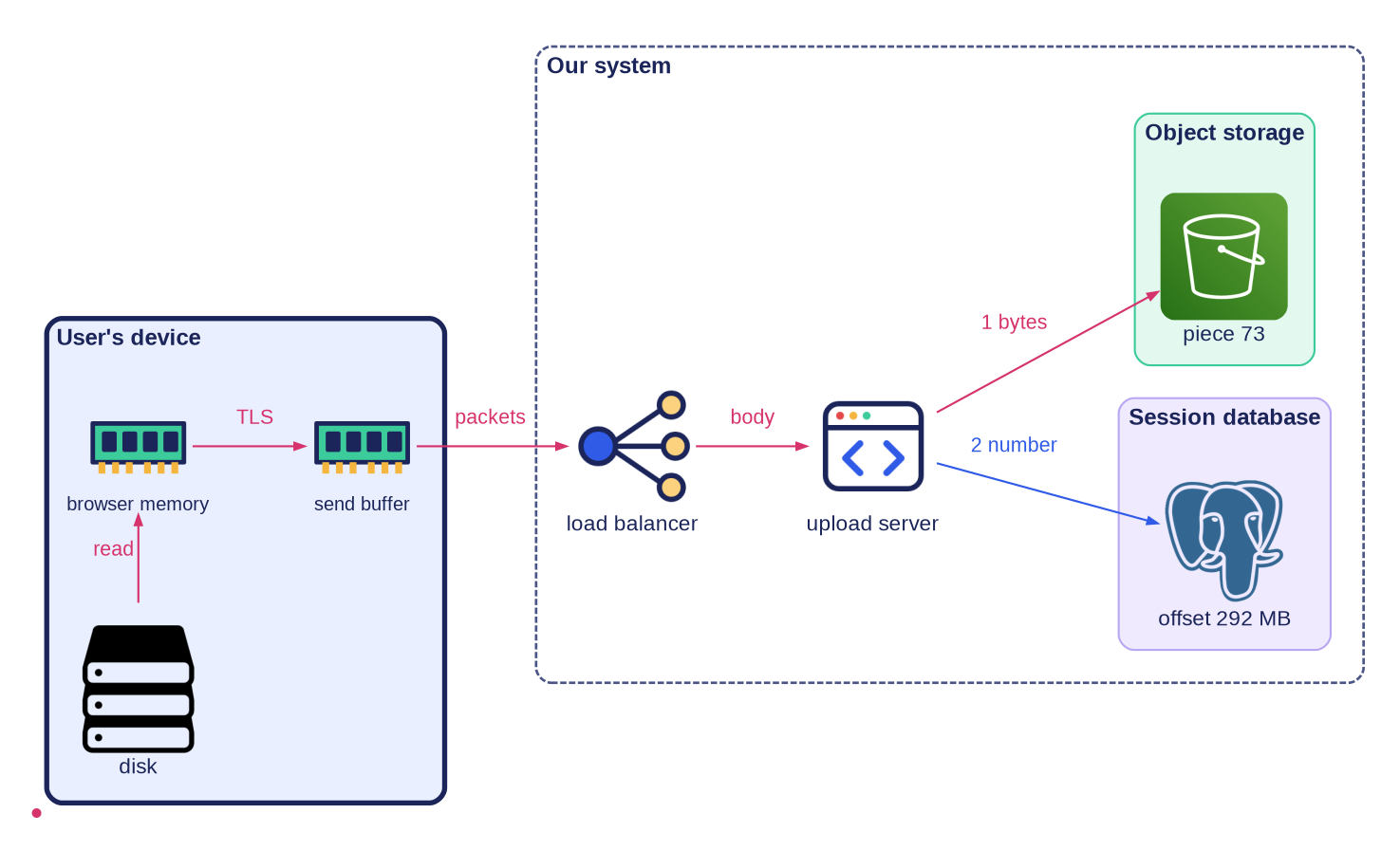
The stops on the way
- 1
Disk to memory
The browser reads a part of the file. A good client holds one piece, not the whole file.
- 2
TLS
The bytes are encrypted in records of at most 16,384 bytes of data, so that nobody on the way can read or change them.
- 3
Send buffer
The operating system accepts bytes into a buffer. The program continues, although nothing may have left the device yet.
- 4
TCP
Bytes leave as packets. Each is numbered, acknowledged, and sent again if the acknowledgment does not come.
- 5
Load balancer
It often ends the TCP and TLS connection and opens another one to a server. An acknowledgment on the first connection says nothing about the second.
- 6
Upload server
It reads the body in small steps, counts bytes, computes the checksum, and passes the bytes on.
- 7
Storage, then the number
First the bytes must be safely stored. Then the offset in the session moves. Then the reply is sent. The order matters.
How many small things are in one piece?
A strange sight
Why 100% is not always finished
You drop a letter into a letterbox on your street. From your side the job is 100% done. The letter is still in the box. A progress bar usually counts what left your side, not what was saved on the other side.
A browser's upload progress event counts bytes of the request body that were transmitted. Below it, a normal send on a socket gives no sign of a failed delivery: it only tells you about errors found locally. So the last bytes can sit in a send buffer, in the network, in a load balancer or in a server that has not stored them yet.
The bar runs ahead
What each 'OK' really promises
| You hear | It means | It does not mean |
|---|---|---|
send returned | The operating system took the bytes | They left the device |
| TCP acknowledgment | The next machine's TCP has them | The program read them, or anything is stored |
| Progress event: 100% | The body was handed over | The server answered |
| Server's reply: offset 292 | Pieces up to 292 MB are saved | The whole file is finished |
| Reply to finish: 200 | The file is joined, checked and visible | Nothing is missing here. This is the one to wait for |
The weak way
Why one long request is fragile
Carrying 100 plates in one tower is fast until you stumble. The same four dangers wait for a long request.
Timeouts
Proxies and servers close requests that are too slow or silent. nginx by default waits 60 seconds between two reads of a body. Cloudflare's 524 error means that the origin did not answer within 125 seconds by default.
Size limits
nginx accepts bodies up to 1 MB by default and answers 413 above that. Every box on the way may have its own limit.
Memory and disk
Careless code holds the whole body. A proxy may first write it to a temporary file.
Mobile hand-over
When a phone leaves Wi-Fi for the mobile network, its address changes. A TCP connection is tied to both addresses, so it ends.
How long does the video take?
How often does one request survive?
The same line, with and without pieces
| File | Without any break | One request, start again | Pieces of 4 MB |
|---|---|---|---|
| 400 MB | 400 s | about 569 s | about 401 s |
| 2 GB | 2,000 s | about 16,200 s, or 4.5 hours | about 2,007 s |
Memory on the server
But TCP
What TCP repairs, and what it cannot
TCP is like a careful postal worker on one road. If a parcel is lost on that road, they carry it again. But if the road itself is gone, or you moved to another house, the worker's notebook is worth nothing.
TCP already does
- Sends lost packets again
- Puts packets into order and drops doubles
- Slows down for a full network or a slow receiver
- Finds most damage with a 16-bit checksum
TCP cannot
- Continue after the connection has ended
- Remember anything after a restart or a closed tab
- Cross a load balancer that ends the connection
- Say that your program stored the bytes
- Know that two requests carry the same piece
It can also be too patient. On Linux, an established connection gives up by default after 15 tries, which the manual puts at roughly 13 to 30 minutes. Your program needs its own, shorter limit: see timeouts.
Step 1
Cut it into pieces
Where is piece N?
Some pieces of the video
| Piece | Starts at | Ends before | Server has afterwards |
|---|---|---|---|
| 1 | 0 MB | 4 MB | 4 MB, 1% |
| 2 | 4 MB | 8 MB | 8 MB, 2% |
| 72 | 284 MB | 288 MB | 288 MB, 72% |
| 73 | 288 MB | 292 MB | 292 MB, 73% |
| 74 | 292 MB | 296 MB | 296 MB, 74% |
| 100 | 396 MB | 400 MB | 400 MB, 100% |
Why not tiny pieces, or huge ones? Think of moving books in boxes. Very small boxes mean many walks. One huge box is dropped once and everything is on the floor.
Choosing the piece size for 400 MB at 1 MB per second
| Piece | Pieces | Waiting for replies | A lost piece costs up to |
|---|---|---|---|
| 100 KB | 4,000 | 400 s: the upload takes twice as long | 0.1 s |
| 1 MB | 400 | 40 s | 1 s |
| 4 MB | 100 | 10 s, or 2.5% extra | 4 s |
| 16 MB | 25 | 2.5 s | 16 s |
| 64 MB | 7 | 0.7 s | 64 s |
Choosing a size
Step 2
An upload ID and one number
A cloakroom gives you a ticket. You do not have to remember the hook, the room or the person who took your coat. An upload ID is that ticket. Behind it, the server keeps the session.
{ "uploadId": "up_9f3c1a7e", "owner": "user_42", "fileName": "school-play.mp4", "totalSize": 400000000, "offset": 288000000, "pieceHashes": ["...72 values..."], "state": "open", "expiresAt": "2026-12-02T10:00:00Z"}A quiet upload
The session must live in a shared database or in the storage service, because the next piece may reach another server. The offset is not a guess made by the client. It is a fact known to the server.
The heart
Lost request or lost reply?
You send a friend a message: "Please water the plants." No answer comes. Did the message get lost, or did they water the plants and only the answer got lost? From your chair both look the same: silence. That is exactly the position of the client after the Wi-Fi died during piece 73.
The same silence, two truths
| What happened | Server has | Percent | What the client knows |
|---|---|---|---|
| The piece was lost on the way | 288 MB | 72% | Nothing: no reply |
| The piece was saved, the reply was lost | 292 MB | 73% | Nothing: no reply |
Case 1: the piece was lost
Case 2: only the reply was lost
What asking the server costs
- Send the same piece again: at most 4 MB extra, 4 seconds here
- Or ask first with one tiny request, and then send only what is missing
- Both end at the server's number, and both are correct
What guessing costs
- Guess "lost", and append blindly: the piece may be in the file twice, and everything after it is shifted by 4 MB
- Guess "saved", and jump to piece 74: there may be a hole of 4 MB
- Give up: the user sends 288 MB again
The rule
Why sending again is safe
What the server does with a piece
MB = 1_000_000stored = 288 * MB # the server's one numberdef append(offset, length): global stored if offset == stored: stored += length # (the bytes are written first) return 200, "saved", stored // MB if offset + length <= stored: return 200, "already here", stored // MB return 409, "continue from my number", stored // MBprint(append(288 * MB, 4 * MB)) # piece 73print(append(288 * MB, 4 * MB)) # piece 73 againprint(append(300 * MB, 4 * MB)) # piece 76: a holeprint(append(292 * MB, 4 * MB)) # piece 74Sending twice with one effect is called idempotency. Here no extra key is needed: the upload ID and the offset together already say exactly which bytes are meant. Two requests for the same place must be handled one after the other, so the server takes a lock for this upload ID or changes the number only if it is still the old one.
Retry
Wait, then try again
If a door does not open, you do not ring a thousand times a second. You wait a little, then a little longer. A client waits 1 second, then 2, then 4, with a random part, and stops at a highest wait. Without the random part, thousands of phones that lost the same network would come back in the same second.
| Failed tries in a row | Longest wait | Waited so far, at most |
|---|---|---|
| 1 | 1 s | 1 s |
| 2 | 2 s | 3 s |
| 3 | 4 s | 7 s |
| 4 | 8 s | 15 s |
| 5 | 16 s | 31 s |
| 6 and more | 30 s | 61 s after the sixth |
Try again
- No reply, or the connection ended
- 408, 429, 500, 502, 503, 504: if there is a Retry-After, obey it
- The device says it is online again: try now
- A damaged piece: send that piece again
Do not repeat the same request
- 400 or 413: the request itself is wrong
- 401 or 403: sign in again first
- 404 or 410: the session is gone, start a new upload
- 409: not an error to repeat. Read the number and continue there
If the network stays away, pause and keep the session. A pause is not a failure. More about budgets and storms: retries.
Closed tab
Continue after a crash
You read a thick book and put it down for a week. A bookmark is enough to continue, but you need the bookmark and the book. The bookmark is the saved upload ID. The book is the file.
A closed tab loses everything in memory: the File object, the list of pieces, the current number. So the page saves a small note when the upload starts, for example in IndexedDB or localStorage. It holds the upload ID and the fingerprint of the file. It does not hold the video.
The next morning
Can the page get the file back?
| Way | After the tab was closed | Note |
|---|---|---|
<input type="file"> | No. The user chooses again | Works in every browser. Plan for this one |
File handle from showOpenFilePicker | Perhaps. A handle can be kept in IndexedDB, and the browser asks for permission again unless the user allowed every visit | MDN marks it experimental and not available in some widely used browsers. Chrome describes lasting permission from version 122 |
| Copy into the browser's private storage | Yes, the copy is there | Costs 400 MB of disk and time, and the browser limits how much a site may keep |
| An installed desktop or phone app | Often yes, within the system's rules | Apps can have file access that a page has not |
Same file
Is it really the same video?
Two jars can have the same label and different jam. If the user chose another file, or edited the video overnight, pieces 74 to 100 of the new file would be glued to pieces 1 to 73 of the old one.
| Check | Cost | Misses |
|---|---|---|
| Name | None | Another file with the same name |
| Size in bytes | None | A changed file of equal size |
| Last modified | None | Some copies and tools change or keep the time. It is a hint |
| Hash of the first 1 MB | Reads 1 MB | A change further on |
| Hashes of the stored pieces | Reads 292 MB from the local disk, sends none of it | Nothing that was stored, apart from accidents too unlikely to plan for |
async function fingerprint(file) { const head = await file.slice(0, 1_000_000).arrayBuffer(); const hash = await crypto.subtle.digest("SHA-256", head); const hex = [...new Uint8Array(hash)].map((b) => b.toString(16).padStart(2, "0")).join(""); return [file.name, file.size, file.lastModified, hex].join("|");}The file can also change during the upload. A browser is asked to remember the state of the file at the moment it was chosen, and a read of a file that changed should fail with NotReadableError. Then the only honest answer is to start a new upload.
Integrity
Are these the right bytes?
The offset says where bytes belong. It does not say that they are the right bytes. A parcel with the right address can still be broken inside.
- 1
Per piece
The client sends the SHA-256 of the piece. The server computes it while reading. If they differ, nothing is saved, and only 4 MB travels again.
- 2
For the whole file
At the end the client sends one value for the complete file. This finds a missing piece, a wrong order, or pieces of two different files.
- 3
At rest
Storage keeps its own checksums and checks them when it reads. See object storage.
A hash of hashes
TLS already finds changes made on one encrypted connection. The extra checks are for everything outside it: a bug in the slicing code, a wrong offset, damaged memory, a proxy that cuts a body, a file that changed.
Speed
One offset or parallel parts?
Two ways to fill a sticker album. Either you always put the next sticker in the next place, so one number says how far you are. Or three friends fill different pages at once, and you need a list of the places that are full.
| One offset, in order | Numbered parts, in parallel | |
|---|---|---|
| State on the server | One number: 288 MB | A list: 1, 2, 3, 5, 8 |
| After a break | Continue from the number | Send what is missing from the list |
| Sending piece 73 again | Offset check: already here | Same part number: replaces or repeats the same part |
| Good when | One connection fills the line, phones, simple clients | Fast line, long distance, one connection is the limit |
| Price | Pieces wait for each other | More state, more memory, joining in order |
What can parallel parts save?
Products
Four protocols, one idea
Every product below cuts, remembers and continues. They differ in who names the place and in what happens when the same piece comes twice. Do not mix them up in an interview.
What happens if piece 73 is sent twice?
| Protocol | How the place is named | The second copy | Ask for progress |
|---|---|---|---|
| Dropbox upload session, in order | cursor with session_id and offset | Error incorrect_offset with correct_offset: continue there | The error itself tells you |
| tus 1.0 | Upload-Offset header | 409 Conflict, upload unchanged. Then HEAD | HEAD gives Upload-Offset |
| S3 multipart | Part number 1 to 10,000 | Overwrites the earlier part with that number | List parts. Keep your own list of numbers and ETags |
| Google Cloud Storage resumable | Content-Range: bytes first-last/total | Bytes at offsets already saved are ignored. Never send different bytes | Empty PUT with bytes */total: 308 and Range |
| YouTube resumable | Content-Range, the same style | Overlapping or skipped bytes: the upload fails. So ask first | Empty PUT: 308 and Range |
| IETF draft 16 | Upload-Offset header | 409 with the right offset in the answer | HEAD |
Dropbox
How a Dropbox upload session does it
- 1
upload_session/start
Creates the session and returns a
session_id. It may already carry the first data. - 2
upload_session/append_v2
Sends data with a
cursor: thesession_idand theoffset, which is how much has been uploaded so far. - 3
If the offset is wrong
The answer is
incorrect_offset, and it containscorrect_offset. Dropbox's specification says this can happen when an earlier request was processed but the client did not get the response. That is our lost reply. - 4
upload_session/finish
Takes the cursor and a
commitwith the path. Only now is there a file in Dropbox.
POST /2/files/upload_session/append_v2 HTTP/1.1Host: content.dropboxapi.comAuthorization: Bearer <token>Content-Type: application/octet-streamDropbox-API-Arg: {"cursor": {"session_id": "<id>", "offset": 288000000}}<the bytes of piece 73>Dropbox limits, from its documentation
| Limit | Value |
|---|---|
| One request | At most 150 MiB |
| One file in a session | 2^41 - 2^22 = 2,199,019,061,248 bytes |
| Life of a session | 7 days. Then the ID is not_found |
| Piece size | Its performance guide suggests multiples of 4 MB |
| Concurrent session | Set session_type to concurrent at start. Pieces may then go in any order |
| Rules for concurrent | No data in start or finish. Offsets and lengths are multiples of 4,194,304 bytes, except the length of the last append, which sets close |
Check the 96 pieces
Dropbox also documents a content_hash: SHA-256 of every 4 MiB block, joined, and hashed again. It is the hash of hashes from above. How a whole file-sync product is built around this: Design Dropbox. Video sites add processing after the upload: Design YouTube.
How the others differ
tus
One
PATCHmay carry the rest of the file. The server should keep as much as it received, so its offset can be 290 MB, in the middle of our piece. The client continues from 290, not from 288.S3 multipart
A part has a number and an ETag. Parts may come in any order, and finish lists all pairs. With 5 MiB, the smallest size, our video has 77 parts. There is no expiry unless you add a lifecycle rule, and unfinished parts are billed.
Google's range style
Pieces are multiples of 256 KiB except the last. A 308 answer means: not finished. Its Range header says the last byte saved.
bytes=0-287999999means continue at 288,000,000. A session lives for a week.IETF draft
A server may send interim answers with status 104 that report the offset while the body is still travelling. Still a draft, so do not promise that browsers support it.
Parts at the S3 minimum
Where
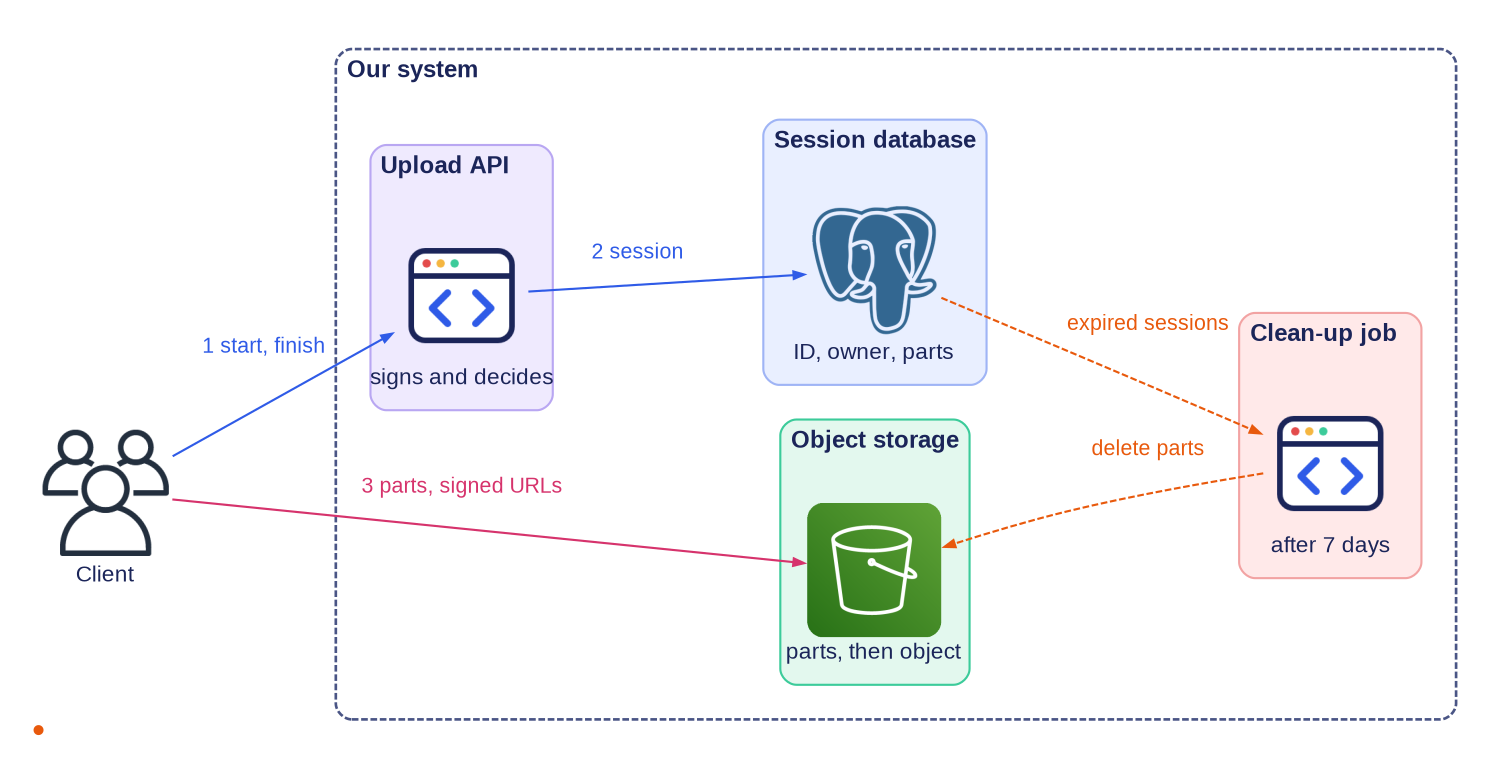
Straight to storage
The bytes do not have to pass through your own servers. Your API can check the user and hand out signed URLs, and the client sends the pieces straight to object storage. The state then lives in the storage service. Signed URLs, forms and the choice between methods are explained in file upload APIs.
Direct parts, and a job that cleans up
Step 3
Finish in one step
A theatre does not open the curtain while the painters are still on stage. Until finish has succeeded, the file does not exist for anybody else.
The life of an upload
What finish does
- 1
Check the length
The offset must be exactly 400,000,000. If not, answer 409 and the offset.
- 2
Check the hash
Compare the client's hash of hashes with the one from the stored pieces.
- 3
Join
Put the pieces together in order, or write a list that names them in order. Storage services do this for you.
- 4
Publish with one change
Move one row from checking to ready, or rename one object. One small change is atomic. Copying 400 MB is not.
- 5
Remember the result
Finish can lose its reply too. A second finish with the same ID must return the same file, not make a second one.
Clean-up
The uploads nobody finished
Someone fills 73 shelves and never returns. The shelves are still full, and somebody pays for them.
What abandoned uploads store
- 1
Give every session an end
Dropbox sessions live 7 days, Google's one week. Tell the client the time, so that it does not offer a dead session.
- 2
Delete in the right order
Mark the session expired first, so that no new piece is accepted. Then delete the pieces. Then delete the row.
- 3
Let storage help
S3 has a lifecycle action for incomplete multipart uploads.
- 4
Let the user cancel
Cancel deletes at once. Deleting twice must be harmless.
Safety
Limits against misuse
| Danger | Limit |
|---|---|
| Somebody guesses or steals an upload ID | Long random IDs, and check the owner on every request. Keep session links out of logs. Google says that a session URI works as its own proof of permission |
| Says 400 MB, sends 400 GB | Count the bytes that really arrive. Stop at the declared size and at the limit of the plan |
| Opens a million sessions | Limit open sessions and reserved bytes per user |
| Sends one byte a minute | A shortest speed or longest time per piece, and a timeout between reads |
| Dangerous name or type | A key of your own, never a path from the client. Look at real bytes, scan, and serve files from another domain |
| Wrong checksum to waste work | Limit failed pieces per session |
| Two tabs write together | Lock or compare-and-set on the offset. The loser gets 409 and the number |
UPDATE uploads SET offset_bytes = 292000000 WHERE id = 'up_9f3c1a7e' AND owner = 'user_42' AND state = 'open' AND offset_bytes = 288000000;-- 1 row changed: this request moved the number.-- 0 rows changed: somebody else was faster. Read the number and answer it.All together
One upload from start to end
| Time | What happens | Server's number |
|---|---|---|
| 0 s | Start. The page saves the upload ID | 0 |
| 288 s | 72 pieces are stored | 288 MB, 72% |
| 290 s | The Wi-Fi dies while piece 73 is in flight | 288 or 292 MB |
| 295 s | Wait, then piece 73 again | 292 MB, 73% |
| 300 s | The user closes the tab. Piece 74 has not been stored | 292 MB, 73% |
| Next day | Same file chosen, ID found, the server says 292 | 292 MB, 73% |
| + 108 s | Pieces 74 to 100: 27 pieces of 4 s | 400 MB, 100% |
| Then | Finish: hash equal, joined, ready | File visible |
Summary
The whole topic in one minute.
Cut the file into pieces. Piece N starts at (N - 1) times the piece size. The server stores the pieces under an upload ID and keeps one number, the offset. Every reply contains that number, and the client always continues from it.
After a break the client cannot know whether the request or the reply was lost, and it does not need to. It sends the same piece again. If the server expected that offset, it saves the piece. If the piece is already stored, the server writes nothing and answers with its number. Wait a little longer before each new try.
A closed tab is the same problem with one extra step: the page must have saved the upload ID, and the user must choose the file again. At the end the pieces are checked, joined and published in one step, and uploads that nobody finished are deleted.
- Piece N starts at (N - 1) x 4 MB. Piece 73 is 288 to 292 MB.
- The server keeps an upload ID and one number: how much it has. Its number wins.
- Silence can mean a lost request (288 MB) or a lost reply (292 MB). The client cannot tell.
- Don't guess. Send it again, let the server decide: expected means save, already stored means write nothing and answer 292.
- A closed tab needs a saved ID and the same file, chosen again by the user.
- 100% sent is not 100% saved. Wait for the answer to finish.
- TCP repairs packets inside one connection. It cannot remember an upload.
- Check every piece and the whole, publish in one step, and delete what nobody finished.
Sources
- Dropbox: upload_session/start (limits, sessions)
- Dropbox API specification: files (incorrect_offset, concurrent rules)
- Dropbox: performance guide
- Dropbox: content hash
- tus: resumable upload protocol 1.0
- tus 1.0 announcement
- Amazon S3: multipart upload
- Amazon S3: multipart upload limits
- Amazon S3: introducing multipart upload (2010)
- Google Cloud Storage: resumable uploads
- Google Cloud Storage: performing resumable uploads
- YouTube: resumable upload protocol
- IETF draft: resumable uploads for HTTP
- RFC 793: TCP (1981)
- RFC 9293: TCP
- RFC 8446: TLS 1.3 record size
- RFC 9000: QUIC
- RFC 1867: file upload in HTML forms (1995)
- W3C File API
- XMLHttpRequest standard: upload progress
- MDN: Blob.slice
- MDN: file input
- MDN: showOpenFilePicker
- Chrome: persistent permissions for file handles
- Linux manual: send
- Linux manual: tcp
- nginx: core HTTP module
- Cloudflare: error 524