
HTTP/2 and HTTP/3
medium 30 minHTTP/2 cuts messages into small frames and mixes many requests on one TCP connection.
Video lesson · Chapter 1 of 5
Three colored files share the connection
HTTP/2 and HTTP/3 in 85 seconds
1:25Reel coming soon
Theory
Read or listen first. About 2 min.
What it is
HTTP has one meaning and three ways of travelling. Methods, status codes, headers and bodies are the same in HTTP/1.1, HTTP/2 and HTTP/3. What differs is how they are put on the wire.
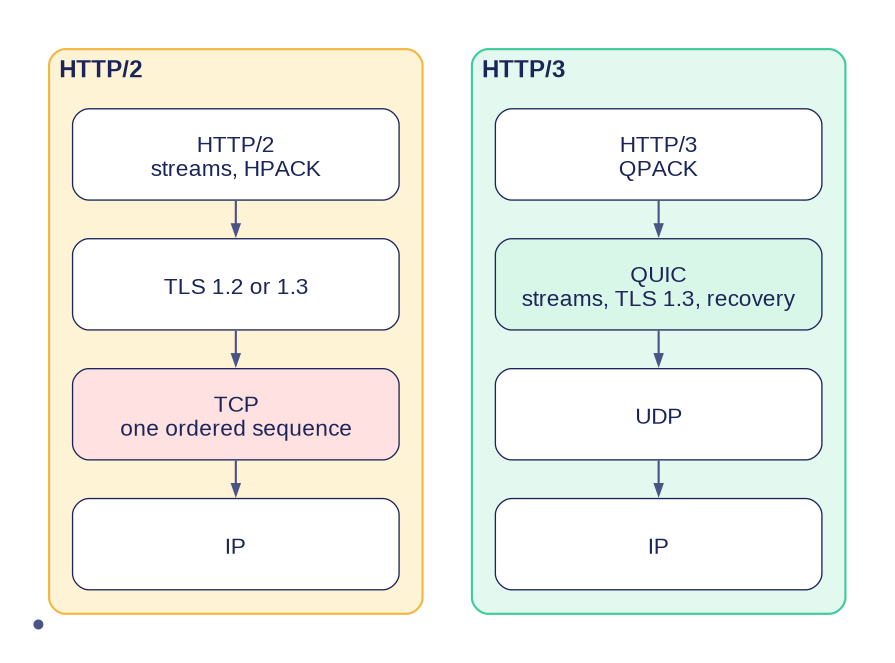
HTTP/2 sends binary frames. Each frame belongs to a numbered stream, one stream per request and answer, and the frames of many streams are mixed on one TCP connection. HTTP/3 keeps the idea, but uses QUIC over UDP. QUIC knows the streams itself, includes TLS 1.3, and delivers each stream independently.
Why it exists
On an HTTP/1.1 connection answers come one after the other. Browsers therefore open up to six connections to a host, and sites invented tricks such as joining files and spreading them over host names.
HTTP/2 removed that limit, and with it showed the next one: TCP delivers bytes in order, so a single lost packet makes every stream wait. TCP lives in operating systems and network boxes and changes slowly. QUIC moves the job above UDP, where browsers and servers can improve it themselves.
A short history
1997
HTTP/1.1 appears as RFC 2068, in January.
November 2009
Google announces SPDY, an experiment with mixed streams. HTTP/2 grows out of it.
2012
Google first deploys its early QUIC, designed by Jim Roskind.
May 2015
HTTP/2 becomes RFC 7540, and its header compression HPACK RFC 7541.
May 2021
The IETF publishes QUIC as RFC 9000, with RFC 9001 for its use of TLS 1.3.
June 2022
HTTP/3 becomes RFC 9114. On the way, HTTP/2 is revised as RFC 9113.
Words to know
- Frame
- The smallest unit: a type, a length and a payload. In HTTP/2 also the number of its stream.
- Stream
- One request and its answer, inside a shared connection.
- Multiplexing
- Mixing the frames of many streams on one connection.
- Head-of-line blocking
- Something ready must wait for something in front of it.
- RTT
- Round-trip time: there and back once.
- QUIC
- A transport over UDP with streams, loss recovery, congestion control and TLS 1.3 built in.
- Connection ID
- The number that names a QUIC connection, independent of the IP address.
- HPACK, QPACK
- Header compression of HTTP/2 and of HTTP/3.
- 0-RTT
- Sending a request in the first packet of a repeated visit.
- ALPN
- The part of TLS in which both sides agree on h2, h3 or http/1.1.
How it works
Step through the idea, or press Play.
One at a time. HTTP/1.1: an answer blocks the next one on its connection
Understand it
Start here
Parcels, a belt and zip lines
Max sends three loads, one red, one yellow and one green, to Lee on the other side of the yard.
The yard is the same: total speed and lost parcels do not change. What changes is who has to wait.
What you get
Why it matters
Many requests at once
One connection instead of six, and 100 or more streams on it.
Shorter start
TCP and TLS 1.3: 2 round trips before the first request. QUIC: 1. A repeated visit: 0.
Loss hurts less
HTTP/3 only. A lost packet stops its own streams.
Change of network
HTTP/3 only. From Wi-Fi to mobile without a new connection.
Small headers
Repeated headers become one or two bytes each.
Server push is over
Once the sixth reason. Chrome removed it in version 106, nginx in 1.25.1. Use preload and early hints.
HTTP/2
Frames and streams
Frame types of HTTP/2
| Frame | Job |
|---|---|
| HEADERS | Request or answer headers, opens a stream |
| CONTINUATION | More headers, when one frame is not enough |
| DATA | A piece of the body |
| RST_STREAM | Ends one stream, the connection stays |
| WINDOW_UPDATE | The receiver allows more bytes |
| SETTINGS | Limits, sent first by both sides |
| PING | Is the connection alive, and how far away |
| GOAWAY | No new streams, with the last one handled |
| PUSH_PROMISE | Server push, off in browsers |
| PRIORITY | Old priorities, deprecated by RFC 9113 |
Three requests on one connection
Limits that meet you in practice
| Setting | Default of the standard | Advice |
|---|---|---|
| Streams at the same time | No limit until the server sets one | At least 100 recommended. nginx: 128 |
| Window per stream | 65,535 bytes | Raise for long distances |
| Window of the connection | 65,535 bytes | Raise with WINDOW_UPDATE |
| Largest frame | 16,384 bytes | Rarely worth changing |
| HPACK table | 4,096 bytes | Leave |
Why the window matters
Headers
HPACK and QPACK
A request may carry several hundred bytes of headers, mostly the same each time. HPACK keeps a static table of 61 common entries and a dynamic table of headers already sent on this connection. A known header becomes an index of one byte or a little more; new text is shortened with a Huffman code.
An example
HPACK needs everything in order. HTTP/3 streams may arrive in any order, so QPACK sends changes of the table on streams of their own, and a request may be held only if it uses an entry that has not arrived. Its static table has 99 entries, and its dynamic table is off until the receiver allows one. Both avoid the kind of compression that let attackers guess secrets in TLS-compressed headers.
The problem
Head-of-line blocking
| Where | HTTP/1.1 | HTTP/2 | HTTP/3 |
|---|---|---|---|
| Between answers on one connection | Yes | No | No |
| Between streams, after a lost packet | One connection waits, others go on | All streams wait | Only streams with data in that packet |
| Inside one stream | Yes | Yes | Yes |
One lost packet
HTTP/3
QUIC
Two stacks
Reliable over UDP
QUIC numbers packets, acknowledges, resends and controls congestion itself. UDP only carries it.
Always encrypted
TLS 1.3 is part of the handshake, and most of each packet header is hidden too.
In the application
Usually a library instead of the kernel, so it can be updated with the browser or the server.
No amplifier
Before the client's address is proven, the server sends at most three times what it received.
The name was once proposed as short for Quick UDP Internet Connections. In the standard it is simply a name. QUIC is also used without HTTP, for example below WebTransport and for DNS.
Start
Handshakes
Round trips before the first request
| TCP | TLS | Sum | First byte of the answer at | |
|---|---|---|---|---|
| HTTP/1.1 or HTTP/2, TLS 1.2 | 1 | 2 | 3 | 4 RTT |
| HTTP/1.1 or HTTP/2, TLS 1.3 | 1 | 1 | 2 | 3 RTT |
| HTTP/1.1 or HTTP/2, TLS 1.3 early data | 1 | 0 | 1 | 2 RTT |
| HTTP/3, first visit | 0 | 1, with QUIC | 1 | 2 RTT |
| HTTP/3, 0-RTT | 0 | 0 | 0 | 1 RTT |
At 80 ms
One round trip
On the move
Connection migration
A TCP connection is named by two addresses and two ports. A phone that leaves the Wi-Fi gets a new address, and its TCP connections end. A QUIC connection is named by connection IDs, up to 20 bytes long, so packets from the new address still belong to it. The other side first checks that the new path works.
From Wi-Fi to mobile
Discovery
How a browser finds HTTP/3
- 1
First contact by TCP
ALPN in TLS agrees on
h2, or onhttp/1.1. - 2
The hint
The answer carries
Alt-Svc: h3=":443"; ma=86400: HTTP/3 is here, remember it for a day. A DNS record of type HTTPS (RFC 9460) can say so before the first connection. - 3
QUIC next time
The browser tries UDP port 443, often racing it against TCP.
- 4
Fallback
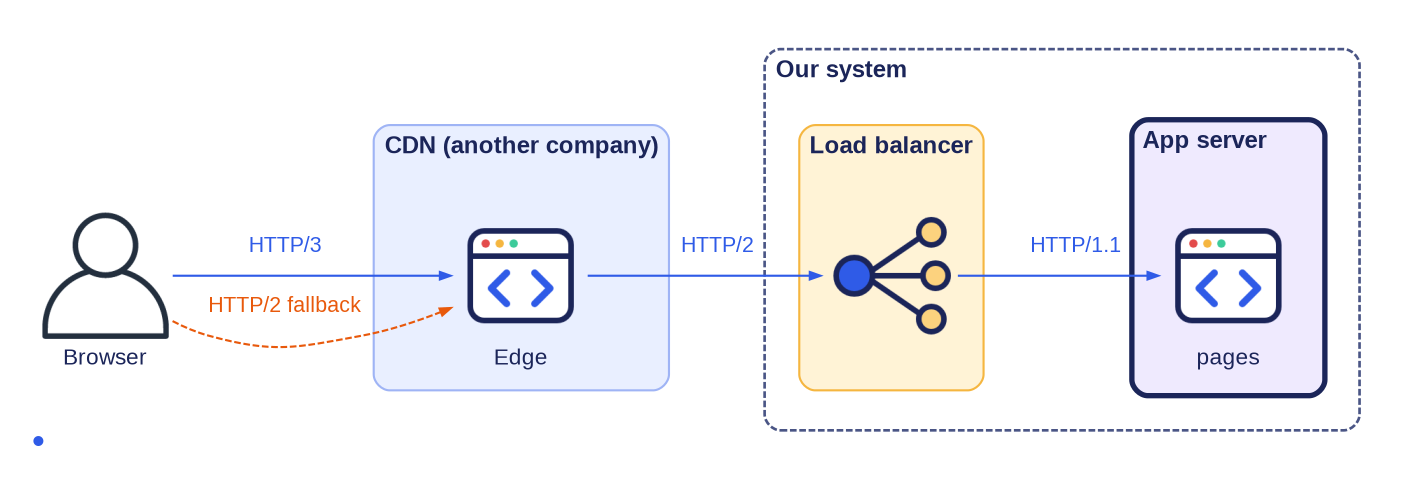
If UDP is blocked, as in some company networks, the page loads over HTTP/2. So keep HTTP/2 on.
Each hop chooses for itself
Operate
Configure a server
server { listen 443 ssl; listen 443 quic reuseport; # UDP, HTTP/3 listen [::]:443 ssl; listen [::]:443 quic reuseport; http2 on; # since 1.25.1, replaces "listen ... http2" server_name example.com; ssl_certificate /etc/ssl/example.com.pem; ssl_certificate_key /etc/ssl/example.com.key; ssl_protocols TLSv1.2 TLSv1.3; # QUIC uses 1.3, others may need 1.2 http2_max_concurrent_streams 128; # the default quic_retry on; # check the client's address first ssl_early_data off; # 0-RTT: see the warning above add_header Alt-Svc 'h3=":443"; ma=86400' always; add_header Strict-Transport-Security "max-age=63072000" always; location / { root /var/www/html; }}# Open UDP 443 in the firewall too: sudo ufw allow 443/udp# Log the variable $http3 to see who uses it.reuseport per address and port in the whole configuration. quic_retry on costs a round trip.curl -sI --http2 https://example.com # HTTP/2 200 ?curl -sI --http3-only https://example.com # needs a curl built with HTTP/3curl -sI https://example.com | grep -i alt-svc # is HTTP/3 announced?curl -v --http2 https://example.com 2>&1 | grep -i alpncurl --http2-prior-knowledge http://localhost:8080 # HTTP/2 without TLS, only if knowncurl --http2 -Z -O https://example.com/a -O https://example.com/b # parallelIn the browser, performance.getEntriesByType("resource") gives nextHopProtocol for each file: http/1.1, h2 or h3. Group your timings by it.
What to watch
| Measure | Why |
|---|---|
| Share of h3, h2, http/1.1 | Whether discovery works and where UDP is blocked |
| Time to first byte and page timings, per protocol and network | The reason for doing it |
| CPU per gigabyte | QUIC encrypts and counts in the application |
| Streams reset per connection | Cancelled pages, or abuse |
| Connections per machine after a deployment | Long connections do not move by themselves |
Performance
Habits to drop, and to keep
Now
- One host name for your own files
- Sensible bundles: tens of files, not one and not a thousand. Larger files compress better
fetchpriority="high"for the main image,lowfor what can waitrel="preload"for fonts,rel="preconnect"andrel="dns-prefetch"for other hosts103 Early Hintswhile the page is being made, over HTTP/2 or later- Long cache times with a hash in the file name
From the old days
- Spreading files over host names (sharding)
- Joining everything into one file
- Putting images into the CSS as text
- Server push
- Headers of many kilobytes
- Forgetting that
deferand order still matter
Priorities were rewritten too: the header Priority: u=1, i (RFC 9218) gives an urgency from 0 (first) to 7, with 3 as the default, and i for answers that are useful piece by piece. Browsers may also use one connection for several host names, if the certificate covers them and they lead to the same server.
Behind the edge
Load balancing and gRPC
One connection, one server
| Topic | Advice |
|---|---|
| Shutting down | Send GOAWAY, finish open streams, then close |
| Cancelled requests | RST_STREAM ends one stream. Limit how fast one client may open and cancel streams, and keep servers patched (CVE-2023-44487) |
| Retries | GOAWAY names the last stream handled. Later ones are safe to send again |
| Without TLS | h2 in clear text exists, between machines that know of each other. Browsers use TLS only |
| WebSocket | By extended CONNECT on one stream: WebSockets |
| Server-sent events | The six-connection limit is gone: server-sent events |
| Chunked encoding | Only HTTP/1.1. DATA frames replace it, and proxies translate |
Decide
Which one, where
| HTTP/1.1 | HTTP/2 | HTTP/3 | |
|---|---|---|---|
| Year, standard | 1997, now RFC 9112 | 2015, now RFC 9113 | 2022, RFC 9114 |
| Format | Text | Binary frames | Binary frames |
| Transport | TCP | TCP | QUIC over UDP |
| Encryption | Optional | In browsers always | Always |
| Requests per connection | One at a time | Many, mixed | Many, independent |
| Header compression | None | HPACK | QPACK |
| Start with TLS 1.3 | 2 RTT | 2 RTT | 1 RTT |
| New network address | Breaks | Breaks | Continues |
| Reading it on the wire | Easy | Tools needed | Tools and keys needed |
Turn it on when
- You serve a web site or app: HTTP/2 always
- People are far away, or on mobile or poor Wi-Fi: HTTP/3
- Pages load many files, or APIs get many calls at once
- Phones change networks while they use you
- A CDN offers HTTP/3 with a switch
Be careful when
- UDP is blocked: keep HTTP/2 as the fallback
- Old proxies or tools know only HTTP/1.1
- CPU is your limit: test QUIC under load
- You must read traffic to find a fault: plan for logs and key export
- The other end is in the same building: little to gain
Other tools for other jobs: gRPC for calls between services, WebSockets for two-way messages, real-time APIs to choose among them, and CDN for being near the user, which saves more than any protocol.
Summary
The whole topic in one minute.
HTTP/2 gives many streams on one TCP connection, binary frames and compressed headers. TCP still blocks all streams when a packet is lost. HTTP/3 over QUIC blocks only the streams that lost data, needs one round trip to start, and keeps its connection when the address changes.
Offer both and HTTP/1.1 too: browsers start with TCP, learn about HTTP/3 from Alt-Svc or a DNS HTTPS record, and fall back when UDP is blocked. Measure before and after, especially for people on poor networks.
- The meaning of HTTP is the same in all three versions. The transport differs.
- HTTP/2: many streams as frames on one TCP connection, HPACK for headers.
- One lost TCP packet stops all HTTP/2 streams. QUIC stops only the streams it carried.
- With TLS 1.3 HTTP/2 needs 2 round trips before a request, HTTP/3 needs 1, or 0 on a repeated visit, for safe requests.
- Connection IDs let a QUIC connection survive a new address.
- Announce HTTP/3 by Alt-Svc or a DNS HTTPS record, open UDP 443, and keep HTTP/2 as the fallback.
- Server push is gone: preload and early hints instead.