
Server-sent events
easy 27 minServer-sent events (SSE) is one ordinary HTTP answer that does not end.
Video lesson · Chapter 1 of 5
A newsroom keeps one response open
Server-sent events in 75 seconds
1:15Reel coming soon
Theory
Read or listen first. About 1 min.
What it is
With server-sent events a client sends one GET and the server answers 200 with the type text/event-stream. Then it leaves the answer open and writes a few lines of text each time something happens. A blank line ends an event.
In the browser the EventSource object does the reading. It cuts the text into events, calls your code, and after a lost connection it asks again, with the id of the last event in the header Last-Event-ID.
Why it exists
Many pages only need to be told: a headline, a score, the progress of a job, the next words of a generated text. Polling is late and wasteful, and a WebSocket brings a protocol of its own, with reconnecting to write yourself.
SSE stays inside HTTP. Cookies, TLS, status codes, load balancers and logs work as for every other request, and the events are text that can be read with curl.
A short history
2004
Ian Hickson specifies the first form as part of the WHATWG proposal Web Applications 1.0.
September 2006
The Opera browser implements the experimental technology under the name Server-Sent Events.
3 February 2015
The W3C publishes Server-Sent Events as a Recommendation. Today the WHATWG HTML standard maintains it.
Words to know
- Event stream
- The text format, type text/event-stream, always UTF-8.
- EventSource
- The browser object that opens and reads a stream.
- Last-Event-ID
- Request header with the id of the last event seen, sent when the browser reconnects.
- Reconnection time
- How long the browser waits before trying again;
retry:changes it. - Replay
- Sending again the events after a given id.
- Comment
- A line that begins with a colon. Ignored by the client, good as a heartbeat.
- Buffering
- A proxy that collects the answer before passing it on, which stops streaming.
How it works
Step through the idea, or press Play.
Ask once. GET with Accept: text/event-stream
Understand it
Start here
News from the balloon
Noor flies in a balloon and can see far. Sam stands on the hill and wants the news. A line runs from the basket down to a post beside Sam, and numbered paper strips slide down the line.
Sam does little: ask, read, remember one number. Keeping the strips is work for the balloon.
Which push method to pick is the topic of real-time APIs. Push or pull in general: push vs pull.
What you get
Why use it
It is HTTP
No protocol switch. Cookies, status codes, compression and ordinary load balancers work. Proxies must not buffer.
Reconnects itself
After a drop the browser waits and asks again, with the last id.
Simple text
No framing and no masking. You can read the stream with curl.
Named events
One stream can carry news, weather and sports, and each goes to its own handler.
In the browser
EventSourceis in all modern browsers. Internet Explorer never had it, and Edge has it since version 79.Shares HTTP/2
Many streams run over one connection, together with all other requests.
On the wire
The event stream
GET /events/news HTTP/1.1Accept: text/event-streamCache-Control: no-cacheHTTP/1.1 200 OKContent-Type: text/event-streamCache-Control: no-cacheretry: 5000id: 12345event: newsdata: {"headline": "Bridge opens"}id: 12346data: first linedata: second line: nothing new, still hereConnection: keep-alive is not needed in HTTP/1.1, and not allowed in HTTP/2 and later.| Line | Meaning | Detail |
|---|---|---|
data: | The payload | Several lines are joined with line breaks |
event: | The type | Without it the type is message |
id: | The id of the event | Remembered until another id comes. An empty id clears it |
retry: | Reconnection time in milliseconds | Digits only, otherwise ignored |
: | Comment | Ignored. Every 15 seconds or so is the advice of the standard |
| blank line | End of the event | Without data nothing is delivered, only the id is kept |
One endless answer
Browser
EventSource
const es = new EventSource("/events/news");es.onopen = () => console.log("open");es.onmessage = (e) => console.log("no event name:", e.data);es.addEventListener("news", (e) => { const item = JSON.parse(e.data); document.getElementById("headline").textContent = item.headline;});es.onerror = () => { if (es.readyState === EventSource.CONNECTING) console.log("trying again"); if (es.readyState === EventSource.CLOSED) console.log("gave up");};// es.close() when the page part goes awayStates, and what happens next
| readyState | When | What the browser does |
|---|---|---|
| 0 CONNECTING | First try, or after a lost connection | Waits the reconnection time and tries again |
| 1 OPEN | 200 with the right type | Delivers events |
| 2 CLOSED | close(), status 204 or another status, wrong type | Nothing. Your code must make a new EventSource |
EventSource can only send a GET, and cannot set headers. Cookies of the same origin are sent; for another origin use withCredentials: true and CORS. When you need POST or an Authorization header, read the stream with fetch and cut the events yourself. Then reconnecting is yours as well.
Reliability
Resume after a drop
Three events in the gap
- 1
Growing ids
A number from the log, not a random id and not the clock. Then after 12345 is a simple range, on every server.
- 2
Keep events for a known time
An hour, or the last 1,000. A list in the memory of one server is lost with that server.
- 3
Say when it is too late
If the id is older than the log, send an event such as
resetand let the page load the whole state. Silently continuing hides a gap. - 4
Expect doubles
The connection may break after the event arrived and before the browser kept its id. With replay the delivery is at least once, so handlers must tolerate a repeat.
Without ids and a log, SSE is at most once: what was sent during the gap is gone. For events that must never be lost, the log is the truth and SSE only the fast way to look at it.
Server
Writing a stream
- 1
Check the user
Before the 200. Afterwards there is no status code left.
- 2
Send the headers and flush
Content-Type: text/event-stream,Cache-Control: no-cache, and for nginxX-Accel-Buffering: no. - 3
Replay, then go live
Events after Last-Event-ID, then new ones.
- 4
Flush after every event
Frameworks and compression like to wait for more bytes.
- 5
Comment when quiet
Every 15 seconds. It keeps proxies awake and shows when the client is gone.
- 6
Clean up
When the client disconnects, remove it. A forgotten client is a leak.
On the way
Buffers and timers
Every hop must let events through
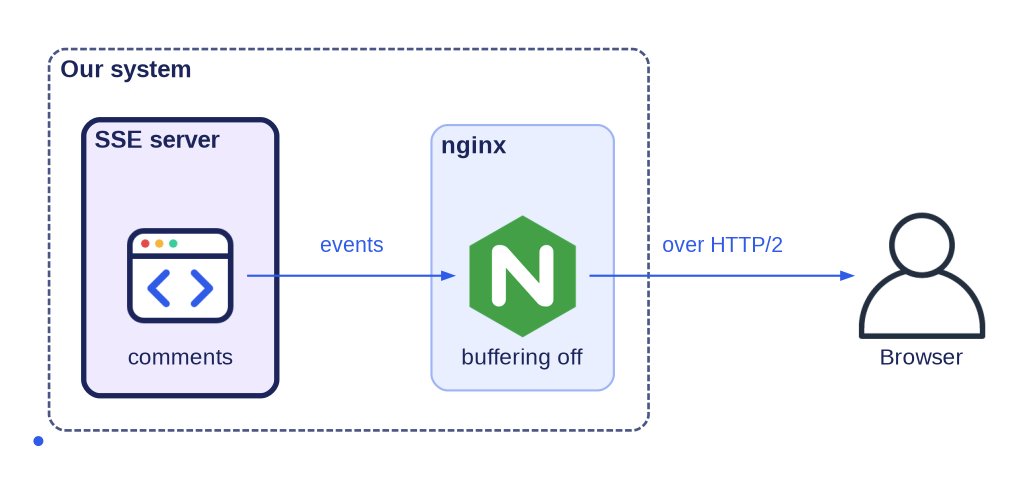
location /events/ { proxy_pass http://sse_backend; proxy_http_version 1.1; # already the default since nginx 1.29.7 proxy_set_header Connection ""; proxy_buffering off; # or X-Accel-Buffering: no in the answer proxy_read_timeout 60s; # default; a comment every 15 s restarts it gzip off;}curl -N https://example.com/events/ should print each event as it happens.| Symptom | Cause | Cure |
|---|---|---|
| Events come in bursts | A proxy, framework or compression buffers | Buffering off, flush |
| Reconnects every 60 s | Idle timer of a proxy or balancer | A comment every 15 s |
| The seventh tab hangs | Six connections per host on HTTP/1.1 | HTTP/2, or one stream shared by tabs |
| Never reconnects | Wrong type or status | 401 or 503 cannot be retried by EventSource: make a new one after a wait |
| Reconnects in a loop | The server ends the answer after each event | Keep it open, or answer 204 to stop |
Scale
Many readers, many servers
A newsroom
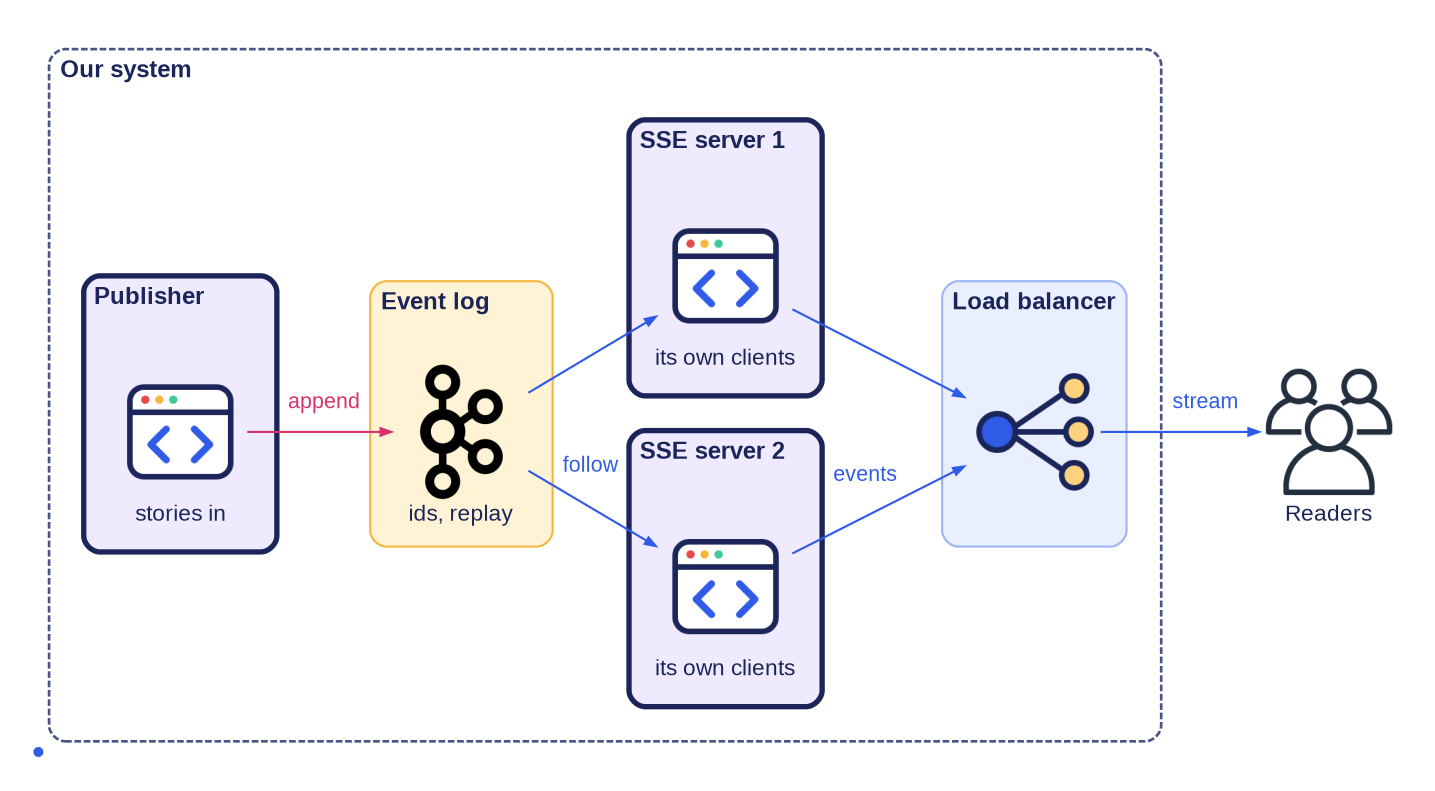
Connections, comments and fan-out
How much log to keep
Slow readers
Each client has a bounded queue. When it is full, end that stream: the browser returns with its last id.
Everybody at once
Set a random
retry:per client, for example 3000 to 8000, so that a restart does not bring all of them back together.One stream per page
Choose the kinds in the URL, such as
?kinds=news,sports, and filter in the server. Tabs can share through a SharedWorker.A CDN in between
Only if it passes streams on unbuffered. Each reader still holds a connection to the edge.
Redis pub/sub instead of a log delivers live events but keeps none. Redis Streams or Kafka keep them: see log-based queues. Splitting the connections: load balancing.
Generated text
Streaming the words of a model
Language model APIs answer a POST with an event stream, so that people read while the rest is written. Because it is a POST, clients use fetch, not EventSource. Anthropic's API, for example, sends named events such as message_start, content_block_delta and message_stop, with ping events in between.
Reading with fetch
Security
Safe streams
Do
- Sign in by cookie, or by a short-lived ticket
- Check the rights per kind of event, also on replay
- Limit streams per user
- End the stream when the session ends
- Encode line breaks in payloads, best by JSON
Do not
- Put long-lived tokens in the URL: they land in logs
- Allow every origin together with credentials
- Write text from people into
event:orid:without checking for line breaks - Put events into innerHTML
- Let a shared cache keep the stream
Decide
When to choose it
Choose it for
- News feeds, notifications, dashboards on an open page
- Live scores and tickers
- Progress, logs, build output
- Generated text
- Pages that send rarely
- Teams that want plain HTTP and few moving parts
Choose something else for
- Chat, games and shared editing with many sends: WebSocket
- Binary data: base64 makes it a third larger
- Events that must arrive once each: a log with acknowledgements
- Closed apps: the push service of the platform
- Another company's server: webhooks
| Compared with | Same | Different | Choose the other when |
|---|---|---|---|
| WebSocket | Live, one open connection, in the browser | Both ways, binary, own protocol, reconnecting is yours | The client sends often |
| Long polling | HTTP, server pushes | A new request per answer, no format of its own | Streams are blocked, or news is very rare |
| HTTP/2 server push | The server begins | Meant for files in the cache. Pages could not read it, and Chrome removed it in version 106 | Never for events |
| Web Push | Server to person | Goes through a push service and wakes a service worker, also when the page is closed | The page is not open |
Is it SSE?
Operate
What to watch
| Measure | Why |
|---|---|
| Open streams, per server | Capacity and balance |
| Reconnects per minute, share with Last-Event-ID | Timers, deployments, weak networks |
| Length of replays, and resets | Whether the log is long enough |
| Time from event to write | What people feel |
| Queue length, streams ended as slow | Slow readers |
| Average life of a stream | Exactly 60 s means a timer, not people |
Summary
The whole topic in one minute.
SSE is HTTP: one GET, one answer that stays open, text events separated by blank lines. The browser reconnects and sends the last id, so most of the hard client work is done.
Your half is to number the events, keep them for a while, send what was missed, flush after each event, switch off buffers on the way, and send a comment when it is quiet. Use HTTP/2 or later, and a normal POST for the other direction.
- One GET, one endless answer of type text/event-stream, UTF-8 text, a blank line after each event.
- The browser reconnects and sends Last-Event-ID. Keeping and replaying events is the server's half.
- Flush, switch buffering off, and send a comment about every 15 seconds.
- Use HTTP/2 or later: HTTP/1.1 allows six connections per host.
- Named events carry several kinds on one stream. Sending goes by POST.
- EventSource is GET without own headers. With fetch you can do more, and must reconnect yourself.