
Design JIRA (Issue Tracker)
medium 60 minTrack work as issues that move across a board under rules each team writes for itself.
Video lesson · Chapter 1 of 5
One issue, several downstream views
Theory
Read or listen first. About 2 min.
What it is
An issue tracker like JIRA stores units of work: a bug, a task, a story. Each issue has a key such as PROJ-124, some fields, a history, and a status that changes as the work moves on. A board shows the issues as cards in columns.
What makes it special is that customers shape it. One team has four statuses, another has twelve with an approval. One adds a field for story points, another for a court date. The program is mostly an engine that runs rules stored as data.
Why it exists
Teams need one place that answers three questions: what is there to do, who is doing it, and what changed. Mail and spreadsheets answer them badly, because nobody can see the whole list and nobody trusts its order.
It is a rich interview problem because it has few users per record but endless variety. The interesting parts are a state machine that stays correct when two people act at once, search over fields we have never heard of, permissions inside search, and boards that stay fresh on many screens.
A short history
1953
Toyota applies kanban cards in its main machine shop: work moves on when the next step has room. Boards with columns come from this.
August 1998
Bugzilla is released by Netscape as an open-source bug tracker.
2002
Atlassian releases Jira. The name began as a nickname its developers used for Bugzilla.
Words to know
- Issue
- One unit of work, with a key people say aloud, such as PROJ-124.
- Workflow
- The statuses an issue can have and the named moves between them.
- Transition
- One allowed move, with conditions, validators and follow-up actions.
- Custom field
- A field a customer added, with a type and a list of projects that use it.
- Tenant
- One customer organisation. Its data must never be visible to another.
- JQL
- Jira Query Language: text such as
status = Open AND assignee = currentUser(). - Rank
- A short string that says where a card stands among the others.
- Outbox
- A table written in the same transaction as the change, from which events are sent later.
Solve it like an interview
New to it? Start with Approach. Revising? Go straight to the mock.
- 1ApproachWhat this question tests, where it gets hard, and how to spend the time.
- 2ScopeAsk what changes the design, then commit to a short list.
- 3NumbersWork out a number when the answer changes what you build.
- 4API and dataThe contract first, then the data that serves it.
- 5DesignStart with the smallest system that works. Change it only when something breaks.
- 6Deep divesCompare the options before you open them, then say which you would pick.
- 7Explain your choicesAnswer first. Then compare your reasoning.
- 8By levelThe same question is judged differently for mid, senior and staff.
- 9MockAnswer against the clock, then score yourself.
How it works
Step through the idea, or press Play.
Ask to move. The browser names the issue, the transition and the version it saw
Understand it
Scope
What are we building?
A service like Jira for many organisations: issues with custom fields, workflows, Kanban and Scrum boards, a query language, permissions, comments, attachments and notifications. This page is an exercise inspired by well-known products. It does not describe any company's real system.
Similar applications
| Service | Known for |
|---|---|
| Asana | Work management |
| Trello | Simple visual boards |
| Linear | Issue tracking for software teams |
| Monday.com | Configurable work tables |
| ClickUp | Many tools in one |
| Notion | Documents and databases |
| GitHub Issues | Tracking beside the code |
| Shortcut | Software projects |
The hard part
Everything is configuration, and still it must be right
Two people drag the same card at the same time. One moves it to Review, the other to Done. If each request reads the status, checks the rules and then writes, both checks pass and the last write wins. The history shows a path that the workflow forbids.
Check, then write: a forbidden path
The finished system
Where the design ends up
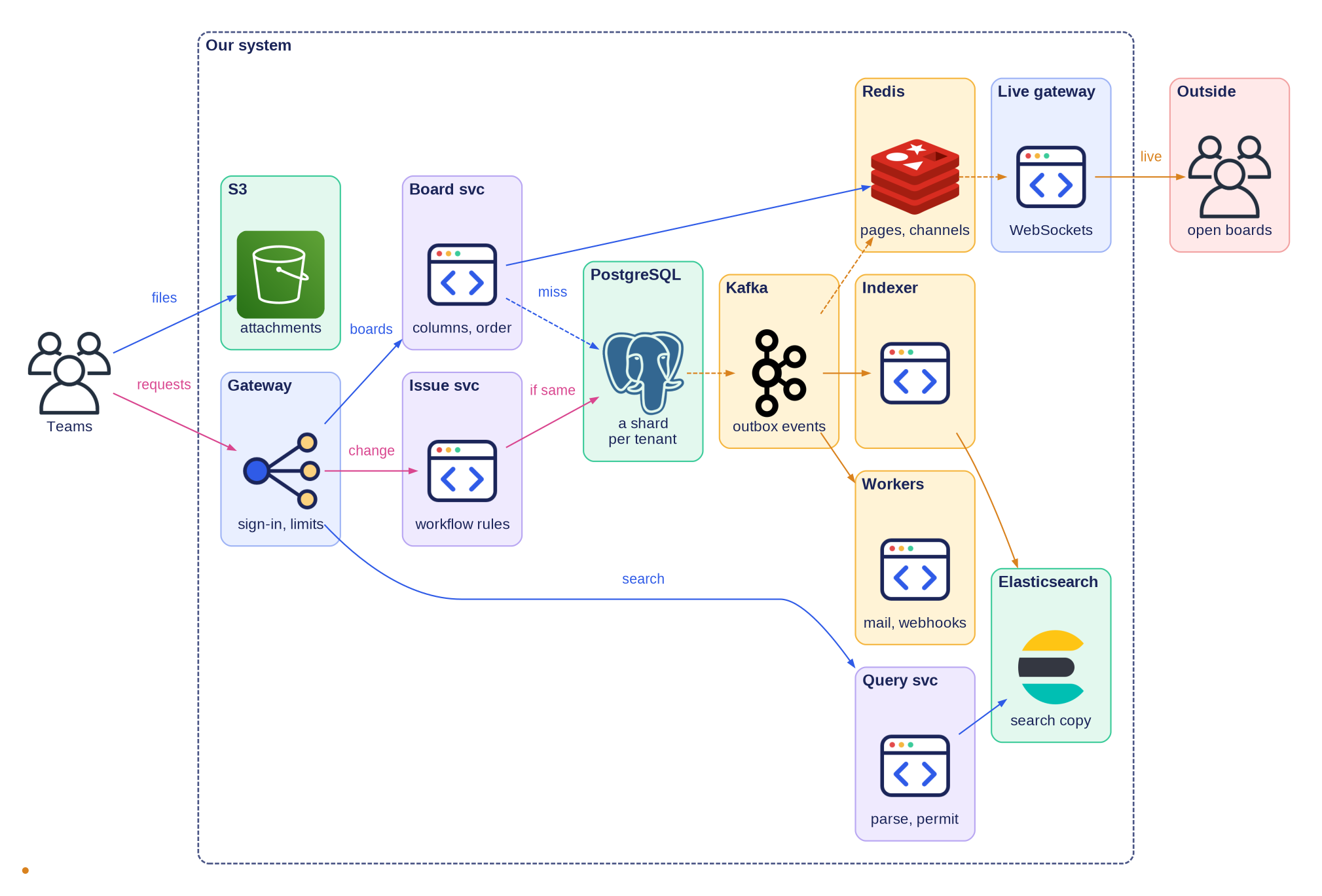
This is the last version. The Design tab starts with one service and one database and shows which number forces each extra box.
The whole system
Four key ideas
Rules are data
A workflow is a small graph in the database. One engine runs every customer's graph.
Change only what you saw
Each write carries the version it was based on. A late write is refused, not merged by luck.
One truth, many copies
Search, boards and mail follow an outbox. Any of them can be rebuilt.
Permission inside the query
Filter before counting. A total that includes hidden issues is already a leak.
Where to go
The tabs and the concepts
| If you want | Open |
|---|---|
| What the interviewer looks for | Approach, By level |
| Targets and sums | Scope, Numbers |
| Endpoints and tables | API and data |
| Workflows, search, boards, permissions | Deep dives |
| Practice against the clock | Mock |
| Version checks and locks | Concurrency control, isolation levels |
| How a search index works | Full-text search |
| Events from the database | Change data capture, log-based queues |
| Live screens and mail | Real-time APIs, notification service |
| Splitting by tenant | Sharding |
Summary
The whole topic in one minute.
The truth is a relational row per issue, in the shard of its tenant. A transition reads the issue and its version, checks the rules stored for that project, and updates the row only if the version is still the same. History and an outbox row are written in the same transaction.
Everything else is a copy fed by the outbox: the search index, board caches, live updates, mail and webhooks. Copies may be a second late, so anything that decides, such as a rule or a permission, is checked against current data.
- The workflow is a state machine stored as data, one per project and issue type.
- Read with a version, check the rules, write only if the version is unchanged.
- Status, history and event are one transaction. Webhooks and mail come after it.
- Custom fields live in JSON beside the issue; the search copy decides which of them can be queried, and how.
- Tenant and permission filters are added by the server inside every query.
Sources
- Atlassian: configure advanced workflows (conditions, validators, post functions)
- Atlassian: JQL operators
- Atlassian: automation service limits
- Elasticsearch: mapping limit settings
- Elasticsearch: flattened field type
- PostgreSQL: JSON types and indexing
- PostgreSQL: row security policies
- GitHub: transferring an issue