
Kappa architecture
medium 27 minKappa architecture uses one stream job and one log that keeps its events.
Video lesson · Chapter 1 of 5
One ticket machine can rebuild a scoreboard
Kappa architecture in 75 seconds
1:15Reel coming soon
Theory
Read or listen first. About 2 min.
What it is
Kappa architecture is a simpler answer to the problem that Lambda architecture solves. All events go into a log that keeps them in order. One stream job reads the log and maintains the results, called views. Questions are answered from the views.
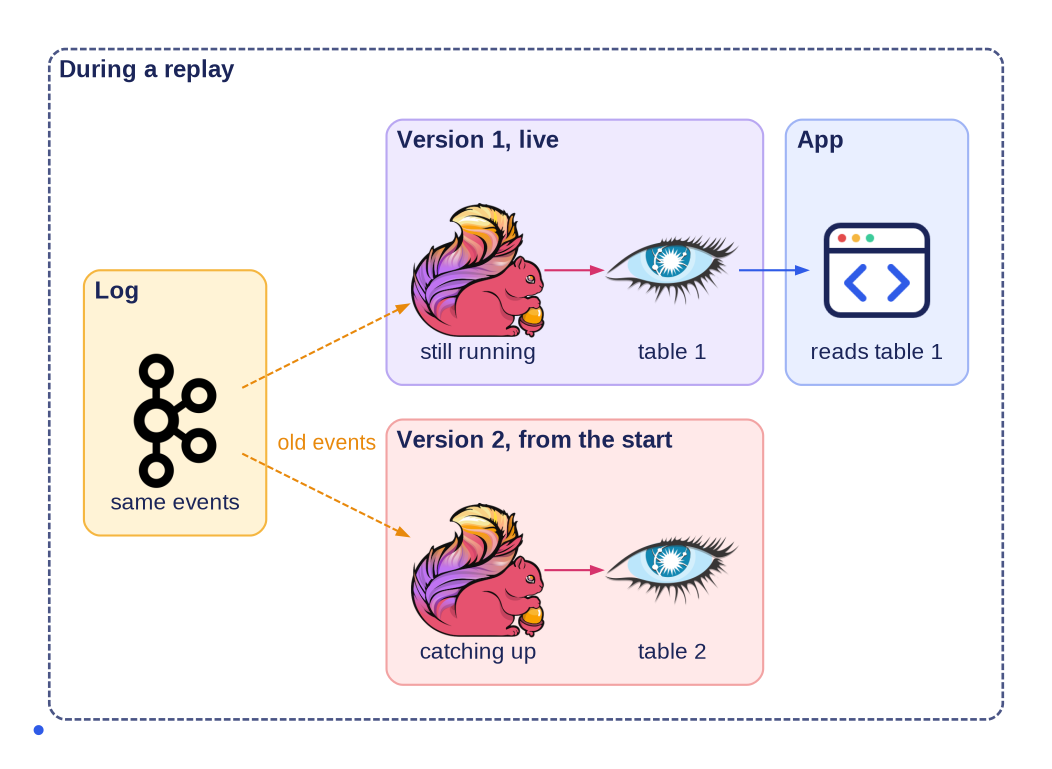
There is no batch layer. If the logic was wrong or has to change, the events are still in the log. A new version of the same job starts at the beginning, reads everything again, and builds new views. Live processing and reprocessing use the same code.
Why it exists
In Lambda each rule exists twice, in two systems that work differently. Keeping them equal costs a team more than the machines do. Kappa asks: if the stream job can be exact, and the log can be read again, what is the batch layer for?
The answer depends on two numbers: how far back the log goes, and how long reading it all takes. If both are acceptable, one road is enough.
A short history
2011
Nathan Marz describes a batch layer that corrects a realtime layer. The combination becomes known as Lambda architecture.
2 July 2014
Jay Kreps publishes Questioning the Lambda Architecture on O'Reilly Radar. The article proposes to keep the log, start a second instance of the stream job from the beginning into a new table, and switch. It suggests the name Kappa, with some doubt that the idea deserves a Greek letter.
2017
Kafka 0.11 adds transactions and exactly-once processing from topic to topic, which makes one exact stream job easier to build.
Words to know
- Log
- A list of events that is only appended to and keeps its order.
- Offset
- The position of an event in a partition of the log.
- Retention
- How long the log keeps events.
- Replay
- Reading old events again.
- View
- A result built from the log, such as a table of counts.
- Catch up
- To reach the newest event while more keep coming.
- Consumer group
- A named reader whose position is remembered. A new name has no position yet.
- Side effect
- Something the job does outside its views, such as sending an email.
How it works
Step through the idea, or press Play.
Append to the log. In order, never changed, kept long enough
Understand it
Start here
The parade film
Lee and Noor count what passes in the town parade. Lee also films it. The film turns out to be more useful than the count.
The same film, counted twice with two rules. Without the film there would be nothing to count again.
The idea
One path
Log, stream job, view
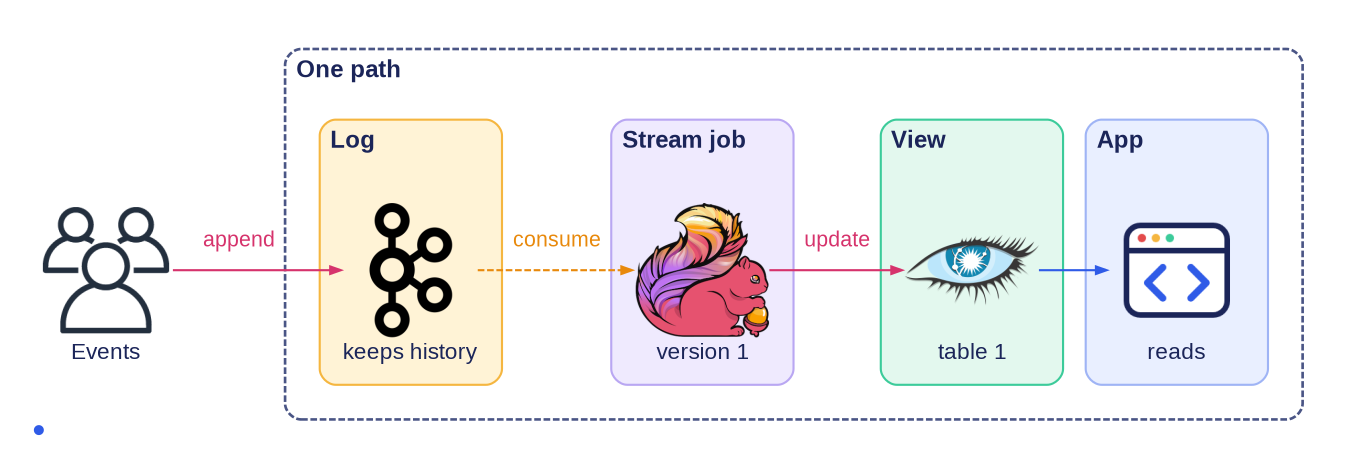
The log is the truth
All events are there. Views can be thrown away.
Stream only
One way of processing, for new and old events.
Replay is reprocessing
Start at the first offset and build the view again.
One code base
Each rule is written, tested and released once.
The log
What the log must offer
| Property | Meaning | Why Kappa needs it |
|---|---|---|
| Append only | Events are added, never changed | A replay sees what happened |
| Ordered | Offsets count up inside a partition | Events of one key keep their order |
| Replayable | Reading does not remove events | Several jobs can read at their own pace |
| Durable | Stored and replicated | It is the source of truth |
| Partitioned | Split over machines | A replay can run in parallel |
| Retention | How long events are kept | Sets how far back you can go |
Two readers of one log
What keeping it costs
Replay
Reprocessing in five steps
Two versions side by side
- 1
Deploy the new version
The fixed or extended logic, as a second job with its own state and output table.
- 2
Start at the beginning
A new consumer group, from the first offset that is needed.
- 3
Rebuild the view
All old events go through the new code.
- 4
Catch up
The job reaches the newest events. Compare both tables on keys you know.
- 5
Switch
Point readers to the new table. Later stop the old job and delete its table.
The switch, in time
When to reprocess
| Reason | Example |
|---|---|
| Bug fix | Refunds were counted as sales |
| New feature | A count per country is wanted, also for the past |
| Schema change | The view needs another shape |
| Better algorithm | A new model scores old events again |
Numbers
How long does it take?
Catch-up time
Ways to make a replay faster
| Way | Limit |
|---|---|
| More parallel tasks | One per partition is the usual maximum for reading |
| Bigger writes to the sink | The database must take many times the normal load |
| Read old data from files | Files can be read in parallel without partitions |
| Replay only what changed | One event type, or the last 30 days |
| Start from a snapshot | Only if the older state is right |
History
Older than the log
If the log keeps 30 days and the view needs a year, the job reads files first. It stops at a known offset of each partition and continues in the log from there, so nothing is missing and nothing is counted twice.
Files first, then the log
Correctness
What can go wrong
| Problem | Why | Remedy |
|---|---|---|
| Emails are sent again | A replay repeats side effects | Views only in the job, a separate sender that remembers ids |
| Other numbers each time | The job asks another service, whose data changed | Put that data into the log as events and join by time |
| Windows are empty or wrong | Windows use the machine's clock | Use event time |
| Doubled counts | Results were added instead of set | Upsert by key, keep the offset with the result |
| Old events cannot be read | The format changed | Versioned schemas, readers that understand old ones |
| Order is lost | Events of one user have different keys | Key by the user |
Compare
Kappa and Lambda
| Aspect | Lambda | Kappa |
|---|---|---|
| Roads | Batch and stream | Stream only |
| Code | Two, same logic | One |
| Reprocessing | Run the batch job | Replay the log |
| Operations | More | Less, except during a replay |
| Reprocessing speed | Usually faster, batch reads in bulk | Limited by partitions, state and sink |
| Storage | Master data and views | Log and views, two sets during a replay |
Kappa when
- Simplicity matters most
- The team runs streams well
- The replay time is acceptable
- One code base is wanted
Lambda, or a batch backfill, when
- Reprocessing must be quick
- History is in petabytes
- Batch processing is already strong
- The logic needs all data at once, such as training a model
Is Kappa enough?
When to use it
Where it fits
Event sourcing
State is kept as a list of changes, so views can be rebuilt at any time.
Log analytics
Application logs counted and searched as they come.
Click streams
What users do, grouped into sessions.
Sensor data
Readings from devices, with new rules applied to old readings.
Practice
Good habits
Do
- Choose the retention on purpose
- Use a new consumer group per version
- Make processing idempotent
- Watch the progress of a replay
- Plan for a parallel replay
Do not
- Delete events that you may need
- Guess the replay time
- Forget the state of the old job
- Skip testing a replay
- Depend on outside data that changes
Summary
The whole topic in one minute.
Kappa keeps one log and one stream job. The log is the source of truth, and views are copies that can be built again. To change the logic, deploy a second version that reads from the start into a new table, wait until it has caught up, compare, switch readers, and remove the old one.
It removes the second code base of Lambda. The limits are the retention of the log, the time a replay takes, double resources while it runs, and side effects that must not be repeated.
- One log, one stream job, views that can be rebuilt.
- Reprocessing is a second job, a second table, then a switch.
- The log reaches back only as far as its retention. Kafka's default is 7 days.
- Catch-up time is the backlog divided by the spare rate.
- Side effects and changing outside data make a replay unsafe.
- If replay is too slow, run the same code over files.