
Load balancing
medium 25 minA load balancer gives many servers one address, sends each request to a healthy one and hides failures and upgrades.
Video lesson · Chapter 1 of 5
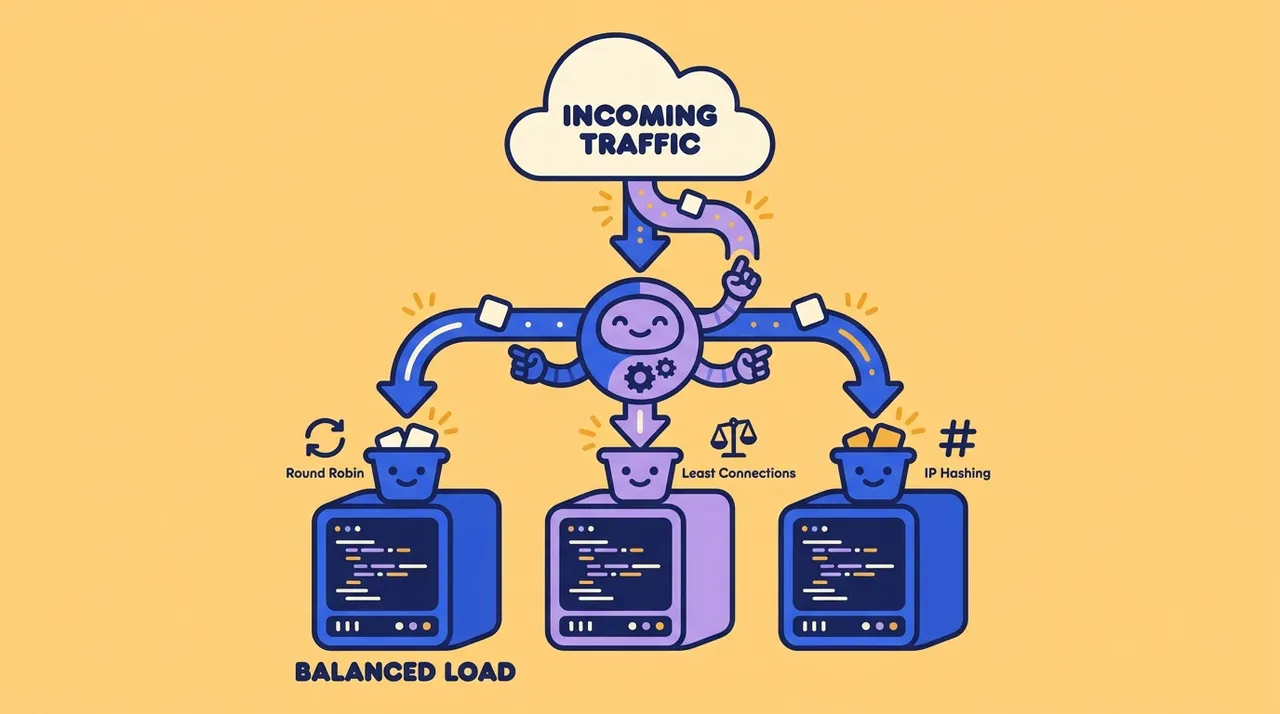
Four ticket windows take turns
Load balancer
1:16Reel
Theory
Read or listen first. About 1 min.
What it is
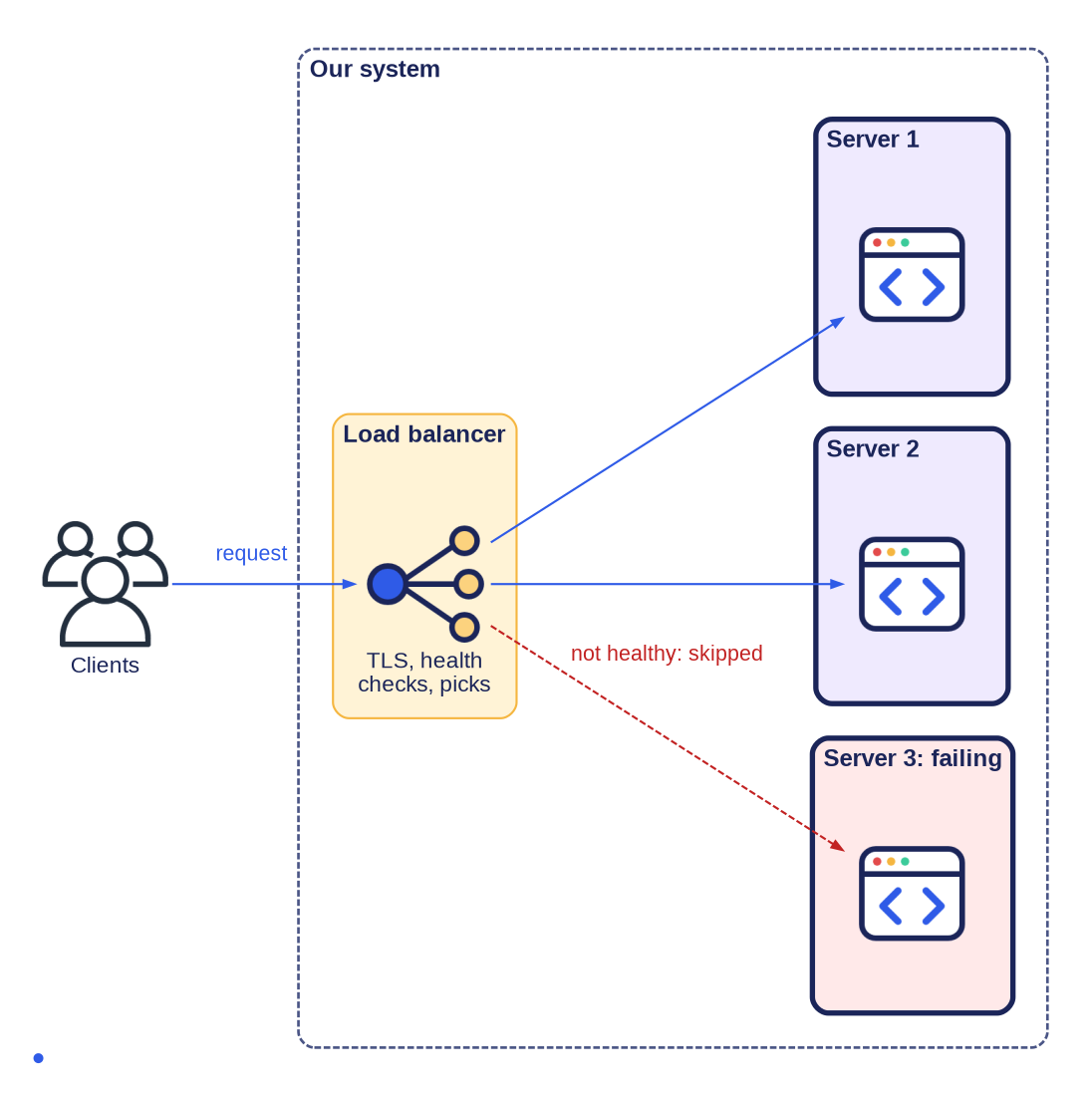
A load balancer stands in front of a group of servers and passes each request to one of them. To the outside it looks like a single address. Behind it there can be two servers or two thousand.
It also watches the servers. When one stops answering its health check, the balancer stops sending it work.
Why it exists
One server can only do so much, and any server can fail. With several identical servers, work can be shared and a failure hurts less. Something has to do the sharing.
Because every request passes through it, the balancer is also a convenient place for encryption, routing by path, and draining a server before an upgrade. It must itself be redundant, or it becomes the weak point.
A short history
1995
RFC 1794 describes using DNS to spread requests over several addresses.
1997
F5 introduces BIG-IP, an early dedicated load-balancing product.
2001
HAProxy 1.0 is released in December: free software that does the same job on ordinary machines.
2004
The first public release of nginx, version 0.1.0, widely used as a web server and reverse proxy.
2009
Amazon launches Elastic Load Balancing in May: a balancer as a service.
2016
Google publishes Maglev, its software network load balancer that runs on a cluster of machines.
Words to know
- Pool
- The servers that can receive work. Also called a backend, upstream or target group.
- Virtual IP
- The address clients use. It belongs to the balancer, not to one server.
- Health check
- A regular test that a server can serve.
- Layer 4
- Balancing by address and port, without reading the request.
- Layer 7
- Balancing by what the request says, such as its path.
- Sticky session
- Sending one user to the same server each time.
- Draining
- Finishing current work before removing a server.
How it works
Step through the idea, or press Play.
Receive. A client opens a connection to the balancer's virtual IP
Understand it
Start here
The host at the picnic
Imagine a picnic with three tables and nobody in charge. Every family walks to the first table they see. Now a host stands at the entrance and says: you go to table 1, you to table 2, you to table 3. That host is a load balancer.
The families never needed to know which tables exist. They only had to find the host.
The path
From client to a healthy server
One address, several servers
Scalability
Add servers as traffic grows. Clients notice nothing.
Availability
A failed server is skipped. A redundant balancer removes the last single point.
Performance
Work goes where there is room, so queues stay short.
Flexibility
Upgrade one server at a time without downtime.
Security
Servers stay in a private network, and one place ends TLS and filters.
Cost
Several ordinary machines instead of one huge one.
Layers
Layer 4 and layer 7 in short
| Layer 4 | Layer 7 | |
|---|---|---|
| Decides by | Address and port | Path, host, headers, cookies |
| Reads the request | No | Yes, so it must end TLS |
| Cost per request | Low | Higher |
| Good for | Any TCP or UDP protocol, very high rates | Routing to services, retries, sticky cookies |
| Examples | AWS Network Load Balancer, Linux IPVS | nginx, HAProxy, AWS Application Load Balancer |
Algorithms 1
Round robin, plain and weighted
Round robin takes turns: 1, 2, 3, 1, 2, 3. It is simple and fair in the number of requests. It is unfair in the amount of work when requests differ, when servers differ or when connections stay open for hours.
Weighted round robin gives each server a share that matches its size. A server with weight 3 gets three requests for every one sent to a server with weight 1. Somebody has to keep the weights up to date.
Shares from weights
Six turns with weights 3, 2 and 1
Algorithms 2
Least connections and two choices
Least connections sends the next request to the server with the fewest open ones. Suppose three servers have 5, 2 and 8 open connections: the second one is next. A slow server keeps its connections longer and so gets fewer new ones, without anyone setting a weight.
Two random choices picks two servers at random and takes the less busy one. It is nearly as good as looking at all of them, and it avoids a herd: several balancers that all see the same quietest server and all send there at once.
Why two choices are so much better than one
Algorithms 3
Hashing: the same client, the same server
IP hash computes a number from the client's address and uses it to choose the server. The same client lands on the same server as long as the pool stays the same. The price: an office behind one shared address is a single "client", so its thousands of users all hit one server.
With hash % n, adding or removing one server moves most clients. Consistent hashing moves only about 1 in n. Other ways to keep a user on one server, such as cookies, are in session persistence.
Choosing an algorithm
| Algorithm | Best for | Weak point |
|---|---|---|
| Round robin | Equal servers, short similar requests | Ignores size and load |
| Weighted round robin | Servers of different size | Weights must be maintained |
| Least connections | Requests of unequal length, WebSockets | Must count; a fast-failing server attracts traffic |
| Two random choices | Many balancers, large pools | Slightly less even than a full scan |
| IP hash | Keeping a client with one server | Uneven behind shared addresses |
| Consistent hash | Caches, pools that change | Needs virtual nodes to be even |
Which algorithm?
Health
Health checks
A balancer learns about trouble in two ways. Active checks send a probe every few seconds. Passive checks watch real requests and notice failures.
Kinds of probe
| Probe | Asks | Misses |
|---|---|---|
| TCP | Can I connect to port 3000? | A process that accepts but cannot answer |
| HTTP | Does GET /health return 200? | Wrong content with status 200 |
| Content | Does the reply contain "healthy"? | Trouble that the endpoint does not test |
One server's state
Settings to choose (an example)
| Setting | Example | Meaning |
|---|---|---|
| Interval | 10 s | How often each server is probed |
| Timeout | 5 s | How long to wait for one reply |
| Unhealthy threshold | 3 failures | Failures in a row before it is taken out |
| Healthy threshold | 2 successes | Successes in a row before it returns |
How long until a dead server is skipped?
upstream backend_api { least_conn; server 10.0.1.10:8080 max_fails=3 fail_timeout=10s; server 10.0.1.11:8080 max_fails=3 fail_timeout=10s; server 10.0.1.12:8080 backup;}server { listen 80; location / { proxy_pass http://backend_api; proxy_connect_timeout 2s; proxy_read_timeout 5s; }}Life cycle
Adding and removing servers
- 1
Add
A new server passes its checks first, then receives traffic. With slow start its share grows over some seconds, while caches warm up.
- 2
Drain
Stop sending new requests to the server, but let current ones finish. AWS waits 300 seconds by default.
- 3
Remove
Close what is left after the time limit, then stop the machine.
Draining during a deploy
Four places
Where balancers sit
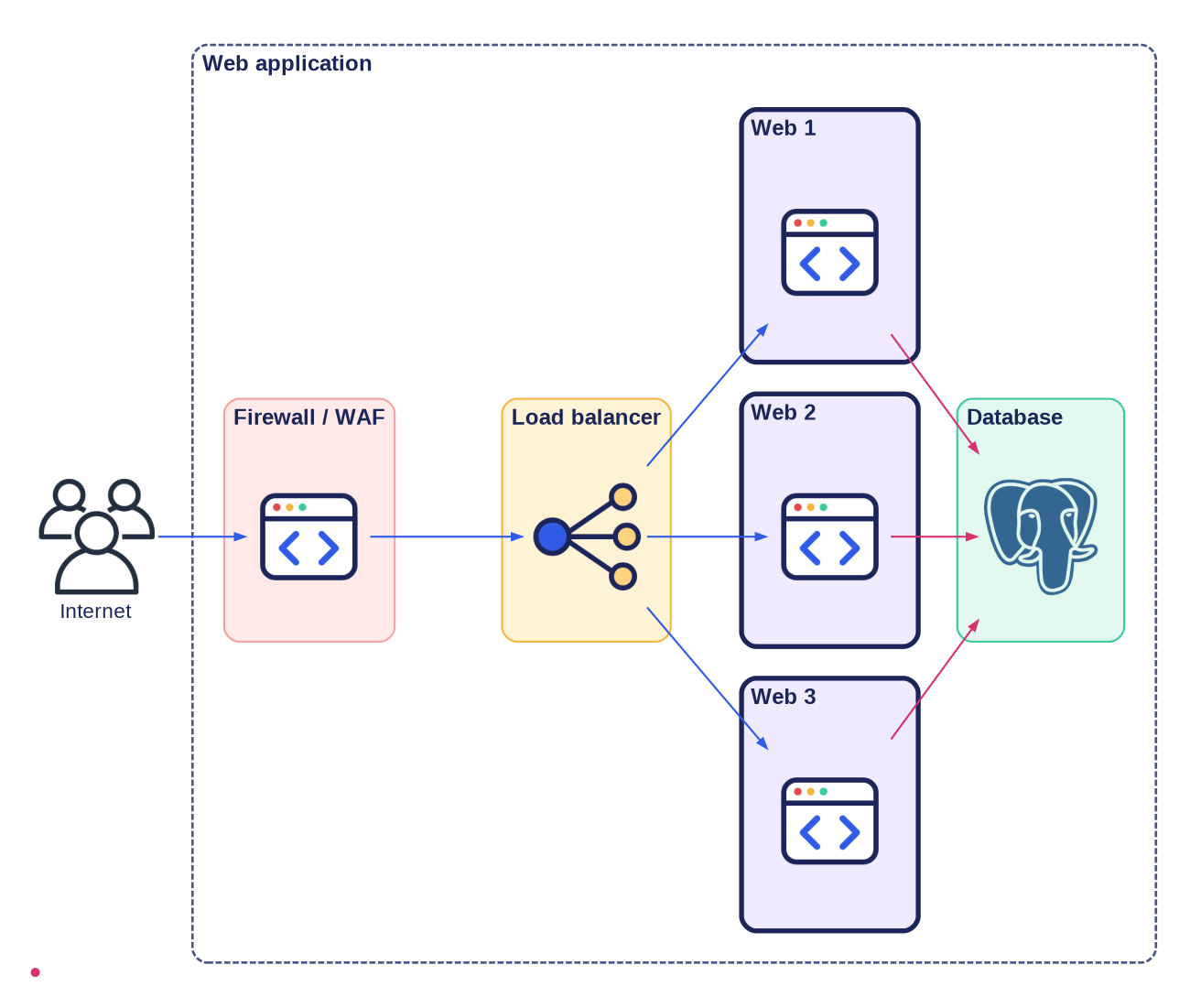
1. A web application
2. Microservices
3. Several regions
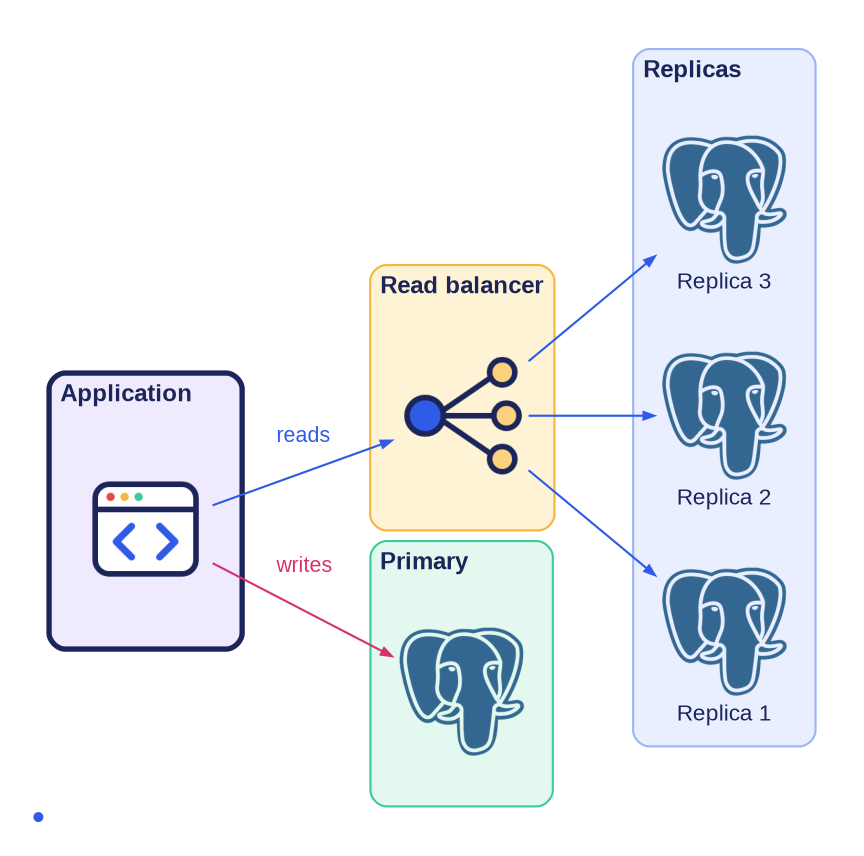
4. Database read replicas
Kinds
Hardware, software, cloud, DNS
| Kind | Examples | For and against |
|---|---|---|
| Hardware | F5 BIG-IP, Citrix NetScaler | Dedicated and fast; expensive, fixed capacity |
| Software | HAProxy, nginx, Envoy | Flexible, runs anywhere; you operate it |
| Cloud | AWS ALB and NLB, Google, Azure | Managed and elastic; pay as you go |
| DNS | Route 53, Cloudflare | Global and simple; coarse, slowed by caches |
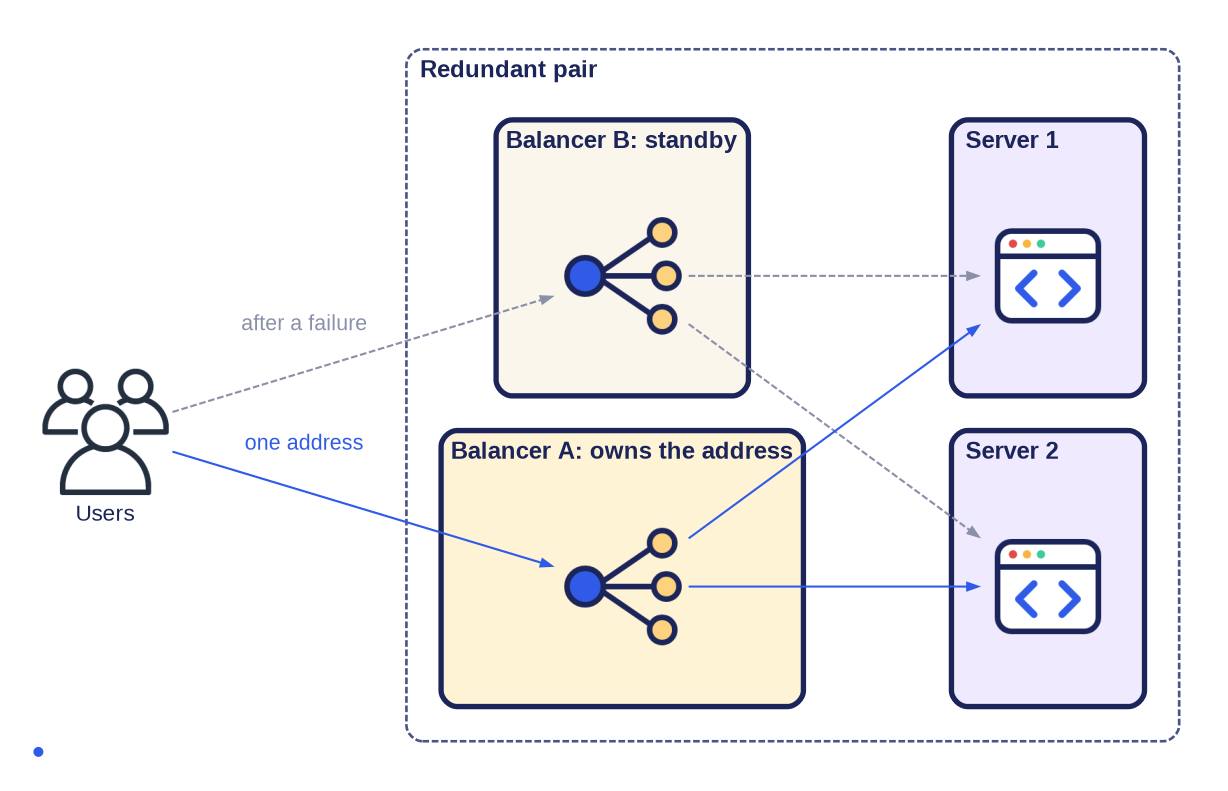
The balancer itself
Do not create a new single point of failure
Two balancers, one address
Good practice
- Pair balancers with VRRP (for example Keepalived), or announce one address from several with anycast
- End TLS at the balancer to take that work off the servers
- A cheap health endpoint of its own
- Connection draining for every deploy
- Sensible timeouts, balancer metrics and a load test before launch
Common traps
- A single balancer without a standby
- Health checks with heavy database queries
- Round robin for long-lived WebSockets
- Sticky sessions without a reason
- Weights nobody updates, and failed checks nobody reads
Availability with and without spare parts is worked out in high availability. Plan one more server than the load needs: with 4 servers at 70%, losing one leaves 3 at about 93%.
Summary
The whole topic in one minute.
A load balancer gives many servers one address, shares the work and skips the ones that fail.
Round robin suits similar, short requests. Weights suit unequal servers. Least connections suits work of unequal length. Hashing keeps a client with one server, at the price of evenness.
Pick layer 4 for speed and layer 7 for decisions based on the request. Keep servers stateless where you can, check health honestly, and run more than one balancer.
- A load balancer gives many servers one address, shares the work and skips the ones that fail.
- Round robin for similar requests, weights for unequal servers, least connections for unequal work, hashing for stickiness.
- Layer 4 routes by address and port; layer 7 reads the request.
- Detection time is interval times failures, plus a timeout.
- Health checks must be light, and deploys must drain.
- Run at least two balancers.