
MQTT
medium 32 minMQTT is a small publish/subscribe protocol for devices on weak networks.
Video lesson · Chapter 1 of 5
A sleeping kitchen sensor speaks to a broker
Theory
Read or listen first. About 2 min.
What it is
MQTT is a messaging protocol. Each device keeps one connection to a broker. A device publishes a message to a topic, which is a path such as home/kitchen/temp. Other clients subscribe to topics, and the broker passes every matching message on. Senders and receivers never talk to each other directly.
The messages are tiny: the smallest packet is 2 bytes. On top of passing messages on, the protocol says how hard to try to deliver them, what a newcomer should see first, what happens to messages for a device that is away, and how everyone learns that a device has died.
Why it exists
A sensor with a battery and a poor link cannot afford a web request for each reading, and nobody can call it, because it is behind a home router or asleep. One long-lived connection that the device opens itself solves both: small packets go up, and commands come down the same connection.
Publishing to a topic also separates the two sides. A thermometer does not know whether one screen, ten programs or nobody is listening. New listeners appear without any change to the device, which may be bolted to a wall for ten years.
A short history
1999
Andy Stanford-Clark of IBM and Arlen Nipper of Arcom invent MQTT, to watch oil pipelines over satellite links with little bandwidth and battery.
August 2011
Facebook describes using MQTT in the first Messenger app, to keep a connection open without emptying the phone's battery.
October 2014
MQTT 3.1.1 becomes an OASIS standard. ISO later adopts the same version.
March 2019
MQTT 5.0 becomes an OASIS standard: reason codes, session expiry, shared subscriptions, topic aliases and more.
Words to know
- Broker
- The server in the middle. The standard calls it the Server. It checks who may connect, routes messages and stores sessions.
- Topic
- A path with
/between levels. It exists as soon as someone publishes to it; nothing has to be created first. - Topic filter
- What a subscriber asks for. It may hold wildcards:
+for one level,#for all that remain. - QoS
- How hard one hop tries: 0 at most once, 1 at least once, 2 exactly once.
- Retained message
- The last message of a topic, kept by the broker for new subscribers.
- Session
- A client's subscriptions and undelivered messages, kept by the broker under its client ID.
- Last will
- A message a client hands over when it connects, to be published if it disappears.
- Keep alive
- The longest silence, in seconds, that a client promises not to exceed.
How it works
Step through the idea, or press Play.
Connect once. Client ID, credentials, keep alive and last will in one packet
Understand it
Start here
The gnomes in the garden
Picture a garden where small gnomes look after the pond and the roses. Nobody runs around with news. Every gnome whispers to one mushroom house in the middle, and the mushroom house passes it on.
The gnomes never meet. They only know the mushroom house and the names of the paths.
The parts
Clients, broker, topics
Everything goes through the broker
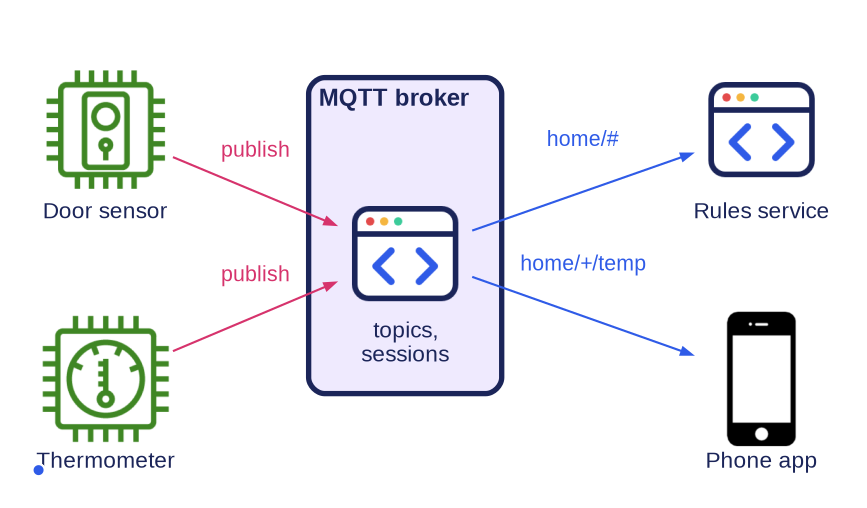
Light
A 2-byte header at least. Clients fit on small microcontrollers.
Kind to batteries
One connection, few bytes, and a device may sleep between readings.
Made for bad links
Sessions continue after a break, and QoS covers what was on its way.
Decoupled
One publisher, any number of subscribers, with no change to the device.
Connect, subscribe, publish
Addresses
Topics and wildcards
What a filter matches
| Filter | Matches | Does not match |
|---|---|---|
home/kitchen/temp | that topic only | home/kitchen/temp/max |
home/+/temp | home/kitchen/temp, home/bed/temp | home/floor1/bed/temp |
home/# | home, home/a, home/a/b/c | garden/a |
+/temp | kitchen/temp | home/kitchen/temp |
# | every topic | topics that begin with $ |
+ fills exactly one level. # must be last and also matches the parent level. Wildcards belong in filters, never in the topic of a message.Good topics
- From general to specific:
site/room/device/reading - The device ID in a fixed level, so rights are easy to write
- Separate branches for state, commands and settings
- Short: the topic travels with each message
- Examples:
factory/line1/robot3/arm,devices/d7/status,devices/d7/cmd/reboot
Avoid
- A leading slash: it creates an empty first level
- Spaces and unprintable characters
$at the start: brokers use it, for example$SYS- One topic for all devices with the ID in the message
- Subscribing to
#in production
Delivery
Quality of service
| Level | Promise | Packets on one hop | Use it for |
|---|---|---|---|
| QoS 0 | At most once | PUBLISH | Frequent readings, where the next one comes soon |
| QoS 1 | At least once, may repeat | PUBLISH, PUBACK | Events and commands that are safe to repeat |
| QoS 2 | Exactly once | PUBLISH, PUBREC, PUBREL, PUBCOMP | The rare message that must not repeat and cannot be made safe |
The three flows
In MQTT 5 a sender resends unacknowledged messages only after reconnecting to a session that still exists. On a live connection TCP already resends lost packets, so a timer of your own would only create duplicates.
State
Retained messages and sessions
A message published with the retain flag replaces the one the broker holds for that topic. A new subscriber receives it at once. It is the right tool for state, such as a temperature or online and offline, and the wrong one for events: a retained "doorbell rang" would ring again for each newcomer. An empty retained message deletes the stored one.
A session holds the subscriptions and the QoS 1 and 2 messages that are waiting for a client. In MQTT 3.1.1 one flag, Clean Session, decides both whether to start fresh and whether to keep anything. MQTT 5 splits it: Clean Start says whether to drop the session that exists, and Session Expiry Interval says how long the broker keeps it after the connection closes. Without that interval the session ends with the connection.
Which feature solves which absence?
| Who missed what | Feature |
|---|---|
| A new subscriber wants the current value | Retained message |
| A known subscriber was offline for a while | Session with an expiry, QoS 1, the same client ID |
| A message is worthless after a minute | Message expiry (MQTT 5) |
| Others must learn that a device is gone | Last will |
| A program wants last month's readings | Not MQTT: a database or a log behind the broker |
Failure
Keep alive and the last will
How long until a dead client is noticed
When is the will published?
A common pattern: the will is a retained offline on devices/d7/status, and after connecting the device publishes a retained online to the same topic. Any newcomer then sees which devices are alive. A device that says goodbye must publish offline itself, because the will is thrown away.
Size
What a message costs
Bytes of one QoS 0 message in MQTT 5
A worked load: 100,000 devices send one reading every 10 seconds, so messages a second come in. With two subscribers for each topic, 20,000 a second go out. At a peak of 3 times the average that is 30,000 in and 60,000 out. Pings add at most one packet pair per device and keep alive period, and none for a device that publishes more often than that.
Choosing
When to use it, and when not
Use it when
- Devices are small or run on batteries
- Many senders and many receivers
- Links break often
- You must notice dead devices
- Senders and receivers should not know each other
- Smart homes, factories, vehicles, metering
Avoid it when
- You need request and reply: use HTTP or gRPC
- You move large files: send a link, use object storage
- Consumers must read history again: use a log
- Browsers are the only clients: a WebSocket is enough
- Peers talk to each other directly: WebRTC
- There is one client and one server
Against the alternatives
| Alike | Different | Choose it for | |
|---|---|---|---|
| AMQP, for example RabbitMQ | Broker, acknowledgements, publish/subscribe | Queues and routing rules, larger frames (8-byte header) | Work queues between servers |
| CoAP | For constrained devices | REST-like, over UDP, no broker needed | Request and reply with the smallest devices |
| WebSocket | One open two-way connection | A pipe only: no topics, QoS or will | Browsers and your own protocol |
| Server-Sent Events | Server push | One way, text over HTTP | Feeds in a browser |
| HTTP and REST | TCP, TLS | One request, one reply, many header bytes | APIs, large payloads |
| Kafka | Publish/subscribe | Stored log, few heavy clients | Processing behind the broker |
Running it
From one broker to many
A device platform
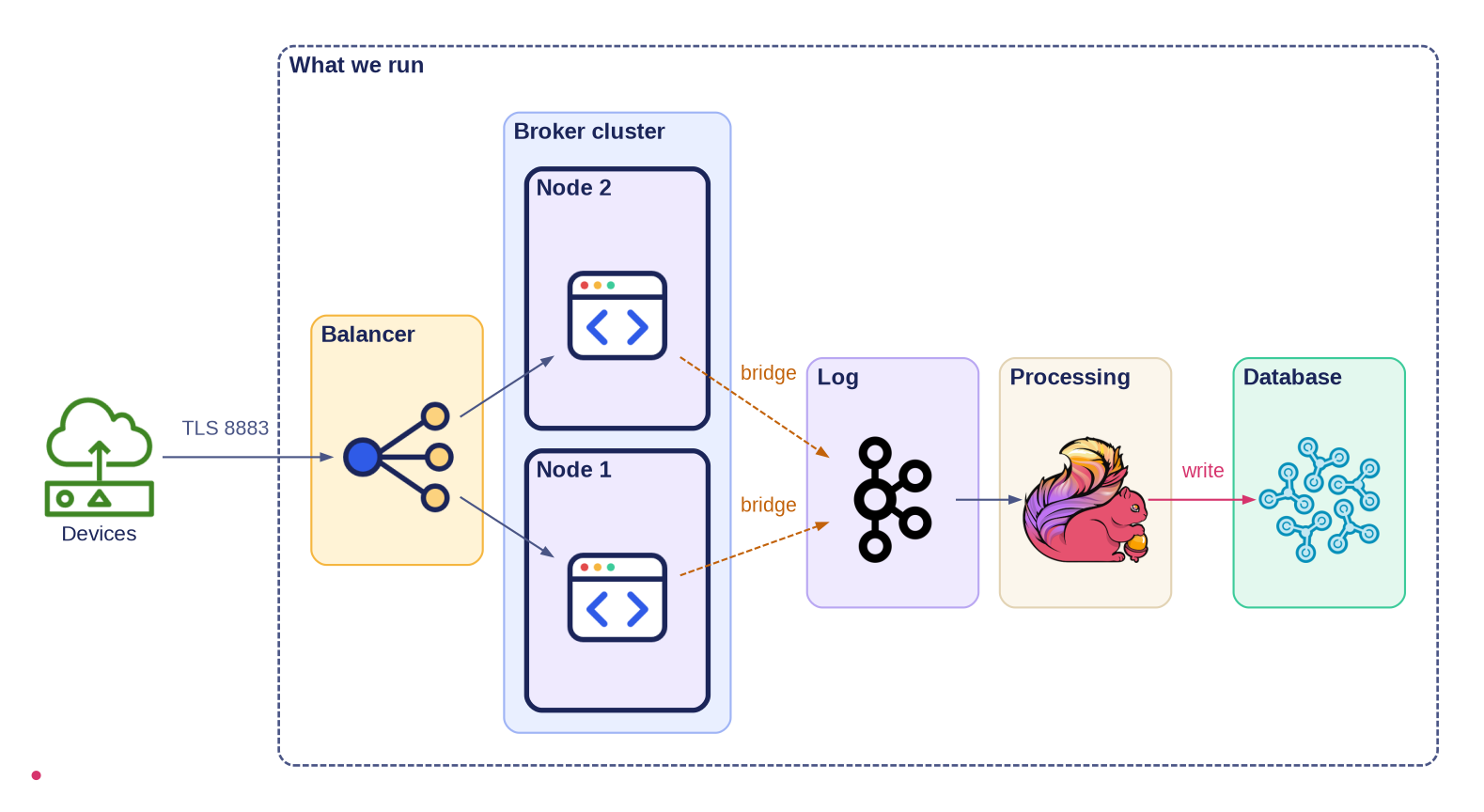
How it grows
- 1
One broker
Mosquitto on one machine is enough for a house or a small factory. It is a single point of failure.
- 2
Cluster
Products such as EMQX and HiveMQ, or a managed service, share subscriptions and sessions between nodes.
- 3
Shared subscriptions
$share/workers/site/#gives each message to one member of the group, so several consumers split the load. - 4
Bridges
A broker on site forwards chosen topics to the cloud and keeps the site working when the line is down.
- 5
Into a log
A bridge writes to Kafka or Kinesis, where data is stored and read again.
After a power cut
Limits worth knowing
| Where | Limit or default |
|---|---|
| MQTT packet | Up to 268,435,455 bytes after the fixed header |
| Topic | Up to 65,535 bytes |
| Keep alive | Up to 65,535 s; 0 turns it off |
| Ports | 1883 plain, 8883 with TLS |
| AWS IoT Core payload | 128 KB |
| AWS IoT Core keep alive | 30 to 1,200 s |
| AWS IoT Core, one connection | 100 publishes a second, in and out together |
| AWS IoT Core QoS | 0 and 1 only |
| Azure IoT Hub | No QoS 2, no stored retained messages |
| Mosquitto 2 | Remote clients refused until a listener is configured |
Security
Close the broker
The protocol does not force encryption or a login; the broker's settings do. Use TLS on port 8883, give each device its own certificate or password, and let a device publish and subscribe only below its own ID. One shared password in ten thousand devices cannot be changed when one of them is taken apart.
# mosquitto.conflistener 8883allow_anonymous falsecafile /etc/mosquitto/certs/ca.crtcertfile /etc/mosquitto/certs/server.crtkeyfile /etc/mosquitto/certs/server.keyrequire_certificate trueuse_identity_as_username trueacl_file /etc/mosquitto/aclmax_packet_size 65536# /etc/mosquitto/aclpattern write devices/%u/state/#pattern read devices/%u/cmd/## try itmosquitto_sub -h broker.example.com -p 8883 --cafile ca.crt \ --cert d7.crt --key d7.key -t 'devices/d7/cmd/#' -q 1 -vTrade-offs
Pros and cons
Pros
- Light: 2-byte minimum header
- Battery friendly: one quiet connection
- Last will: others learn that a device is gone
- Retained messages: newcomers see the state at once
- Open standard with many clients and brokers
Cons
- A broker is required, and must be made redundant
- No native browser support: needs WebSocket
- Not for files or large payloads
- Security is up to you: TLS and logins are optional
- No history and no replay
- Order and once-only hold per hop, not end to end
Costs: the protocol and brokers such as Mosquitto are free to use. You pay for memory for each connection and session, for TLS handshakes, for messages that fan out, and, with managed services, usually per message and per connected minute. A chatty topic with many subscribers is the usual surprise.
Summary
The whole topic in one minute.
MQTT moves small messages through a broker by topic. QoS covers each hop, retained messages give newcomers the latest state, sessions hold messages for a client that is away, and the last will tells everyone that a client is gone.
It is for devices and weak links, not for large files, history or request and reply. The broker is the part you must secure, size and make redundant; behind it, a log or a database keeps the data.
- One connection per client, one broker in the middle, messages by topic.
- QoS 0 at most once, 1 at least once, 2 exactly once, always per hop.
- Retained for new subscribers, sessions for absent ones, last will for the dead.
- A silent client is dropped after 1.5 times the keep alive.
- TLS, one identity per device, rights by topic, random delay on reconnect.