
Vertical scaling
easy 18 minVertical scaling, or scaling up, means giving one machine more CPU, memory, disk or network so it can handle more load.
Video lesson · Chapter 1 of 8
Four hundred checkouts still waiting
Vertical scaling
1:13Reel
Theory
Read or listen first. About 2 min.
What it is
Every program runs on a machine, and every machine has a fixed amount of processor, memory, disk and network. Vertical scaling means replacing that machine with a bigger one, or adding parts to it, so that the same program can do more work.
Nothing about the program changes. There is still one process, one copy of the data and one place to look when something goes wrong. The only difference is how much the machine underneath can do.
Why it exists
Software gets slower when it runs out of one resource: the processor is busy all the time, the data no longer fits in memory, or the disk cannot keep up. The quickest remedy is usually to give it more of that resource.
It is attractive because it is simple. Splitting work over many machines needs load balancers, coordination and new ways to fail. A larger machine needs a short restart. So it is a good first step, as long as you remember that the largest machine is also the end of the road.
A short history
1964
IBM announces the System/360, a family of compatible computers. A customer can move to a larger model and keep the same programs: scaling up as a product.
1965
Gordon Moore observes that the number of components on a chip is doubling at a steady pace. For decades, waiting for next year's machine was a scaling plan.
1967
Gene Amdahl points out that the part of a program that cannot run in parallel limits how much extra processors help.
About 2005
Processor clock speeds stop rising quickly. Chips gain more cores instead, so programs must run in parallel to benefit.
2006
Amazon EC2 opens in beta. Renting machines by the hour makes resizing a matter of minutes instead of months.
Words to know
- Resource
- Something a machine has a limited amount of: CPU, memory, disk, network.
- Bottleneck
- The resource that runs out first. Growing any other one changes nothing.
- vCPU
- A virtual processor, often one hardware thread of a core.
- Ceiling
- The largest machine you can get. Beyond it you must use more than one.
- Single point of failure
- One part whose failure stops everything.
- Standby
- A second copy ready to take over.
How it works
Step through the idea, or press Play.
Monitor one machine. Watch CPU, memory, disk and network, and find which one is full
Understand it
Start here
The backpack story
Imagine a small backpack for school. If you need to carry more books, you get a bigger backpack. That is vertical scaling: you make your single container more powerful. But you can only wear one backpack, and even the biggest one has a limit.
Carrying more after that needs a friend with a backpack: horizontal scaling, a topic of its own.
The idea
What it is, and what it is not
Vertical scaling is
- Adding more CPU cores
- Adding more RAM
- Upgrading to a faster SSD
- Getting a better network card
- Moving to a bigger instance type
Vertical scaling is not
- Adding more servers
- Distributing the load
- Load balancing
- Sharding data
- Creating replicas
One machine, before and after
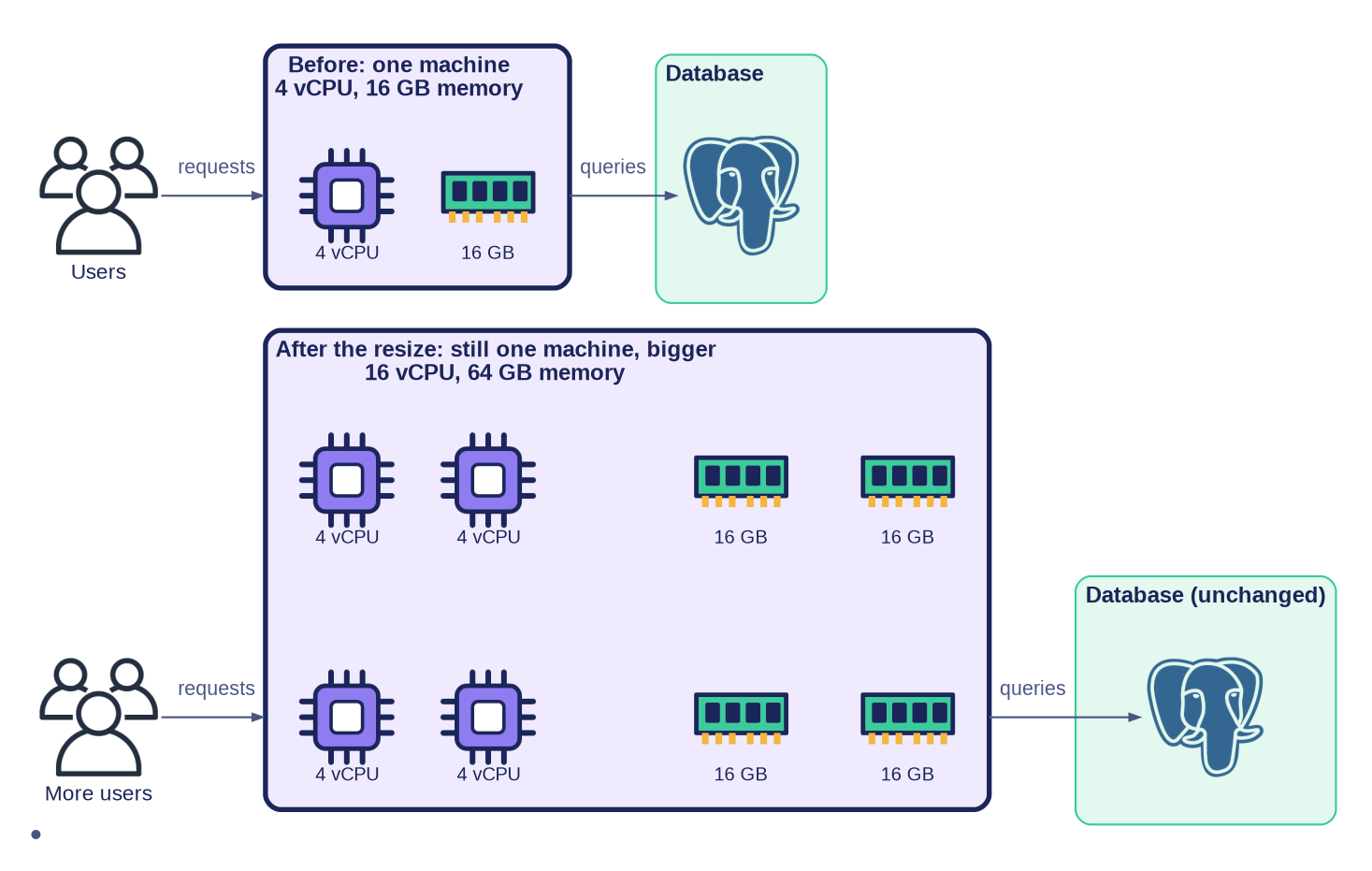
Server size evolution
| Size | vCPU | RAM | What changed |
|---|---|---|---|
| Small | 2 | 4 GB | Starting point |
| Medium | 4 | 16 GB | 2x CPU, 4x memory |
| Large | 8 | 32 GB | 2x both |
| XLarge | 16 | 64 GB | 2x both |
Resources
Find the bottleneck first
A machine is as fast as its scarcest resource. Growing any other one changes nothing, so measure before you buy.
CPU
Sustained use above 70% is a warning and above 90% is critical. Fix with more or faster cores, or a compute-optimized type.
Memory
Warning at 75%, critical at 90%: the next step is swapping or an out-of-memory kill. Fix with a memory-optimized type.
Disk
Space: warning at 80%, critical at 95%. Speed is separate: check IOPS and throughput too. Cloud volumes often grow online.
Network
Compare Mbps with the type's baseline, not its "up to" burst figure. Bigger types usually get more bandwidth.
Which resource do I grow?
Utilisation after a resize
Process
How a resize works
- 1
Monitor resources
Track CPU, memory and disk usage with alerts, so you act on a trend instead of an outage.
- 2
Identify the bottleneck
Determine which resource is maxed out: CPU, RAM, disk or network.
- 3
Plan the upgrade
Select the next type that solves the bottleneck without shrinking anything else.
- 4
Schedule downtime
Plan a maintenance window (usually 2 to 10 minutes), take a snapshot and write down the rollback.
- 5
Resize the instance
Stop the server, change the instance type, start it again, then check that the bottleneck moved.
One server through a resize
The same operation in three clouds
| Cloud | Command | Method |
|---|---|---|
| AWS | aws ec2 modify-instance-attribute | Stop, modify, start |
| GCP | gcloud compute instances set-machine-type | Stop, resize, start |
| Azure | az vm resize | Restarts the VM; deallocate first if the size is not on the current hardware |
Trade-offs
Pros and cons
Advantages
- Simple: no code changes, just resize.
- No distributed complexity: no sharding, replication or consensus.
- Strong consistency: one machine has nothing to sync with.
- Lower latency: no network hops between servers.
- Single management: one server to monitor and maintain.
Disadvantages
- Hardware limits: it can only get so big.
- Downtime: the server usually stops for 2 to 10 minutes.
- Single point of failure: the server dies, everything dies.
- Diminishing returns: doubling the price rarely doubles throughput.
- Not infinite: eventually you must scale horizontally.
Money
What it really costs
On-demand list price, AWS us-east-1, Linux
| Type | vCPU | RAM | Per hour | Per month |
|---|---|---|---|---|
t3.small | 2 (burstable) | 2 GB | $0.0208 | about $15 |
t3.medium | 2 (burstable) | 4 GB | $0.0416 | about $30 |
m5.large | 2 | 8 GB | $0.096 | about $70 |
m5.2xlarge | 8 | 32 GB | $0.384 | about $280 |
m5.4xlarge | 16 | 64 GB | $0.768 | about $561 |
Inside one family the price is linear: m5.4xlarge is exactly 8 times m5.large in both resources and price. The painful part is at the edges: very large machines come from special, expensive families, and the speed-up you get shrinks as you grow.
Amdahl's law: why 2x cores is not 2x speed
Choosing a type
Instance families
| Family | Memory per vCPU | Good for |
|---|---|---|
| Burstable (t) | 0.5 to 4 GB | Small or spiky load; runs on CPU credits |
| General purpose (m) | 4 GB | Web and app servers, mid-size databases |
| Compute-optimized (c) | 2 GB | Encoding, batch work, game servers |
| Memory-optimized (r, x) | 8 GB and up | In-memory databases and caches such as Redis or SAP HANA |
Choosing the target type
When to use it
Use cases
Databases
PostgreSQL primary, MySQL standalone, MongoDB single node. More RAM means more data cached, so faster queries.
Legacy applications
Monoliths, enterprise software, desktop apps in the cloud. Not built to be distributed, and rewriting is expensive.
Small or medium load
Startup MVPs, internal tools, development environments. One machine has enough capacity and is simpler.
Buying time
Traffic spikes, holiday preparation, or while re-architecting. Fast relief that leaves time to plan properly.
Limits
The ceiling
How big can one AWS machine get?
| Type | vCPU | Memory | Kind |
|---|---|---|---|
x2idn.32xlarge | 128 | 2 TB | Memory optimized |
c7i.48xlarge | 192 | 384 GB | Compute optimized |
u-24tb1 (retired for new launches) | 448 | 24 TB | The old biggest |
u7inh-32tb.480xlarge | 1,920 | 32 TB | Largest announced by AWS (December 2024) |
Signs you have hit the limit
- 1
You use the largest available type
Time to scale horizontally.
- 2
Cost per request keeps climbing
Several smaller machines may be cheaper.
- 3
Downtime is unacceptable
You need more than one instance.
- 4
Users are across the globe
You need geographic distribution; one machine is far from most people.
Availability
Less downtime, and what scaling up never fixes
A resize with a standby shrinks downtime to a switchover: resize the replica, let it catch up, promote it, then resize the old primary. Managed databases do this for you when a standby exists.
Resize with a standby
Decide
Vertical or horizontal?
For comparison: scaling out
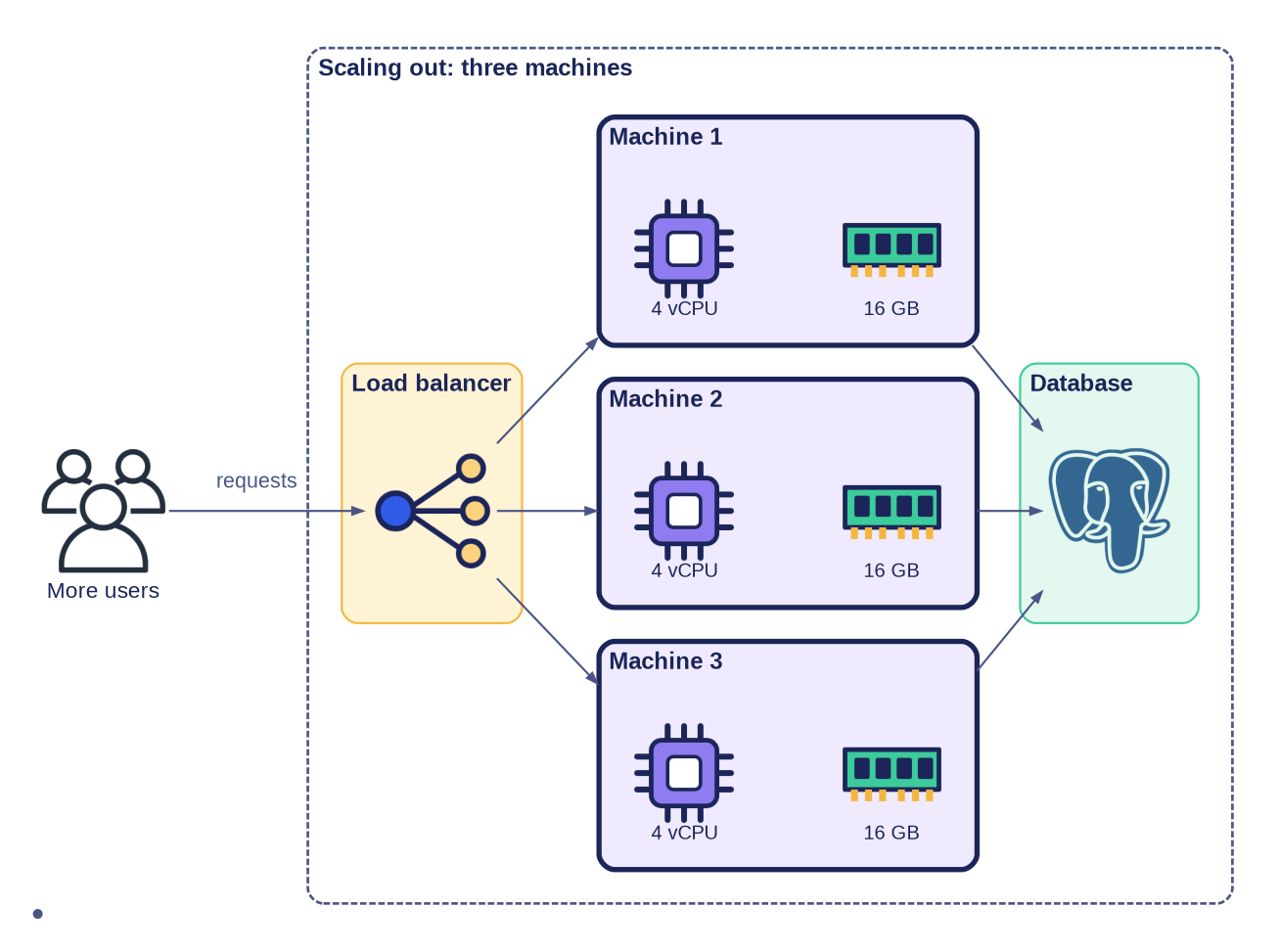
Four questions
| Vertical (up) | Horizontal (out) | |
|---|---|---|
| Change | Bigger machine | More machines |
| App changes | None | Stateless, or shared state |
| Consistency | Easy, one copy | Needs coordination |
| Failure | Single point of failure | Survives losing one |
| Downtime to scale | Minutes, or a switchover | None |
| Ceiling | Largest machine | Very high, limited by coordination |
Summary
The whole topic in one minute.
Vertical scaling makes one machine stronger. It needs no change to the program and keeps the data in one consistent place, which is why most systems begin this way.
It has three limits: the resize usually needs a restart, speed grows more slowly than price once work cannot run in parallel, and one machine can always fail. Use it first, watch the bottleneck, add a standby, and know in advance which number will make you scale out.
- Vertical scaling adds CPU, RAM, disk or network to one machine.
- Find the bottleneck first, then take the cheapest type that fixes it.
- Expect 2 to 10 minutes of downtime, or seconds with a standby.
- Price is linear inside a family; speed-up is not.
- It ends at the largest machine and never removes the single point of failure.