
Achieving high availability
medium 30 minHigh availability is built from four pillars: spare copies of everything (redundancy), a way to switch to them (failover), a way to share work between them (load balancing), and a way to notice failures fast (monitoring).
Video lesson · Chapter 1 of 6
Find every indispensable owner
Four pillars in 85 seconds
1:25Reel coming soon
Theory
Read or listen first. About 1 min.
What it is
A single point of failure is a part whose loss stops everything. Achieving high availability means finding every such part and giving it a spare.
A spare alone does nothing. Something must notice that the first copy is gone (monitoring), something must move the work (failover and load balancing), and the spare must have the data and the room to do the job (redundancy).
Why it exists
No single machine can be made good enough. A part that works 99% of the time is down 7 hours a month. Two of them, where one is enough and they fail independently, are down together only 0.01% of the time: 4 minutes.
That trade is the whole idea: instead of buying perfect parts, use ordinary parts in pairs and make the switch quick and automatic. Planned work benefits as well, because you can update one copy while the other serves.
A short history
1976
The first Tandem/16 NonStop system ships: duplicated processors, buses and disks with software that takes over.
1988
Patterson, Gibson and Katz publish the RAID paper: many ordinary disks with redundancy instead of one expensive disk.
1998
VRRP becomes RFC 2338: a standby router takes over the address of a failed one.
2011
Netflix describes the Simian Army, with Chaos Monkey switching off instances on purpose to prove that failover works.
Words to know
- Redundancy
- More copies than you need on a normal day.
- Failover
- Moving work from a failed copy to a healthy one.
- Active-passive
- One copy works, the other waits.
- Active-active
- All copies work at the same time.
- Health check
- A regular question to a server: can you serve?
- Split brain
- Two copies both believe they are the primary.
- Fencing
- Making sure the old primary can no longer write.
- Failure domain
- Things that fail together: a machine, a rack, a zone, a region.
How it works
Step through the idea, or press Play.
Find what has no spare. Walk the request path and ask: what if this box dies now?
Understand it
Start here
The supermarket checkout
Imagine a supermarket. If there is one open lane, everybody waits for one cashier, and if that cashier goes home nobody can pay. With several lanes, a manager who sends people to the shortest line, somebody who asks the cashiers whether they are well, and a spare cashier, the shop never stops.
Four jobs: more lanes, someone who shares the work, someone who checks, and a way to switch.
The four pillars
What holds high availability up
Redundancy
Several copies of every part. Like spare batteries for a favourite toy, or the spare tyre in a car.
Failover
An automatic switch to a copy. Like a substitute teacher: the teacher is ill, the lesson goes on.
Load balancing
Sharing the work. Like the manager who sends each customer to the shortest checkout lane.
Monitoring
Noticing fast. Like a check-up at the doctor: temperature, heartbeat, does anything hurt?
With the four pillars
- A server dies: another one takes over
- The database crashes: the replica is promoted
- A network path fails: traffic takes another one
Without them
- A server dies: the whole site is down
- The database crashes: down, and perhaps data is lost
- A network path fails: users cannot connect
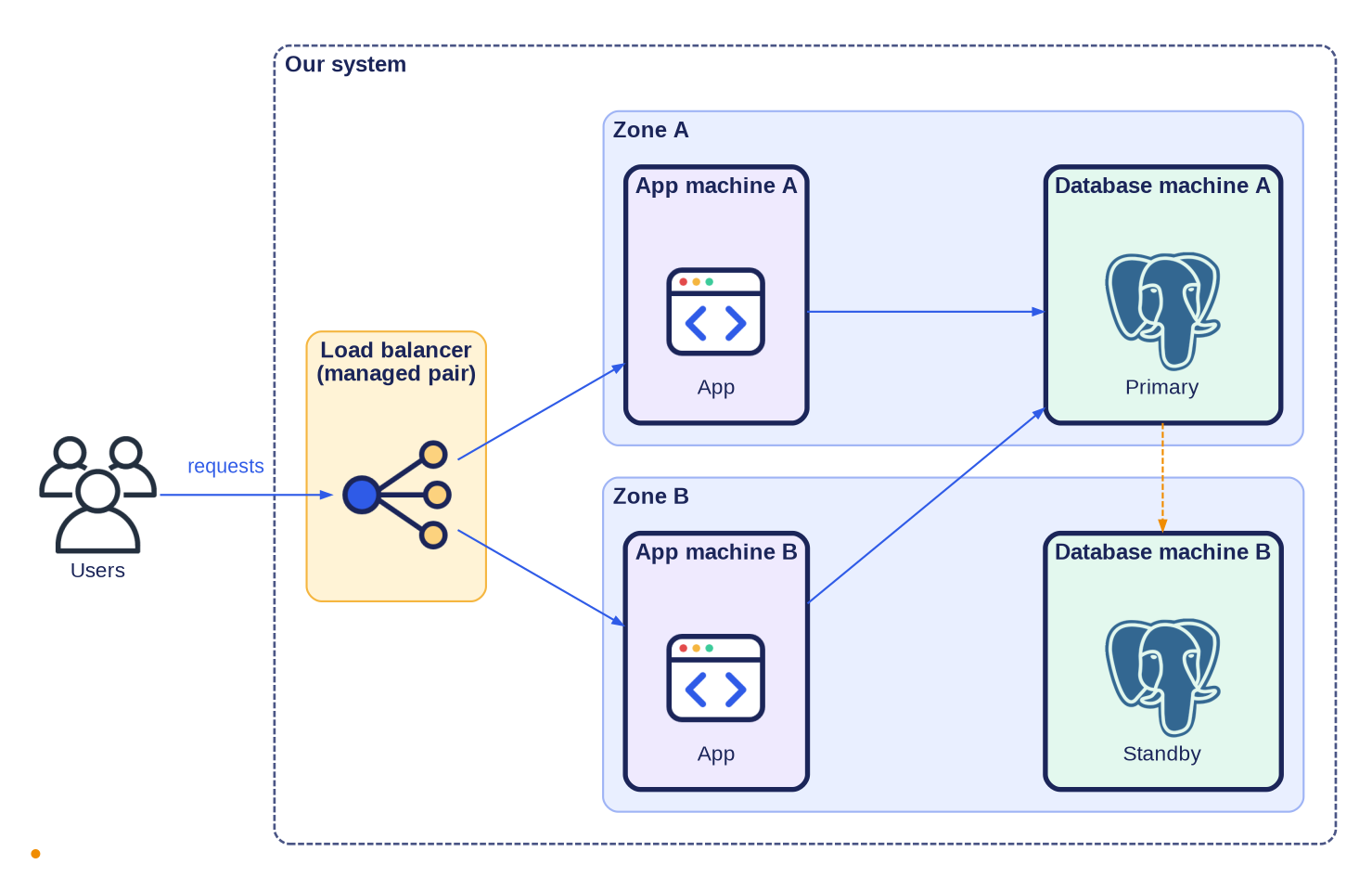
The standard shape: two zones
Pillar 1
Redundancy: active-passive or active-active
| Active-passive | Active-active | |
|---|---|---|
| Normal day | One handles 100%, one waits | Both handle 50% |
| On failure | The standby is promoted, then takes over | The other already serves; it gets the rest |
| Good | Simple to reason about, one place for writes | Uses all machines, tests them all the time, more capacity |
| Cost | The standby earns nothing while it waits; a short break during failover | Data must be kept in sync; two places that write need conflict rules |
| Typical for | Databases, schedulers, licences per machine | Stateless web and API servers, read replicas |
Two copies, one is enough
How many spares? Example: N = 3 machines carry the peak
| Scheme | Machines | Survives | Note |
|---|---|---|---|
| N | 3 | Nothing | Enough on a good day only |
| N+1 | 4 | Any one | The usual choice for app servers |
| 2N | 6 | A complete half | Two zones, each big enough alone |
| 2N+1 | 7 | A half, plus one more | Can lose a zone during maintenance |
Leave room for the failure
Where to put spares
Failure domains
Two copies on one machine fail together. Spread copies over the largest domain you want to survive.
| Domain | Typical cause | Spread over | Price |
|---|---|---|---|
| Process | A bug, out of memory | Several processes | Nearly free |
| Machine | Hardware, host maintenance | Several machines | Low |
| Zone | Power, cooling, network of one building | Two or three zones | Extra machines, about a millisecond between zones |
| Region | A large network or control-plane failure, a disaster | Two regions | High: double the system, slow replication, hard data questions |
| Software | The same bad release everywhere | Staged releases | Patience |
Is this part a single point of failure?
Pillar 2
Failover: noticing, deciding, switching
Automatic failover
How long do users notice?
Three ways to switch
| Way | How | Typical time | Good | Bad |
|---|---|---|---|---|
| Automatic | Software detects and switches | Seconds to a minute or two | Works at night without people | False alarms, harder to build |
| DNS | The name points to another address | Detection plus TTL: often 2 to 5 minutes, longer for clients that ignore the TTL | Works between regions, no change in the client | Cached answers |
| Manual | A person decides | About 10 to 60 minutes | Full control, no false alarms | Slow, needs people on call |
Database failover without two primaries
Pillar 3
Load balancing: sharing the work
A load balancer sits between the internet and the servers, picks one for every request, and skips the unhealthy ones. The full topic is Load balancing. Here is what matters for availability.
| Algorithm | How it picks | Good | Bad | Use when |
|---|---|---|---|---|
| Round robin | Next in turn: R1 to S1, R2 to S2, R3 to S3, R4 to S1 | Simple and fair | Ignores capacity and slow requests | Stateless APIs, similar servers, quick requests |
| Least connections | Fewest open: of 5, 2 and 4 it takes the one with 2 | Adapts to slow requests | Must track connections | WebSockets, long or uneven requests |
| Weighted | By weight: 5, 3, 2 give 50%, 30%, 20% | Respects size | Weights are tuned by hand | Mixed sizes, canary releases |
| IP hash | Same client address, same server | Keeps a session in place | Uneven; many users behind one address; a change of servers moves people | Session state or a local cache you cannot move |
| Random | Any healthy server | No shared state | Uneven for few requests | Many balancers that cannot coordinate |
Pillar 4
Monitoring: health checks
One health check
Four kinds of check
| Kind | Asks | Example | Use it for |
|---|---|---|---|
| TCP | Is the port open? | Connect to :8080 | Fast and basic. A hung app can still accept connections |
| HTTP | Does the app answer? | GET /health returns 200 | The default for a load balancer |
| Deep | Do its dependencies work? | GET /health/deep returns db, cache, queue: ok | Dashboards and alerts, not for removing servers |
| Database | Can it run a query? | SELECT 1, or pg_isready | Database failover tools |
What to do when checks fail
| Failures in a row | Meaning | Action |
|---|---|---|
| 1 | Perhaps a network blip | Nothing, keep watching |
| 2 | Something may be wrong | Record it, warn |
| 3 | Unhealthy | Remove it from the pool |
| 2 successes after that | Probably back | Return it, with little traffic first |
Four metrics on the dashboard
| Metric | Starting point | Why |
|---|---|---|
| Latency | p99 under your target, for example 100 ms for an API | Slow is down for users |
| Error rate | Under 0.1% of requests (5xx) | That is 99.9% |
| CPU | Under 70%, or lower if it must absorb a failed neighbour | Room for failover |
| Memory | Under 80% | Before swapping or a kill |
Planned failure
Releases are failovers too
- 1
Drain
Mark the server as leaving. It finishes open requests and gets no new ones.
- 2
Update
Install the new version on this copy only.
- 3
Check
Health check, then a little traffic. Compare errors and latency with the old copies.
- 4
Continue or roll back
One copy, then 10%, then all. Roll back if the numbers get worse.
Proof
Test the spare
You know it works
- Kill one server every week, in working hours
- Promote the standby on a fixed date
- Restore a backup and read it
- Write down how many seconds users noticed
You hope it works
- The standby was never promoted
- Its disk has been full since spring
- The switch needs a password of a person on holiday
- Nobody knows how to switch back
Summary
The whole topic in one minute.
Give every part a spare in a different failure domain, keep enough room that the rest can carry the load, check health from outside, and switch automatically. Active-passive is simpler, active-active uses the machines better but needs the data story solved.
Failover time is detection plus decision plus switch, so checks and thresholds matter more than the switch itself. Protect against false alarms, against split brain, and against deep checks that remove every server at once. Then test it, because an untested spare is a hope.
- Redundancy, failover, load balancing, monitoring: a spare without the other three is useless.
- n copies: 1 - (1 - a)^n, if they fail independently. Put them in different failure domains.
- Failover time is detection + decision + switch. Detection usually dominates.
- Act with a majority and fence the old primary, or you get split brain.
- Keep room for a failed neighbour, and test the switch on purpose.